

1 Before you start
This is not graded, and it does not count towards anything. Answer every question even if you are only guessing — having a go at something before you have been taught it is one of the best ways to remember it afterwards. The lesson ends with another short check, and there you will be shown the correct answer for anything you missed. Choose an option for every question and confidence rating, then click Submit answers.
You write import math at the top of your script. Which of these calls works as expected?
After the line from statistics import mean, how do you call the function?
What does the keyword as do in import numpy as np?
Why is from math import * discouraged?
Which of these must you pip install before you can import it?
A script begins with import biopython. You run it and get ModuleNotFoundError: No module named 'biopython'. What is the right next step?
Which command lists every Python package currently installed in your environment?
What is a requirements.txt file used for?
I can import a built-in module like math or statistics and call one of its functions using the module-name prefix.
I can install a third-party package with pip from a terminal and recognise the ModuleNotFoundError that says I need to.
I can read a short script’s import block and tell a peer which modules are built in, which are third-party aliases, and what each module is being used for.
2 Introduction
Almost nothing you write in precision medicine will be written entirely from scratch. When you need to take an average, you do not write your own averaging function — you reach for one that other people have already written, tested, and shared.
Python ships with a large library of useful tools right out of the box, and far more is available as a one-line install. The skill you are picking up here is how to bring that outside work into your own code so you can use it without rebuilding it.
This module covers the two routes by which outside code becomes part of your script:
- Importing built-in modules — using the tools that arrive bundled with Python itself, such as
math,statistics,random,csv, andpathlib. Nothing to install — they are already there. - Installing third-party packages with pip — pulling in tools written by other people that do not come with Python, such as
numpyfor array maths,pandasfor data tables, andbiopythonfor sequence handling.
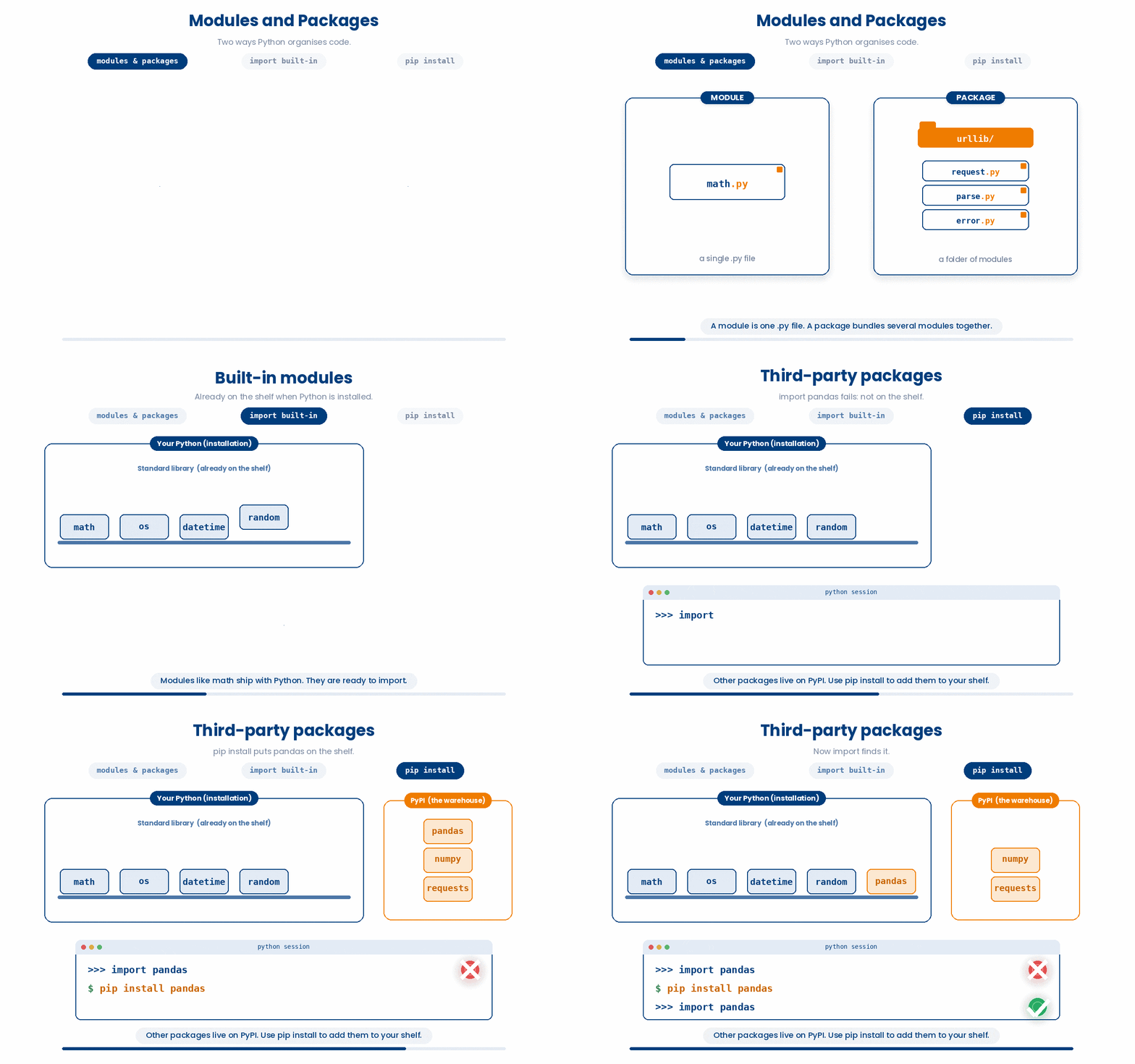
By the end you will be able to write import math at the top of a script and call math.sqrt with confidence, run pip install pandas in a terminal to add a new tool to your environment, and tell when something is missing because of a typo versus when it is genuinely not installed yet.
3 Importing built-in modules
Imagine you are cleaning a dataset of patient records and need to generate random IDs for anonymisation, calculate the square root of lab values, and timestamp each entry. Rather than writing this logic yourself, you may decide to import Python's built-in random, math, and datetime modules, which handle all of this in a few lines. How do you do this?
3.1 Import modules
A built-in module is a bundle of pre-written Python code that ships with the language itself. You do not have to download or install anything to use it — it is already on your computer the moment Python is.
For example, The math module gives you square roots, logarithms, and the constant pi. The statistics module gives you means, medians, and standard deviations. The random module generates random numbers and shuffles lists. The pathlib module helps you handle file paths in a way that works the same on Windows, Mac, and Linux. There are dozens more, all collectively known as the standard library.
To use a module you have to ask Python to load it, which you do with the import keyword on a line near the top of your script.
Try this snippet in the Python Scratchpad on the right.
import math
result = math.sqrt(16)
print(result)The shape is import module_name. After that line runs, every function inside the module is available to you, but you have to write it as module_name.function_name — for example math.sqrt, math.log, math.pi. The dot is what tells Python “look inside math for sqrt.” Keeping the module name as a prefix is on purpose: it tells the reader where the function came from, which matters once you have several modules imported in the same script.
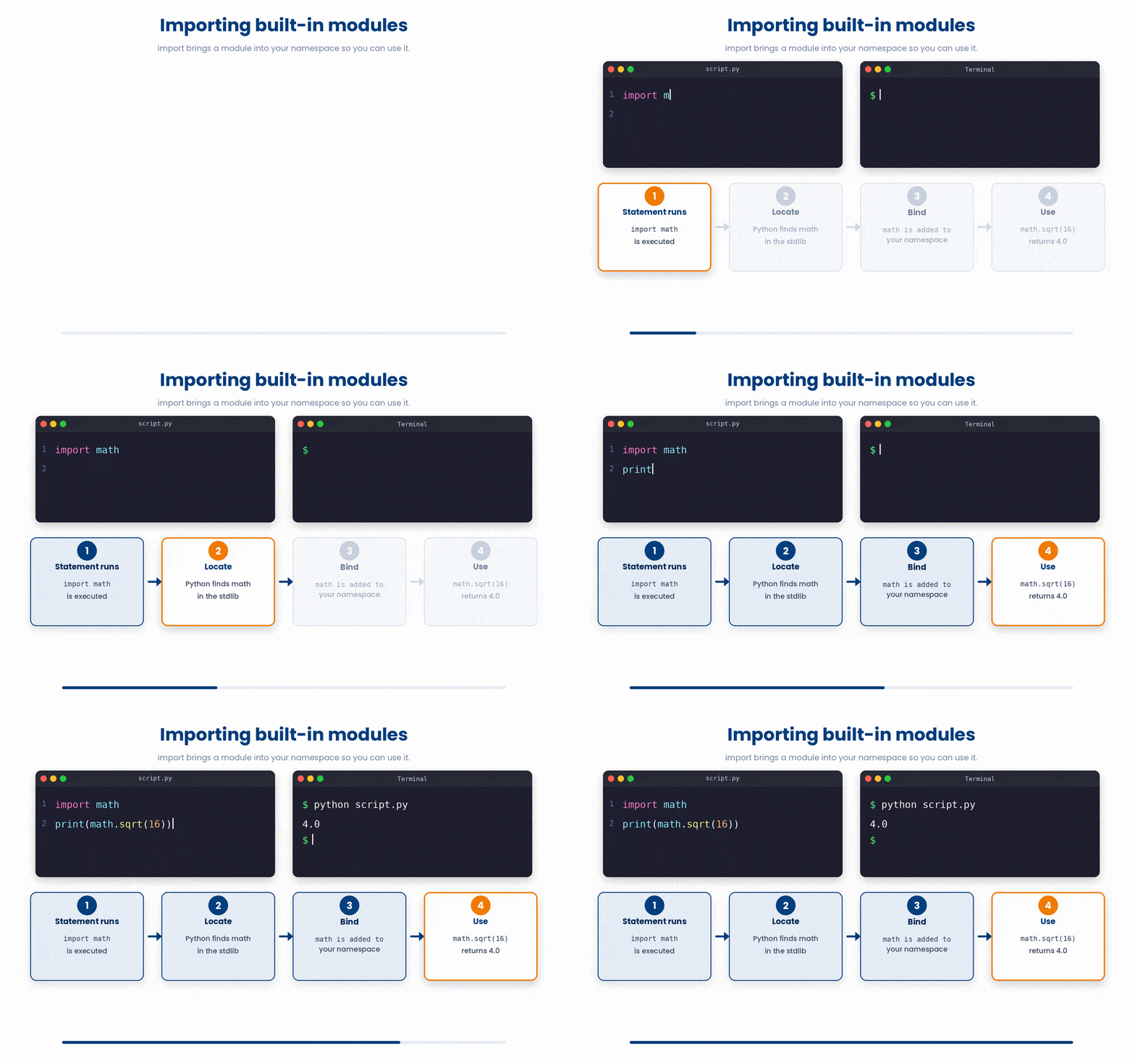
You write the import line once, near the top of your script, and the module stays loaded for the rest of the run. You do not need to import it again inside every function that uses it.
A handful of standard-library modules will show up over and over in this course and in your later work:
math— square roots, logarithms, exponentials, the constantmath.pistatistics—mean,median,stdev,variancefor a list of numbersrandom—random.random(),random.choice(my_list),random.shuffle(my_list)csv— read and write comma-separated value filespathlib— handle file paths in a way that works on Windows, Mac, and Linuxdatetime— work with dates and timesosandsys— talk to the operating system and the running Python process
You do not need to memorise this list. Just know that when you find yourself wanting “the standard tool for X,” it is worth a quick search for “python standard library X” before you write your own.
3.2 Other shapes of import
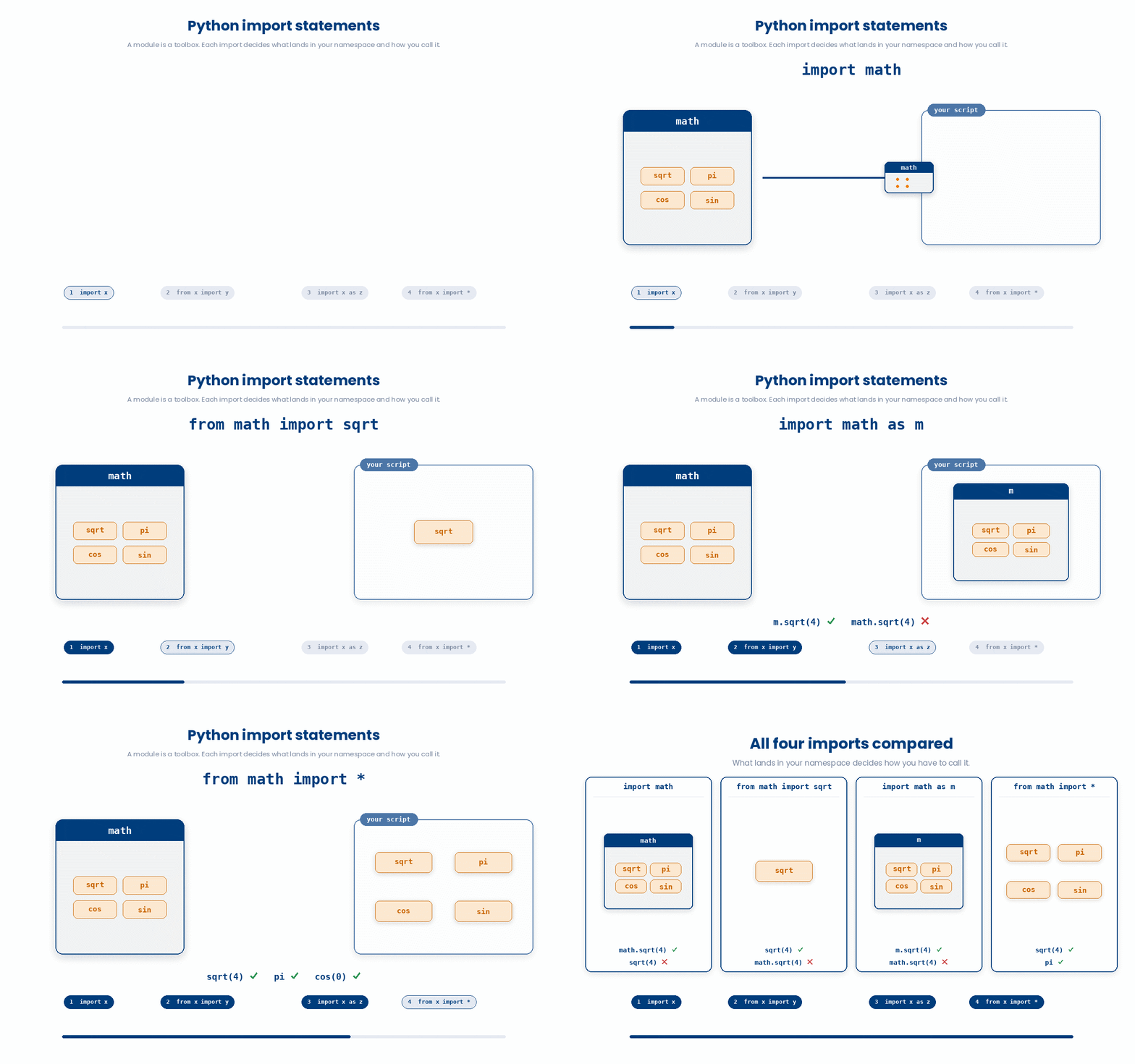
There are a few different shapes of import statement, and each has its place. Up to now we have used the plain import math form, which keeps the module name as a prefix on every call. The next most common shape is from module import name, which pulls a single specific function out of the module so you can use it without the prefix.
from math import sqrt
print(sqrt(16))
After that line runs, sqrt is available on its own — you write sqrt(16), not math.sqrt(16). This is handy when you only want one or two functions from a module and the prefix would clutter the code. The trade-off is that the reader of your code has to remember (or guess) where sqrt came from. For one or two well-known functions that is fine; for a long script that imports from many modules, the prefixed form is usually clearer.
A third shape is import module as alias, which loads the module under a shorter name of your choosing for example import numpy as np or import pandas as pd
These two aliases — np and pd — are so common that almost every Python tutorial or textbooks uses them. When you read someone else’s code and see np.array or pd.read_csv, you will know that np is numpy and pd is pandas. It is a convention worth following, not a rule the language enforces.
import numpy as np
import pandas as pd

ages = np.array([54, 67, 71, 49])
print(ages.mean()) # 60.25

df = pd.DataFrame({"id": ["P001", "P002"], "age": [54, 67]})
print(df.head())
A final shape worth knowing about, mostly so you can recognise it and avoid it, is from module import *. The asterisk means “import every name from this module into the current script with no prefix.” It is convenient in the moment but causes hard-to-trace bugs: a function called mean from one module can silently overwrite a mean from another, and the reader has no clue where any name came from. The Python community treats this as a smell. If you see it in someone else’s code, you know to be wary; do not write it yourself.
Here is a summary of the four Python import shapes:
- Standard Import: Use
import mathto load an entire module, which requires you to prefix its functions, likemath.sqrt(16). - Specific Import: Use
from math import sqrtto load a specific function so you can call it directly without a prefix, likesqrt(16). - Aliased Import: Use
import numpy as npto assign a shorter, more convenient name to a module, allowing you to use prefixes likenp.array([1, 2, 3]). - Wildcard Import: Avoid
from math import *because it imports every function at once and clutters your namespace.
4 Installing third-party packages with pip
The standard library is generous, but it does not cover everything. The moment you want to handle a real spreadsheet of patient data, draw a publication-quality chart, or read a FASTA file of DNA sequences, you reach for tools that did not ship with Python. These tools are called third-party packages — written by other people, distributed for free, and downloaded on demand. The tool that fetches them and installs them on your computer is called pip.
4.1 Running pip
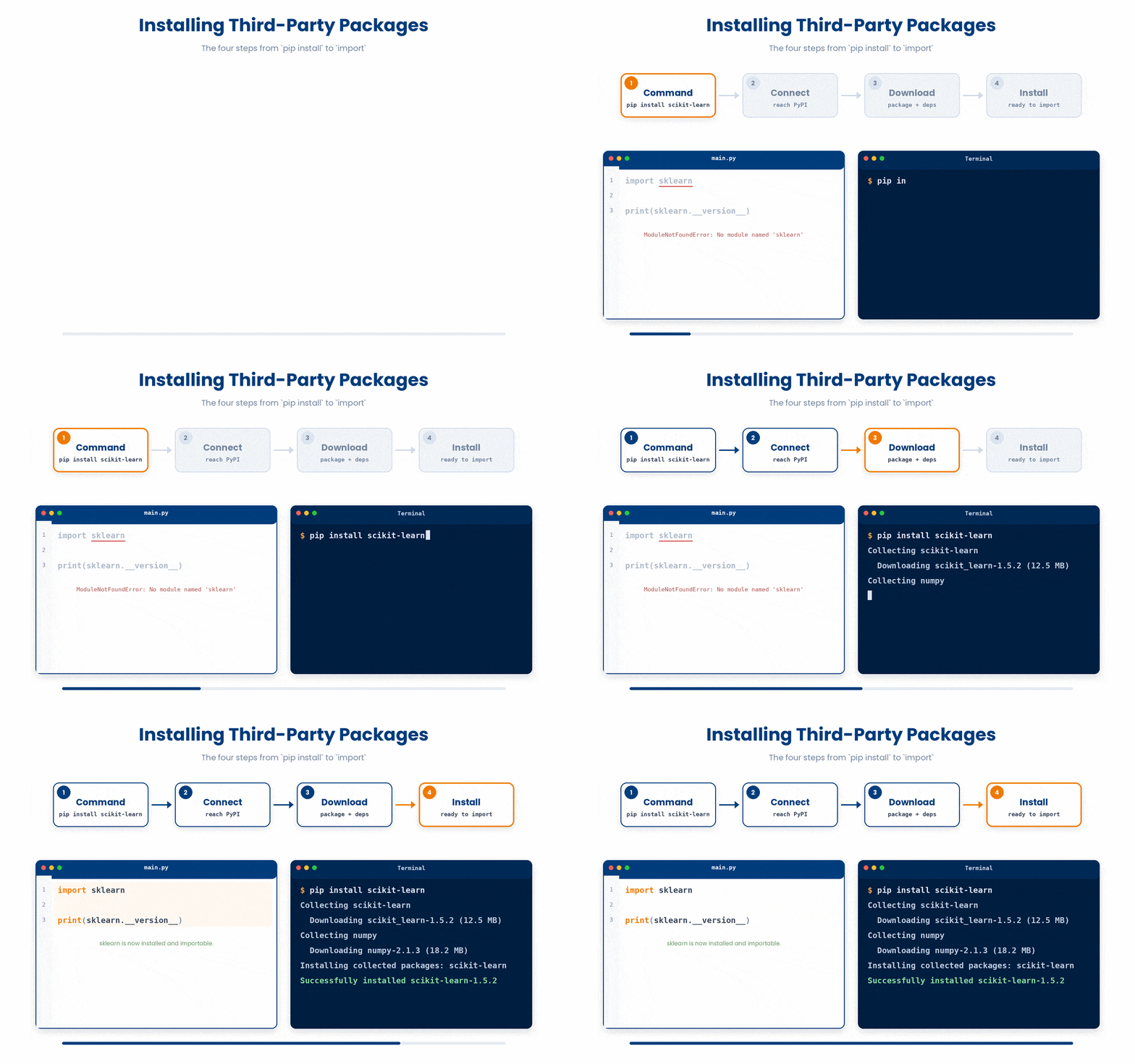
You run pip from a terminal, not from inside a Python script. The shape of the command is pip install package_name
For example, to install pandas — the package most data scientists use to handle tabular data — you would open a terminal and type: pip install pandas. When this happens, pip then connects to the Python Package Index (PyPI), downloads the package, and installs it into your Python environment. From that moment on, you can write import pandas at the top of any script and use it. You only need to install a package once per environment, not every time you use it.
One thing worth recognising before you meet it: inside a Jupyter or Colab notebook — including the notebooks used in PHM5005 — the same command is usually typed as !pip install pandas, with a leading exclamation mark. The ! is a notebook shortcut meaning "run the rest of this line as a terminal command, not as Python," and you will see it in front of other shell commands too, such as !ls or !pip list. It is not a different tool from the pip install pandas you just learned, only a different place to type the same instruction.
The Python Scratchpad on these pages is not a real terminal, so it does not use the ! form. Type a plain pip install package_name line into it and the Scratchpad recognises the pattern and rewrites it into the right install step for you.
A few packages will come up repeatedly in the modules ahead and in your wider work:
numpy— fast numerical arrays and matrix maths; the foundation many other packages are built onpandas— tabular data: spreadsheets, CSV files, anything with rows and columnsmatplotlib— charts and plotsscipy— scientific computing: statistical tests, optimisation, signal processingscikit-learn— machine learning: classifiers, regressors, clustering, preprocessingbiopython— bioinformatics: parsing FASTA and FASTQ files, querying NCBI databases
You do not need to install all of these now. Install one when you actually need it.
4.2 Tools and tricks
A few tools and tricks with pip
- If you need a specific version of a package — common when you are reproducing someone else’s analysis or working on a project with a fixed environment — you can pin the version with two equal signs:
pip install pandas==2.1.0 - To see everything that is currently installed in your environment, run:
pip list - This prints a list of every package and its version. To remove a package you no longer need, the command is:
pip uninstall package_name.
Two more habits will save you trouble later.
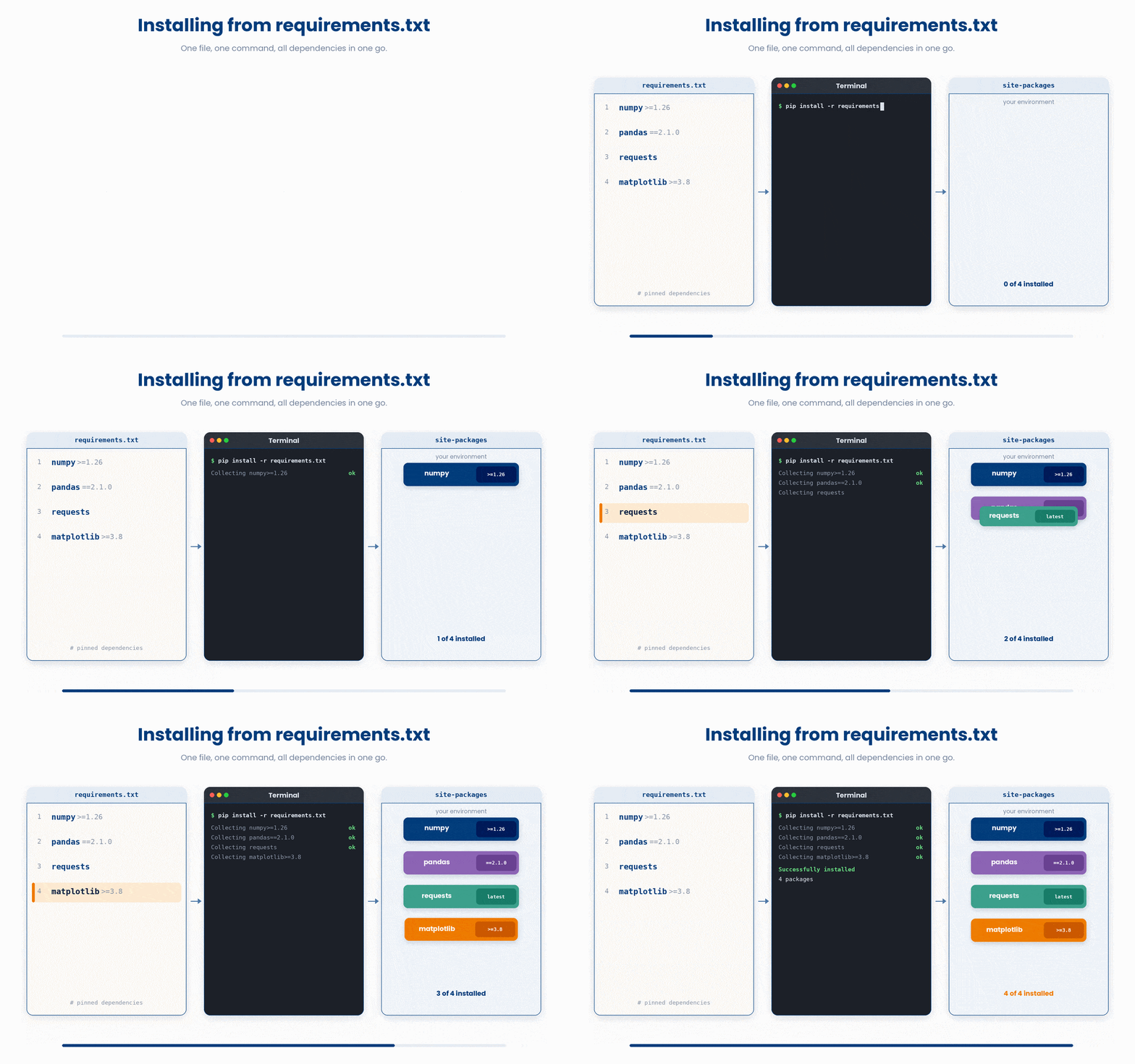
The first is requirements.txt. When a project depends on several packages, the convention is to list them — one per line, with their pinned versions — in a plain-text file called requirements.txt at the top of the project. Anyone who clones the project can then install everything in one step:
pip install -r requirements.txt
You will see this file in almost every Python project on GitHub. It is how Python projects answer the question “what do I need to run this?”
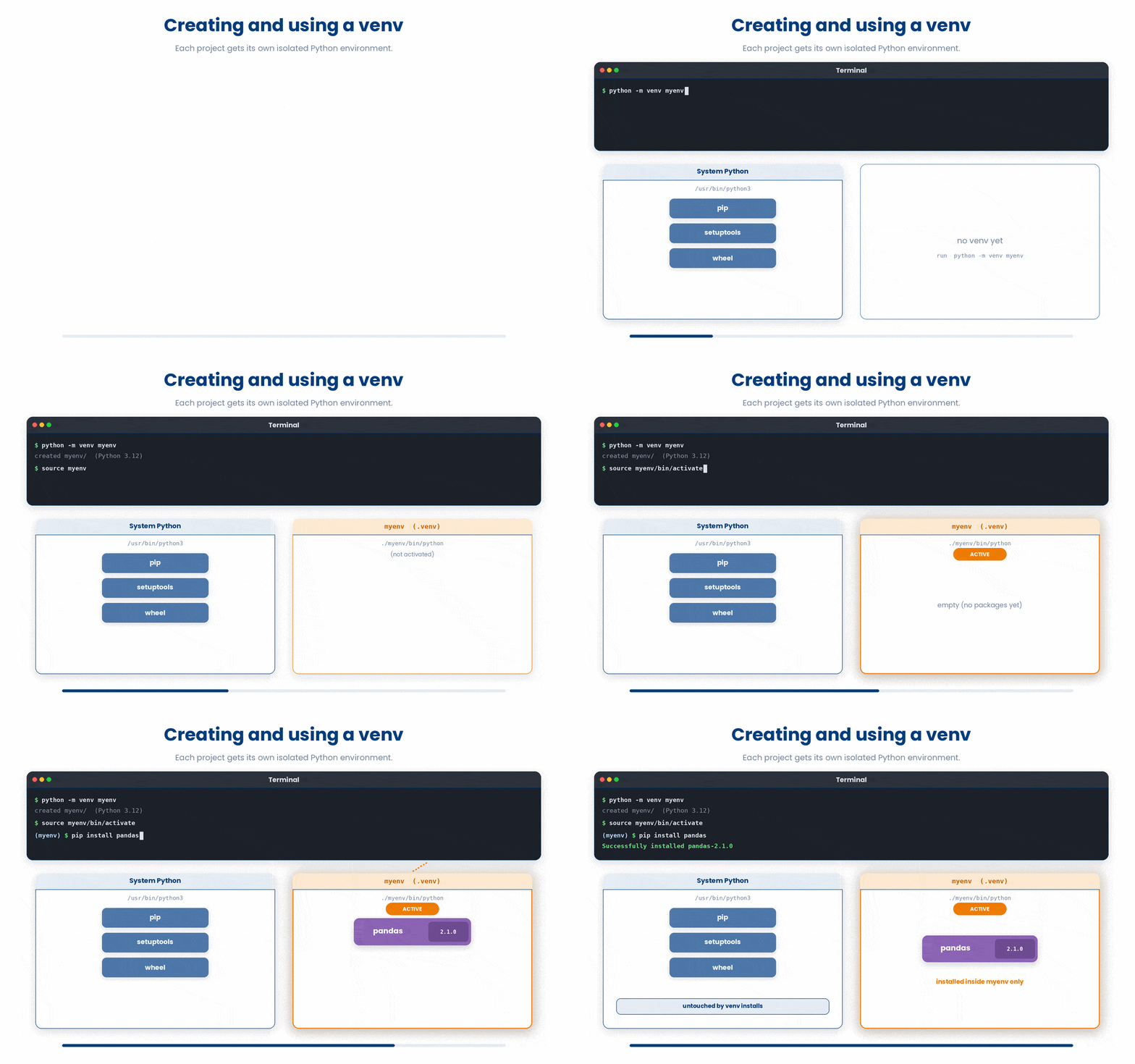
The second is a quick mention of virtual environments. If you install many packages globally on your machine, two projects can end up needing different versions of the same package and breaking each other. The standard solution is to give each project its own isolated Python environment — a sandbox where its packages live without affecting anything else. The two common tools for this are venv (built in to Python) and conda. You do not need to set one up for this course, but be aware of the idea: when a tutorial mentions “activate your environment first,” that is what they are asking you to do.
5 Putting it together
A typical short analysis script begins with a small block of imports, mixes built-in modules with third-party packages, and uses each one for the job it is best at. The worked example below shows the pattern: take a list of patient ages, and use the built-in statistics module to compute the mean and standard deviation.
All the lines you need are in the Line bank on the left — some may be distractors you should leave behind. Drag the lines you need into the Your solution column on the right, in the correct order, then click Check.
Task: Assemble the import lines a typical short analysis script would start with — the built-in statistics module, then pandas under the alias pd, then matplotlib's pyplot under the alias plt. Built-in modules first, then third-party packages.
install pandasimport statisticsimport pd as pandasimport pandas as pdimport matplotlib.pyplot as pltimport matplotlib as pltfrom pandas import *
- Drop lines here, in order.
6 Check your understanding
You have reached the end of the module. Try the same questions again — your answers here, paired with your pre-test answers, are how we measure what the module taught you. Answer every question and confidence rating, then click Submit and see results to view your score.
You write import math at the top of your script. Which of these calls works as expected?
After the line from statistics import mean, how do you call the function?
What does the keyword as do in import numpy as np?
Why is from math import * discouraged?
Which of these must you pip install before you can import it?
A script begins with import biopython. You run it and get ModuleNotFoundError: No module named 'biopython'. What is the right next step?
Which command lists every Python package currently installed in your environment?
What is a requirements.txt file used for?
I can import a built-in module like math or statistics and call one of its functions using the module-name prefix.
I can install a third-party package with pip from a terminal and recognise the ModuleNotFoundError that says I need to.
I can read a short script’s import block and tell a peer which modules are built in, which are third-party aliases, and what each module is being used for.
7 Your results
Here is how your post-test answers compare with your pre-test answers. The pre/post pairing is the most reliable way to see what this module actually taught you.
Submit the post-test to see your results.
What is the one thing from this module that is still unclear to you?