

1 Before you start
This is not graded, and it does not count towards anything. Answer every question even if you are only guessing — having a go at something before you have been taught it is one of the best ways to remember it afterwards. The lesson ends with another short check, and there you will be shown the correct answer for anything you missed. Choose an option for every question and confidence rating, then click Submit answers.
Which line correctly defines a class TrialPatient that inherits from an existing Patient class?
A child class's __init__ needs to set the parent's attributes too. What is the recommended way?
TrialPatient defines a label method that overrides Patient.label. From inside TrialPatient.label, how do you call the parent's version?
TrialPatient inherits from Patient, which defines bmi(); TrialPatient does not define bmi() itself. What happens when you call tp.bmi() on a TrialPatient?
Why is super().__init__(...) preferred over copying the parent's self.x = x lines into the child?
Patient defines label(); TrialPatient overrides label() with its own version. For tp = TrialPatient(...), which version runs when you call tp.label()?
is_treatment() is defined only on the child TrialPatient, not on Patient. What happens if you call it on a plain Patient object?
Patient.label() returns the text Patient T001. A child overrides it as return "Trial " + super().label(). What does the child's label() return?
I can build a child class that inherits from a parent class, call super().__init__ correctly, and override one of the parent's methods.
2 Introduction
In Object-Oriented Programming, you write your first classes — bundling each patient's id, age, weight and height into a single Patient object with its own bmi() method. That works well until two classes start to look almost the same.
Imagine a TrialPatient: the same four fields as Patient, plus a trial_id and a trial_arm. Copying the Patient code and pasting in two extra attributes is tempting, but it leaves you with two near-identical classes to keep in sync. There is a cleaner way.
This module covers the everyday bits of object-oriented programming you will need:
- Inheritance and extending classes — building a more specific class on top of a general one without copy-pasting code.
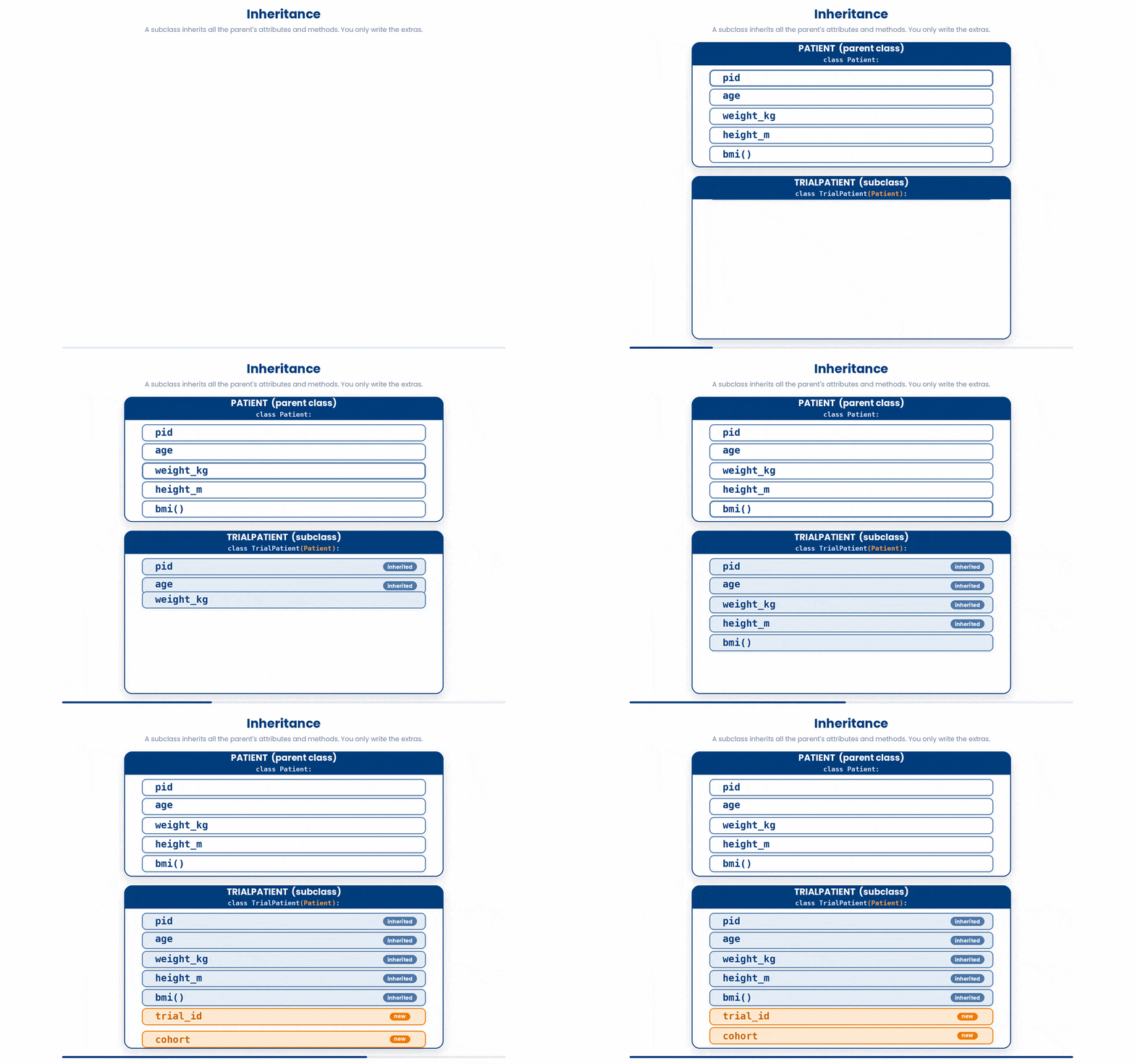
Try every snippet in the Python Scratchpad on the right. By the end of the module you will define a Patient class, extend it into a TrialPatient class, and chain a small pipeline of cleaning steps on a Sample object.
3 Inheritance and extending classes
Your Patient class works. Then a new requirement arrives: some patients are in a clinical trial, so on top of the basic four fields they also have a trial_id and a cohort label.
The tempting move is to copy the whole Patient class, rename it TrialPatient, and add the new attributes. It works, but now you have two copies of the same code. Fix a bug in Patient and you have to remember to fix it in TrialPatient too. Add a new method to Patient and the copy silently falls behind.
Inheritance is Python's way of saying: this new class is just like that one, plus a few extras.
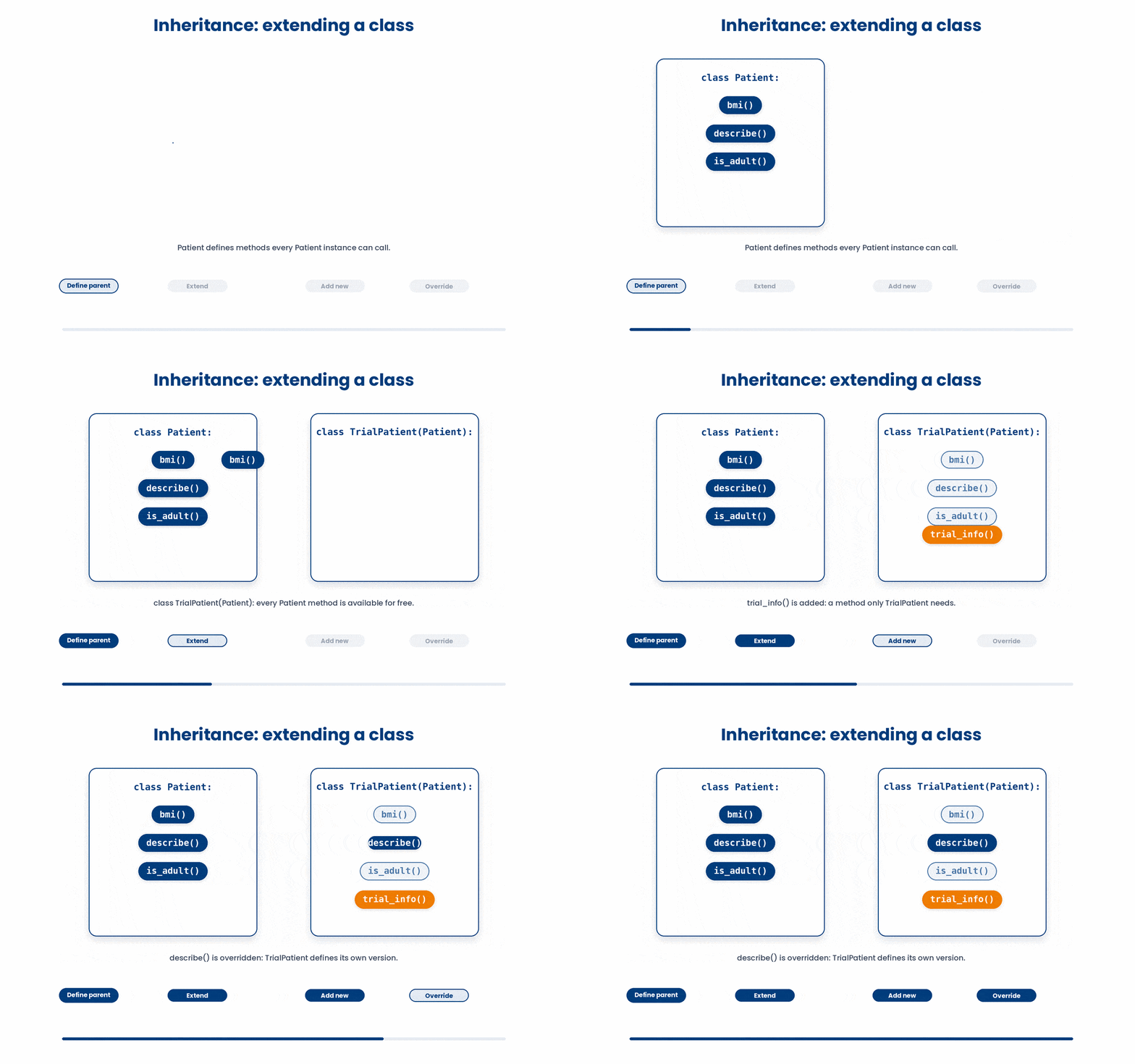
We can also extend, add, new or override new methods in the class.
3.1 Terminologies
Let’s first understand the terminologies.
- Parent class (or base class) – The original class.
Patientis our example - Child class (or sub class) – The new class that inherits from it e.g.
TrialPatient Super()– A way for the child to call methods on the parent
3.2 Your first child class
The syntax for inheritance is one line: put the parent’s name in round brackets after the child’s name.
class TrialPatient(Patient):
 ...
You declare an inheriting class by putting the parent's name in round brackets after the class name: class TrialPatient(Patient):. From that single line, the new class automatically has every attribute and method the parent class has. You only need to write the extras.
Try this snippet in the Python Scratchpad on the right.
class Patient:
    def __init__(self, patient_id, age, weight_kg, height_m):
        self.patient_id = patient_id
        self.age = age
        self.weight_kg = weight_kg
        self.height_m = height_m

    def bmi(self):
        return self.weight_kg / (self.height_m ** 2)

class TrialPatient(Patient):
    def __init__(self, patient_id, age, weight_kg, height_m, trial_id, cohort):
        super().__init__(patient_id, age, weight_kg, height_m)
        self.trial_id = trial_id
        self.cohort = cohort

tp = TrialPatient("T001", 49, 80, 1.78, "TRIAL_A", "treatment")
print(tp.trial_id)
print(tp.bmi())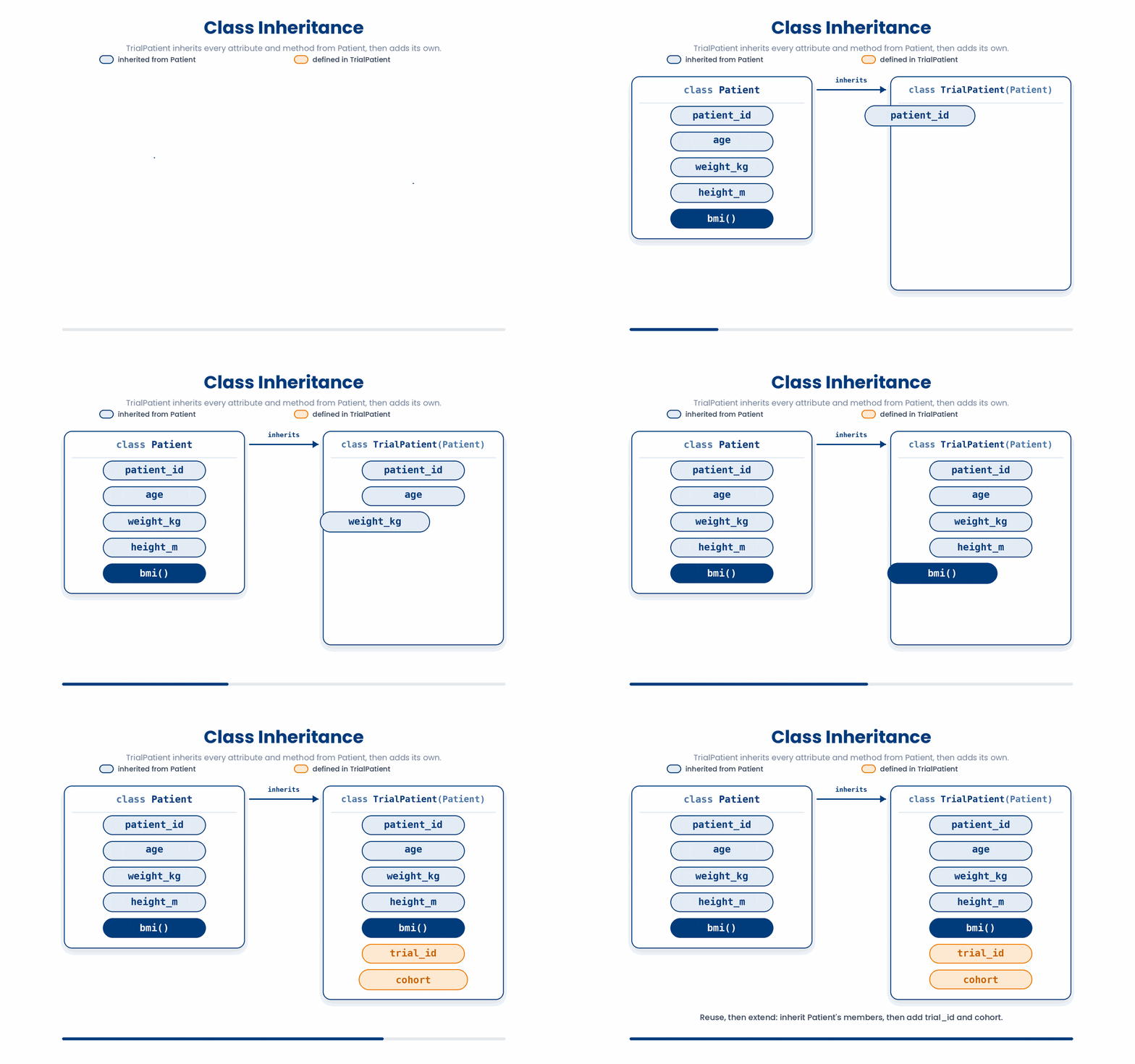
Two things to notice:
TrialPatient.__init__takes all six parameters: the four shared ones plus the two new ones.- The first line of the child's
__init__issuper().__init__(...), which hands the four shared values to the parent. The parent does its normal job of storing them on the instance. The child then adds its own extras on top.
Now to use it, you can just do the following:
tp = TrialPatient("T001", 49, 80, 1.78, "TRIAL_A", "treatment")

print(tp.trial_id) # "TRIAL_A" the new attribute we added
print(tp.cohort) # "treatment" also new
print(tp.age) # 49 inherited from Patient via super().__init__
print(tp.bmi()) # 25.25... inherited method, never rewritten
bmi was never written inside TrialPatient. It came along for free. That is the whole point of inheritance.
Now your turn to understand the order of the syntax.
All the lines you need are in the Line bank on the left — some may be distractors you should leave behind. Drag the lines you need into the Your solution column on the right, in the correct order, then click Check.
Task: Build a class Gene that stores a gene symbol and a chromosome number, then create one and print its symbol.
self.chromosome = chromosomedef __init__(symbol, chromosome):g = Gene("APOE", 19)class Gene:def __init__(self, symbol, chromosome):print(g.symbol)self.symbol = symbolg = Gene.new("APOE", 19)symbol = symbol
- Drop lines here, in order.
Now, let’s try it out!
Try this snippet in the Python Scratchpad on the right.
class BloodPressure:
    def __init__(self, systolic, diastolic):
        self.systolic = systolic
        self.diastolic = diastolic

    def category(self):
        if self.systolic >= 140 or self.diastolic >= 90:
            return "hypertensive"
        if self.systolic >= 130 or self.diastolic >= 80:
            return "elevated"
        return "normal"

readings = [BloodPressure(118, 76), BloodPressure(134, 82), BloodPressure(152, 94)]
for bp in readings:
print(bp.systolic, bp.diastolic, bp.category())3.3 Why super().__init__ is better
Let’s try and imagine this.
You have two classes:
class Patient:
    def __init__(self, patient_id, name, age, condition):
        self.patient_id = patient_id
        self.name = name
        self.age = age
        self.condition = condition

class TrialPatient(Patient):
    def __init__(self, patient_id, name, age, condition, trial_arm):
        super().__init__(patient_id, name, age, condition)
        self.trial_arm = trial_arm
TrialPatient is a Patient plus one extra thing (trial_arm). So it needs all four attributes from Patient, plus trial_arm.
You have two ways to give it those four attributes:
Option A: copy the four lines into TrialPatient.__init__ yourself.
class TrialPatient(Patient):
    def __init__(self, patient_id, name, age, condition, trial_arm):
        self.patient_id = patient_id
        self.name = name
        self.age = age
        self.condition = condition
        self.trial_arm = trial_arm
Option B: ask the parent to do it for you with super().__init__(...) as the code above.
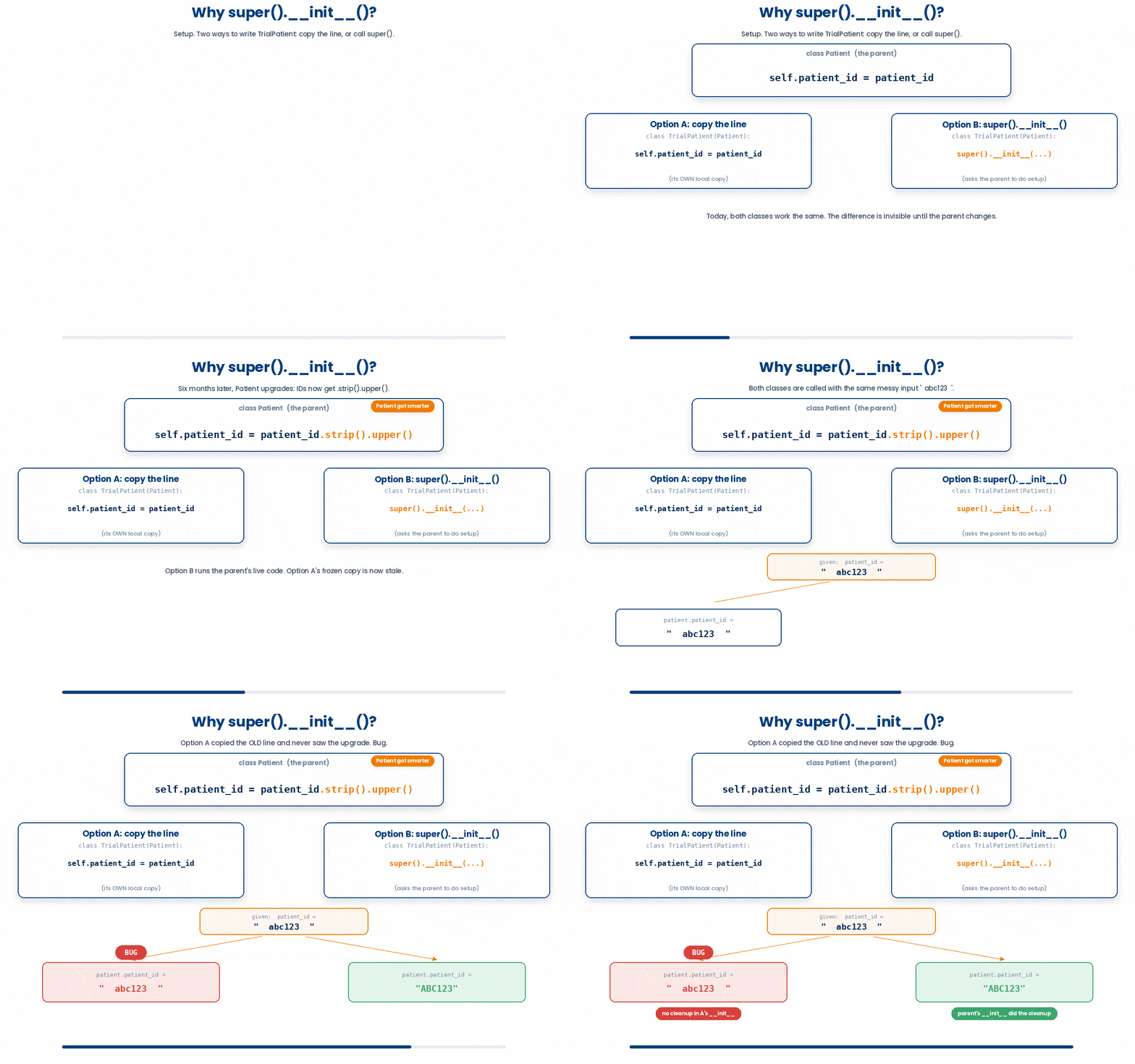
Both work today. The reason Option B is preferred is maintenance. Imagine six months from now you decide that patient IDs should always be cleaned up before being stored, so you change Patient:
self.patient_id = patient_id.strip().upper()If you used Option A, TrialPatient still has the old self.patient_id = patient_id line. The parent got smarter, the child silently didn't. Now your trial patients store messy IDs and your regular patients store clean ones. Bug.
With Option B, you didn't copy anything. You just said "parent, do your setup". Whatever the parent does now or later, the child inherits it automatically.
Let’s practise using super()
Try this snippet in the Python Scratchpad on the right.
class Patient:
    def __init__(self, patient_id, weight_kg, height_m):
        self.patient_id = patient_id
        self.weight_kg = weight_kg
        self.height_m = height_m

    def label(self):
        return f"Patient {self.patient_id}"

class TrialPatient(Patient):
    def __init__(self, patient_id, weight_kg, height_m, trial_id):
        super().__init__(patient_id, weight_kg, height_m)
        self.trial_id = trial_id

    def label(self):
        return f"Trial patient {self.patient_id} ({self.trial_id})"

p = Patient("P001", 72, 1.75)
tp = TrialPatient("T001", 80, 1.78, "TRIAL_A")
print(p.label())
print(tp.label())There is a shorter way to write the child's __init__ when it only wants to add one new field, without touching the shared ones individually. Instead of naming every parameter Patient takes and passing each one through by hand, the child can catch everything it does not recognise with **kwargs — the same catch-all you met earlier in the course for a function that accepts any number of keyword arguments — and forward the whole lot to super().__init__(**kwargs) unopened.
Try this snippet in the Python Scratchpad on the right.
class Patient:
    def __init__(self, patient_id, age, weight_kg, height_m):
        self.patient_id = patient_id
        self.age = age
        self.weight_kg = weight_kg
        self.height_m = height_m

class TrialPatient(Patient):
    def __init__(self, trial_id, **kwargs):
        super().__init__(**kwargs)
        self.trial_id = trial_id

tp = TrialPatient(trial_id="TRIAL_A", patient_id="T001", age=49, weight_kg=80, height_m=1.78)
print(tp.trial_id, tp.patient_id, tp.age)TrialPatient.__init__ never lists patient_id, age, weight_kg, or height_m anywhere in its own code. **kwargs collects whichever of those the caller supplies into a dictionary, and super().__init__(**kwargs) unpacks that same dictionary back out as keyword arguments for Patient. If Patient gains a fifth field next year, this TrialPatient needs no change at all. This is the professional form of the pattern you have already seen, worth reaching for once a subclass has nothing of its own to say about the shared fields.
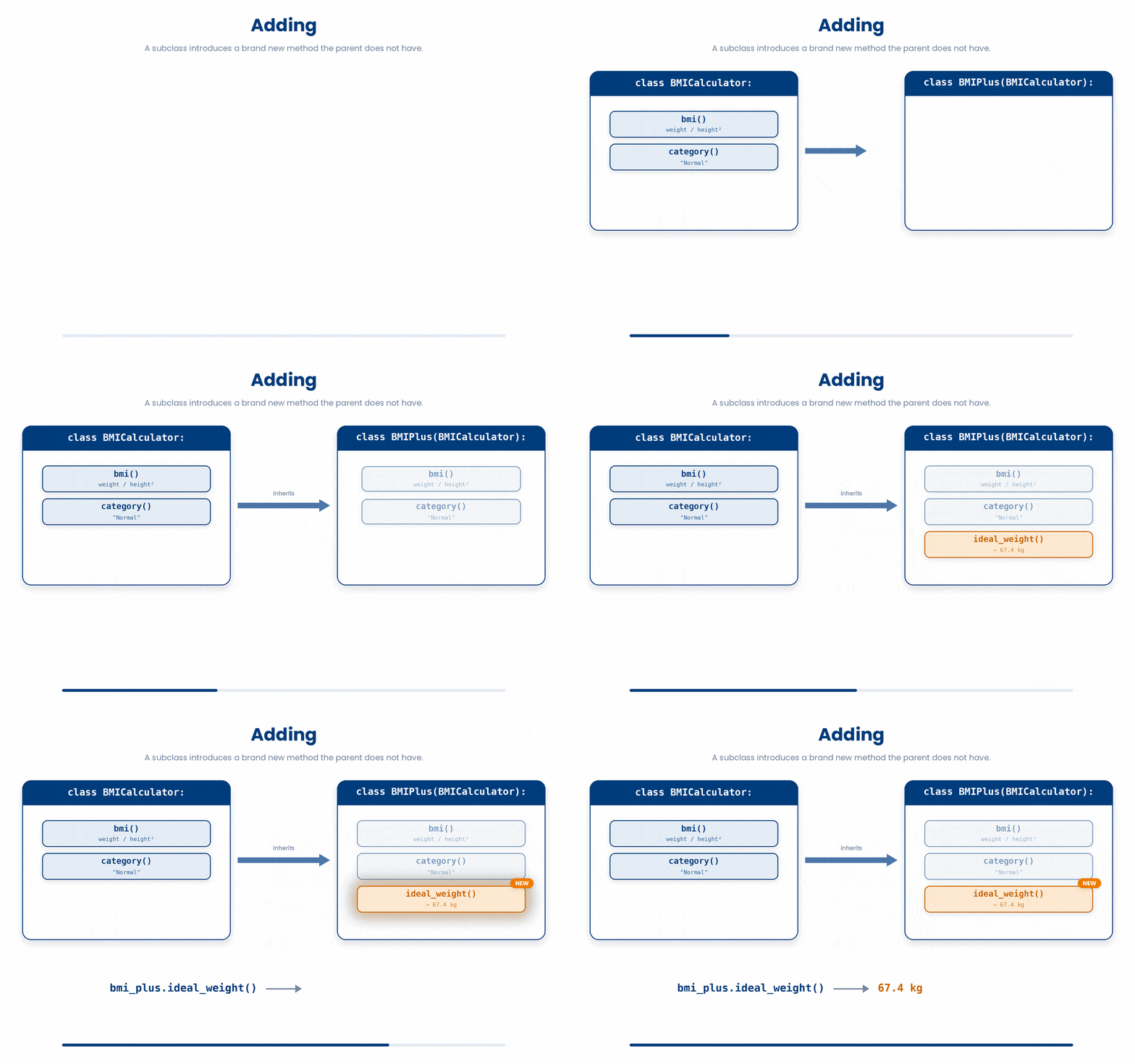
3.4 Adding: Introducing new methods
The child class can define methods the parent does not have at all. These are just like any other method: indented inside the class, first parameter self.
class TrialPatient(Patient):
    def __init__(self, patient_id, age, weight_kg, height_m, trial_id, cohort):
        super().__init__(patient_id, age, weight_kg, height_m)
        self.trial_id = trial_id
        self.cohort = cohort

    def is_treatment(self): # brand new, not on Patient
        return self.cohort == "treatment"

    def summary(self): # also new, uses inherited bmi()
        return f"{self.patient_id} in {self.trial_id}: BMI {self.bmi():.1f}"
Two things worth noticing:
is_treatmentusesself.cohort, which only exists onTrialPatient. A plainPatientdoes not have it, so this method would not make sense on the parent. That is exactly why it lives on the child.summarycallsself.bmi(), even thoughbmiis defined onPatient, not onTrialPatient. Inherited methods are reachable throughselfjust like methods defined locally.
tp = TrialPatient("T001", 49, 80, 1.78, "TRIAL_A", "treatment")
print(tp.is_treatment()) # True
print(tp.summary()) # "T001 in TRIAL_A: BMI 25.2"
A plain Patient would raise AttributeError if you tried to call is_treatment() on it, which is correct: control patients and non-trial patients have no cohort, so the question does not apply to them.
3.5 Overriding: replacing a parent’s method
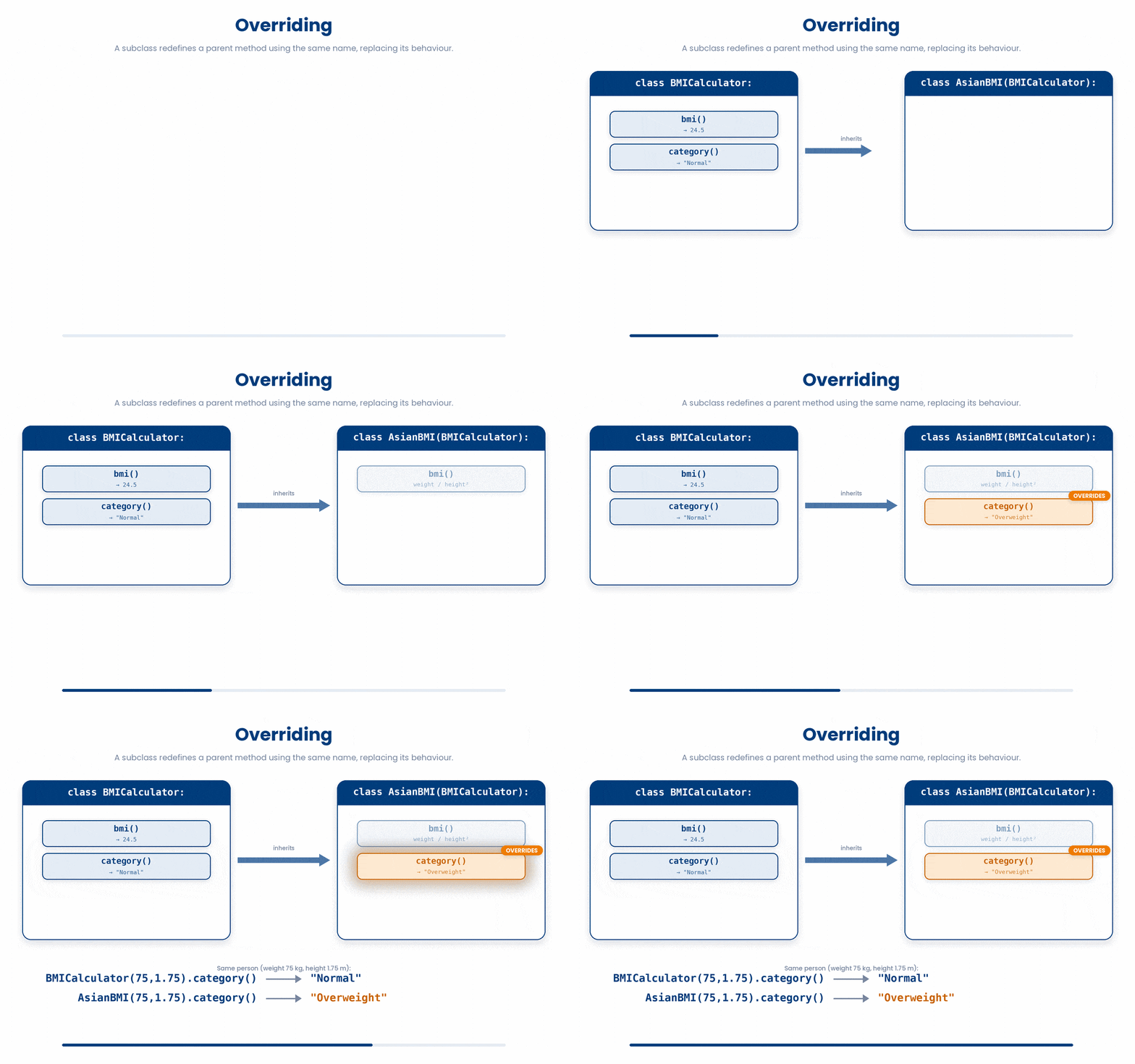
Inheritance lets you add new methods but it also lets you replace existing ones. If the child defines a method with the same name as one of the parent, the child’s version wins.
Try this snippet in the Python Scratchpad on the right.
class Patient:
    def __init__(self, patient_id):
        self.patient_id = patient_id

    def label(self):
        return f"Patient {self.patient_id}"


class TrialPatient(Patient):
    def __init__(self, patient_id, trial_id):
        super().__init__(patient_id)
        self.trial_id = trial_id

    def label(self): # same name as parent's method, so this replaces it
        return f"Trial patient {self.patient_id} ({self.trial_id})"


p = Patient("P001")
tp = TrialPatient("T001", "TRIAL_A")

print(p.label()) # "Patient P001" parent's version
print(tp.label()) # "Trial patient T001 (TRIAL_A)" child's versionPython looks at the actual object first. For p, it finds label on Patient and uses it. For tp, it finds label on TrialPatient and uses that instead.
3.6 Extending: calling the parent’s method as part of yours
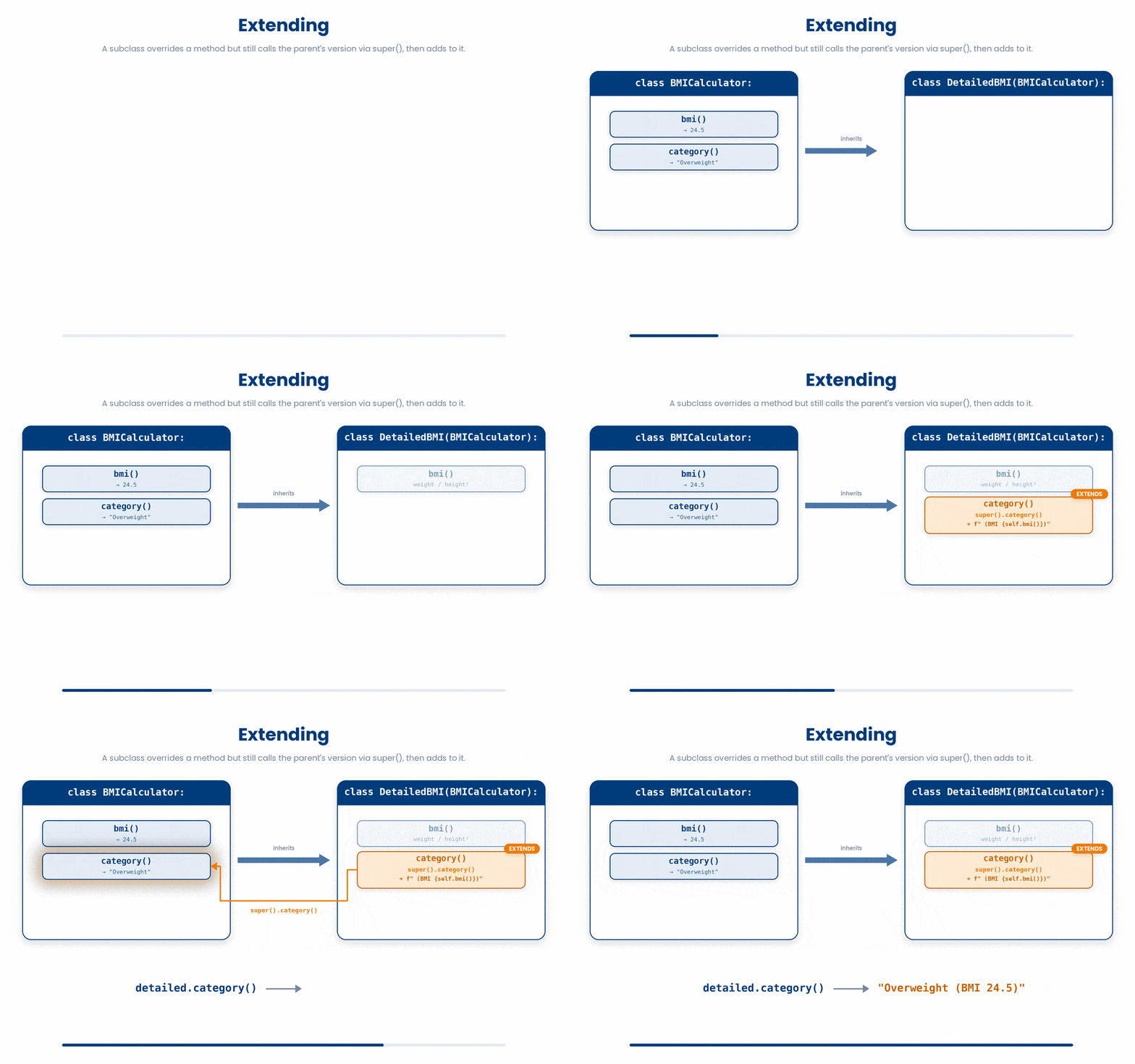
Sometimes you do not want to replace the parent's method entirely, just wrap it. You can call the parent's version from inside the child's with super().method_name().
Try this snippet in the Python Scratchpad on the right.
class TrialPatient(Patient):
    def __init__(self, patient_id, trial_id):
        super().__init__(patient_id)
        self.trial_id = trial_id

    def label(self):
        return f"[{self.trial_id}] " + super().label() # prepend, then reuse parent's work


tp = TrialPatient("T001", "TRIAL_A")
print(tp.label()) # "[TRIAL_A] Patient T001"The child gets the prefix it wanted, and Patient.label still owns the formatting of the base part. If Patient.label ever changes, the child automatically picks up the change.
4 Putting it together
In real code these three ideas show up together. You define a base class for the kind of object you are working with, you build one or two more specific subclasses on top of it, and you give some of the transformation methods a return self so they chain. The worked example below ties all three ideas into one short routine: a Sample class with two transformation methods, a BloodSample subclass that adds a haemoglobin attribute and overrides the label, and a final chained call that cleans up an instance and prints it.
Let’s practise with the code arrangement first.
All the lines you need are in the Line bank on the left — some may be distractors you should leave behind. Drag the lines you need into the Your solution column on the right, in the correct order, then click Check.
Task: Define a Patient class with patient_id and age, and a Counter-style method add_year that increases age by 1 and returns self. Then create a single Patient with id "P001" and age 54, chain add_year onto it twice, and print the resulting age.
print(p.age)self.patient_id = patient_idclass Patient:p = p.add_year().add_year()p.add_year().add_year()def add_year(self):self.age = self.age + 1p = Patient.new("P001", 54)self.age = agedef __init__(self, patient_id, age):def Patient(patient_id, age):self.age += 1p = Patient("P001", 54)return self
- Drop lines here, in order.
and now a worked example!
Work through this example in three stages. You unlock each stage only after the tutor confirms the previous one. Each stage removes more of the scaffolding — by the end you are writing it yourself.
Problem: Build a Sample base class with a patient_id, a weight, and two chainable cleaning methods. Then extend it into a BloodSample child class that adds a haemoglobin level and a custom label. Finally, create one BloodSample, run a chain of cleaning steps on it, and print its label.
class Sample:
    def __init__(self, patient_id, weight):
        self.patient_id = patient_id
        self.weight = weight

    def round_weight(self):
        self.weight = round(self.weight, 1)
        return self

    def label(self):
        return f"Sample {self.patient_id}"

class BloodSample(Sample):
    def __init__(self, patient_id, weight, haemoglobin):
        super().__init__(patient_id, weight)
        self.haemoglobin = haemoglobin

    def label(self):
        return f"Blood {self.patient_id} (Hb {self.haemoglobin})"

b = BloodSample("P001", 72.456, 13.4)
print(b.round_weight().label())- The Sample class holds the shared data (patient_id, weight) and the shared method round_weight, which ends with return self so it can be chained.
- BloodSample inherits from Sample, calls super().__init__ to set the shared fields, and then adds its own haemoglobin attribute. It also overrides label so a blood sample reports itself differently.
- The final line creates one BloodSample, chains round_weight onto it (which mutates the weight and returns the same object), and then calls label on that returned object — all in one expression.
The same solution with key parts replaced by ???.
Fill in every ??? so the code matches the reference,
then ask the tutor to check it.
Your turn: Add a UrineSample subclass that takes patient_id, weight, and a ph value. Override label so it returns f"Urine {self.patient_id} (pH {self.ph})". Then create a UrineSample with patient_id "P002", weight 5.231, and ph 6.8, chain round_weight onto it, and print the label.
5 Check your understanding
You have reached the end of the module. Try the same questions again — your answers here, paired with your pre-test answers, are how we measure what the module taught you. Answer every question and confidence rating, then click Submit and see results to view your score.
Which line correctly defines a class TrialPatient that inherits from an existing Patient class?
A child class's __init__ needs to set the parent's attributes too. What is the recommended way?
TrialPatient defines a label method that overrides Patient.label. From inside TrialPatient.label, how do you call the parent's version?
TrialPatient inherits from Patient, which defines bmi(); TrialPatient does not define bmi() itself. What happens when you call tp.bmi() on a TrialPatient?
Why is super().__init__(...) preferred over copying the parent's self.x = x lines into the child?
Patient defines label(); TrialPatient overrides label() with its own version. For tp = TrialPatient(...), which version runs when you call tp.label()?
is_treatment() is defined only on the child TrialPatient, not on Patient. What happens if you call it on a plain Patient object?
Patient.label() returns the text Patient T001. A child overrides it as return "Trial " + super().label(). What does the child's label() return?
I can build a child class that inherits from a parent class, call super().__init__ correctly, and override one of the parent's methods.
6 Your results
Here is how your post-test answers compare with your pre-test answers. The pre/post pairing is the most reliable way to see what this module actually taught you.
Submit the post-test to see your results.
What is the one thing from this module that is still unclear to you?