

1 Before you start
This is not graded, and it does not count towards anything. Answer every question even if you are only guessing — having a go at something before you have been taught it is one of the best ways to remember it afterwards. The lesson ends with another short check, and there you will be shown the correct answer for anything you missed. Choose an option for every question and confidence rating, then click Submit answers.
A line is read in as line = "S001,72,M". What does line.split(",") return?
After parts = "S001,72,M".split(","), what is the type of parts[1]?
What does " hello ".strip() return?
What does "banana".strip("an") return?
You want to pick out file names that start with either "GTEX_" or "TCGA_". Which call does that in one line?
raw = " P001 ". You run raw.strip() on its own line (no assignment), then print(repr(raw)). What is printed?
What does "A-A-A".replace("A", "T") return?
What does ",".join(["S001", "72", "M"]) return?
I can split a comma-separated line into a list of fields and pull out each field by index.
I can clean stray whitespace off the ends of a string with strip(), and explain why I have to assign the result back to a variable.
I can use startswith() with a tuple of prefixes to filter a list of file names by project.
2 Introduction
Almost every piece of data you handle in precision medicine arrives as text before it becomes anything else.
A patient ID like "P001", a gene symbol like "APOE", a line read from a CSV file, a file name like "GTEX_blood_001.fastq", a free-text clinical note — all of them are strings. Before you can analyse them, count them, or match them against a list, you usually need to do a small amount of tidying first: chop them into pieces, trim off stray spaces, decide which ones belong together, or swap one code for another.
This module covers the everyday tools Python gives you for that kind of work. We start with four string methods you will reach for constantly:
split()— break one string into a list of pieces. A line"S001,72,M"becomes["S001", "72", "M"].strip()— remove stray whitespace from both ends." P001 "becomes"P001".startswith()— ask whether a string begins with a given prefix. Useful for filtering file names or codes by project.replace()— swap one substring for another. Turn"M"into"Male", or strip a unit suffix like"kg"off a number.
Try every snippet in the Python Scratchpad on the right. By the end of the section you will read a messy line of patient data, clean it up, and pull each field out cleanly.
3 String methods (split, strip, startswith, replace)
In precision health and medicine, most of the data you will encounter is not a clean number in a spreadsheet. It is a patient note, a lab report, a gene identifier, a drug name, an ICD code, or a field someone typed freehand into an EHR. Before any analysis can happen, that raw text needs to be cleaned, standardised, and parsed into usable pieces.
String methods are the tools that make this possible. Whether you are extracting a dosage from a clinical note, normalising inconsistent medication names, filtering records by a diagnostic code prefix, or preparing free-text survey responses for NLP, you will reach for split, strip, startswith, and replace constantly. They are not glamorous, but they are the unglamorous work that sits between messy real-world health data and every model, dashboard, or insight you want to build.
Here is a quick run through of the common methods:
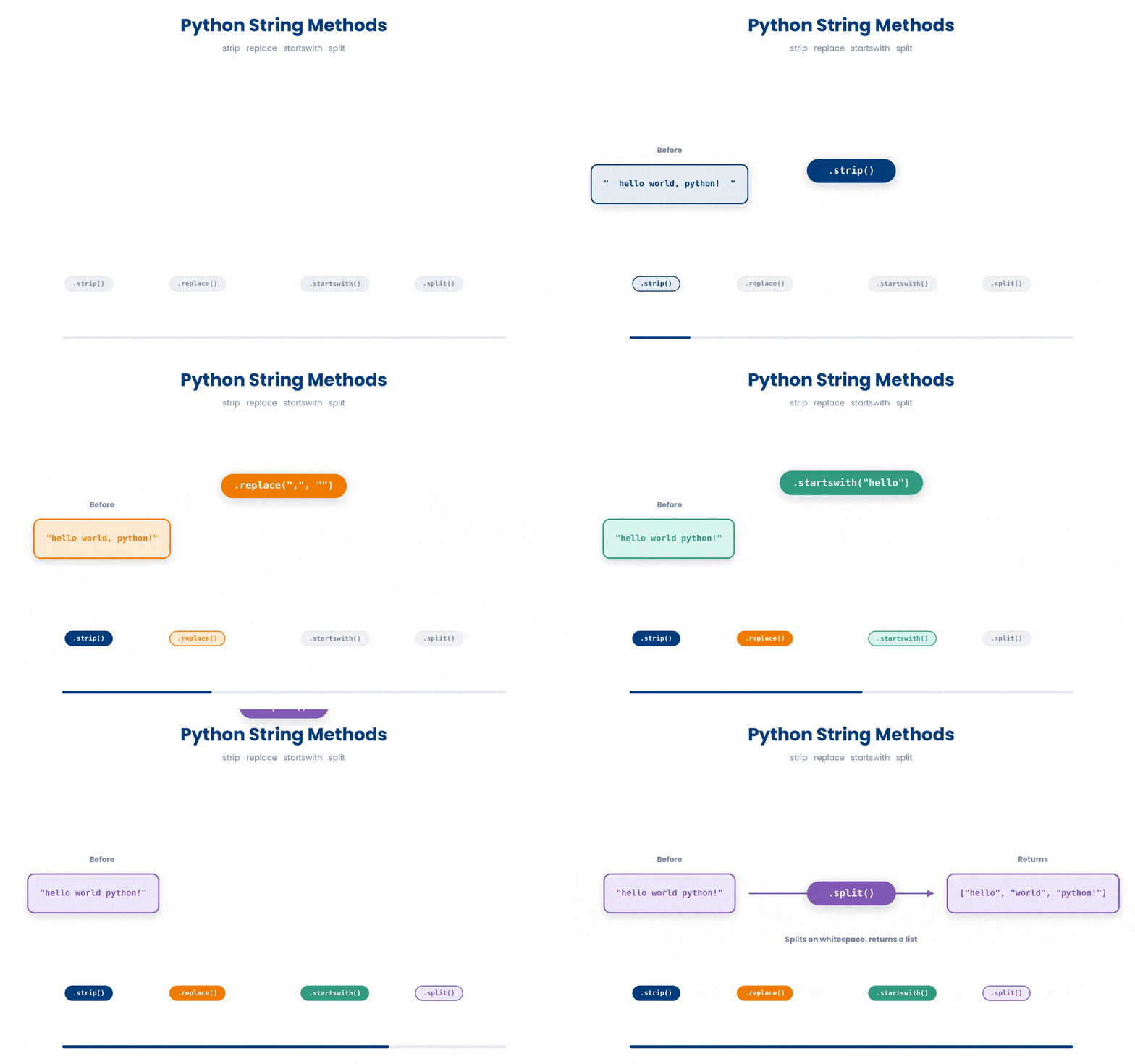
3.1 Split
The first method on our list is split. Imagine you read a single line out of a CSV file and the whole line lands in your code as one long string: "S001,72,M". That string is not very useful while it is still in one piece — you wanted three separate fields, not one. split takes the string apart for you. You hand it the character to split on (the comma), and it gives you back a list of pieces.
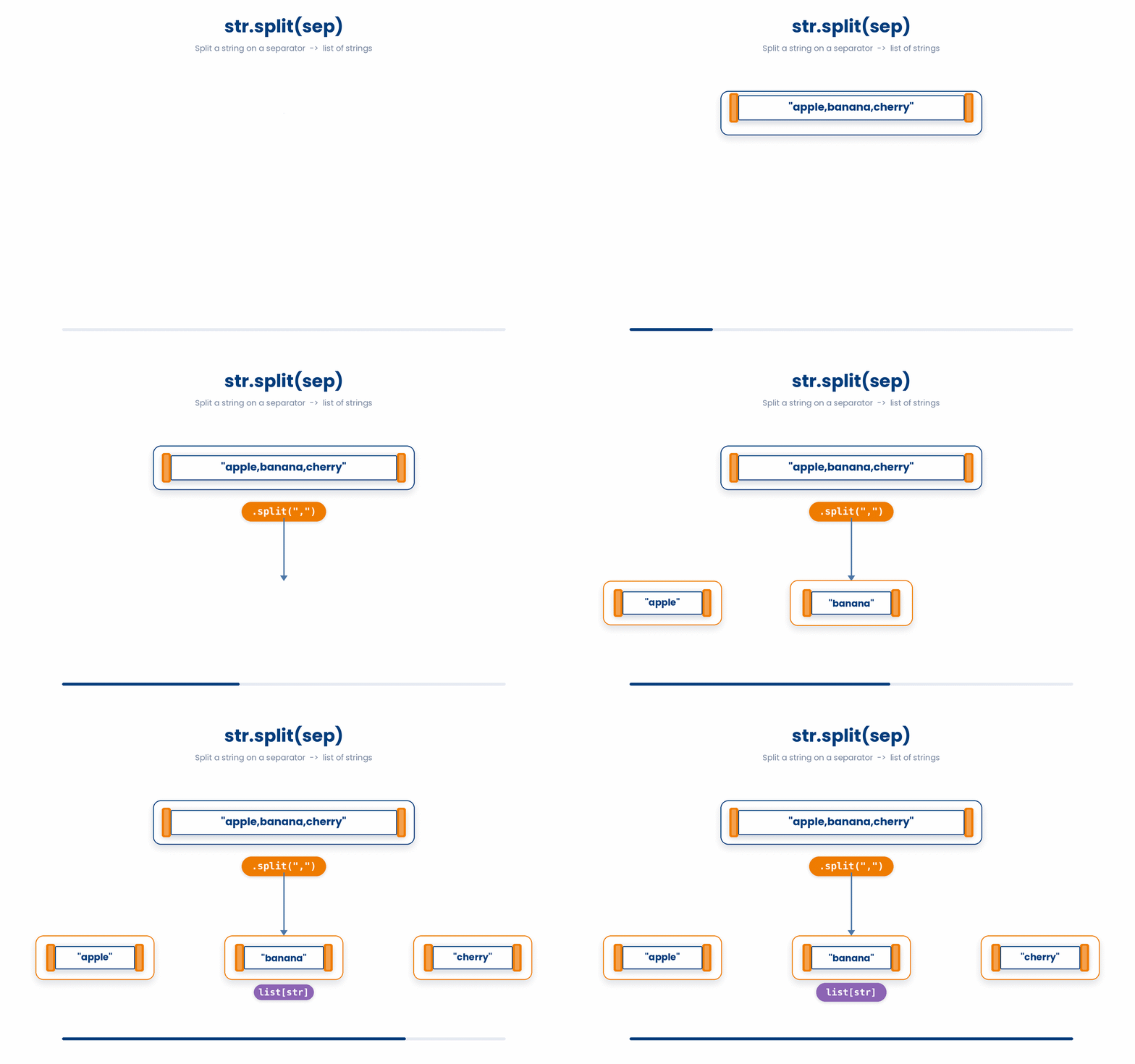
The shape is some_string.split(separator). The separator goes inside the brackets as a string itself; that is why the comma has quotes around it. The result is a list, so everything you already know about lists applies — parts[0] gives you "S001", parts[1] gives you "72", and len(parts) tells you how many fields there are.
Try this snippet in the Python Scratchpad on the right.
line = "S001,72,M"
parts = line.split(",")
print(parts)One thing worth keeping in mind: split returns a list of strings, even if the pieces look like numbers. After splitting "S001,72,M" on a comma, the middle piece is the string "72", not the integer 72. To do arithmetic with it you have to convert it with int() or float().
Forgetting this is one of the most common errors in early data-loading code.
The code below is broken. Type a fixed version into the editor, then click Run & check. Success means your code runs without errors and produces output. Use Show hint only if you get stuck.
record = "S001,72,M"
parts = record.split(",")
age = parts[1]
years_to_60 = 60 - age
print(years_to_60)- Convert the age piece to an integer before subtracting: age = int(parts[1]) ★
- Cast the 60 to a string so both sides are strings: years_to_60 = str(60) - age
- Wrap the whole subtraction in int() to coerce the result: years_to_60 = int(60 - age)
Now, let’s try it out.
Try this snippet in the Python Scratchpad on the right.
line = "S001,72,M"
pid, age_str, sex = line.split(",")

age = int(age_str)
print(pid, age + 1, sex)3.2 strip
Now to strip. Text from the real world rarely arrives clean. A line you read from a file usually carries a hidden newline character at the end. A field copy-pasted out of a spreadsheet often has a stray space at the front. A patient ID typed by hand might be " P001 " with padding on both sides.
You can spend hours chasing bugs because a comparison that looks right ("P001" == "P001 ") quietly returns False over a single trailing space. strip is the cure: it returns a new copy of the string with whitespace removed from both ends.
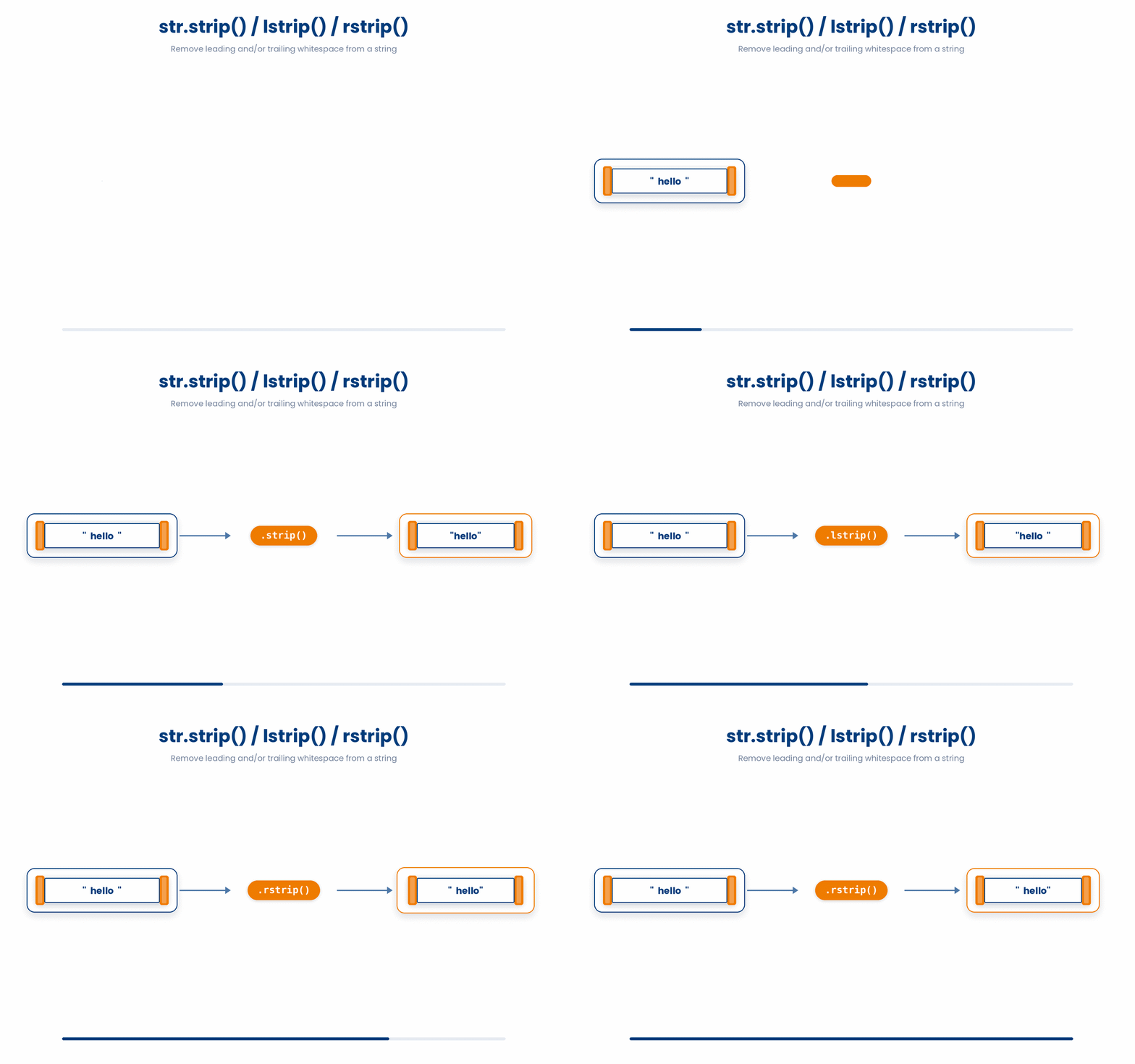
The shape is some_string.strip(). With no argument it removes any whitespace — spaces, tabs, newlines — from both ends. The middle of the string is left alone. We use repr() in the snippet above so you can see the quotes around the cleaned string and confirm nothing is hiding at the edges; print on its own would not show trailing spaces.
Try and debug the following and see how much time you spent!
The code below is broken. Type a fixed version into the editor, then click Run & check. Success means your code runs without errors and produces output. Use Show hint only if you get stuck.
records = [" P001", "P002 ", "  P003  "]
genotypes = {"P001": "AA", "P002": "AG", "P003": "GG"}
for record in records:
print(genotypes[record])- Strip whitespace from both ends before the lookup: print(genotypes[record.strip()]) ★
- Strip only the leading whitespace: print(genotypes[record.lstrip()])
- Slice off the first and last character: print(genotypes[record[1:-1]])
Now let’s try the same example with strip
Try this snippet in the Python Scratchpad on the right.
records = [" P001", "P002 ", "  P003  "]
genotypes = {"P001": "AA", "P002": "AG", "P003": "GG"}
for record in records:
print(genotypes[record.strip()])There are a few variations to strip
(a) Custom Character Stripping: Remove specific characters instead of whitespace, pass them as an argument (e.g., some_string.strip("#") removes both leading and trailing # characters).
Note: The argument you provide is treated as a set of individual characters to remove, not an exact phrase. Using strip("abc") will remove any a, b, or c from the ends in any order. It only stops stripping when it encounters a character that is not in that provided set.
Try this snippet in the Python Scratchpad on the right.
header = "###Gene: BRCA1###"
print(header.strip("#"))
brackets = "[[APOE]]"
print(brackets.strip("[]"))
flanked = "ATATCGATCGATAT"
print(flanked.strip("AT"))(b) Targeted Stripping: Use lstrip() to remove characters only from the left side (leading). Use rstrip() to remove characters only from the right side (trailing).
Try this snippet in the Python Scratchpad on the right.
raw = " P001 "
print("[" + raw.lstrip() + "]")
print("[" + raw.rstrip() + "]")A subtle but important point: strip does not change the original string. Strings in Python cannot be modified once they exist — they are immutable. Every string method returns a new string and leaves the original alone. So clean = raw.strip() works, but writing raw.strip() on a line by itself does nothing useful, because you threw the result away. This is a frequent source of "why did my code not do anything?" confusion.
The code below is broken. Type a fixed version into the editor, then click Run & check. Success means your code runs without errors and produces output. Use Show hint only if you get stuck.
name = "  Mary  "
name.strip()
print(name)- Reassign the result: name = name.strip() ★
- Use lstrip and rstrip together instead
- Add a comma after strip: name.strip,()
3.3 startswith
startswith answers a yes-or-no question: does this string begin with this prefix?
You will use it any time you need to filter, categorise, or route data based on the first few characters. File names that begin with "GTEX_" come from one project; those that begin with "TCGA_" come from another. SNP IDs that start with "rs" are from one reference database; those that start with "ss" are from a different one. With startswith you can write exactly that test in one short line.
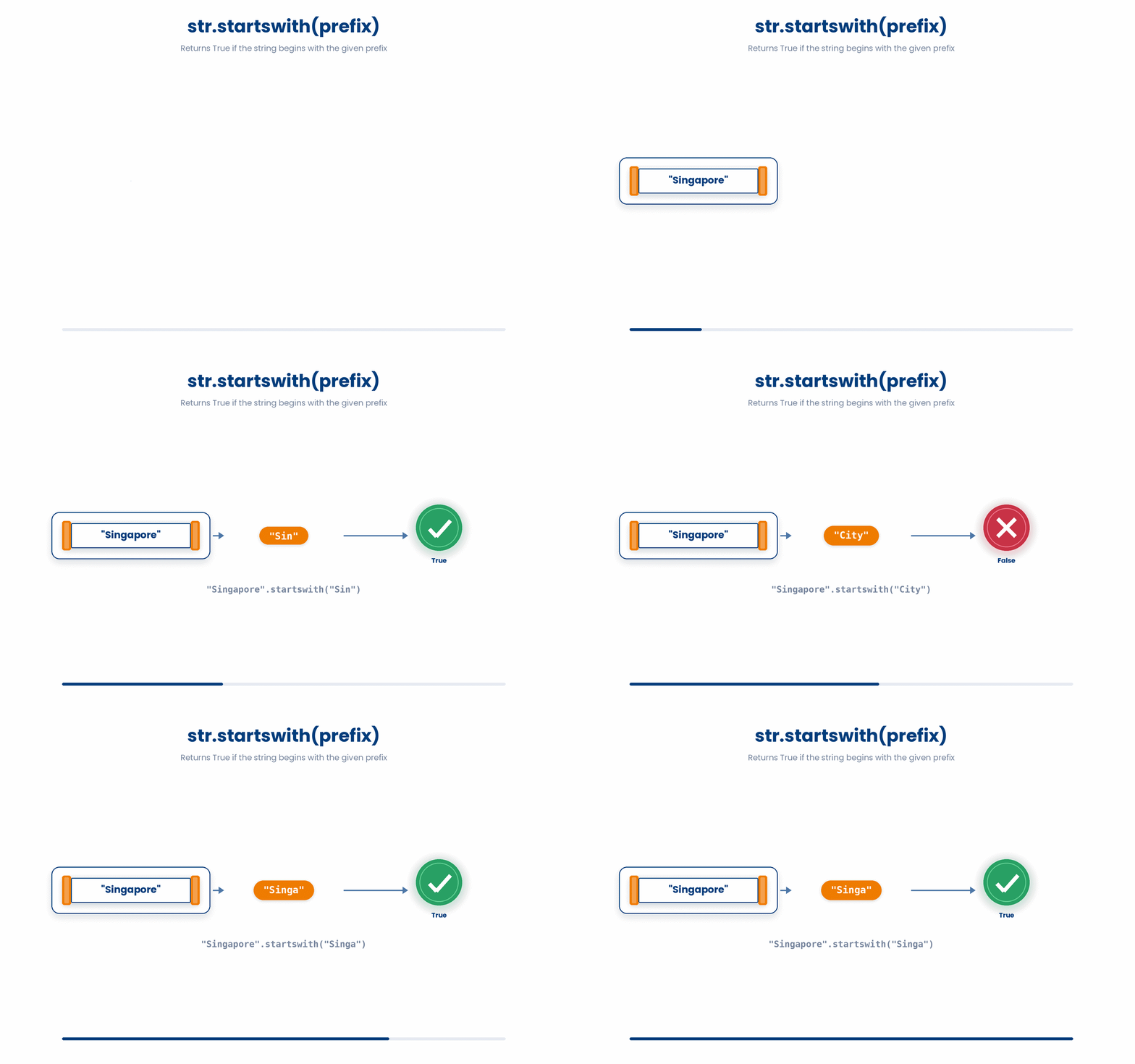
The shape is some_string.startswith(prefix). The result is True or False, which is exactly what an if statement needs. There is also a matching endswith for the other end — handy for picking out files by extension, like fname.endswith(".fastq").
Try this snippet in the Python Scratchpad on the right.
fname = "GTEX_blood_001.fastq"
if fname.startswith("GTEX_"):
print("from GTEX project")If you have several prefixes you want to match, you do not need a long chain of or. Pass a tuple of prefixes inside the brackets and startswith returns True if the string begins with any of them.
code = "rs12345"
print(code.startswith(("rs", "ss"))) | True
Tuples are written with round brackets. The double brackets in code.startswith(("rs", "ss")) are not a typo: the outer pair belongs to the method call, and the inner pair makes the tuple. If you forget the inner pair and write startswith("rs", "ss"), Python will think you meant the second argument (a start position) and complain.
3.4 replace
The last method in this section is replace. Whenever you need to tidy or standardise text — turn every "M" into "Male", strip the unit "kg" off a weight, swap commas for tabs in a line — replace is the tool. It scans the string for every occurrence of the old substring and gives you back a new string with each occurrence swapped for the new one.
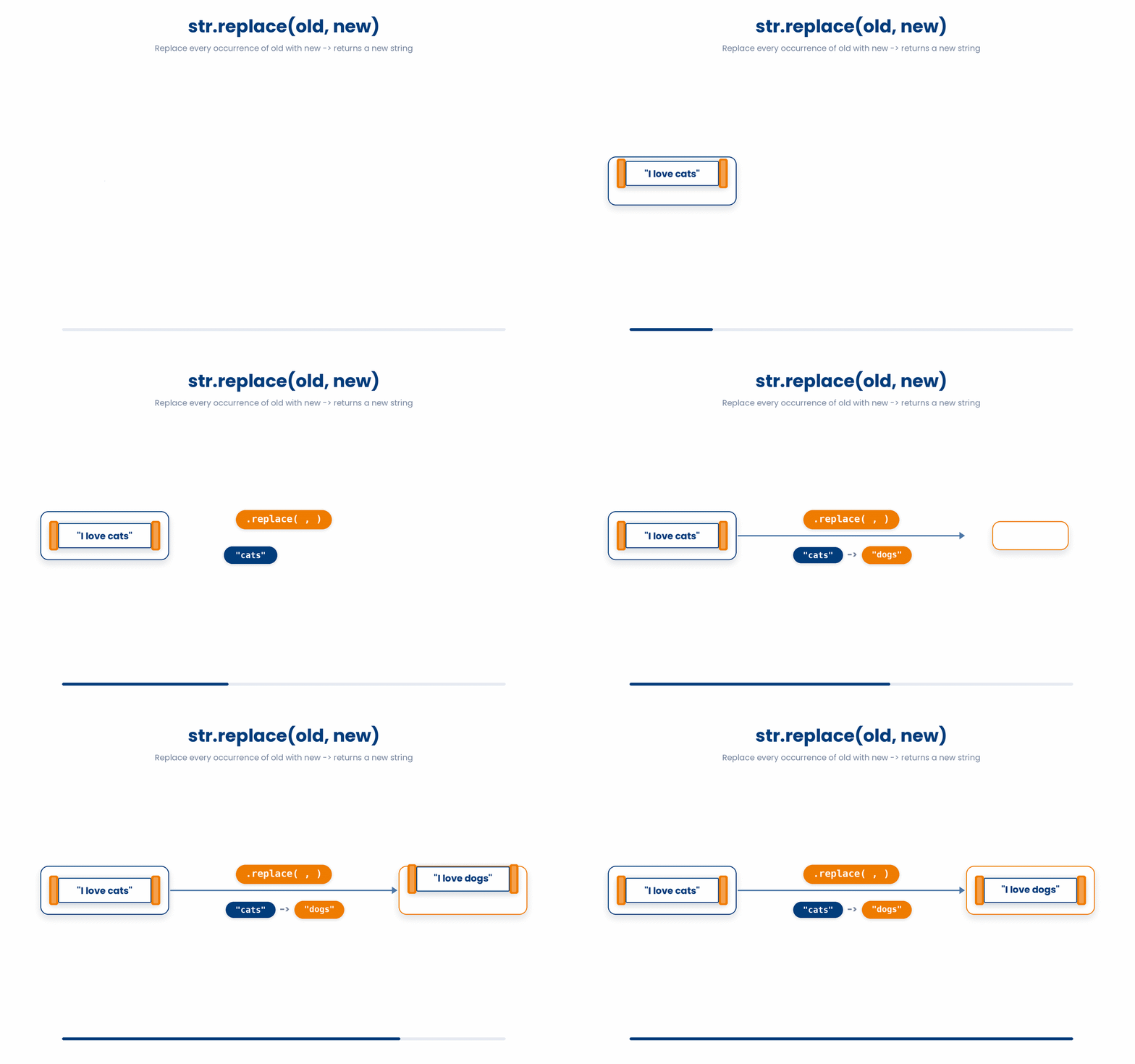
The shape is some_string.replace(old, new). The original string is left alone — replace returns a new string, so you almost always want to assign the result back to the same variable, the way the snippet above does. Forgetting that step is the same trap we hit with strip: the work is done, but the result is thrown away, and the original variable still holds the old value.
Try this snippet in the Python Scratchpad on the right.
sex = "M"
sex = sex.replace("M", "Male")
print(sex)A subtle point: replace swaps every occurrence by default. If a string contains the old substring three times, all three get swapped. Sometimes that is what you want, sometimes not. If you only want to replace the first one or two occurrences, pass a third argument: some_string.replace(old, new, count). And remember, replace works on substrings — you can replace any string, not just single characters. "none reported".replace("none", "missing") works fine.
Try this snippet in the Python Scratchpad on the right.
raw = "AAA-AAA-AAA"
raw.replace("A", "T")
raw.replace("A", "T", 2)

note = "none reported"
note.replace("none", "missing")3.5 join: the inverse of split
split takes one string and turns it into a list of pieces. join does the opposite - it takes a list of strings and glues them back into one.
The syntax looks backwards the first time you see it. The separator goes first, then .join is called on it, and the list of pieces is passed in: "".join(["S001", "72", "M"]) gives back "S00172M". Whenever you build a CSV row, a log line, or a path from parts, join is the right call.
Try this snippet in the Python Scratchpad on the right.
parts = ["S001", "72", "M"]
line = "".join(parts)
print(line)

genes = ["APOE", "TREM2", "BIN1"]
print(" | ".join(genes))

ages = [54, 61, 47]
print(",".join(str(a) for a in ages))4 Putting it together
In real code these four methods almost always show up together. A typical pattern looks like this: take a messy line, strip the padding off the whole thing, split it into fields, strip each field individually (because the padding came back on the inside after splitting), and standardise any codes with replace. The worked example below ties all four methods into one short routine.
Try and familiarize yourself with the syntax:
All the lines you need are in the Line bank on the left — some may be distractors you should leave behind. Drag the lines you need into the Your solution column on the right, in the correct order, then click Check.
Task: Given a list of file names, print only the ones that come from the GTEX project. Strip any whitespace from each name first, since the names were copy-pasted from a spreadsheet.
if f.startswith("GTEX_"):if f.endswith("GTEX_"):print(f)files = [" GTEX_001.bam", "TCGA_002.bam ", "GTEX_003.bam"]for f in files:f = f.replace(" ", "")f = f.strip()if startswith(f, "GTEX_"):for f in files.split():
- Drop lines here, in order.
And now let’s try an example.
Work through this example in three stages. You unlock each stage only after the tutor confirms the previous one. Each stage removes more of the scaffolding — by the end you are writing it yourself.
Problem: A line of patient data has arrived as one long string with extra whitespace and a one-letter sex code. Strip the line, split it on the commas, strip each field, expand the sex code, and print the three cleaned fields.
line = "  P001 ,  72 , M  "
line = line.strip()
parts = line.split(",")
patient_id = parts[0].strip()
age = parts[1].strip()
sex = parts[2].strip().replace("M", "Male").replace("F", "Female")
print(patient_id, age, sex)- We strip the whole line first to remove the outside padding before we split it.
- split on the comma gives us three pieces, but each piece still has its own leading or trailing spaces, so we strip each piece by hand into its own variable.
- Finally we standardise the sex code with two chained replace calls — one for M and one for F — so a downstream report shows the full word.
The same solution with key parts replaced by ???.
Fill in every ??? so the code matches the reference,
then ask the tutor to check it.
Your turn: A new line has arrived: line = " S007 ; 58 ; F ". Clean it the same way, but note that the separator is a semicolon, not a comma. Print the three cleaned fields.
5 Check your understanding
You have reached the end of the module. Try the same questions again — your answers here, paired with your pre-test answers, are how we measure what the module taught you. Answer every question and confidence rating, then click Submit and see results to view your score.
A line is read in as line = "S001,72,M". What does line.split(",") return?
After parts = "S001,72,M".split(","), what is the type of parts[1]?
What does " hello ".strip() return?
What does "banana".strip("an") return?
You want to pick out file names that start with either "GTEX_" or "TCGA_". Which call does that in one line?
raw = " P001 ". You run raw.strip() on its own line (no assignment), then print(repr(raw)). What is printed?
What does "A-A-A".replace("A", "T") return?
What does ",".join(["S001", "72", "M"]) return?
I can split a comma-separated line into a list of fields and pull out each field by index.
I can clean stray whitespace off the ends of a string with strip(), and explain why I have to assign the result back to a variable.
I can use startswith() with a tuple of prefixes to filter a list of file names by project.
6 Your results
Here is how your post-test answers compare with your pre-test answers. The pre/post pairing is the most reliable way to see what this module actually taught you.
Submit the post-test to see your results.
What is the one thing from this module that is still unclear to you?