

1 Before you start
This is not graded, and it does not count towards anything. Answer every question even if you are only guessing — having a go at something before you have been taught it is one of the best ways to remember it afterwards. The lesson ends with another short check, and there you will be shown the correct answer for anything you missed. Choose an option for every question and confidence rating, then click Submit answers.
What does a function return if you forget to write a return statement?
You define def greet(name, greeting="Hello"): return f"{greeting}, {name}". Which call uses keyword arguments correctly?
Given def greet(name, greeting="Hi"): return f"{greeting}, {name}", what does greet("Sam") return?
Which is equivalent to def square(x): return x**2?
What does sorted([5, -3, 1], key=lambda x: abs(x)) return?
You define def f(*args): print(args). What type is args inside the function?
You define def f(**kwargs): print(kwargs). What type is kwargs inside the function?
A variable is created inside a function with an ordinary assignment (no global keyword). After the function returns, what happens to it?
I can write a function with parameters and a default value, and call it using either positional or keyword arguments.
I can write a lambda to use as the key= argument of sorted, max, or min.
I can read a function signature that uses *args or **kwargs and tell what kind of inputs it accepts.
2 Introduction
Up to now every program you have written lives in one block. You assign variables, run a loop, print a result. As soon as your scripts get longer or you want to reuse the same logic, you need a way to package a piece of behaviour under one name and call it whenever you like. That is what a function does.
This is the first of two parts. Part I covers functions themselves — how to define them, pass arguments, set defaults, write anonymous lambdas, and reason about which variables a function can see. Part II covers reading and writing files, and accepting input from the command line.
This part covers five tools:
- Functions and parameters — define a piece of behaviour once, call it from anywhere with whatever inputs you want.
- Positional vs keyword arguments — two ways of telling a function which value goes where, and when each is better.
- Anonymous functions with
lambda— one-line functions forsortkeys,max/min, and quick transforms. - Flexible arguments with
*argsand**kwargs— letting a function accept any number of positional or keyword arguments. - Variable scope — why a variable defined inside a function vanishes when the function returns, and what that buys you.
Try every snippet in the Python Scratchpad on the right. By the end of this part you will write a function with a default value, a lambda passed to sorted, and a small function that takes *args.
3 Functions and parameters
You compute a BMI. Then a few lines later you compute another one. Then in a different file, for a different patient, you compute another. Each time you write the same expression, weight_kg / (height_m ** 2), and each time there is a small risk of typing it wrong.
A function lets you write that expression once, give it a name, and call it whenever you need the result.
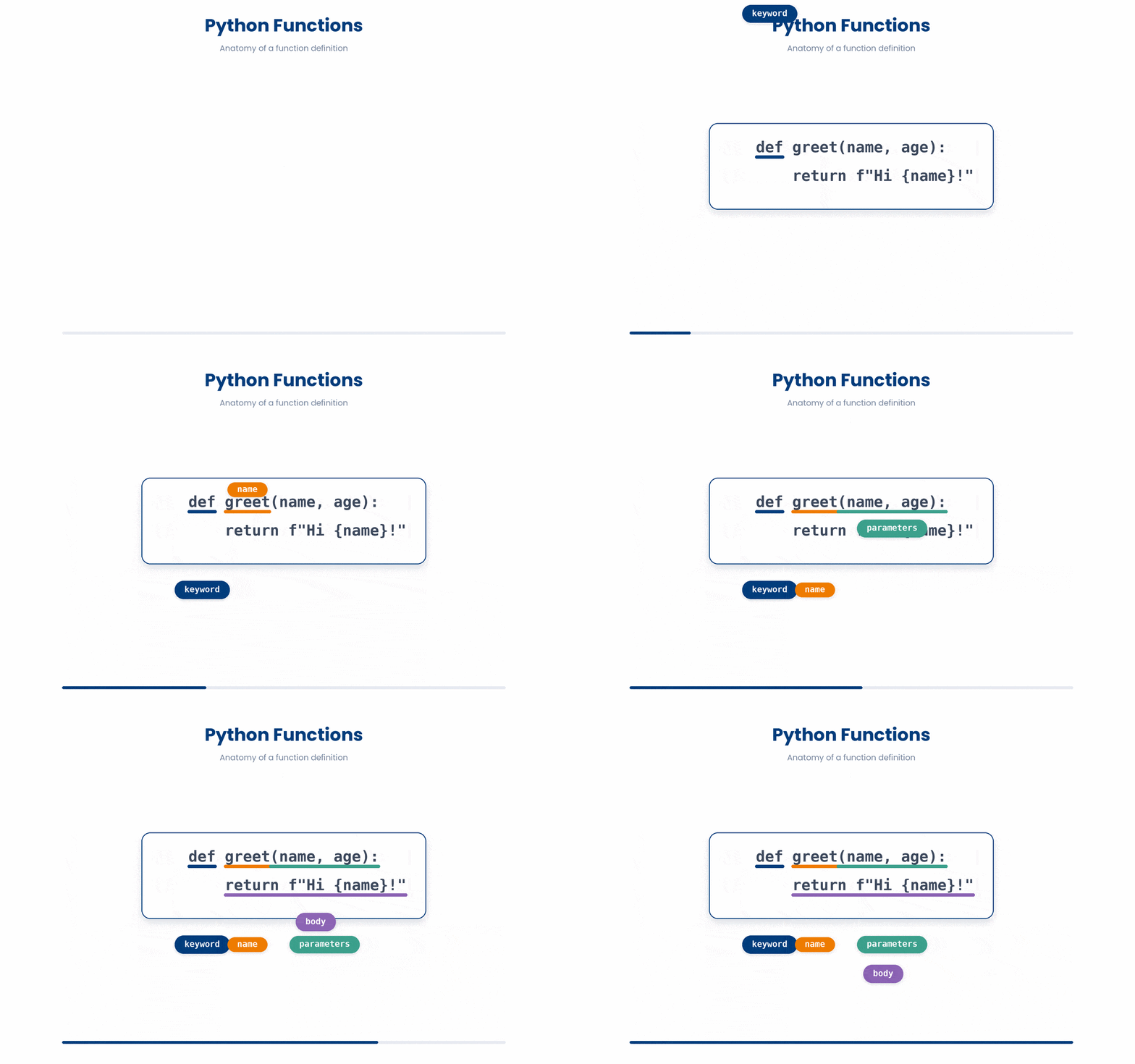
A function definition starts with the word def, then the name you want to give it, then a list of parameters in round brackets, then a colon. The lines that make up the function's body are indented by four spaces, just like the body of an if or a for loop. The word return tells Python what value to send back to whoever called the function.
Try and create your own functions!
Try this snippet in the Python Scratchpad on the right.
def calculate_bmi(weight_kg, height_m):
    return weight_kg / (height_m ** 2)

print(calculate_bmi(72, 1.75))Three pieces of vocabulary that get used interchangeably in conversation but mean slightly different things.
- A parameter is a name in the function's definition — the
weight_kgandheight_mabove. - An argument is the actual value you pass in when you call the function — the
72and1.75above. - A return value is what the function hands back. If you forget the
return, the function still runs but it hands backNone, and any code that tried to use the result will quietly behave strangely.
Functions can take any number of parameters, including zero. When you call the function, you pass that many values, in the same order. If you pass too few or too many, Python raises a TypeError before the function body even runs.
The code below is broken. Type a fixed version into the editor, then click Run & check. Success means your code runs without errors and produces output. Use Show hint only if you get stuck.
def add(a, b):
    return a + b

print(add(3))- Pass two values when you call the function: add(3, 5) ★
- Replace return with print inside the function
- Remove the colon at the end of the def line
A small habit worth forming early: write a one-line description of what the function does on the line right under def, wrapped in triple quotes. That string is called a docstring, and Python treats it specially — help(calculate_bmi) will show it, and editors like VS Code pop it up as a tooltip when you hover the function name. Future-you, six months from now, trying to remember what this function does, will thank you.
def calculate_bmi(weight_kg, height_m):
    """Return body-mass index from weight in kg and height in metres."""
    return weight_kg / (height_m ** 2)

help(calculate_bmi) # shows the docstring4 Positional vs keyword arguments
Once a function takes more than two parameters, calling it gets risky.
The code calculate_energy(72, 1.75, 54, "M") is fine if you remember the order, but is the third number the age or the heart rate? Did "M" mean male or metric? Python gives you a second way to pass arguments that removes the guessing.
When you write add(3, 5), the values 3 and 5 are positional arguments. Python matches them to the parameters by their position. The first value goes to the first parameter, the second value to the second, and so on. That is what you have been doing so far.
The second call uses keyword arguments — you write the parameter name, then =, then the value. The two calls do exactly the same thing, but the second one is self-documenting: anyone reading the call sees which value is which. For a function with two parameters that is overkill; for a function with five it is the difference between readable code and a guessing game.
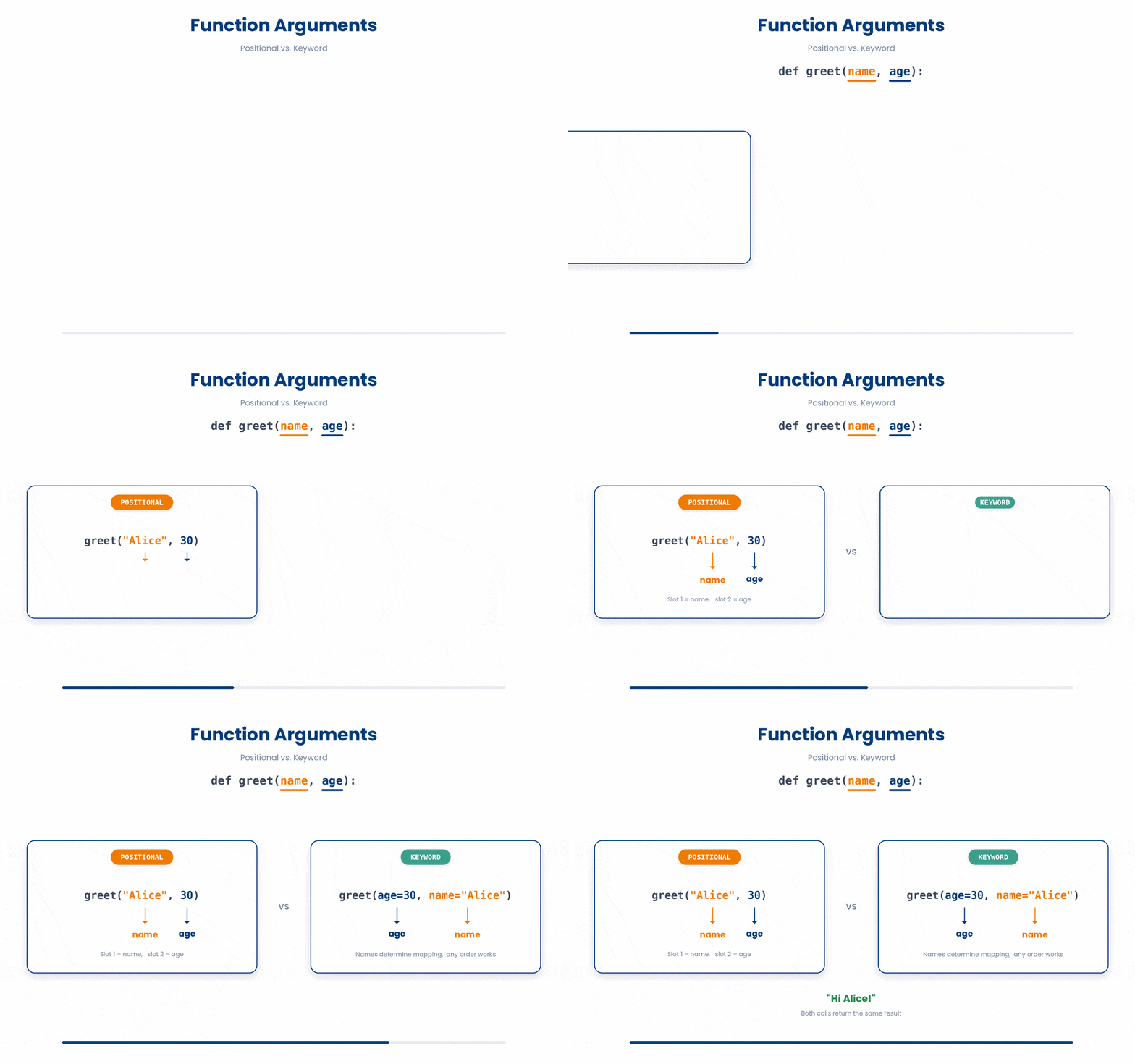
You can mix the two styles in a single call, but positional arguments must come first. calculate_bmi(72, height_m=1.75) is fine. calculate_bmi(weight_kg=72, 1.75) is a SyntaxError — once you start using keywords, you have to stick with keywords for the rest of the call.
The code below is broken. Type a fixed version into the editor, then click Run & check. Success means your code runs without errors and produces output. Use Show hint only if you get stuck.
def calculate_bmi(weight_kg, height_m):
 return weight_kg / (height_m ** 2)

print(calculate_bmi(weight_kg=72, 1.75))- Make both arguments keyword so order no longer matters: print(calculate_bmi(weight_kg=72, height_m=1.75)) ★
- Swap to positional first, keep the keyword second: print(calculate_bmi(1.75, weight_kg=72))
- Give the first parameter a default in the definition: def calculate_bmi(weight_kg=72, height_m):
The other reason keyword arguments matter is default values. When you define a parameter with an = and a value in the def line, you are saying "if the caller does not pass this, use this value instead." Default values must come after non-default parameters in the signature.
Try and practice writing functions below:
Try this snippet in the Python Scratchpad on the right.
def prescribe(patient_id, drug, dose_mg, frequency="daily", route="oral"):
    print(f"{patient_id}: {dose_mg}mg {drug}, {frequency}, {route}")

prescribe("P01", "metformin", 500)
prescribe("P02", "heparin", 5000, "twice daily")
prescribe("P03", "insulin", 10, route="subcutaneous")5 Anonymous functions with lambda
When you only need a tiny throwaway function - one expression, used once - giving it a name with def is overkill.
Python lets you write the function inline with lambda. The shape is lambda parameters: expression. It is a function value with no name attached. The most common place you will see lambda is as the key= argument to sorted, max, or min, where you want to tell Python which part of each item to compare on.
Here is a simple example to illustrate:
Try this snippet in the Python Scratchpad on the right.
patients = [("Alice", 27.3), ("Bob", 22.1), ("Chen", 31.5)]
patients.sort(key=lambda p: p[1])
print(patients)And a slightly more complicated version:
Try this snippet in the Python Scratchpad on the right.
patients = [
 {"id": "P001", "age": 54},
 {"id": "P002", "age": 38},
 {"id": "P003", "age": 72},
]

by_age = sorted(patients, key=lambda p: p["age"])
print(by_age)

oldest = max(patients, key=lambda p: p["age"])
print(oldest)

square = lambda x: x ** 2
def square_def(x):
 return x ** 2
print(square(5), square_def(5))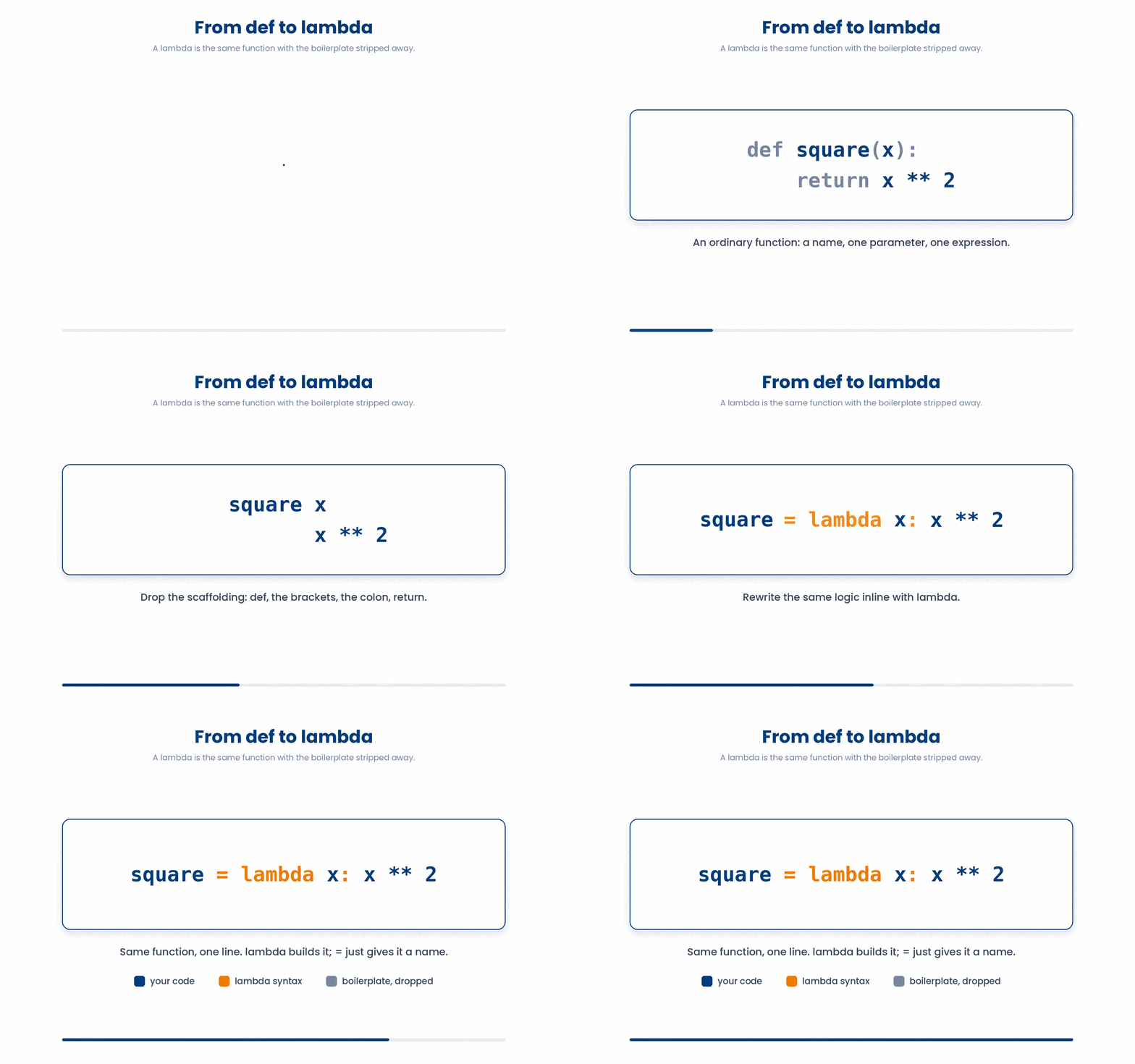
6 Flexible arguments with *args and **kwargs
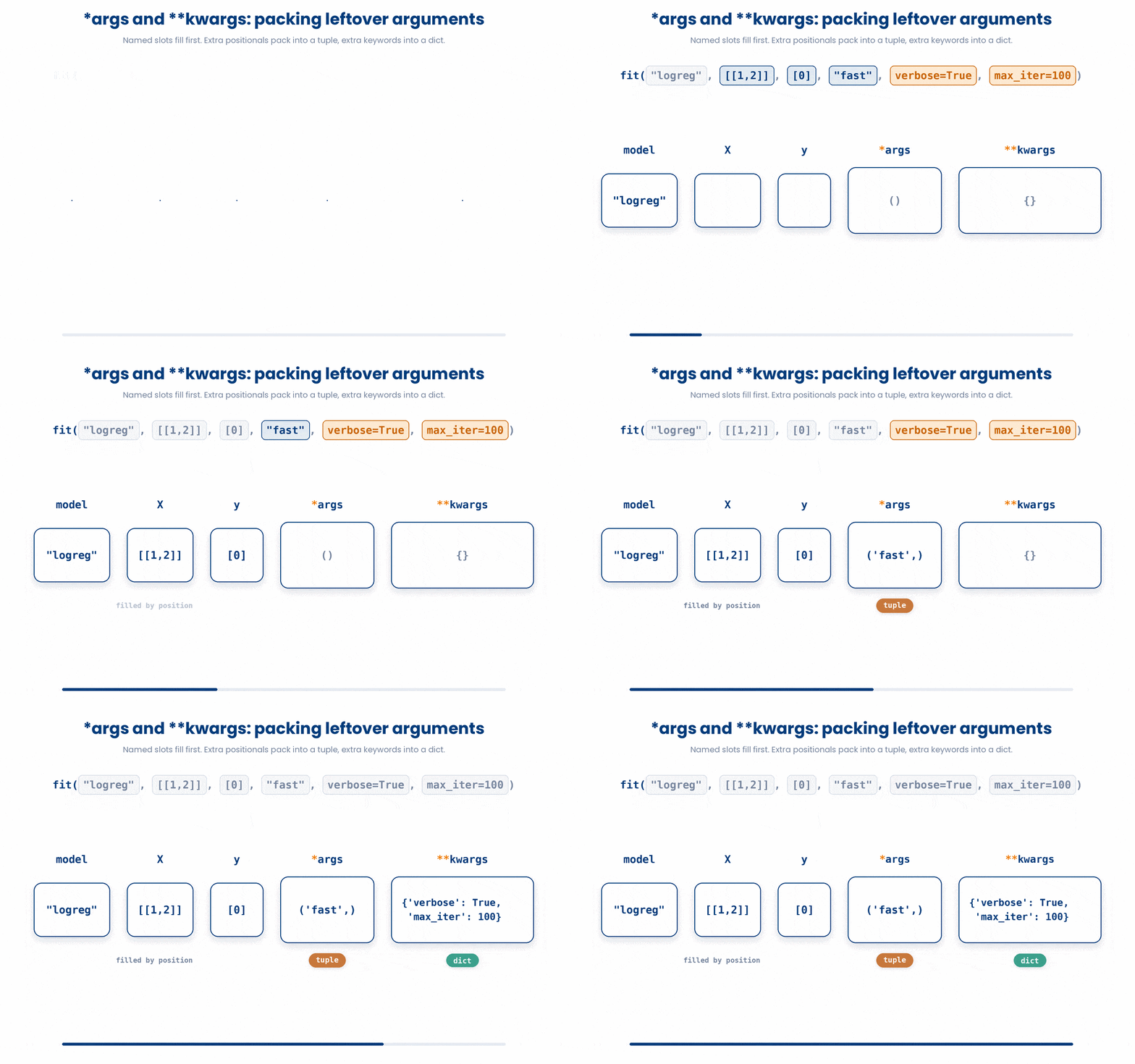
Sometimes you want a function to accept any number of positional arguments, or any number of keyword arguments. Python lets you do this with two special parameter forms:
*argscollects any extra positional arguments into atuple**kwargscollects any extra keyword arguments into a dictionary.
The names args and kwargs are just conventions; the * and ** operators do the heavy lifting. You’ll see this pattern across almost all machine learning libraries, allowing a function to accept a few specific parameters while using a catch-all to forward any remaining arguments it doesn't process itself.
Let’s practice the syntax.
All the lines you need are in the Line bank on the left — some may be distractors you should leave behind. Drag the lines you need into the Your solution column on the right, in the correct order, then click Check.
Task: Define a function that takes a patient ID, any number of symptoms, and any number of named admission details, then call it for one patient.
admit_patient("P042", ward="A3", "fever", "cough")def admit_patient(patient_id, **details, *symptoms):admit_patient("P042", "fever", "cough", ward="A3", priority="urgent")def admit_patient(patient_id, *symptoms, **details):print(f"Admitting {patient_id}")print(f"Symptoms: {symptoms}")print(f"Details: {details}")print(f"Symptoms: *symptoms")
- Drop lines here, in order.
Try the following code now:
Try this snippet in the Python Scratchpad on the right.
def mean(*values):
    return sum(values) / len(values)

print(mean(54, 61, 47, 72))
print(mean(1, 2, 3))

def describe_patient(**fields):
    for key, value in fields.items():
        print(f"{key}: {value}")

describe_patient(id="P001", age=54, weight_kg=72)

# Combining both - the standard signature you will see in ML libraries
def fit(model, X, y, *args, **kwargs):
    print("model:", model)
    print("extra positional:", args)
    print("extra keyword:", kwargs)

fit("logreg", [[1,2]], [0], "fast", verbose=True, max_iter=100)7 Variable scope (local and global)
A function is a self-contained unit of work. Any variables you create inside it (including its parameters) only exist while the function is running. Once it finishes, they're gone. This is called local scope.
Local scope is what makes functions safe to reuse: you can call calculate_bmi from twenty different places in your code and none of them will interfere with each other.
The tradeoff is that you can't access those variables from outside the function. Try to read bmi after the function returns, and Python will tell you it doesn't exist.
Try this snippet in the Python Scratchpad on the right.
def calculate_bmi(weight_kg, height_m):
    bmi = weight_kg / (height_m ** 2)
    return bmi

print(calculate_bmi(72, 1.75))
print(bmi)The print(calculate_bmi(...)) line works because the function returned a value. The print(bmi) line fails because bmi only ever existed inside the function. The way to get a value out of a function is return, not "look at its variables from outside."
Variables defined at the top level of a script — outside any function — live in what is called global scope.
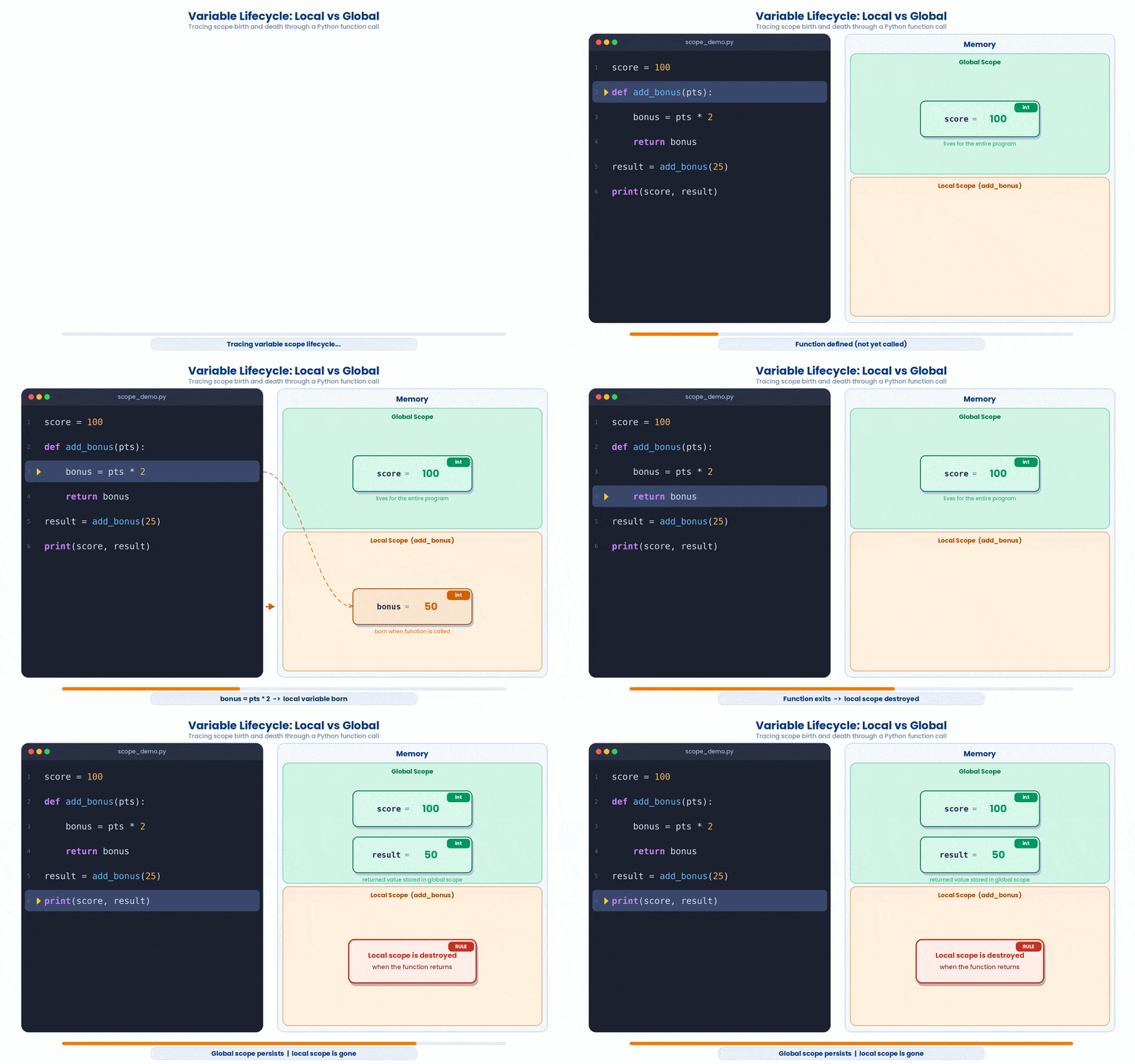
Local scope has a nastier failure mode running the other way. Reading a variable that only exists inside a function, from outside it, raises a NameError straight away — you cannot miss it. A typo running the OTHER direction, from inside a function out to a name that happens to exist at global scope, raises no error at all. Python finds a name, quietly uses it, and moves on. Here is a conversion function with exactly that bug.
Try this snippet in the Python Scratchpad on the right.
Factor = 1  # a scaling factor used elsewhere in this script, unrelated to this function

def kg_to_lb(weight_kg):
    factor = 2.20462  # the real kg-to-lb conversion factor
    return weight_kg * Factor  # typo: should be factor, not Factor

print(kg_to_lb(70))This prints 70 — the input weight, completely unconverted — nowhere near the correct answer. factor (lowercase) is assigned correctly inside the function and then never used. Factor (capital F), the name the return line actually reads, is not a local name at all, so Python looks outward, finds the unrelated global Factor defined earlier in the script, and quietly uses that instead. No error, no warning, just a wrong number that looks entirely plausible. The fix is not to rename things more carefully and hope the same typo never happens again — it is to make the function take everything it needs as a parameter, so there is nothing outside itself left for it to accidentally reach:
Try this snippet in the Python Scratchpad on the right.
def kg_to_lb(weight_kg, factor=2.20462):
    return weight_kg * factor

print(kg_to_lb(70))8 Putting it together
The five tools in this part work together in almost every function you write. A typical helper function has named parameters with sensible defaults, perhaps a *args or **kwargs catch-all, and may use a lambda inline for a quick sort or filter. Variables inside the function vanish when it returns, leaving only what you return behind.
There is one shape you will meet in almost every real analysis function: start with an empty list, loop over your data, append one result per pass, then return the finished list once the loop ends. It has a name — the accumulator pattern — because the list accumulates results as the loop runs. You already know for, append, and return on their own; the accumulator pattern is just the three of them combined inside one function, so the whole recipe becomes reusable.
Try this snippet in the Python Scratchpad on the right.
def flag_high_bmi(patients, threshold=30):
    flagged = []
    for p in patients:
        if p["bmi"] >= threshold:
            flagged.append(p["id"])
    return flagged

patients = [
    {"id": "P001", "bmi": 27.4},
    {"id": "P002", "bmi": 31.2},
    {"id": "P003", "bmi": 33.8},
]
print(flag_high_bmi(patients))Notice the three indentation levels. flagged = [] sits above the loop and runs once. flagged.append(...) sits inside the loop and runs once per patient. return flagged sits outside the loop again, after it has finished, and runs once. Move any of those three to the wrong level — appending outside the loop, or returning inside it — and the function stops working correctly. Whenever you catch yourself building a list by hand, one item at a time, this is the pattern to reach for.
Work through this example in three stages. You unlock each stage only after the tutor confirms the previous one. Each stage removes more of the scaffolding — by the end you are writing it yourself.
Problem: Write a function summarise(patients, sort_by="age") that takes a list of patient dicts and an optional sort key, returns the list sorted by that key, and prints a one-line summary per patient. Use a lambda for the sort key.
def summarise(patients, sort_by="age"):
    sorted_patients = sorted(patients, key=lambda p: p[sort_by])
    for p in sorted_patients:
        print(f"{p['id']}: {p['age']} years, BMI {p['bmi']}")
    return sorted_patients

patients = [
    {"id": "P001", "age": 54, "bmi": 27.4},
    {"id": "P002", "age": 72, "bmi": 29.1},
    {"id": "P003", "age": 38, "bmi": 24.8},
]
summarise(patients, sort_by="bmi")- Define the function with a default sort key of "age". Inside, call sorted() on the patient list with a lambda that pulls out the chosen key from each dict — this returns a new list without mutating the original.
- Loop over the sorted result and print one formatted line per patient using an f-string. Each line shows the id, age, and BMI in a consistent layout.
- Return the sorted list so callers can use it downstream. Then build a small list of patient dicts and call summarise(patients, sort_by="bmi") to see them ordered by BMI ascending.
The same solution with key parts replaced by ???.
Fill in every ??? so the code matches the reference,
then ask the tutor to check it.
Your turn: Write a function rank_genes(genes, by="p_value") that takes a list of gene dicts (each with keys "symbol", "p_value", "effect_size") and an optional sort key, sorts the list ascending using a lambda, prints one line per gene as "{symbol}: p={p_value}, effect={effect_size}", and returns the sorted list. Call it on [{"symbol": "APOE", "p_value": 4.2e-8, "effect_size": 0.42}, {"symbol": "TOMM40", "p_value": 1.1e-6, "effect_size": 0.31}, {"symbol": "PVRL2", "p_value": 8.3e-5, "effect_size": 0.58}] with by="effect_size".
9 Check your understanding
You have reached the end of the module. Try the same questions again — your answers here, paired with your pre-test answers, are how we measure what the module taught you. Answer every question and confidence rating, then click Submit and see results to view your score.
What does a function return if you forget to write a return statement?
You define def greet(name, greeting="Hello"): return f"{greeting}, {name}". Which call uses keyword arguments correctly?
Given def greet(name, greeting="Hi"): return f"{greeting}, {name}", what does greet("Sam") return?
Which is equivalent to def square(x): return x**2?
What does sorted([5, -3, 1], key=lambda x: abs(x)) return?
You define def f(*args): print(args). What type is args inside the function?
You define def f(**kwargs): print(kwargs). What type is kwargs inside the function?
A variable is created inside a function with an ordinary assignment (no global keyword). After the function returns, what happens to it?
I can write a function with parameters and a default value, and call it using either positional or keyword arguments.
I can write a lambda to use as the key= argument of sorted, max, or min.
I can read a function signature that uses *args or **kwargs and tell what kind of inputs it accepts.
10 Your results
Here is how your post-test answers compare with your pre-test answers. The pre/post pairing is the most reliable way to see what this module actually taught you.
Submit the post-test to see your results.
What is the one thing from this module that is still unclear to you?