

1 Before you start
This is not graded, and it does not count towards anything. Answer every question even if you are only guessing — having a go at something before you have been taught it is one of the best ways to remember it afterwards. The lesson ends with another short check, and there you will be shown the correct answer for anything you missed. Choose an option for every question and confidence rating, then click Submit answers.
Inside a for loop, what does break do?
Inside a for loop, what does continue do?
You write for i, x in enumerate(["a", "b", "c"]): print(i, x). What does it print?
You write for i, x in enumerate(["a", "b", "c"], start=1): print(i, x). What does it print?
A break runs inside the inner of two nested for loops. Which loop stops?
Given ids = ["P1", "P2"] and ages = [54, 61], what does for x, y in zip(ids, ages): print(x, y) print?
What does [a * 2 for a in [1, 2, 3]] produce?
Given labels = {"A": 0, "B": 1}, what does {v: k for k, v in labels.items()} produce?
I can explain to a peer the difference between break and continue, and pick the right one for a given task.
I can use enumerate to walk a list and report each item's position alongside its value.
2 Introduction
This module follows on directly from the previous control flow module. By now you can write an if/elif/else chain, walk a list with a for loop, and run a while loop until a condition flips.
That is enough for most everyday code. This module covers two refinements that turn up constantly in real work:
- Break and continue — exit a loop early, or skip the current item and go straight to the next one. Stopping at the first significant SNP is
break; ignoring missing values iscontinue. Enumerate— when you need both the position and the value as you loop, like printing a numbered list of samples or reporting which row of a table failed QC.
Try every snippet in the Python Scratchpad on the right. By the end of this module you will write a loop that walks a list, skips missing values, exits the moment it finds what it is looking for, and reports the position alongside the value.
3 Loop control with break and continue
When working with loops, you don't always want them to run from beginning to end.
Sometimes you need to alter their path using two distinct tools: break and continue.
Think of break as an eject button. When your code encounters a break statement, the loop stops instantly and completely terminates, with your program immediately moving on to whatever code follows the loop. This is incredibly useful when you have found exactly what you are looking for.
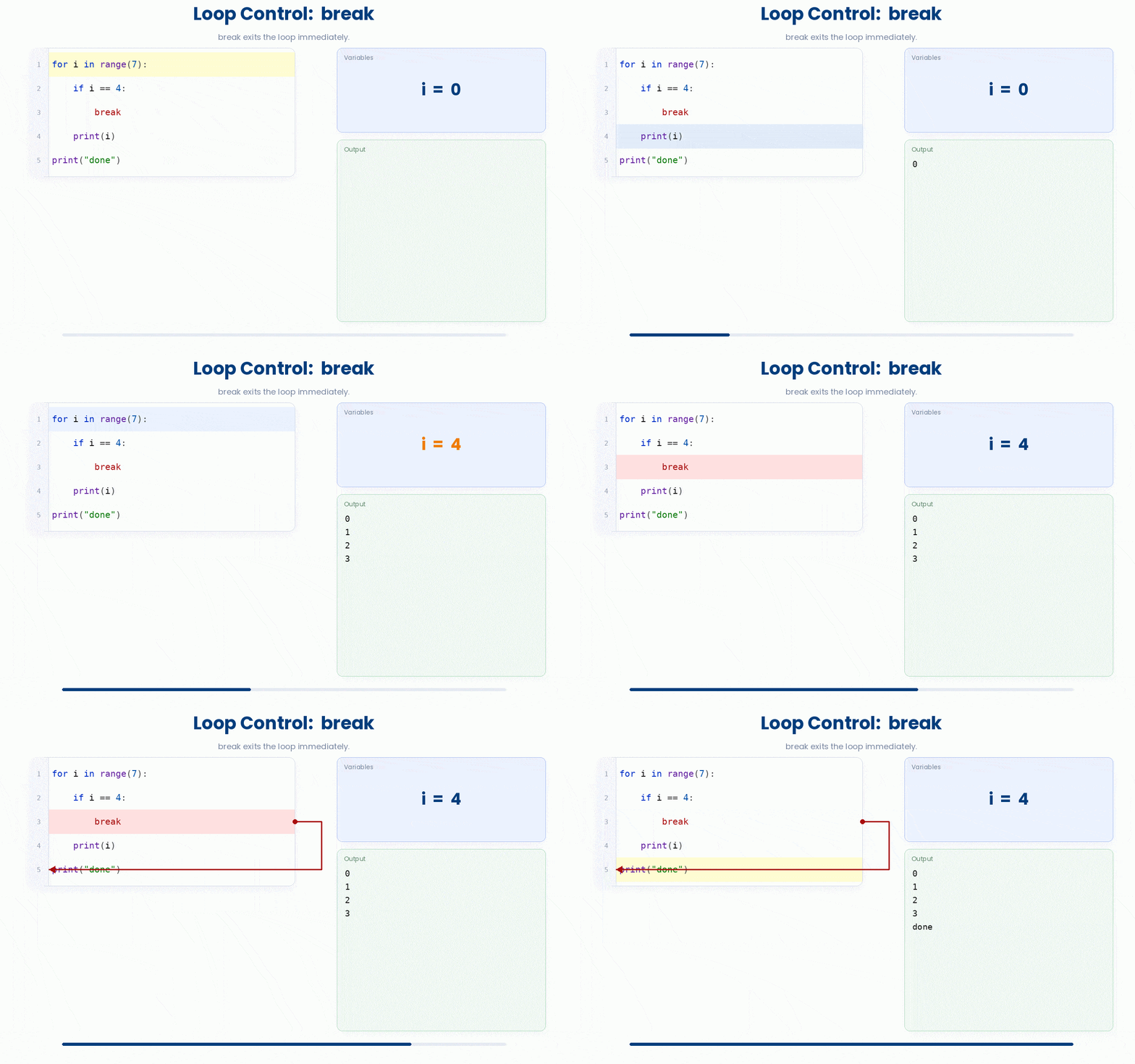
Can you predict what you will get from the code below:
Read the code carefully and type what you think it will print. Click Submit prediction for AI tutor feedback comparing your prediction against the real output, then click Reveal actual output to run the snippet yourself and see what happens.
glucose_readings = [110, 125, 165, 130, 175]
for reading in glucose_readings:
    if reading > 160:
        print(f"First critical: {reading}")
        break
print("Done")Try and practise the break keyword and the indent level
Try this snippet in the Python Scratchpad on the right.
glucose_readings = [110, 125, 165, 130, 145]
for reading in glucose_readings:
    if reading > 160:
        print(f"Critical: {reading}")
breakOn the other hand, continue does something different. It skips the rest of the current pass and goes straight to the next item. The loop keeps running; only this one iteration is cut short.
Use it to filter out items you do not want to process — missing values, blanks, anything that fails a quick sanity check.
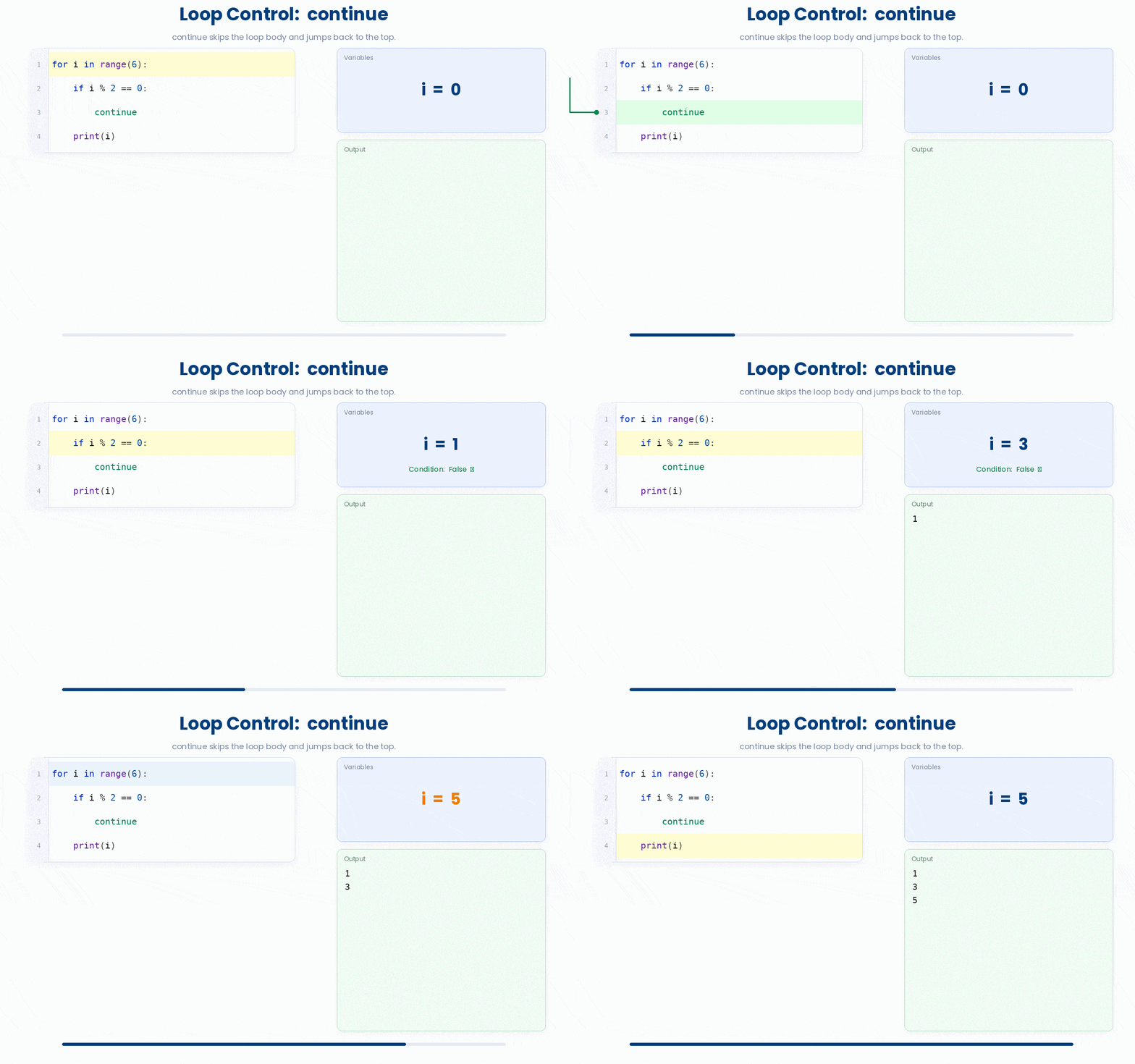
Can you predict what will happen with the code below?
Read the code carefully and type what you think it will print. Click Submit prediction for AI tutor feedback comparing your prediction against the real output, then click Reveal actual output to run the snippet yourself and see what happens.
readings = [120, -1, 145, -1, 130]
total = 0
for r in readings:
    if r < 0:
        continue
    total = total + r
print(total)Try it out!
Try this snippet in the Python Scratchpad on the right.
readings = [120, -1, 145, -1, 130]
for r in readings:
    if r < 0:
        continue
print(f"Valid: {r}")You can also combine both break and continue in a single code too!
Both break and continue affect only the loop they are written directly inside. If you have a loop nested inside another loop and you break, only the inner loop ends — the outer one keeps running.
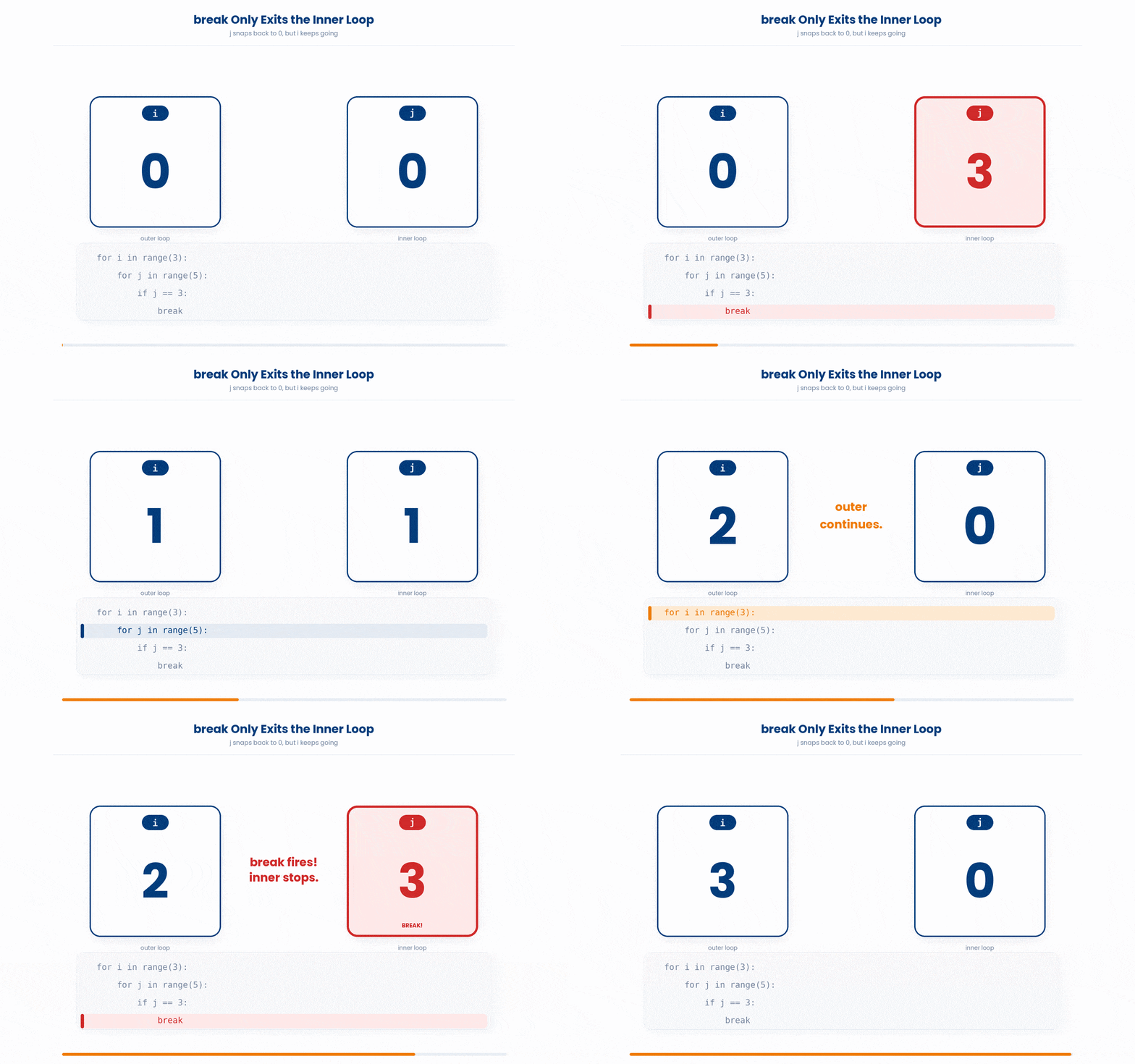
In the example above, you can see two counters running side by side: i (left) tracks the outer loop, while j (right) tracks the inner loop.
Watch what happens when j reaches 3. The break statement fires, immediately stopping the inner loop and resetting j to 0.
Notice, however, that i keeps counting up uninterrupted. This demonstrates a key rule: a break statement only exits the immediate loop it lives inside, leaving the outer loop completely unaffected.
4 Index tracking with enumerate
Most of the time when you iterate through a list, you only need the items themselves. But occasionally, you also need to know their exact positions
This is where enumerate comes in. It automatically provides both the index and the item on every pass, saving you the hassle of tracking the count manually.
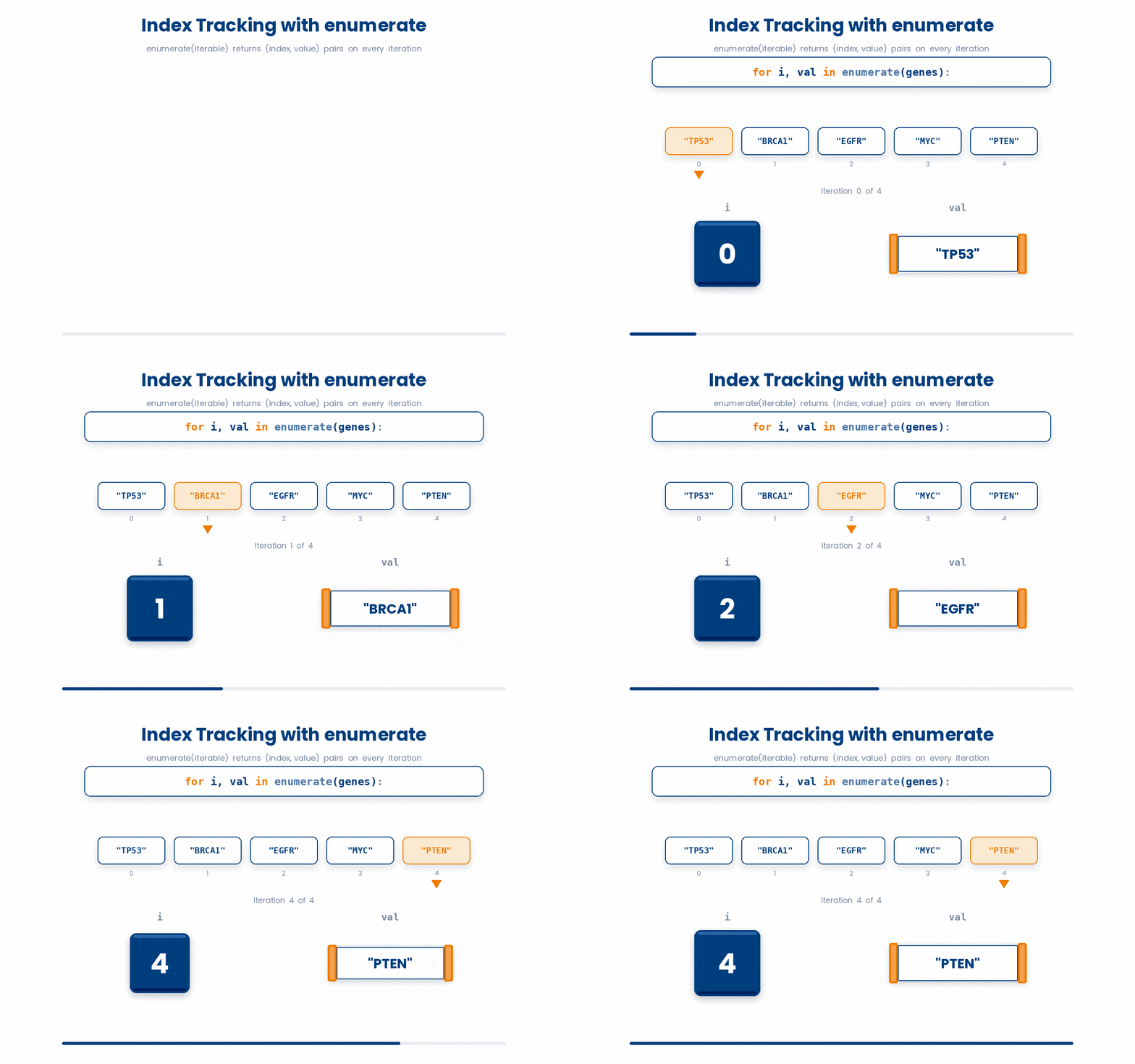
The syntax for enumerate is as follows:
readings = [120, 145, 110]
for i, r in enumerate(readings):
    print(f"Patient {i}: {r} mg/dL")
Try it out!
Try this snippet in the Python Scratchpad on the right.
samples = ["S001", "S002", "S003", "S004"]
for i, sample in enumerate(samples):
print(i, sample)If you'd prefer to count from 1 instead of 0, simply pass start=1.
Calling enumerate(samples, start=1) shifts the counter to begin at 1, 2, 3, and so on, while leaving your actual list items completely unchanged.
Read the code carefully and type what you think it will print. Click Submit prediction for AI tutor feedback comparing your prediction against the real output, then click Reveal actual output to run the snippet yourself and see what happens.
patient_ids = ["P07", "P12", "P03"]
for bed, pid in enumerate(patient_ids, start=10):
print(f"Bed {bed}: {pid}")Try it · Loop tracer
Run a loop one line at a time
Guess what the code prints, then press Step to run one line at a time and watch the variables change.
Before you step: what will this code print?
Variables
Printed so far
5 Looping over two lists in parallel with zip
enumerate gives you the position alongside the value of one list.
The zip function iterates through two or more lists in parallel. Using the syntax for a, b in zip(list_a, list_b), each pass yields the corresponding items from every sequence.
This is the standard approach for pairing related datasets, such as mapping patient IDs to ages or model features to labels.
Try this snippet in the Python Scratchpad on the right.
patient_ids = ["P001", "P002", "P003", "P004"]
ages = [54, 61, 47, 72]

for pid, age in zip(patient_ids, ages):
    print(f"{pid}: {age} years")

# Three lists at once
weights = [82.0, 68.5, 75.1, 90.2]
for pid, age, weight in zip(patient_ids, ages, weights):
    print(pid, age, weight)
6 List and dictionary comprehensions
A very common pattern is to walk a list, transform each item, and collect the results into a new list.
You can write that as a three-line for loop, but Python has a one-line shortcut called a list comprehension.
The shape is [expression for item in iterable if condition], where the if part is optional. Read it left-to-right like a sentence: "the squared value for each a in ages where a is positive."
Comprehensions are everywhere in real Python code, so being comfortable reading them matters.
Try this snippet in the Python Scratchpad on the right.
ages = [54, 67, 71, 49, 82]
squared = [a ** 2 for a in ages]
print(squared)

seniors = [a for a in ages if a >= 65]
print(seniors)

labels = ["senior" if a >= 65 else "adult" for a in ages]
print(labels)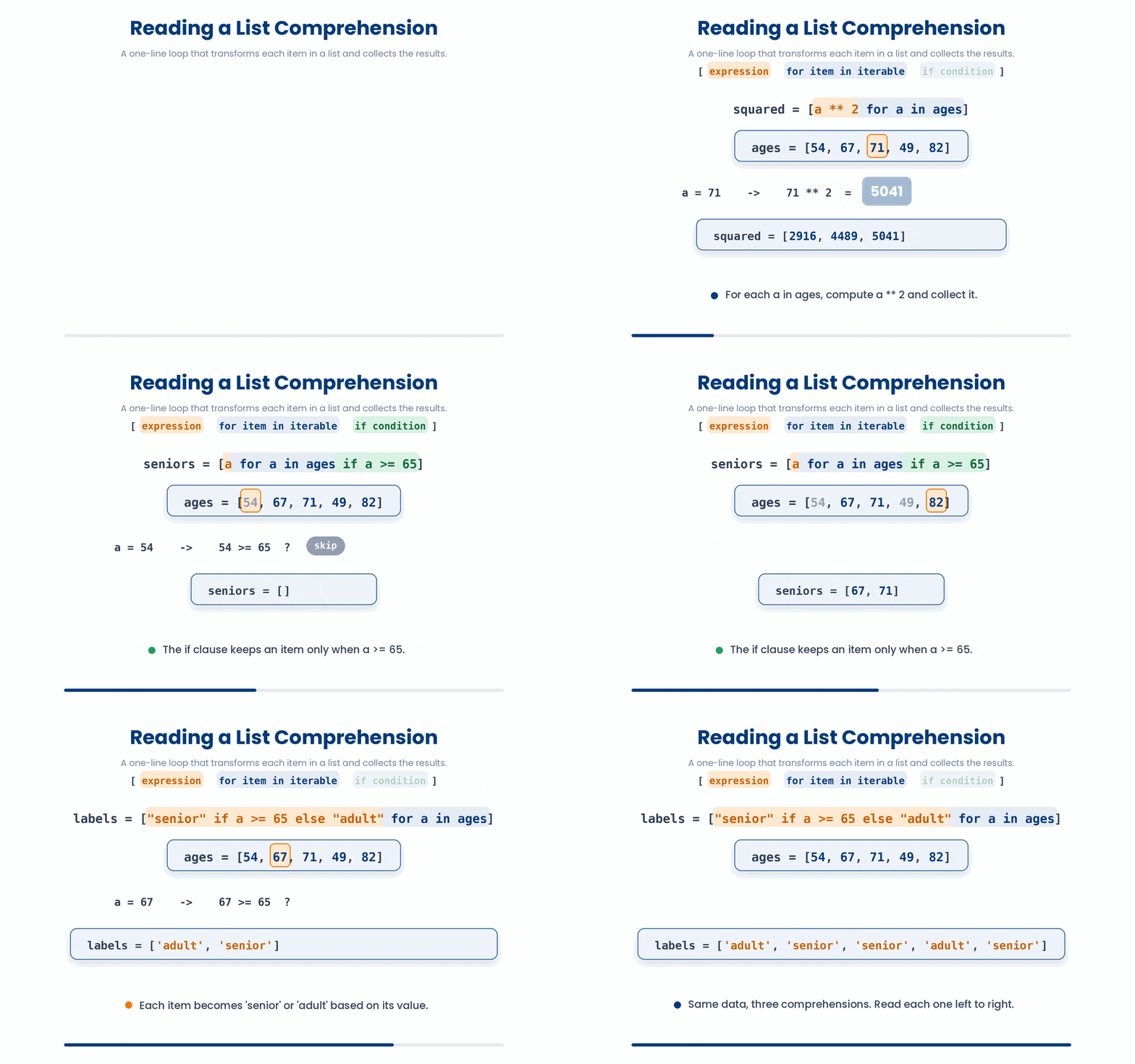
The same shortcut works for dictionaries. The shape is {key_expression: value_expression for item in iterable}.
Two common uses are turning a list of pairs into a dict, and building a quick lookup table where the key and value are computed from the same source.
Try this snippet in the Python Scratchpad on the right.
pairs = [("P001", 54), ("P002", 61), ("P003", 47)]
lookup = {pid: age for pid, age in pairs}
print(lookup)

labels = {"A": 0, "B": 1, "C": 2}
inverse = {v: k for k, v in labels.items()}
print(inverse)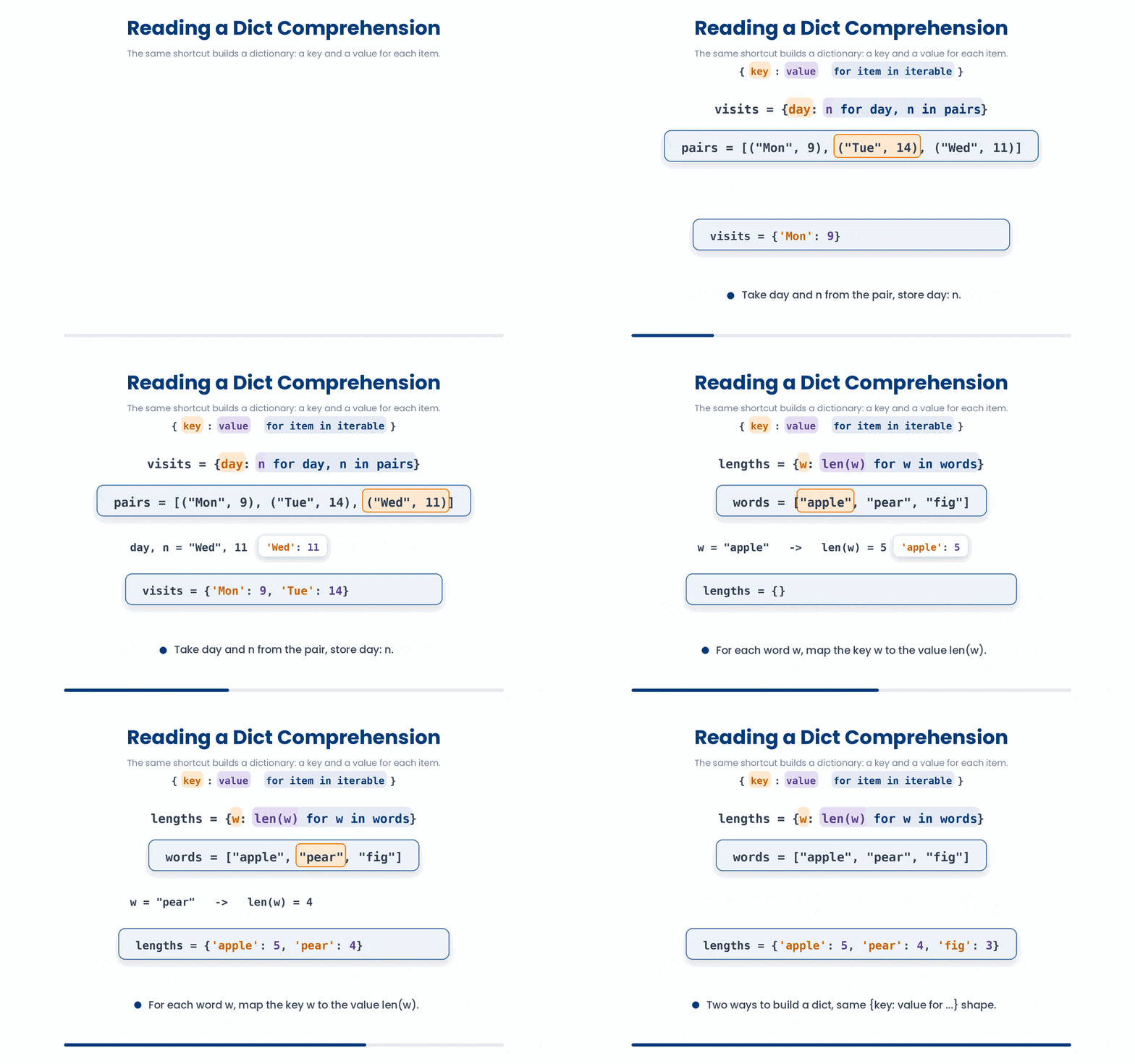
Try it · Loop to one line
Which part of the loop becomes which part of the one-liner?
Matching parts share a colour. Tap any coloured part to light up its twin.
Starting with
The loop
The same thing on one line
Both give
7 Check your understanding
You have reached the end of the module. Try the same questions again — your answers here, paired with your pre-test answers, are how we measure what the module taught you. Answer every question and confidence rating, then click Submit and see results to view your score.
Inside a for loop, what does break do?
Inside a for loop, what does continue do?
You write for i, x in enumerate(["a", "b", "c"]): print(i, x). What does it print?
You write for i, x in enumerate(["a", "b", "c"], start=1): print(i, x). What does it print?
A break runs inside the inner of two nested for loops. Which loop stops?
Given ids = ["P1", "P2"] and ages = [54, 61], what does for x, y in zip(ids, ages): print(x, y) print?
What does [a * 2 for a in [1, 2, 3]] produce?
Given labels = {"A": 0, "B": 1}, what does {v: k for k, v in labels.items()} produce?
I can explain to a peer the difference between break and continue, and pick the right one for a given task.
I can use enumerate to walk a list and report each item's position alongside its value.
8 Your results
Here is how your post-test answers compare with your pre-test answers. The pre/post pairing is the most reliable way to see what this module actually taught you.
Submit the post-test to see your results.
What is the one thing from this module that is still unclear to you?