

1 Before you start
This is not graded, and it does not count towards anything. Answer every question even if you are only guessing — having a go at something before you have been taught it is one of the best ways to remember it afterwards. The lesson ends with another short check, and there you will be shown the correct answer for anything you missed. Choose an option for every question and confidence rating, then click Submit answers.
Which operator do you use to test whether x holds the value 5?
What tells Python which lines belong to an if block?
bmi = 27.3, checked in order: if bmi < 18.5 prints "underweight", elif bmi < 25 prints "normal", elif bmi < 30 prints "overweight", else prints "obese". What prints?
age = 72 and bmi = 31.4. What is the result of (age > 65) and (bmi > 30)?
What does range(2, 8) produce when used in a for loop?
ages = [54, 67, 71, 49, 82], then seniors = 0 and for age in ages: if age > 65: seniors = seniors + 1. What is the final value of seniors?
A while loop runs while count < 5: but never updates count inside the body. What happens?
glucose = 180, then while glucose > 140: glucose = glucose - 15. What is glucose when the loop ends?
I can write an if/elif/else chain that picks between three or more outcomes based on a numeric value.
I can write a for loop that walks a list, applies an if-test to each item, and counts how many items pass.
I can write a while loop that runs until a condition becomes false, and explain how to avoid an infinite loop.
2 Introduction
So far, every line of code you have written runs once, in the order it appears. That is fine for short snippets, but real work almost always needs two extra abilities:
- choosing what to do next based on a value (conditionals), and
- doing the same thing repeatedly without writing it out by hand (loops).
Control flow is the umbrella name for both. This first module on control flow covers the three foundational tools:
if/elif/else— pick which block of code to run based on a condition, like flagging patients over 65 for the senior cohort.forloops — walk through every item in a collection one by one, like computing the mean of a list of p-values.whileloops — keep going as long as a condition stays true, like titrating a dose until a marker drops below threshold.
Try every snippet in the Python Scratchpad on the right. By the end of this module you will write a loop that walks a list, applies a decision to each item, and counts what passes.
3 If/elif/else statements
The simplest decision your code can make is yes or no. For example.
- If a patient is older than 65, mark them as senior.
- If a p-value is below 0.05, flag the result as significant.
- If a sample has fewer than 10 reads, drop it from the analysis.
Every one of those rules is an if statement.
3.1 if statements
An if statement starts with the word if, followed by a condition that is either true or false, then a colon.
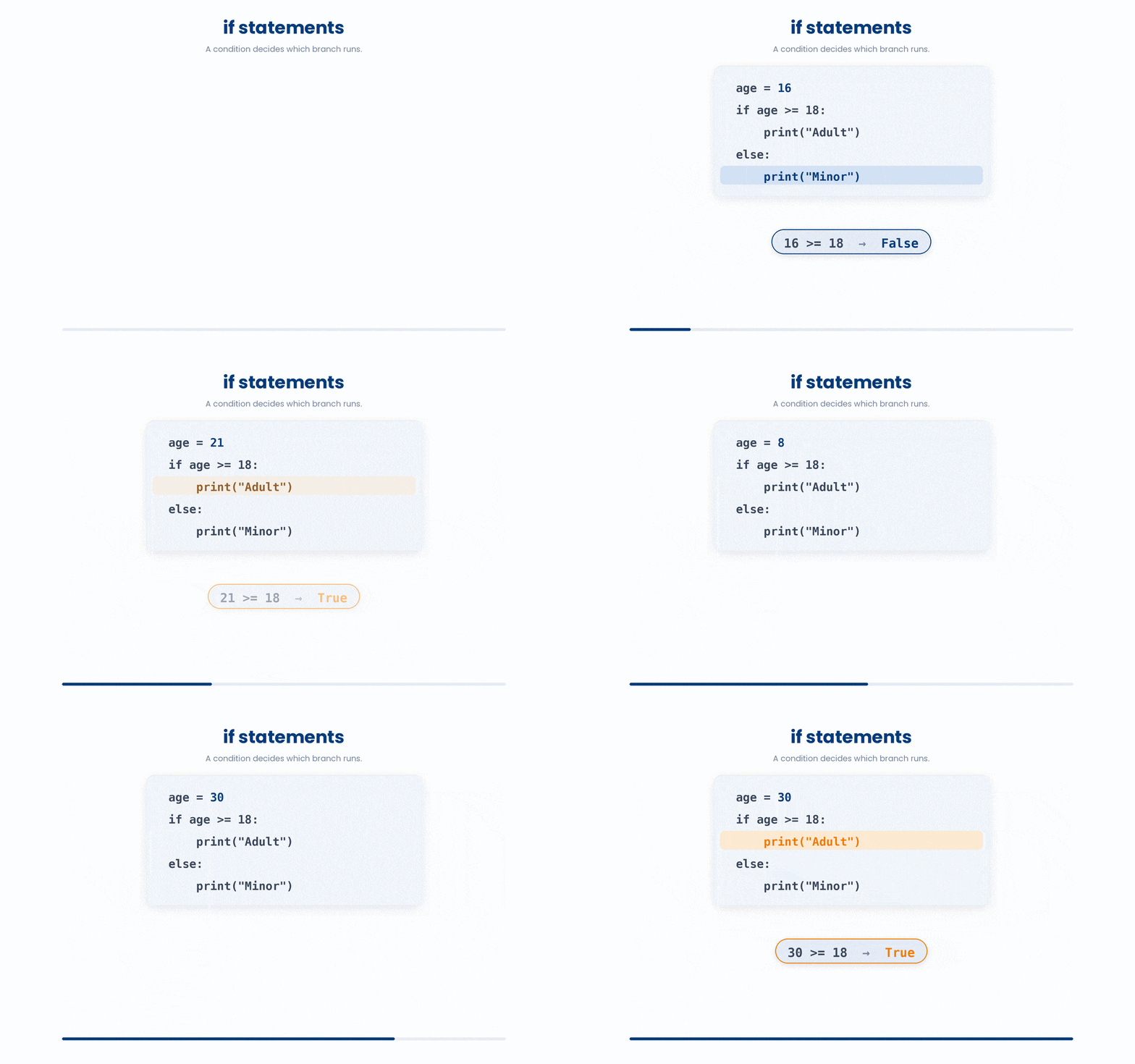
The block of code that runs when the condition is true is written on the next line, indented by four spaces. Indentation is not decoration — it is how Python knows which lines belong to the if. The block ends as soon as the indentation goes back to where it was.
An example is shown below.
systolic_bp = 152
if systolic_bp >= 140:
    print("Blood pressure is high")
    print("Flag for follow-up")
print("Screening complete")
The first two print statements in this snippet only trigger because the condition (systolic_bp >= 140) is met.
However, since the final print("Screening complete") isn't indented, it falls outside that rule and runs every time.
If you change systolic_bp to 118, you'll see the first two messages get skipped while the final one still prints.
There is a sequence on how you would arrange the codes. You can practice with the example below.
All the lines you need are in the Line bank on the left — some may be distractors you should leave behind. Drag the lines you need into the Your solution column on the right, in the correct order, then click Check.
Task: A patient's systolic reading is stored in systolic. Set status to "hypertensive" if it is 140 mmHg or above, otherwise to "normal", then print status.
else:if systolic = 140:status = "normal"systolic = 145if systolic >= 140:print(status)status = "hypertensive"status == "normal"if systolic => 140:
- Drop lines here, in order.
Now that you know the logic, let’s try to code and if statement.
Try this snippet in the Python Scratchpad on the right.
glucose_mmol = 7.4
if glucose_mmol >= 7.0:
    print("Above diabetes threshold")
    print("Order HbA1c test")
print("Reading logged")To compare two values, Python uses double-equals: ==. The other comparison operators are != (not equal), <, >, <=, and >=. Each one returns either True or False, which is exactly what an if statement needs.
Try the codes below and see what happens!
Try this snippet in the Python Scratchpad on the right.
glucose = 7.2  # = assigns: store the value
threshold = 7.0
print(glucose == 7.2)  # == compares: True
print(glucose > threshold)  # True
print(glucose != 5.0)  # True
if glucose >= threshold:
print("Above diabetic threshold")3.2 elif and else statements
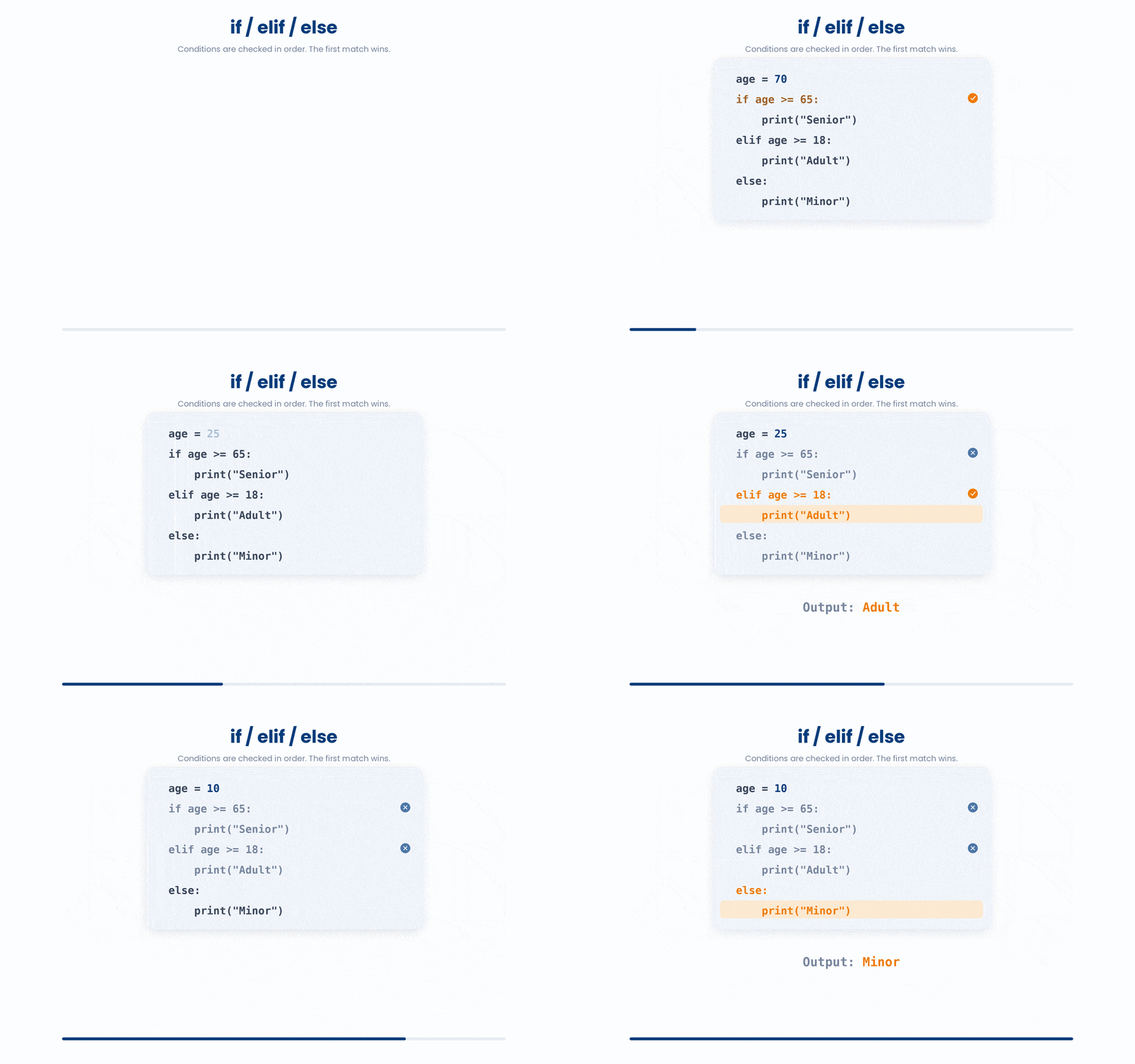
When you have more than two outcomes, add elif (short for "else if") for each extra branch and a final else for everything that did not match.
Python checks the conditions from top to bottom and runs the first one that is true — the rest are skipped, even if they would also be true.
The else block has no condition; it runs only when none of the earlier branches matched.
Let’s get use to the code sequence.
All the lines you need are in the Line bank on the left — some may be distractors you should leave behind. Drag the lines you need into the Your solution column on the right, in the correct order, then click Check.
Task: Classify a patient with systolic 138 and diastolic 88 mmHg as normal (<120 / <80), elevated (<130 / <80), stage 1 hypertension (<140 / <90), or stage 2 hypertension.
stage = "stage 2"if systolic < 120 and diastolic < 80:systolic = 138elif systolic = 130 and diastolic = 80:else:elif systolic < 130 and diastolic < 80:stage = "elevated"else if systolic < 140 and diastolic < 90:stage = "normal"diastolic = 88print(stage)elif systolic < 130 or diastolic < 80:stage = "stage 1"elif systolic < 140 and diastolic < 90:
- Drop lines here, in order.
Can you predict what is being printed out in the example below?
Read the code carefully and type what you think it will print. Click Submit prediction for AI tutor feedback comparing your prediction against the real output, then click Reveal actual output to run the snippet yourself and see what happens.
bmi = 22.4
if bmi < 18.5:
    print("underweight")
elif bmi < 25:
    print("normal")
elif bmi < 30:
    print("overweight")
else:
print("obese")You can build complex rules by combining conditions using and, or, and not:
and: True only if both conditions are met (e.g.,age > 65 and bmi > 30).or: True if at least one condition is met (e.g.,age < 18 or age > 90).not: Reverses the outcome, making it true only when the original statement is false (e.g.,not is_smoker).
Try this snippet in the Python Scratchpad on the right.
age = 81
bmi = 34.2
is_smoker = False

if (age > 65) and (bmi > 30):
    print("high-risk: senior with obesity")
if (age < 18) or (age > 90):
    print("age outside study range")
if not is_smoker:
print("non-smoker cohort")You have now met elif chains and the word or. Put them together and you can often shorten a chain: when two branches end in the exact same outcome and only their condition differs, one combined condition replaces both.
(a) Two branches doing the same thing:
clinic = "east"
if clinic == "east":
    print("Route to Building A")
elif clinic == "west":
    print("Route to Building A")
elif clinic == "north":
    print("Route to Building B")
else:
    print("Unknown clinic")
(b) Combined with or:
clinic = "east"
if clinic == "east" or clinic == "west":
    print("Route to Building A")
elif clinic == "north":
    print("Route to Building B")
else:
    print("Unknown clinic")
Both versions yield the same result, but the second approach is better for two reasons:
- Readability: Consolidating conditions with an
orstatement groups everything that routes to "Building A" in one place, rather than splitting it across multiple branches. - Maintainability: You should only collapse branches if they execute the exact same logic. If they ever need to behave differently, leave them separated.
4 For loops
If you have a list of fifty patient ages and you want to know how many are over 65, you do not write fifty if statements.
You write one if statement inside a loop that walks the list for you. That is what a for loop is for: it takes a collection, picks each item in turn, and runs the indented block once per item.
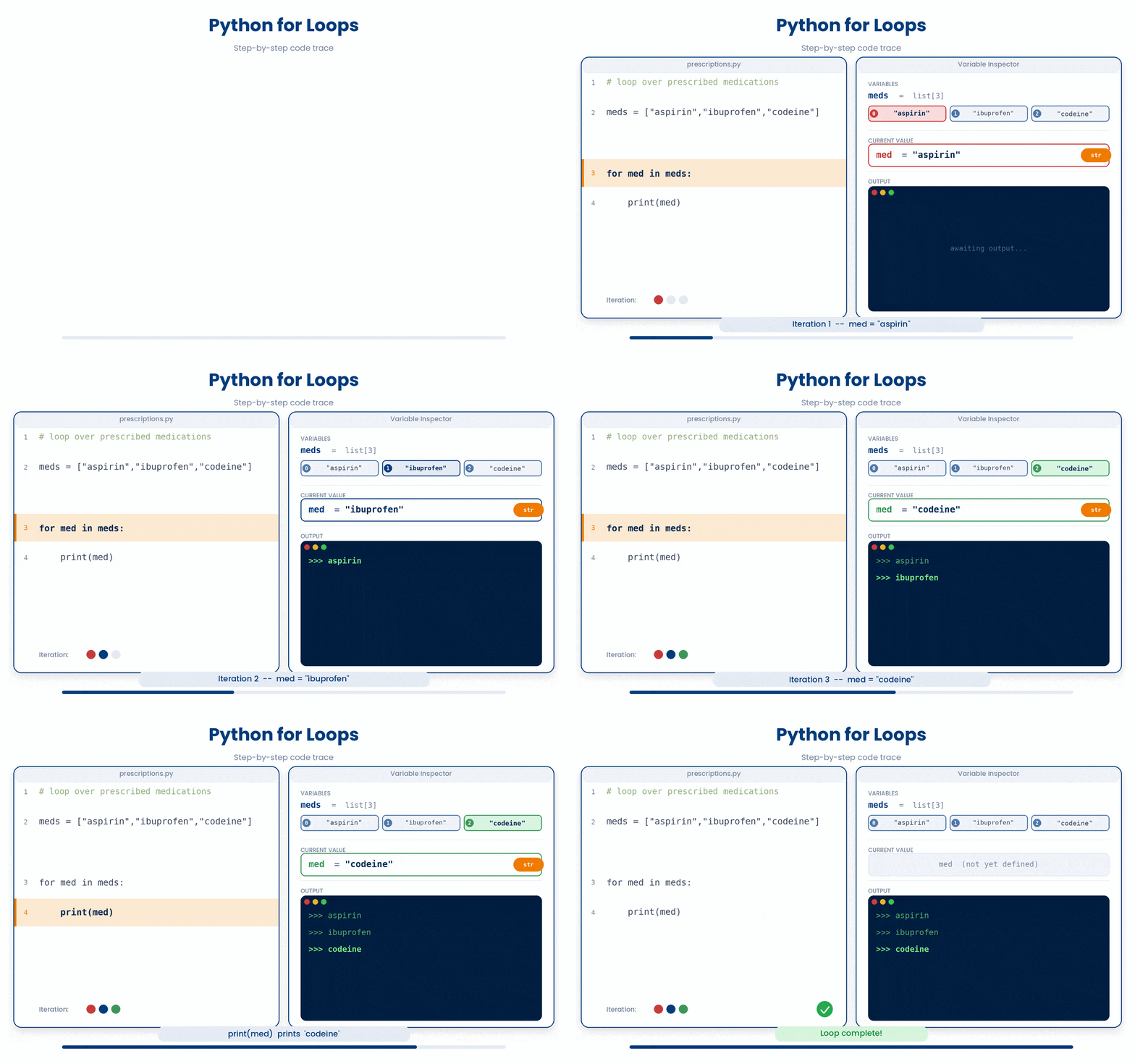
An example code for a for loop is as below.
patient_glucose_readings = [95, 110, 130, 145, 102]
for reading in patient_glucose_readings:
    print(reading)
Now is your turn to practice with for loops.
Try this snippet in the Python Scratchpad on the right.
ages = [45, 78, 62, 59, 70]
seniors = 0
for age in ages:
    if age > 65:
        seniors = seniors + 1
print(seniors)Use the range() function to loop a specific number of times or to generate a direct number sequence. Remember that the stop value is excluded, similar to list slicing:
- Stop only:
range(5) yields 0 through 4. - Start and Stop:
range(3, 9)yields 3 through 8. - Start, Stop, and Step:
range(0, 10, 2)yields 0, 2, 4, 6, 8.
Let’s see if you can get the syntax right.
All the lines you need are in the Line bank on the left — some may be distractors you should leave behind. Drag the lines you need into the Your solution column on the right, in the correct order, then click Check.
Task: A 12-week clinical trial has assessments every 2 weeks starting at week 0. Print each visit week and the total number of visits.
print(f"Total visits: {visit_count}")for week in (0, trial_weeks, 2):trial_weeks = 12visit_count = 0visit_count = visit_count + 1for week in range(trial_weeks):for week in range(0, trial_weeks):for week in range(0, trial_weeks, 2):print(f"Assessment at week {week}")
- Drop lines here, in order.
Now, let’s try out the code.
Try this snippet in the Python Scratchpad on the right.
for day in range(5):
    print(f"Day {day}")
for hour in range(0, 24, 4):
print(f"Take dose at hour {hour}")The loop still runs exactly three times, just as range(3) says — only the counter's name changed. Reach for _ whenever you catch yourself writing a loop variable you never read; it tells the next reader the counter is not used, before they go looking for it.
One habit worth forming early. If you find yourself writing codes such as “for i in range(len(ages)):”, you can write the code as “for age in ages:” instead.
(a) Without the habit – using range(len(…)):
ages = [54, 67, 42, 71, 38]
for i in range(len(ages)):
    print(ages[i])
(b) With the habit – looping directly over the list:
ages = [54, 67, 42, 71, 38]
for age in ages:
    print(age)
Both produce the same output, but the second version reads like a sentence.
5 While loops
A for loop is the right tool when you know in advance what you are looping over — a list of patients, a range of numbers.
A while loop is the right tool when you do not know what you are looping over. In each case, the loop runs as long as some condition stays true; you have no idea ahead of time how many times that will be.
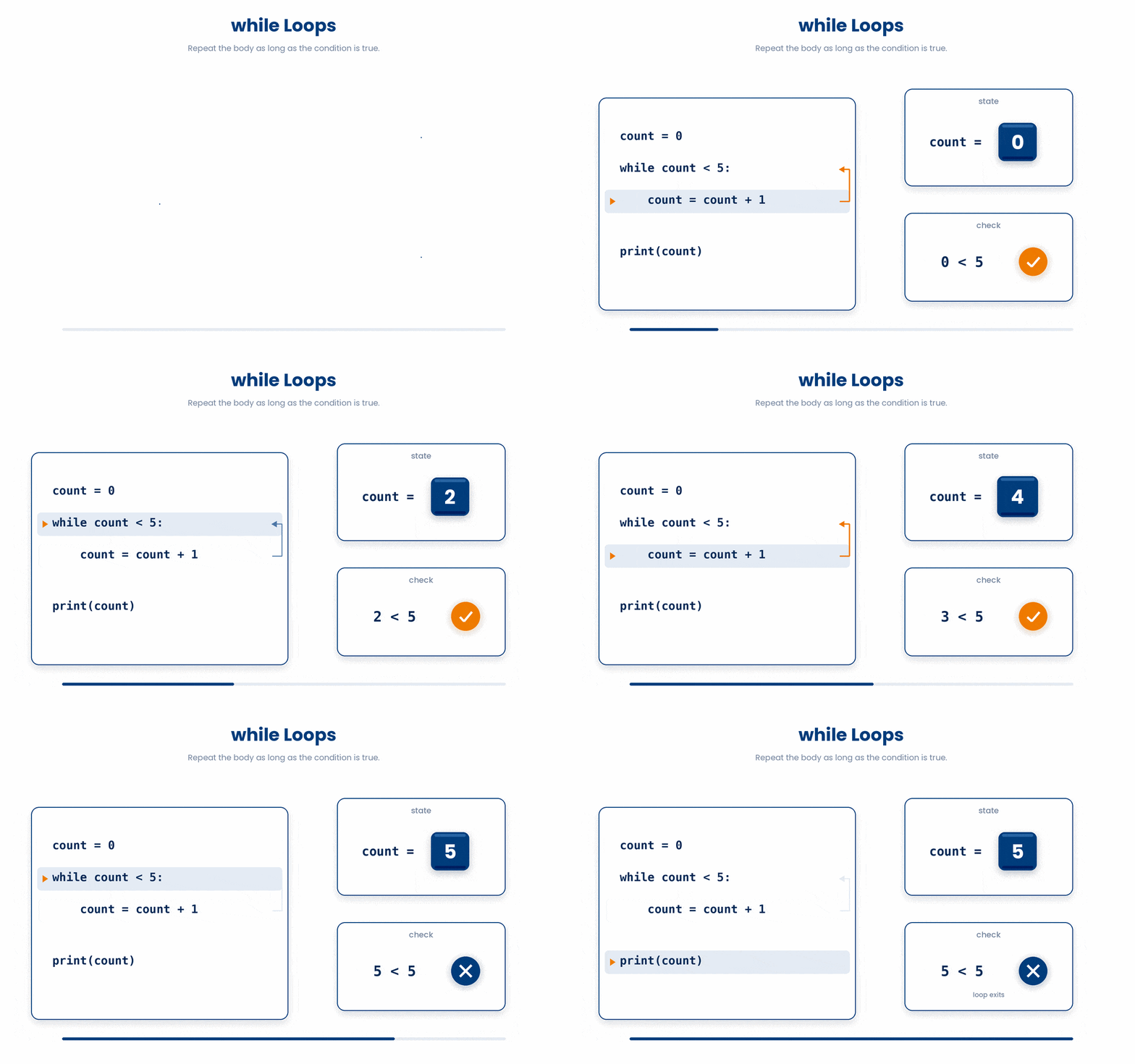
Here is an example code.
glucose = 205
insulin_units = 0
while glucose > 140:
    insulin_units = insulin_units + 1
    glucose = glucose - 15
print(f"Administered {insulin_units} units
glucose now {glucose}")
The code above can be read as: keep adding one unit of insulin (each drops glucose by ~15 mg/dL) until glucose falls to 140 mg/dL or below.
Basically, it says keep adding one unit of insulin until the patient's glucose drops to 140 or below, then print how many units it took and the final glucose.
Your turn to try!
Try this snippet in the Python Scratchpad on the right.
dose = 50
marker = 120
while marker > 90:
    dose = dose + 5
    marker = marker - 12
print(dose)
print(marker)The single most important rule of while loops: something inside the block must change the value the condition depends on. If you forget that line, the condition is true forever and the loop never stops. That is an infinite loop, and it is the classic while-loop bug.
(a) Wrong — the infinite-loop trap:
glucose = 205
while glucose > 140:
    print("Giving insulin...")
In the code above, glucose starts at 205 and the condition glucose > 140 is true, so the block runs. But nothing inside the block ever changes glucose, so the condition stays true forever. The loop prints "Giving insulin..." again and again with no way to stop — you would have to kill the program manually.
(b) Right — the loop terminates:
glucose = 205
while glucose > 140:
    print("Giving insulin...")
    glucose = glucose - 15
The only difference is the last line: each pass through the loop now lowers glucose by 15. After enough passes the value drops to 140 or below, the condition becomes false, and the loop exits.
The takeaway: when you write a while loop, look at the condition (glucose > 140 here), find the variable it depends on (glucose), and check that something inside the block changes it. If you cannot point to that line, you have an infinite loop.
If you ever start an infinite loop in the Scratchpad, you can stop it by reloading the page. In a terminal, Ctrl+C kills it.
Try it · Loop tracer
Run a loop one line at a time
Guess what the code prints, then press Step to run one line at a time and watch the variables change.
Before you step: what will this code print?
Variables
Printed so far
6 Check your understanding
You have reached the end of the module. Try the same questions again — your answers here, paired with your pre-test answers, are how we measure what the module taught you. Answer every question and confidence rating, then click Submit and see results to view your score.
Which operator do you use to test whether x holds the value 5?
What tells Python which lines belong to an if block?
bmi = 27.3, checked in order: if bmi < 18.5 prints "underweight", elif bmi < 25 prints "normal", elif bmi < 30 prints "overweight", else prints "obese". What prints?
age = 72 and bmi = 31.4. What is the result of (age > 65) and (bmi > 30)?
What does range(2, 8) produce when used in a for loop?
ages = [54, 67, 71, 49, 82], then seniors = 0 and for age in ages: if age > 65: seniors = seniors + 1. What is the final value of seniors?
A while loop runs while count < 5: but never updates count inside the body. What happens?
glucose = 180, then while glucose > 140: glucose = glucose - 15. What is glucose when the loop ends?
I can write an if/elif/else chain that picks between three or more outcomes based on a numeric value.
I can write a for loop that walks a list, applies an if-test to each item, and counts how many items pass.
I can write a while loop that runs until a condition becomes false, and explain how to avoid an infinite loop.
7 Your results
Here is how your post-test answers compare with your pre-test answers. The pre/post pairing is the most reliable way to see what this module actually taught you.
Submit the post-test to see your results.
What is the one thing from this module that is still unclear to you?