

1 Before you start
This is not graded, and it does not count towards anything. Answer every question even if you are only guessing — having a go at something before you have been taught it is one of the best ways to remember it afterwards. The lesson ends with another short check, and there you will be shown the correct answer for anything you missed. Choose an option for every question and confidence rating, then click Submit answers.
You run ages = [3, 1, 2]; result = ages.sort(); print(result). What is printed?
You run nums = [3, 1, 2]; new = sorted(nums); print(nums). What is printed?
You run scores = [80, 90]; scores.append([70, 60]); print(len(scores)). What is printed?
For vitals = {"hr": 78}, what does vitals.get("spo2", 98) return?
After patient = {"age": 54}; patient.update({"age": 55, "site": "NUH"}), what is patient["age"]?
You run tags = {"S1", "S2"}; tags.add("S1"); print(len(tags)). What is printed?
You run allergies = {"latex"}; allergies.discard("peanuts"); print(allergies). What happens?
You run a = [1, 2, 3]; b = a; b.append(4); print(a). What is printed?
I can choose between .sort() and sorted() depending on whether I want to change the list in place or get a new list back.
I can predict whether a built-in method modifies the original container in place or returns a new value.
I can explain why writing b = a does not make a copy of a list, and how to make a real, independent copy.
2 Introduction
So far, you have met the four built-in containers — lists, tuples, dictionaries, and sets — and learned how to read values out of them. Now, we will learn how to change what is inside these containers.
Each container comes with its own set of built-in tools, called methods. A method is a function that belongs to a value. With an ordinary function such as print(), you put the value inside the round brackets, as in print(patient_ids). With a method, you write the value’s name first, then a dot, then the method’s name and its round brackets, as in patient_ids.append("P004"). You have already used one method in Part I: .get() on a dictionary.
As before, try every snippet in the Python Scratchpad on the right. By the end of this part you will know the everyday methods for each container and avoid the one trap that catches every beginner: mistaking a method that changes a container in place for one that returns a new value.
3 List methods
Lists are mutable, which means you can change them in place.
We can broadly separate these methods into three categories:
(a) Adding items to list
.append(x)— addxto the end of the list..extend(other)— add every item of another list to the end..insert(i, x)— putxat positioni, shifting later items right.
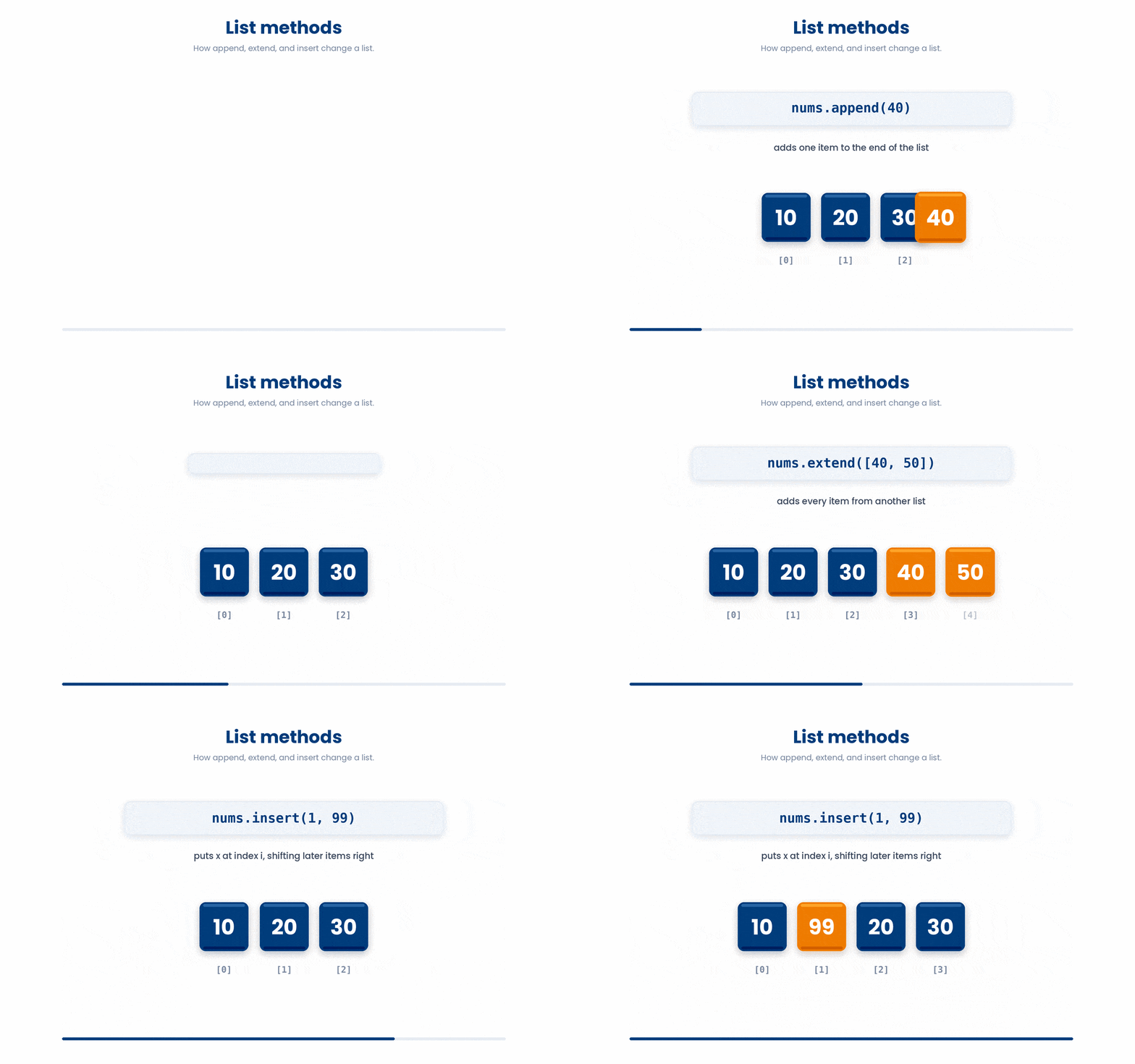
- Try with the example below.
Try this snippet in the Python Scratchpad on the right.
patient_ids = ["P001", "P002", "P003"]
patient_ids.append("P004")
patient_ids.extend(["P005", "P006"])
patient_ids.insert(0, "P000")
print(patient_ids)(b) Removing items from list
.remove(x)— remove the first occurrence ofx. RaisesValueErrorifxis not present..pop()— remove and return the last item;.pop(i)does the same at positioni..clear()— remove every item, leaving the list empty ([]).
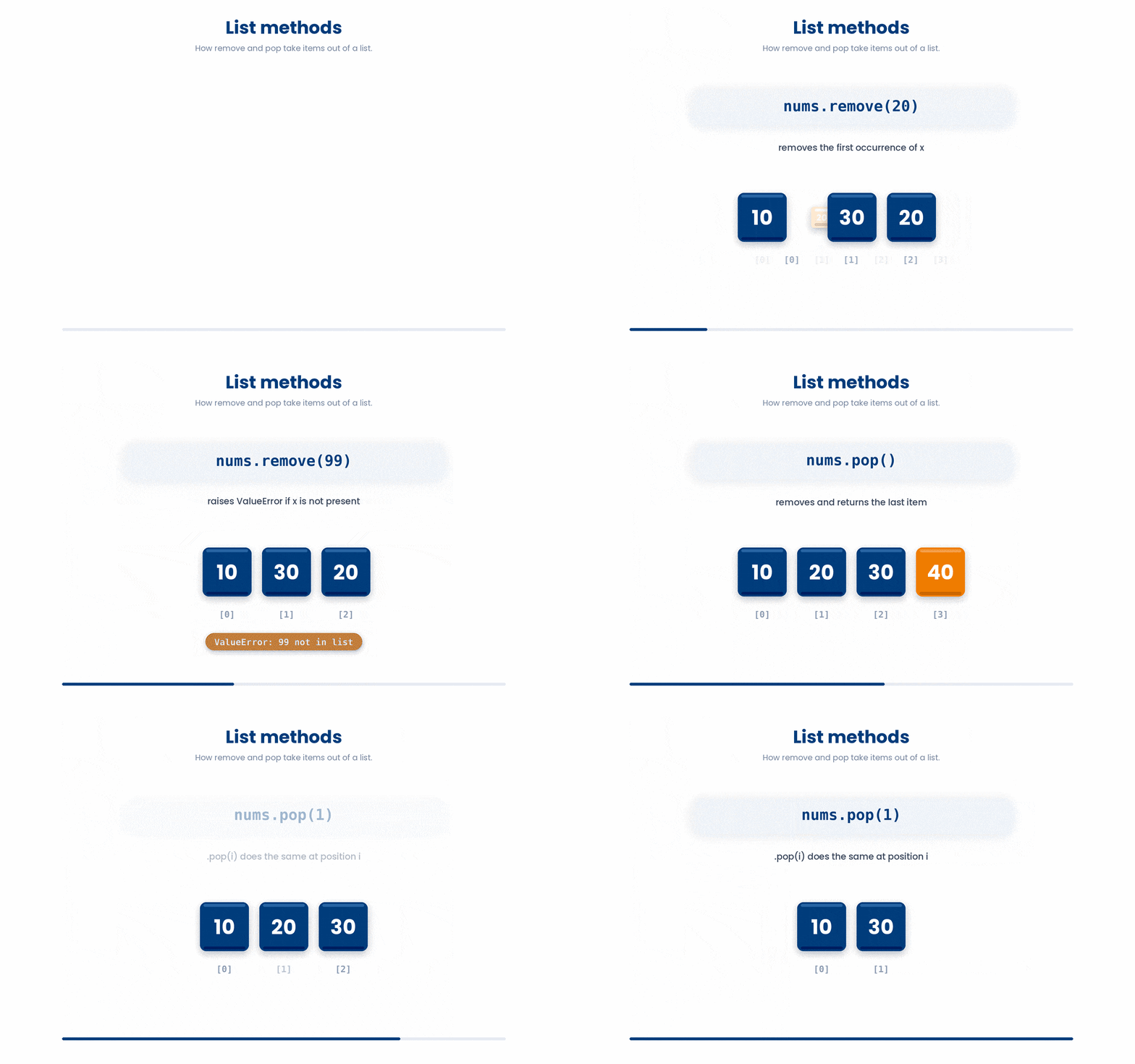
- Try with the example below.
Try this snippet in the Python Scratchpad on the right.
medications = ["aspirin", "metformin", "lisinopril", "ibuprofen"]
medications.remove("ibuprofen")
last = medications.pop()
first = medications.pop(0)
print(medications, last, first)- Try it with the example below.
Try this snippet in the Python Scratchpad on the right.
vaccine_doses = ["dose_1", "dose_2", "dose_3"]
vaccine_doses.clear()
print(vaccine_doses)- (c) Reordering items in list
.sort()— sort the list in place. ReturnsNone..reverse()— reverse the list in place. ReturnsNone.sorted(lst)— a built-in function (not a method) that returns a NEW sorted list and leaves the original alone.
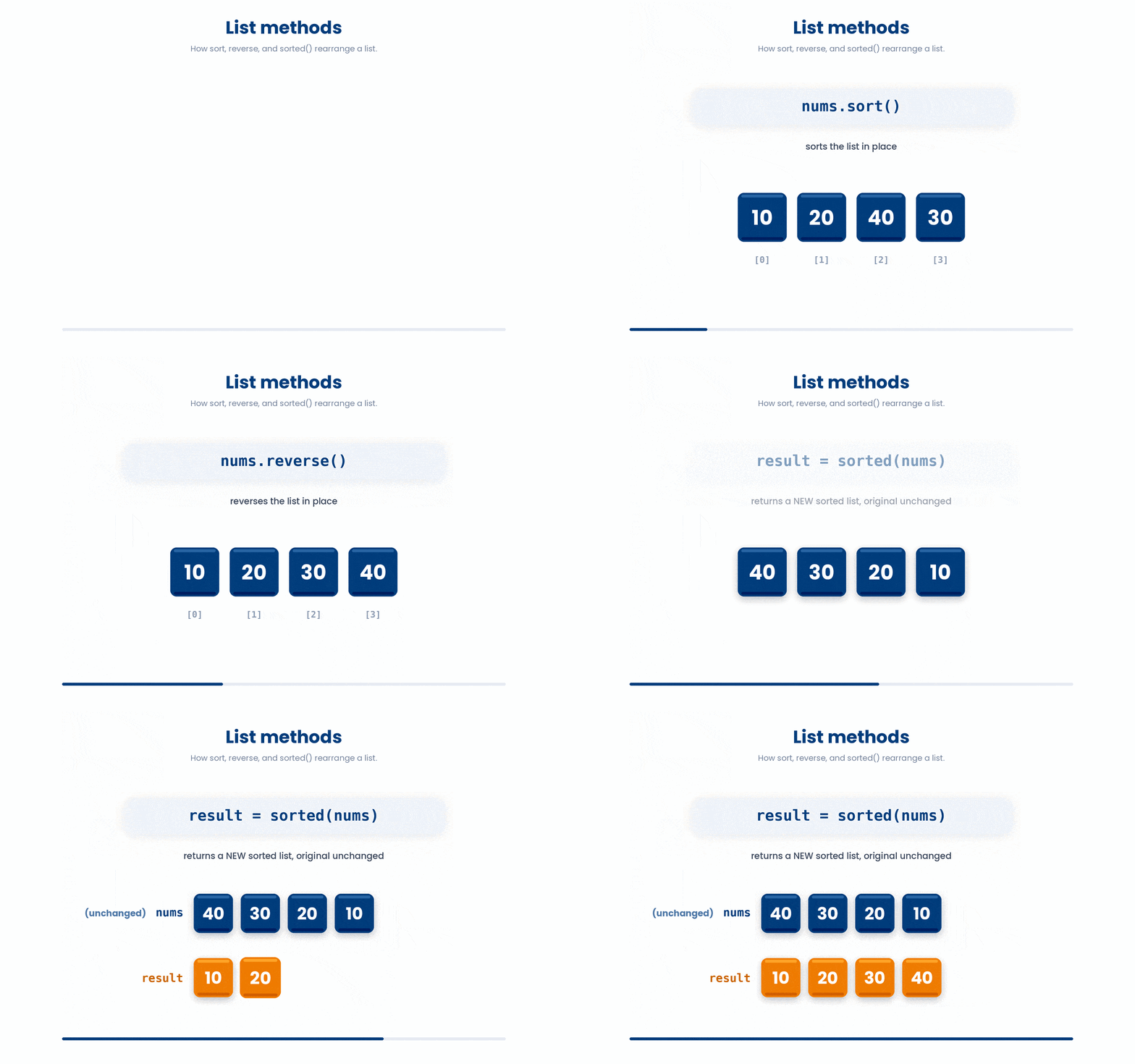
- Try with the example below.
Try this snippet in the Python Scratchpad on the right.
systolic_bp = [142, 118, 135, 128, 150]
ascending_copy = sorted(systolic_bp)
systolic_bp.sort()
systolic_bp.reverse()
print(ascending_copy)
print(systolic_bp)One trap that catches every beginner: .sort() returns None, not the sorted list. It changes the list in place. If you write sorted_ages = ages.sort() you will end up with sorted_ages equal to None and a sorted ages — not what you wanted. To get the new list out as a value, use the built-in sorted() function instead.
4 Dictionary methods
Dictionaries are mutable too. The methods you will use most often:
(a) Looking up keys or values in dictionary
.keys(),.values(),.items()— three views you loop over..get(key, default)— safe lookup, returnsdefault(orNone) if the key is missing.
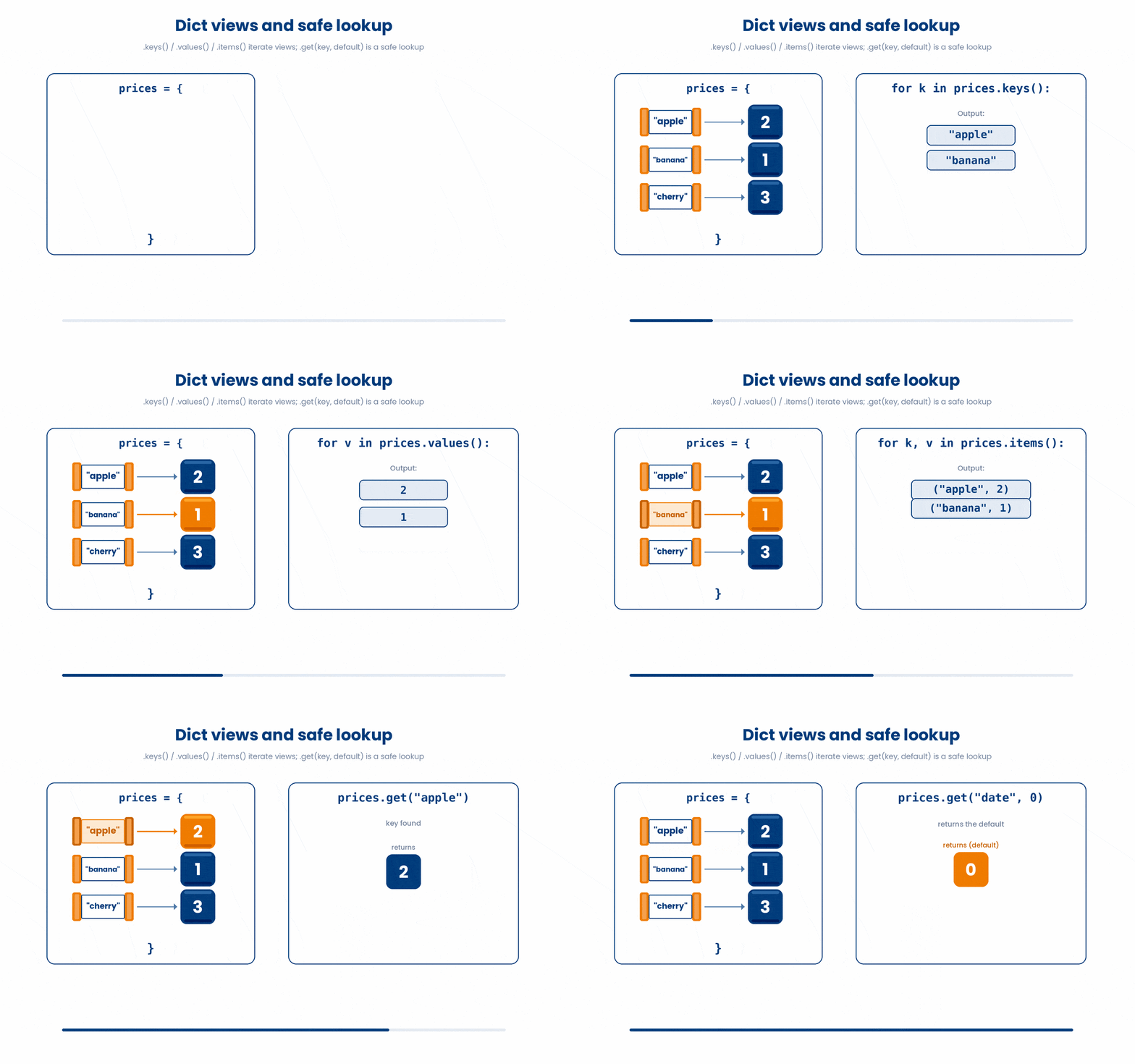
(b) Modifying/Mutating dictionary
.pop(key)— remove and return the value atkey.del d[key]— also removes the key-value pair, but does not return anything. Use.pop(key)when you need the removed value; usedelwhen you only want it gone.
Try this snippet in the Python Scratchpad on the right.
patient = {"id": "P001", "age": 54, "site": "NUH"}
del patient["site"]
print(patient).update(other)— merge another dictionary in, overwriting any keys that already exist.d[k] = v— ordinary assignment adds a new key or replaces an existing one.
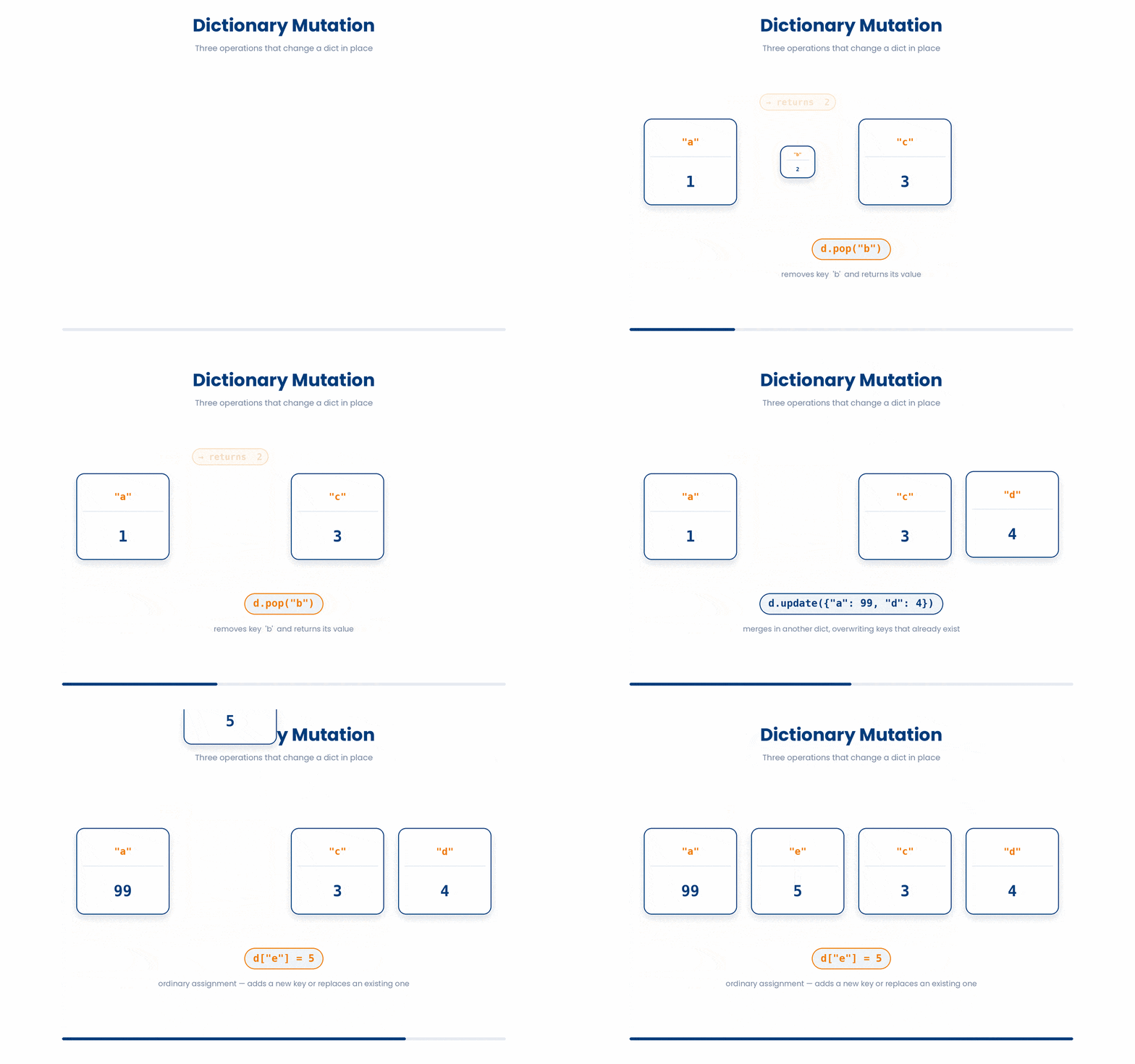
Let's try the sample code below.
Try this snippet in the Python Scratchpad on the right.
vitals = {"hr": 78, "sbp": 120, "temp": 36.8}
print(list(vitals.keys()), list(vitals.values()))
spo2 = vitals.get("spo2", 98)
vitals.update({"spo2": 97, "hr": 82})
vitals["rr"] = 16
removed_temp = vitals.pop("temp")
print(vitals, spo2, removed_temp)5 Set methods
Sets are mutable but, by design, do not have positions, so the methods are about adding and removing values:
.add(x)— add a single value. Adding a value already in the set does nothing..discard(x)— removexif it is present; do nothing if it is not..remove(x)— removexif it is present; raiseKeyErrorif it is not..update(other)— add every value from another iterable.
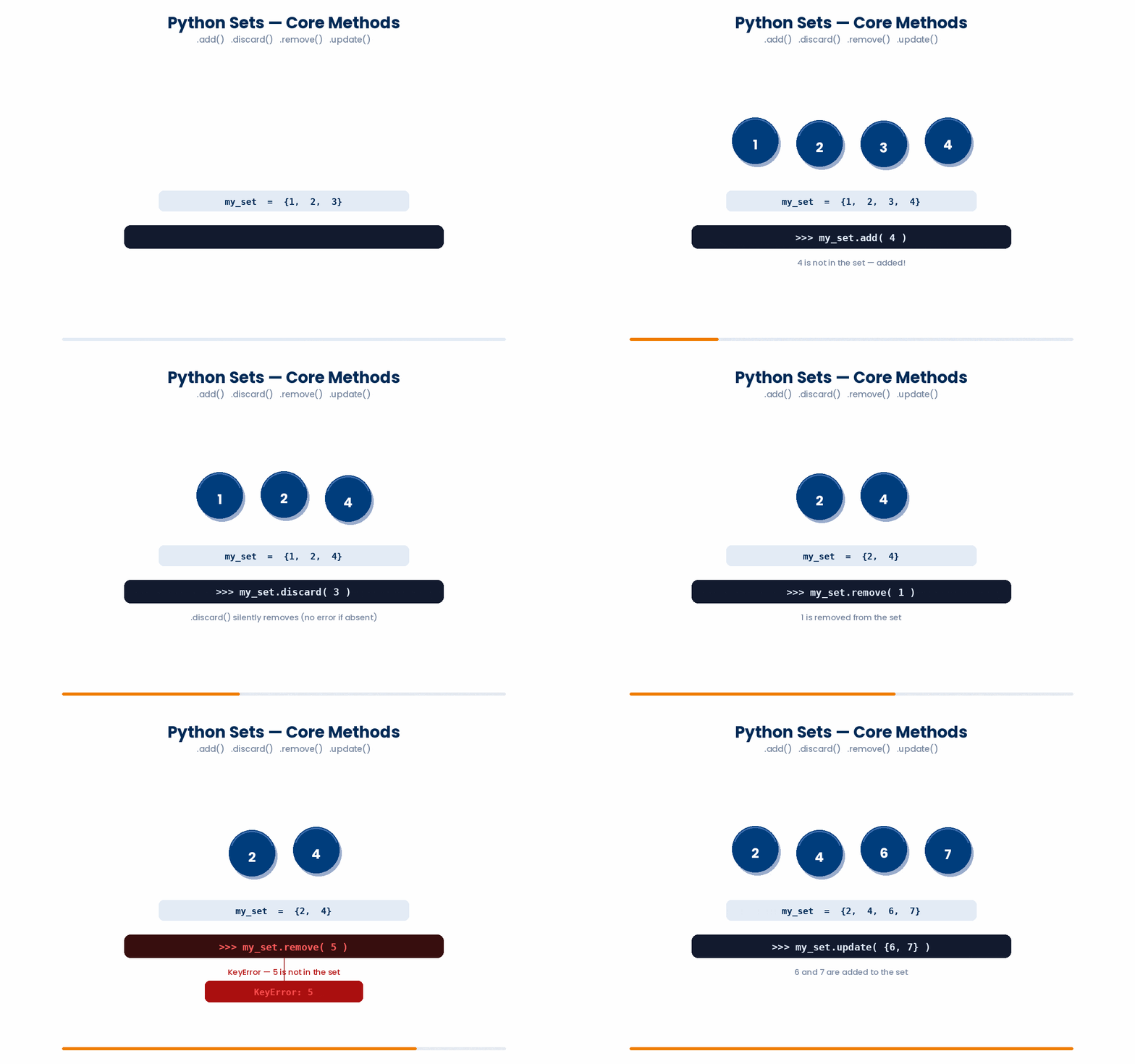
- Try out these codes!
Try this snippet in the Python Scratchpad on the right.
allergies = {"penicillin", "latex"}
allergies.add("sulfa")
allergies.add("penicillin")
allergies.discard("peanuts")
allergies.remove("latex")
allergies.update(["aspirin", "iodine"])
print(allergies)6 Tuple methods
Tuples have no methods that change them, because they cannot change. If you need to update a tuple, the answer is to make a new one. The two methods worth remembering are:
.count(x)— how many timesxappears.index(x)— the position of the first occurrence
Let’s try it out!
Try this snippet in the Python Scratchpad on the right.
diagnoses = ("hypertension", "diabetes", "hypertension", "asthma", "hypertension")
n_hypertension = diagnoses.count("hypertension")
first_diabetes = diagnoses.index("diabetes")
print(n_hypertension, first_diabetes)Try it · Method sorter
Does it change the variable, give something back, or both?
Some methods change the value they belong to. Others leave it alone and hand you a result. Tap an answer for each line.
7 Copy versus aliasing
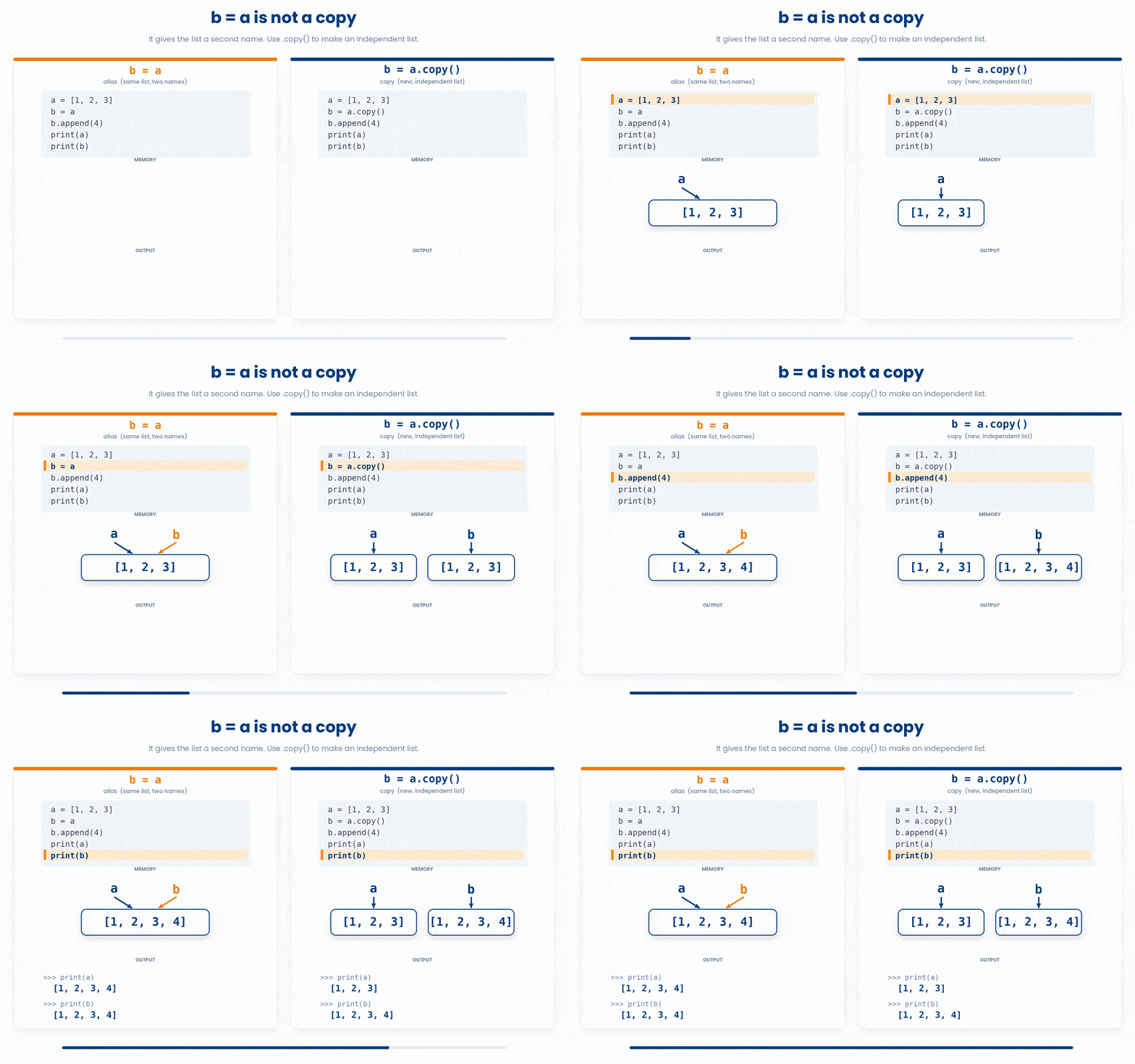
One last thing to watch out for. When you write b = a where a is a list, b is not a copy of the list — it is another name for the same list. This is called aliasing. Changing b changes a too, because they point to the same object in memory.
If you want an actual independent copy, write b = a.copy() or b = list(a). The same is true for dictionaries and sets, with d.copy() and set(s) doing the equivalent job.
8 Check your understanding
You have reached the end of the module. Try the same questions again — your answers here, paired with your pre-test answers, are how we measure what the module taught you. Answer every question and confidence rating, then click Submit and see results to view your score.
You run ages = [3, 1, 2]; result = ages.sort(); print(result). What is printed?
You run nums = [3, 1, 2]; new = sorted(nums); print(nums). What is printed?
You run scores = [80, 90]; scores.append([70, 60]); print(len(scores)). What is printed?
For vitals = {"hr": 78}, what does vitals.get("spo2", 98) return?
After patient = {"age": 54}; patient.update({"age": 55, "site": "NUH"}), what is patient["age"]?
You run tags = {"S1", "S2"}; tags.add("S1"); print(len(tags)). What is printed?
You run allergies = {"latex"}; allergies.discard("peanuts"); print(allergies). What happens?
You run a = [1, 2, 3]; b = a; b.append(4); print(a). What is printed?
I can choose between .sort() and sorted() depending on whether I want to change the list in place or get a new list back.
I can predict whether a built-in method modifies the original container in place or returns a new value.
I can explain why writing b = a does not make a copy of a list, and how to make a real, independent copy.
9 Your results
Here is how your post-test answers compare with your pre-test answers. The pre/post pairing is the most reliable way to see what this module actually taught you.
Submit the post-test to see your results.
What is the one thing from this module that is still unclear to you?