

1 Before you start
This is not graded, and it does not count towards anything. Answer every question even if you are only guessing — having a go at something before you have been taught it is one of the best ways to remember it afterwards. The lesson ends with another short check, and there you will be shown the correct answer for anything you missed. Choose an option for every question and confidence rating, then click Submit answers.
Given ages = [54, 67, 71, 49], what does ages[-1] return?
Given genes = ["APOE", "TREM2", "BIN1", "MAPT"], what does genes[1:3] return?
coords = (4, 9) is a tuple. What happens when you run coords[0] = 5?
A patient dictionary is patient = {"id": "P001", "age": 54}. Which line safely returns None instead of raising KeyError when "middle_name" is missing?
In the loop for k, v in patient.items():, what do k and v hold on each pass?
You write samples = {"S1", "S1", "S2"}. What does len(samples) return?
With a = {"P1", "P2", "P3"} and b = {"P2", "P3", "P4"}, what does a - b return?
You need a collection of unique patient IDs with no duplicates and no guaranteed order. Which container fits best?
I can explain to a peer when to use a list, a tuple, a dictionary, or a set.
I can write a loop that walks a dictionary and uses both the key and the value on each iteration.
I can use .get() to read a value from a dictionary safely without raising KeyError.
2 Introduction
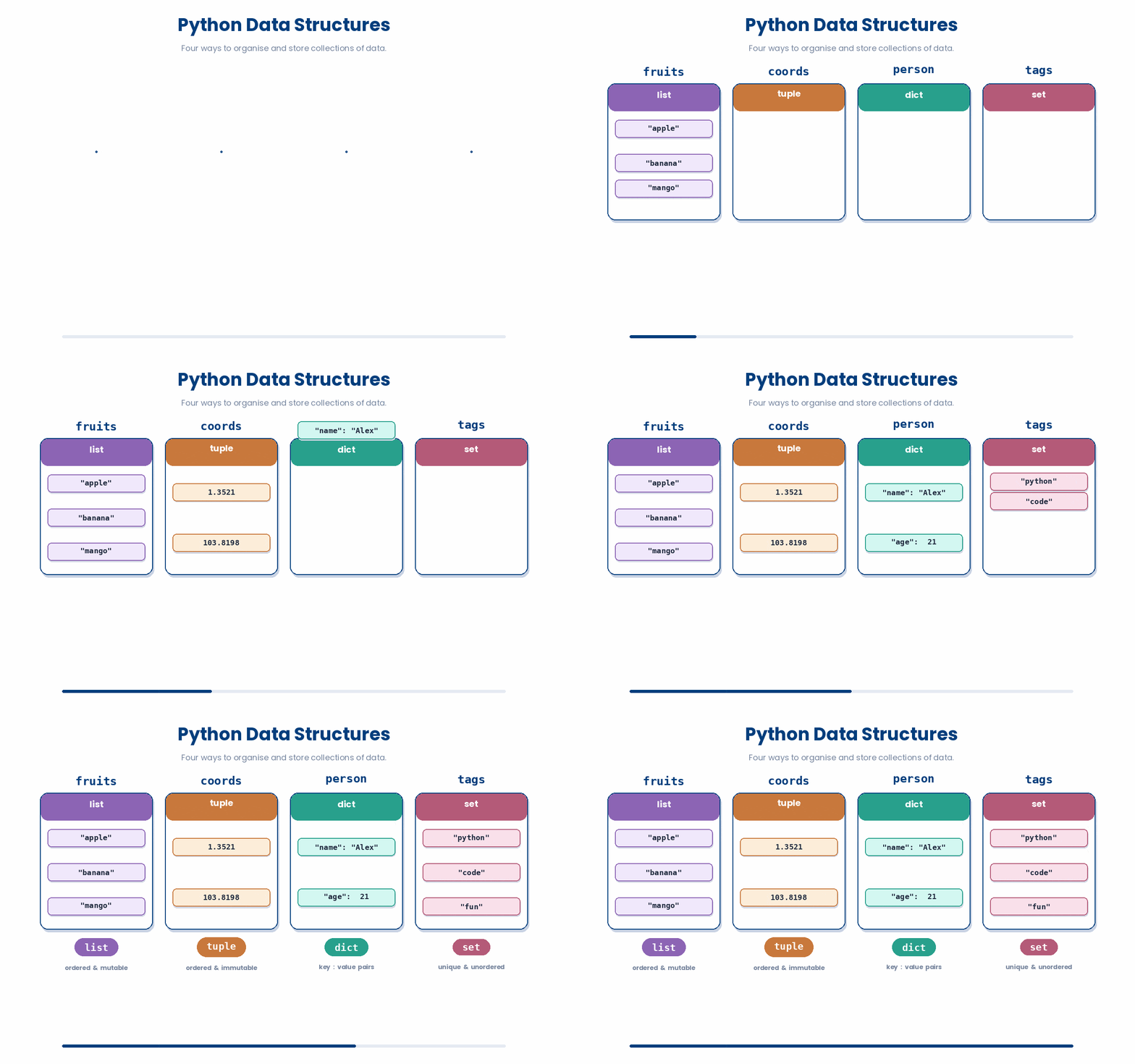
Once you can store a single value in a variable, the next question is how to store many values together. This module covers the four built-in containers Python gives you for collecting data:
- Lists — ordered, changeable collections, like a column of patient ages.
- Tuples — ordered collections that cannot change after they are made, like a fixed (row, column) coordinate.
- Dictionaries — labelled collections that look things up by name, like a patient record where you ask for the age or the diagnosis directly.
- Sets — unordered collections of unique values, useful for finding what is in one group but not another.
Try every snippet in the Python Scratchpad on the right. By the end of the module you will pick the right container for the job, read a line of code that uses any of the four, and know the handful of methods you use to change them in Part II.
3 Lists
When you have a handful of values that belong together — the four ages of the patients in your cohort, the ten SNPs your colleague flagged, the rows of a small table — you reach for a list.
A list is a sequence of values inside square brackets, separated by commas.
For example, ages = [54, 67, 71, 49] stores four whole numbers under the name ages, and genes = ["APOE", "TREM2", "BIN1"] stores three text values under the name genes.
Here are some examples of how to build a list in Python.
Try this snippet in the Python Scratchpad on the right.
ages = [54, 67, 71, 49]
genes = ["APOE", "TREM2", "BIN1"]
print(ages)
print(genes)3.1 Lists and Indexes
Lists keep the order you put things in. The first item is at position 0 (not 1), the second is at position 1, and so on. Negative positions count from the end: -1 is the last item, -2 is the second-to-last. This is called indexing.

Here is an example of you can do indexing with a list in Python. Try it out.
Try this snippet in the Python Scratchpad on the right.
meds = ["aspirin", "insulin", "warfarin"]
print(meds[0])
print(meds[-1])
print(meds[-2])Here’s another for practice.
Try this snippet in the Python Scratchpad on the right.
temps_celsius = [37.2, 38.1, 38.9, 38.4, 37.6]
print(temps_celsius[0])
print(temps_celsius[2])
print(temps_celsius[-1])
print(temps_celsius[-2])Lists can hold any mix of types — numbers, text, even other lists — but in practice you almost always keep one list to one type. A list of patient ages should be all ints; a list of gene names should be all strings. Mixing types is allowed, just rarely a good idea.
3.2 Slicing a list
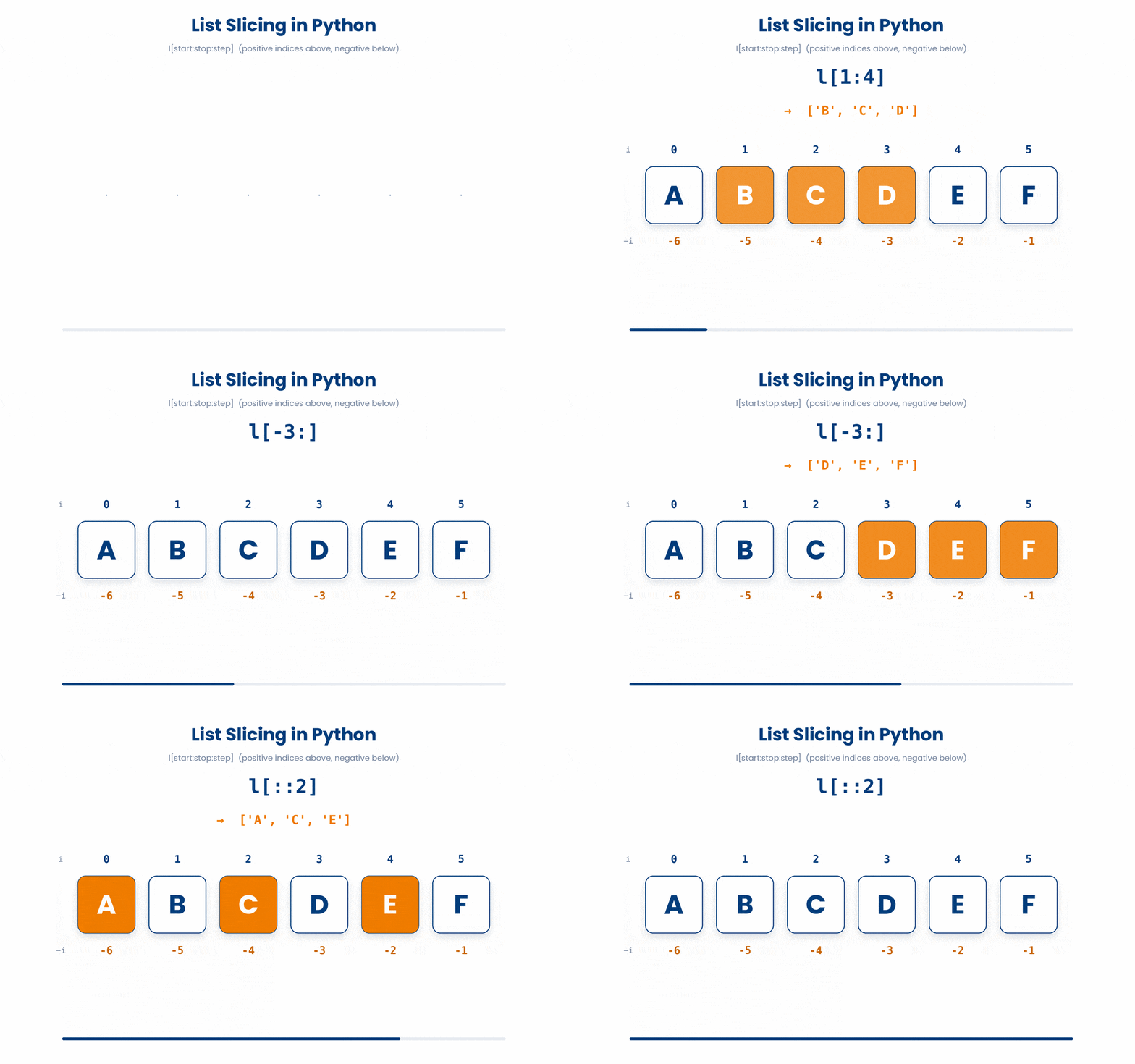
When you want a piece of a list rather than a single item, use a slice. The syntax is two positions separated by a colon — the start position (included) and the stop position (excluded). Leaving a side blank means "go all the way to that end".
Can you predict what the code below should produce?
Read the code carefully and type what you think it will print. Click Submit prediction for AI tutor feedback comparing your prediction against the real output, then click Reveal actual output to run the snippet yourself and see what happens.
snps = ["rs1", "rs2", "rs3", "rs4", "rs5"]
print(snps[1:3])
print(snps[:2])
print(snps[-2:])
Your turn. Try practicing slicing a Python list below.
Try this snippet in the Python Scratchpad on the right.
antibiotics = ["amoxicillin", "doxycycline", "ciprofloxacin", "ceftriaxone", "vancomycin", "meropenem"]
print(antibiotics[:2])
print(antibiotics[-2:])
print(antibiotics[2:5])
print(antibiotics[::2])Try it · Slice explorer
Which items does a slice pick?
Type a position like 2 or a slice like 1:4, then press Show. The numbers above each box count from the front; the numbers below count from the back.
weeks = ["wk0", "wk4", "wk8", "wk12", "wk16", "wk24"]
Can you make these?
3.3 Looping over a list
Looping over a list is the bread and butter of data work.
Looping over a list means going through each item in the list one by one and doing something with it.
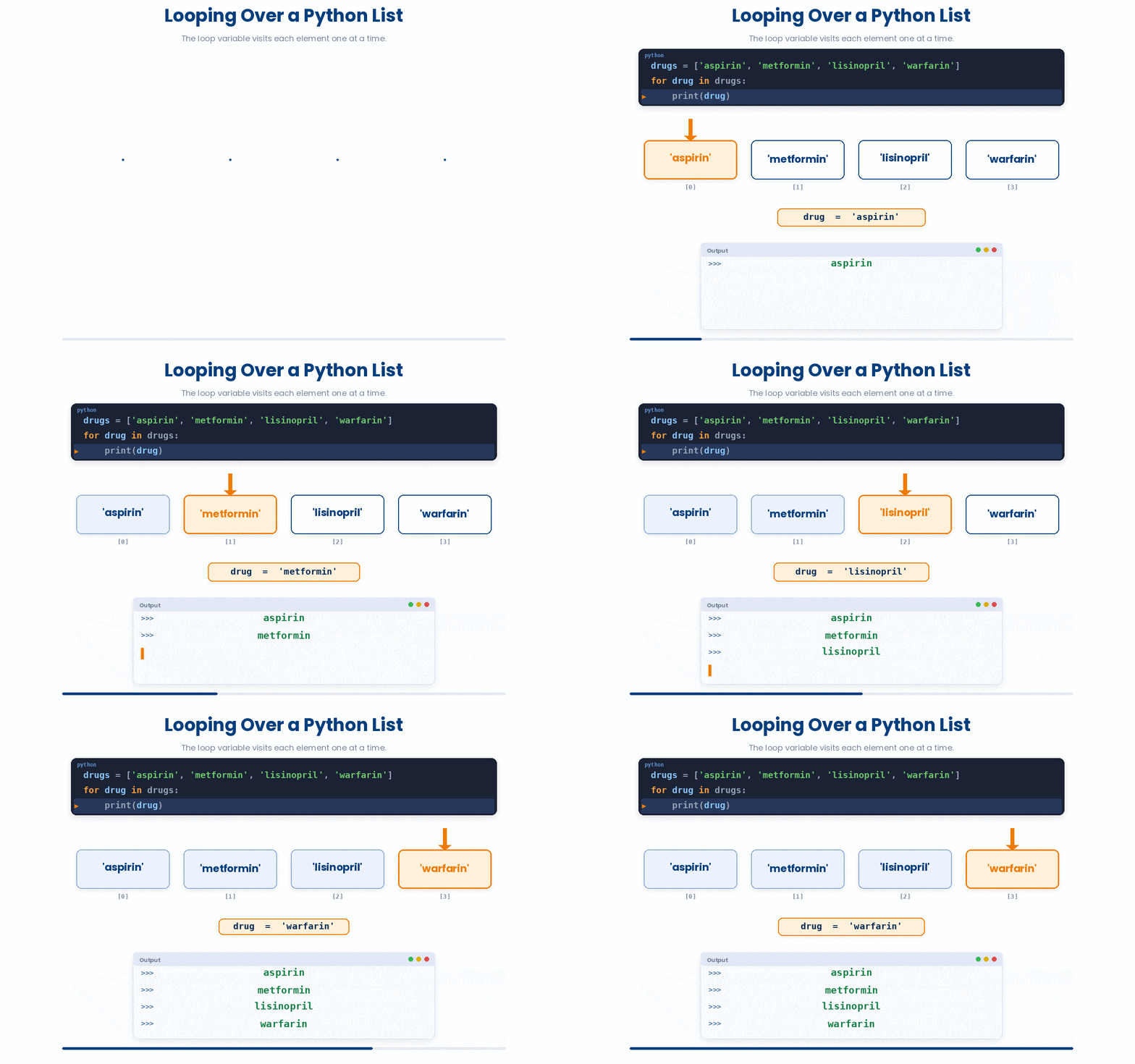
Here is how you can set up a loop on a list.
sbp_readings = [118, 142, 130, 155, 122]
for sbp in sbp_readings:
    if sbp >= 140:
        print(f"{sbp} mmHg: hypertensive")
    else:
        print(f"{sbp} mmHg: normal")
First, let’s try and familiarize yourself with the syntax first.
All the lines you need are in the Line bank on the left — some may be distractors you should leave behind. Drag the lines you need into the Your solution column on the right, in the correct order, then click Check.
Task: Given a list of patient temperatures in Celsius, count how many readings are above 38.0 (indicating fever).
if t > 38.0:if t < 38.0:fever_count = fever_count + 1temps = [36.5, 38.2, 37.1, 39.0, 36.8]fever_count = 0print(fever_count)for t in temps:fever_count == fever_count + 1for t in temps
- Drop lines here, in order.
Try the code below to practice this skill.
Try this snippet in the Python Scratchpad on the right.
hba1c_values = [5.4, 6.1, 7.8, 5.9, 8.5]
for hba1c in hba1c_values:
    if hba1c >= 6.5:
        print(f"{hba1c}%: diabetic range")
    else:
print(f"{hba1c}%: not diabetic")4 Tuples
Tuples look almost the same as lists but use round brackets, and once you have made one you cannot change what is inside. You index and slice them the same way you do a list.
The reason to reach for a tuple instead of a list is when the collection has a fixed shape — a (row, column) pair, a (gene, p_value, significant) record — and you do not want anyone to accidentally change the parts later.
You can set up a tuple as below. Try it out.
Try this snippet in the Python Scratchpad on the right.
patient = ("P-1042", 58, "O+", 1.72, 68.5)
patient_id, age, blood_type, height_m, weight_kg = patient
bmi = weight_kg / (height_m ** 2)
print(f"{patient_id}: BMI = {round(bmi, 1)}")Like lists, you can slice tuples to extract data. Let’s practise slicing tuples!
Try this snippet in the Python Scratchpad on the right.
hr_week = (72, 78, 75, 82, 70, 68, 74)
print(hr_week[0])
print(hr_week[-1])
print(hr_week[:3])
print(hr_week[-3:])
print(hr_week[::-1])Can you predict the results of the code below?
Read the code carefully and type what you think it will print. Click Submit prediction for AI tutor feedback comparing your prediction against the real output, then click Reveal actual output to run the snippet yourself and see what happens.
bp = (120, 80, 72)
print(bp[:2])
print(bp[-1])In summary, a list lets you change its contents (mutable) after creation, while a tuple does not (immutable). If you try to modify a tuple, Python throws a TypeError.

5 Dictionaries
A dictionary stores pairs of keys and values inside curly braces. Keys are usually short strings; values can be anything — a number, a string, a list, even another dictionary.
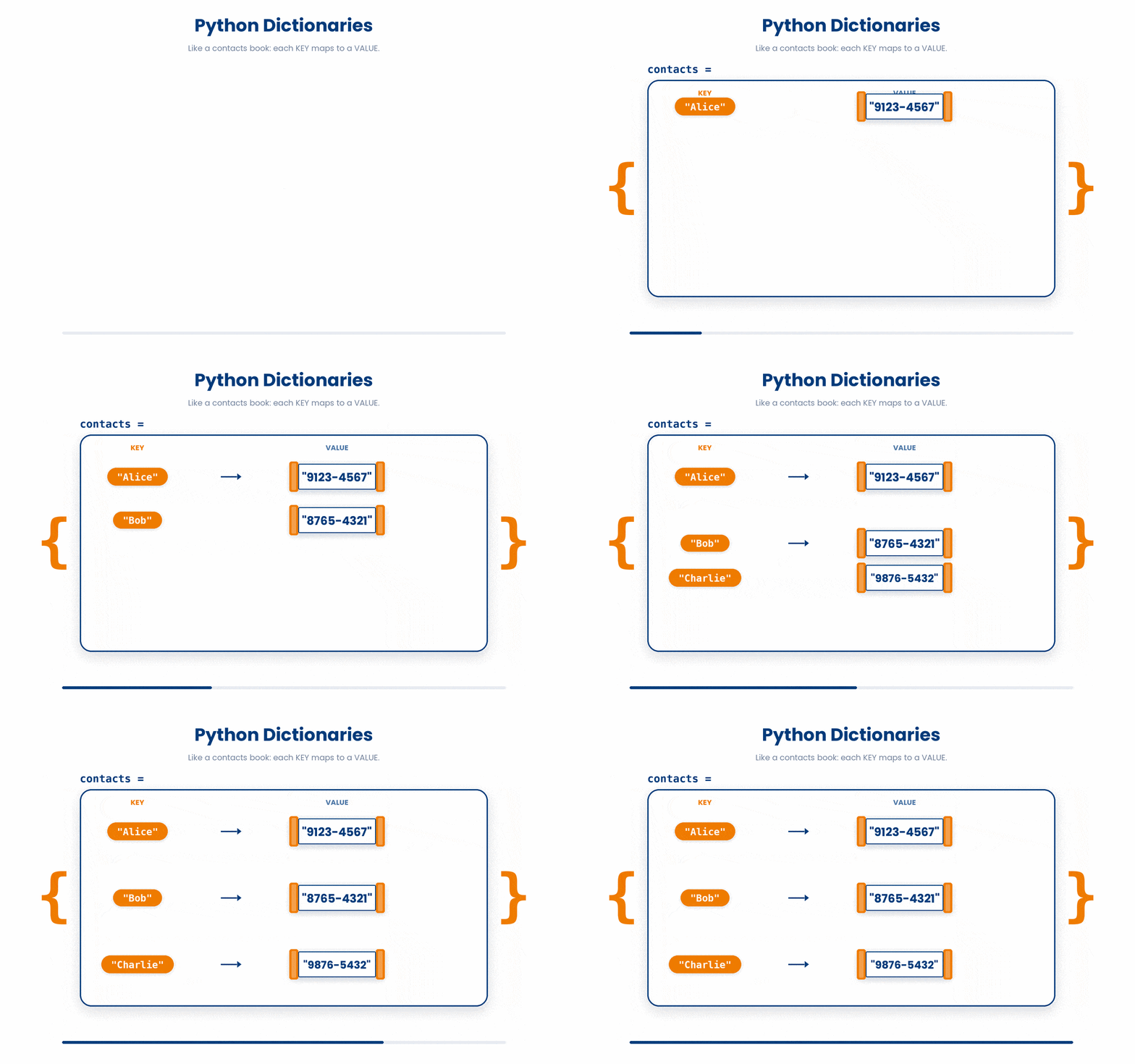
For example, patient = {"id": "P001", "age": 54, "gene": "APOE"} stores three key-value pairs. You read a value back by writing the dictionary name and the key in square brackets: patient["age"] gives 54.
Try this snippet in the Python Scratchpad on the right.
patient = {"id": "P001", "age": 54, "gene": "APOE"}
print(patient["id"])
print(patient["age"])
print(len(patient))A dictionary's value does not have to be a single number or string. It can be a list, and then you reach inside it by chaining two square-bracket lookups — one for the dictionary key, one for the position in the list that key gives you.
If you ask for a key that is not in the dictionary, Python raises a KeyError. There are two clean ways to avoid that.
- The first is to test for the key with the
inoperator:if "middle_name" in patient. - The second is to use the
.get()method, which returnsNone(or a default value of your choosing) instead of crashing.
The code below is broken. Type a fixed version into the editor, then click Run & check. Success means your code runs without errors and produces output. Use Show hint only if you get stuck.
patient = {"id": "P001", "age": 54}
print(patient["middle_name"])- Use .get(): print(patient.get("middle_name")) ★
- Wrap the print in try/except ValueError
- Add quotes around the key: patient["'middle_name'"]
5.1 Looping over a dictionary
Looping over a dictionary walks the keys by default.
- To loop over the key and the value at the same time, use
.items(). - To loop over the values only, use
.values().
Try the code below to see what we mean.
Try this snippet in the Python Scratchpad on the right.
vitals = {"heart_rate": 72, "systolic_bp": 118, "temp_c": 36.8}
for measurement, value in vitals.items():
    print(f"{measurement}: {value}")
for v in vitals.values():
print(v)6 Sets
A set stores unique values with no duplicates and no order. You make one with curly braces — genes_a = {"APOE", "TREM2", "BIN1"} — but unlike a dictionary, you write only values, no keys. If you put a duplicate in, the set silently keeps only one copy.
Sets support three operators that read like the maths they implement.
&is intersection (in both).|is union (in either).-is difference (in the first but not the second).
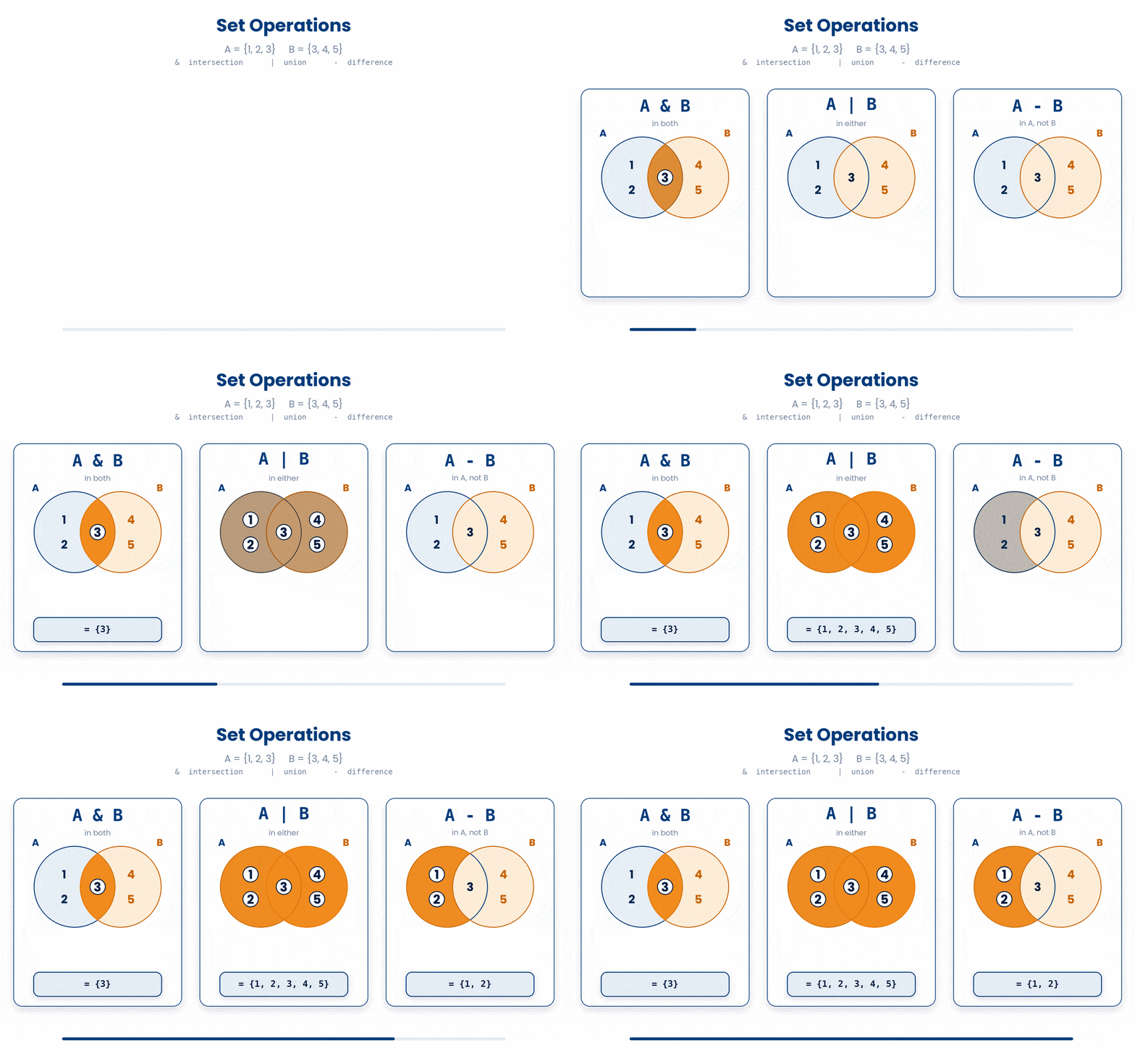
Let’s practise using the operators above on a set!
Try this snippet in the Python Scratchpad on the right.
diabetes = {"P001", "P002", "P003", "P004"}
hypertension = {"P002", "P004", "P005", "P006"}
print(diabetes & hypertension)
print(diabetes | hypertension)
print(diabetes - hypertension)Try it · Sets
Which patients does each set operator give?
Two sets of patient IDs from one clinic week. Tap an operator to light up the part of the diagram it gives.
A set has no order, so Python may print these IDs in a different order.
7 Check your understanding
You have reached the end of the module. Try the same questions again — your answers here, paired with your pre-test answers, are how we measure what the module taught you. Answer every question and confidence rating, then click Submit and see results to view your score.
Given ages = [54, 67, 71, 49], what does ages[-1] return?
Given genes = ["APOE", "TREM2", "BIN1", "MAPT"], what does genes[1:3] return?
coords = (4, 9) is a tuple. What happens when you run coords[0] = 5?
A patient dictionary is patient = {"id": "P001", "age": 54}. Which line safely returns None instead of raising KeyError when "middle_name" is missing?
In the loop for k, v in patient.items():, what do k and v hold on each pass?
You write samples = {"S1", "S1", "S2"}. What does len(samples) return?
With a = {"P1", "P2", "P3"} and b = {"P2", "P3", "P4"}, what does a - b return?
You need a collection of unique patient IDs with no duplicates and no guaranteed order. Which container fits best?
I can explain to a peer when to use a list, a tuple, a dictionary, or a set.
I can write a loop that walks a dictionary and uses both the key and the value on each iteration.
I can use .get() to read a value from a dictionary safely without raising KeyError.
8 Your results
Here is how your post-test answers compare with your pre-test answers. The pre/post pairing is the most reliable way to see what this module actually taught you.
Submit the post-test to see your results.
What is the one thing from this module that is still unclear to you?