

1 Before you start
This is not graded, and it does not count towards anything. Answer every question even if you are only guessing — having a go at something before you have been taught it is one of the best ways to remember it afterwards. The lesson ends with another short check, and there you will be shown the correct answer for anything you missed. Choose an option for every question and confidence rating, then click Submit answers.
What does print(f"{2 + 3} items") display?
What does f"{4.2e-8:.2e}" produce?
What does f"{0.0423:.1%}" display?
Why does int("banana") raise a ValueError rather than a TypeError?
A script raises KeyError: 'middle_name'. What is the most likely cause?
When you read a Python traceback, which line tells you the exception type and its message?
A line age = int(raw) is wrapped in a try block, with except ValueError setting age = None. If raw is "42", what is age after the block runs?
What happens when Python runs assert len(a) == len(b), "length mismatch" and the two lengths are equal?
I can write an f-string that formats a p-value in scientific notation with two decimal places.
I can read a Python traceback and identify which exception was raised and on which line.
I can wrap a risky line in try/except and decide which specific exception to name.
2 Introduction
Now that you can store values and combine them, the next two questions are: how do you format them so a human can read the result, and what happens when something goes wrong?
- String formatting with f-strings — the modern way to drop a value into a sentence, control how many decimal places it prints with, and align it neatly in a table.
- Common Python errors and exceptions — the handful of error messages you will meet first, how to read the traceback Python prints when one of them happens, and how to catch errors.
Try every snippet in the Python Scratchpad on the right. By the end of the module you will be able to write an f-string that prints a p-value in scientific notation, read a traceback to find the line that broke, and decide when to wrap a line in try/except.
3 String Formatting with f-strings
To recap, a string is a sequence of characters enclosed in quotes (" " or ' '). It is how Python represents text, whether that is a single letter, a word, a sentence, or even an empty sequence of nothing at all.
Sooner or later, you will need to assemble a string out of several values — a patient ID and an age, a gene name and a p-value, a column name and a count. The most common way is to use f-strings.
Try this snippet in the Python Scratchpad on the right.
diagnosis = "Type 2 Diabetes"
blood_type = 'O positive'
print(diagnosis)
print(blood_type)
print(type(diagnosis))
print(type(blood_type))An f-string is a normal string with a lower-case f in front of the opening quote. Inside it, anything in curly braces is a Python expression that gets evaluated and dropped into the string at that position.
They are easy to read, faster, and the default in modern Python code.
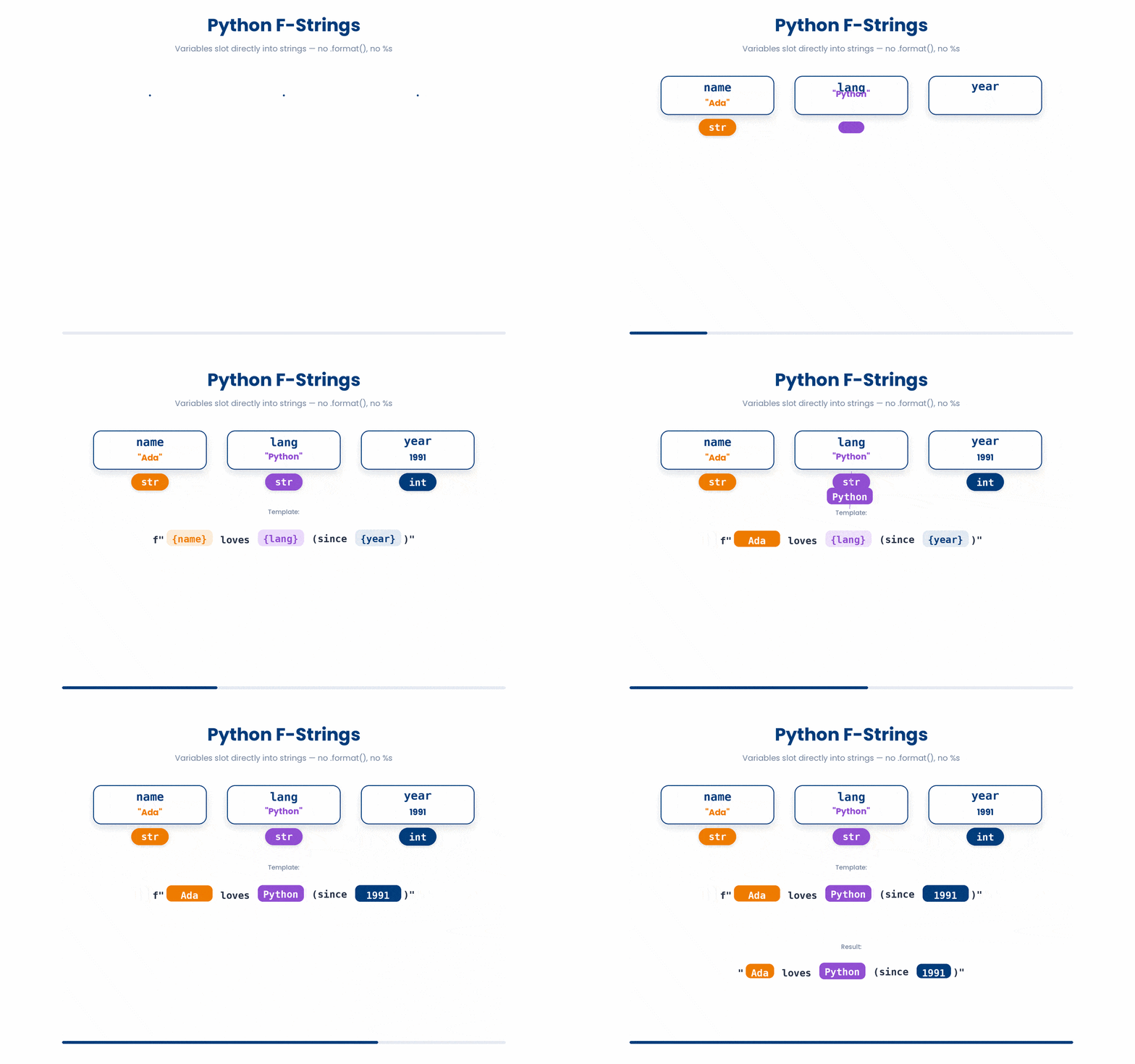
Here is a sample code on how you can use f-strings in Python.
Try this snippet in the Python Scratchpad on the right.
patient_id = "P00472"
glucose_mmol = 7.823
hba1c_fraction = 0.0654
print(f"Patient {patient_id}: glucose = {glucose_mmol:.1f} mmol/L")
print(f"HbA1c = {hba1c_fraction:.1%}")Anything that can appear in an expression can go inside the braces, including arithmetic, function calls, and dictionary lookups.
Try this snippet in the Python Scratchpad on the right.
patient = "Sim Hui En"
systolic_bp = 142
diastolic_bp = 91
print(f"Patient {patient} has a blood pressure of {systolic_bp}/{diastolic_bp} mmHg.")3.1 Format specifiers
You can ask Python to format the value in a particular way after a colon inside the braces. The most useful ones for data work:
:.2f— float with two decimal places:f"{0.04567:.2f}"gives0.05:.3e— scientific notation with three significant figures:f"{4.2e-8:.3e}"gives4.200e-08:,— thousands separator:f"{1234567:,}"gives1,234,567:.1%— percentage with one decimal:f"{0.0423:.1%}"gives4.2%:>10— right-align in a 10-character field, useful for tables:<10— left-align in a 10-character field
Try this snippet in the Python Scratchpad on the right.
print(f"[{0.04567:.2f}]")
print(f"[{4.2e-8:.3e}]")
print(f"[{1234567:,}]")
print(f"[{0.0423:.1%}]")
print(f"[{'gene':>10}]")
print(f"[{'gene':<10}]")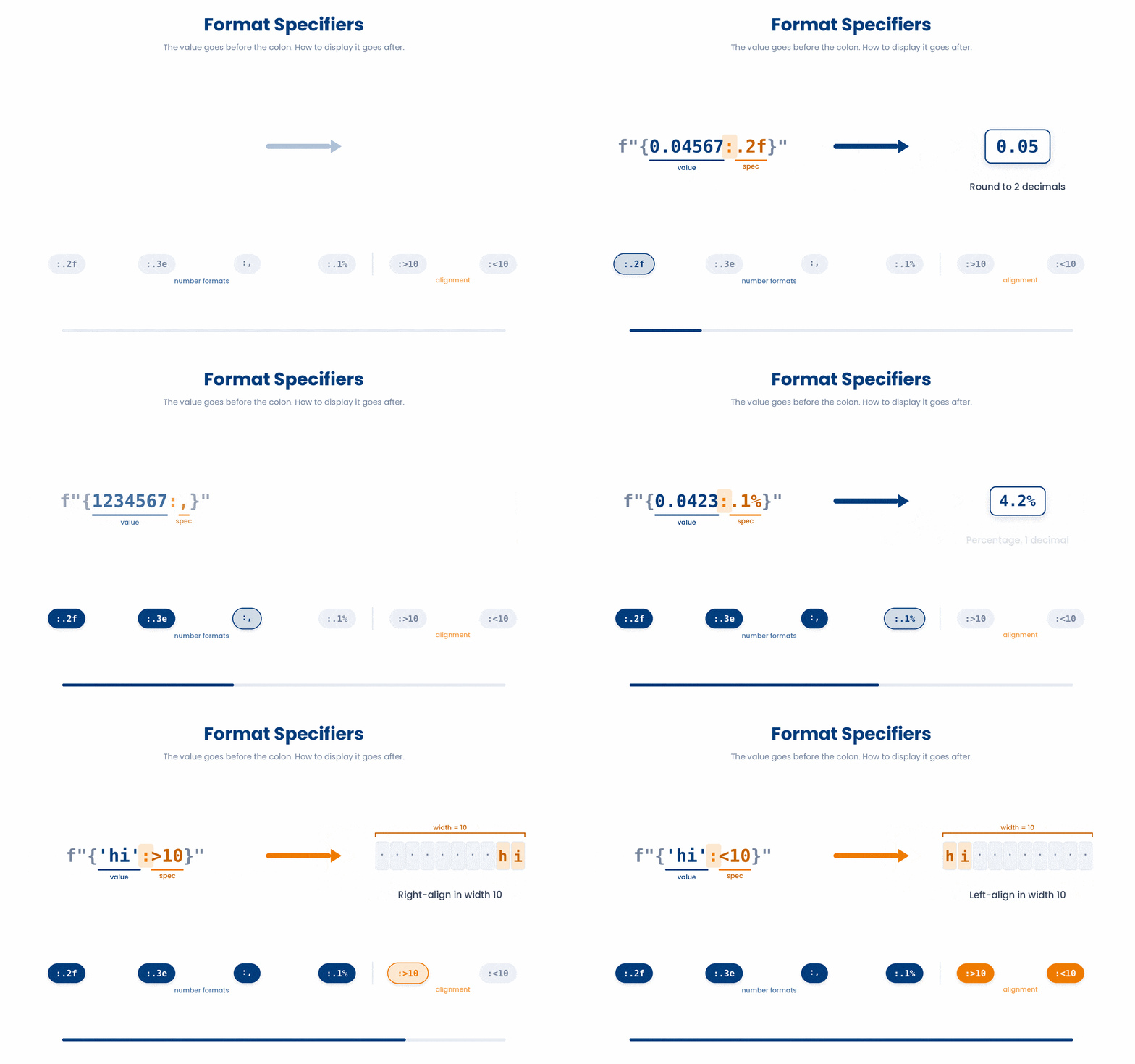
Try it · Format playground
What does each format do to a number?
Pick a number, then a format. The f-string and what Python prints change straight away.
1. A number
2. A format (the part after the colon)
Can you make these?
4 Common Python Errors and Exceptions
Errors are not failures — they are how Python tells you what it could not do. Reading errors well is one of the most important skills in programming. Every error in Python belongs to one of two broad camps.
A SyntaxError happens before your code runs at all: Python tries to read the file, finds something that is not valid Python, and refuses to start.
Everything else is a runtime exception: the read worked, the program started, but something went wrong in the middle.
4.1 The errors you will meet first
These are the eight runtime exceptions that account for almost every bug a beginner hits:
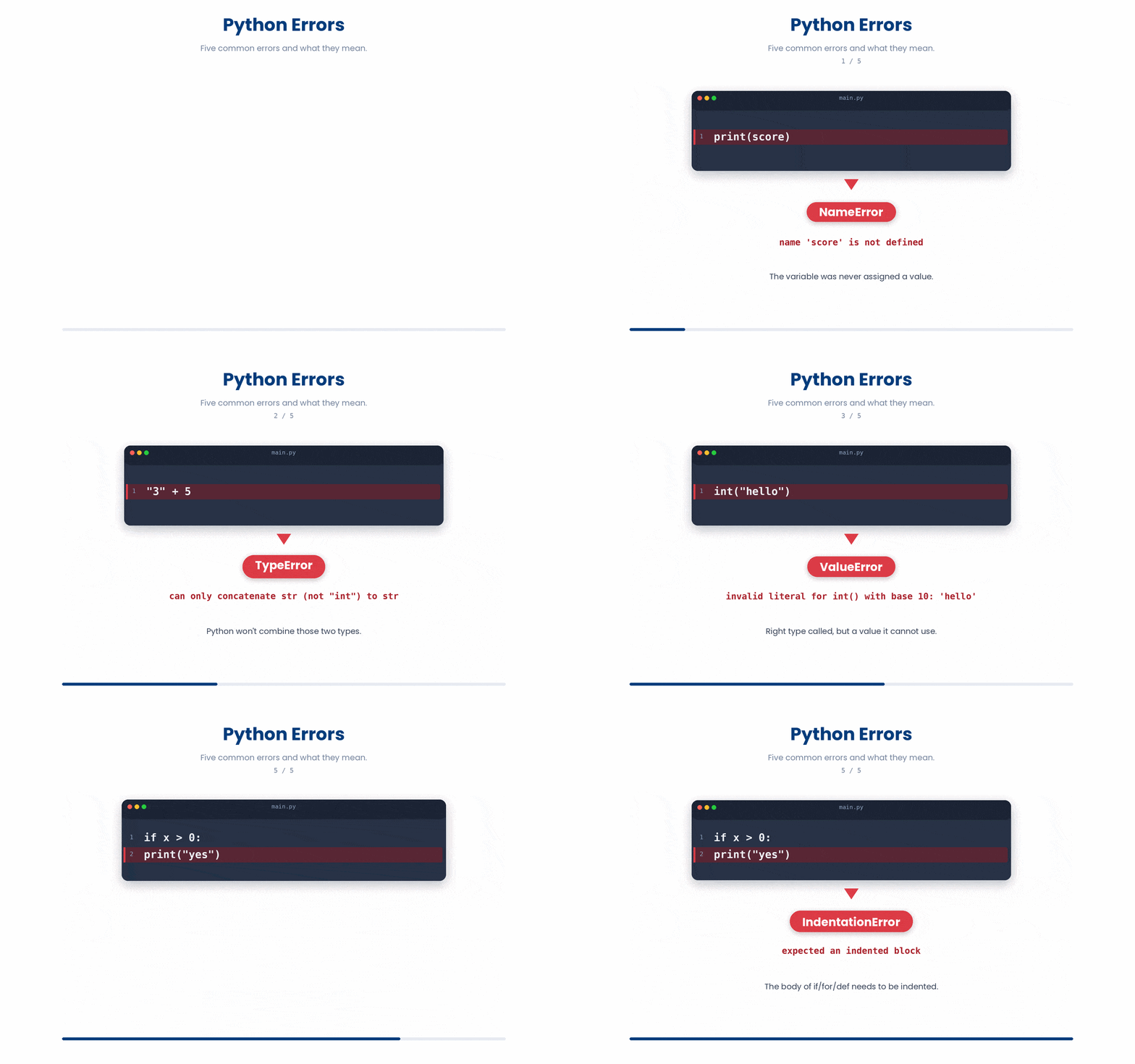
NameError— you used a variable name Python has never seen. Usually a typo.TypeError— you tried to do something with a value that does not support it."5" + 5fails becausestring + inthas no obvious meaning.ValueError— the type was right but the value was not.int("banana")fails not because"banana"is the wrong type but because there is no integer hiding inside it.IndexError— you asked for the sixth item when the list only has five entries.KeyError— you asked for a dictionary key that is not present.ZeroDivisionError— you divided by zero. Common when computing rates over a filtered subset that turned out to be empty.IndentationError— your indentation is inconsistent. Always use four spaces; never mix tabs and spaces in the same file.AttributeError— you called a method that the object does not have.
Here are some of the common errors that you will encounter.
4.2 Reading a traceback
When an exception is raised, Python prints a traceback — a stack of function calls leading up to the error. Read it bottom-up.
- The last line tells you the exception type and its message.
- The line above tells you the file and line number where the error happened.
For most beginner bugs, the very last line is enough.
Now is the time to get your hands wet and debug the code. Each broken snippet raises an error when run in Python. Can you fix them?
(a) NameError
The code below is broken. Type a fixed version into the editor, then click Run & check. Success means your code runs without errors and produces output. Use Show hint only if you get stuck.
heart_rate = 78
respiratory_rate = 16
vitals_total = heart_rate + repiratory_rate
print(vitals_total)- Fix the typo in repiratory_rate so it matches respiratory_rate defined above ★
- Wrap the addition in a try/except NameError block
- Put quotes around repiratory_rate so it becomes a string
(b) TypeError
The code below is broken. Type a fixed version into the editor, then click Run & check. Success means your code runs without errors and produces output. Use Show hint only if you get stuck.
weight_kg = "72"
height_m = 1.75
bmi = weight_kg / (height_m ** 2)
print(round(bmi, 1))- Convert weight_kg to a number with float(weight_kg) before dividing ★
- Replace / with // so Python uses integer division
- Wrap height_m in str() so both sides are strings
(c) ValueError
The code below is broken. Type a fixed version into the editor, then click Run & check. Success means your code runs without errors and produces output. Use Show hint only if you get stuck.
blood_pressure = "120/80"
systolic = int(blood_pressure)
print(systolic)- Split blood_pressure on the slash first, then convert the first piece with int() ★
- Replace int() with float() to handle the slash
- Strip whitespace first with blood_pressure.strip() then call int()
(d) IndentationError
Indentation is the empty space at the start of a line. In Python, that gap is not decoration. It is how Python decides which lines belong together as a group. Whenever you write a line that ends with a colon (:) — if, for, while, def, try, except — the lines that follow need to be pushed to the right.
The standard amount to push in is four spaces. You don't have to count them — pressing the Tab key in most editors inserts four spaces for you. The one rule Python is strict about is consistency: every line in the same block must be indented by the same amount.
glucose = 8.2
if glucose > 7.0:
    print("high")
    print("recheck in 3 months")
print("done")
Try and fix the indentation errors below:
The code below is broken. Type a fixed version into the editor, then click Run & check. Success means your code runs without errors and produces output. Use Show hint only if you get stuck.
temperature_c = 38.4
if temperature_c >= 38.0:
print("Fever - notify nursing team")- Indent the print line so it sits inside the if block ★
- Remove the colon from the end of the if line
- Replace the if with a while loop so it keeps running
4.3 Catching exceptions with try/except
Sometimes you can predict an exception and want to handle it rather than crash. The pattern is try/except: put the risky line inside a try block, and put your fallback inside an except block that names the specific exception you expect.
patient = {"id": "P001"}
try:
    age = patient["age"]
except KeyError:
    age = 0
print(age)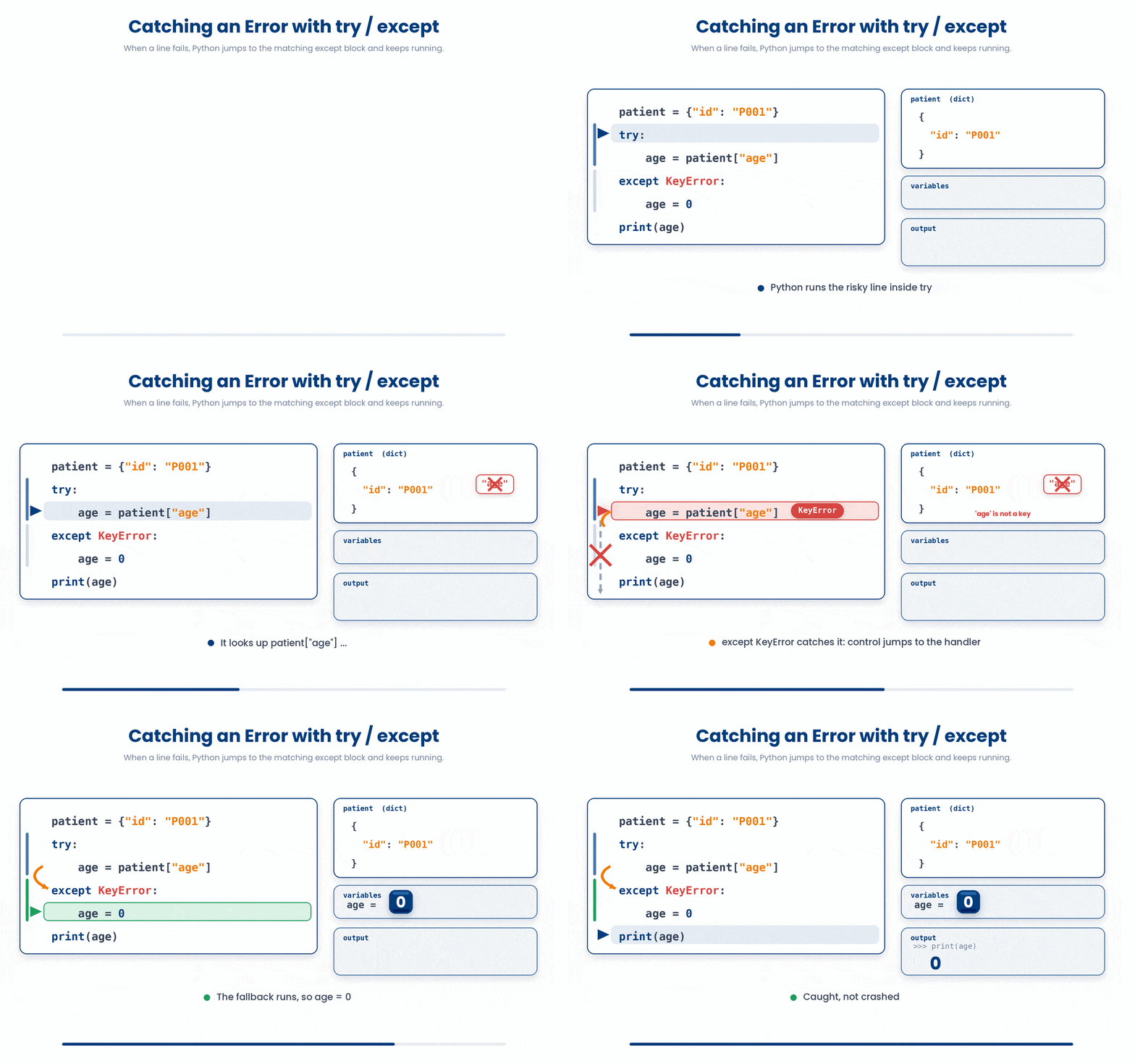
Let’s practise arranging the syntax.
All the lines you need are in the Line bank on the left — some may be distractors you should leave behind. Drag the lines you need into the Your solution column on the right, in the correct order, then click Check.
Task: The patient ID may not exist in the records dict. Look up the diagnosis, or fall back to "no record found" if the ID is missing.
diagnosis = patient_records[patient_id]try:print(diagnosis)patient_records = {"P001": "diabetes", "P002": "hypertension"}except KeyErrorpatient_id = "P003"diagnosis = "no record found"except KeyError:diagnosis = patient_records[patient_id]except:
- Drop lines here, in order.
Now, practise writing try/except block using the code below:
Try this snippet in the Python Scratchpad on the right.
raw = "42"
try:
    age = int(raw)
except ValueError:
    age = None
print(age)And now, a more complicated version.
Try this snippet in the Python Scratchpad on the right.
raw_ages = ["42", "NA", "65", "unknown"]
parsed = []
for raw in raw_ages:
    try:
        parsed.append(int(raw))
    except ValueError:
        parsed.append(None)
print(parsed)4.4 Raising your own exceptions with raise
Normally, you write code to catch exceptions (errors) so your program doesn't crash. However, you can also raise (create) them yourself.
If your code detects that something is wrong — like a negative age, a missing argument, or an impossible number — it is better to stop the program immediately.
Raising an exception acts as an emergency brake. It stops the code right there and provides a clear explanation, rather than letting the program limp along and produce the wrong answer later.
To trigger an error, you use the raise keyword, followed by the type of error, and a message explaining what went wrong. The syntax is as follows:
raise ExceptionType("A message that explains what went wrong")When you raise an exception, you should pick the specific type that best describes the problem. Here are the two most common ones mentioned:
ValueError: Use this when the data type is correct, but the actual value is wrong.TypeError: Use this when the wrong type of data is provided altogether.
Can you rearrange the code?
All the lines you need are in the Line bank on the left — some may be distractors you should leave behind. Drag the lines you need into the Your solution column on the right, in the correct order, then click Check.
Task: Write a function that raises TypeError if age is not an int, raises ValueError if age is negative, otherwise returns the age. Then call it with 30.
raise TypeError("Age must be an integer")def set_age(age):raise TypeError("Age cannot be negative")return ageraise ValueError("Age cannot be negative")if age < 0:if age < 0if not isinstance(age, int):raise ValueError("Age must be an integer")print(set_age(30))
- Drop lines here, in order.
Let’s try it out.
Try this snippet in the Python Scratchpad on the right.
def calculate_bmi(weight_kg, height_m):
    if weight_kg <= 0:
        raise ValueError(f"Weight must be positive, got {weight_kg}")
    if height_m <= 0:
        raise ValueError(f"Height must be positive, got {height_m}")
    return weight_kg / (height_m ** 2)

print(calculate_bmi(72, 1.75))
print(calculate_bmi(72, 0))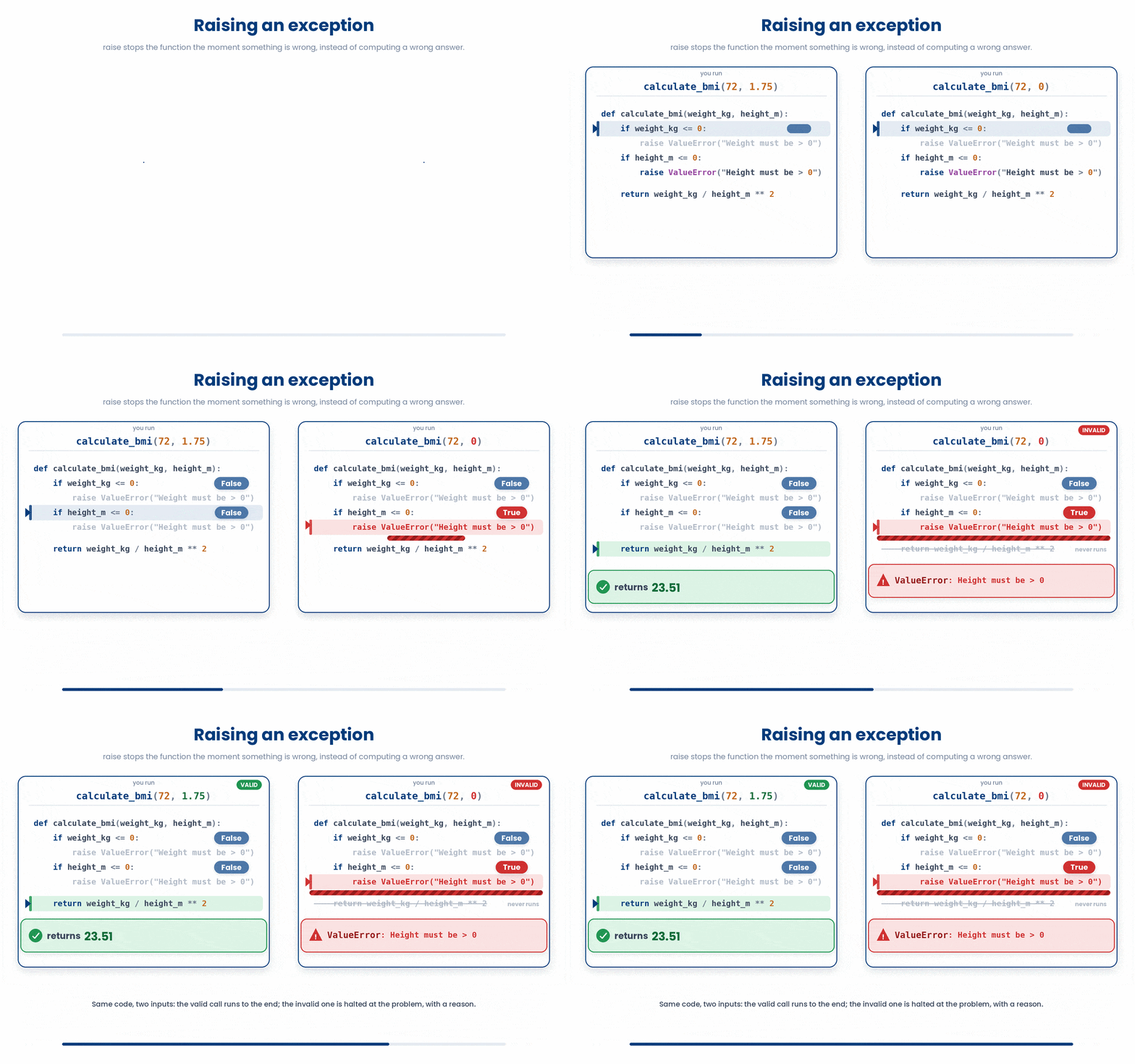
Always make your error messages descriptive. The message you type inside the quotes is exactly what you (or another programmer) will see in the error report (traceback). A message like "Age cannot be negative" is much more helpful than "Error!".
5 Sanity checks with assert
An assert statement is a quick sanity check for you. It is a way to test if something you believe is true in your code actually is true right at that exact moment.
You write the word assert, followed by a condition that should be true, and then a message explaining the failure just in case.
assert condition, "message if it fails"What happens to the results from assert statement?
- If the condition is True: Absolutely nothing happens. The program just quietly carries on to the next line.
- If the condition is False: The program stops immediately and throws an AssertionError, displaying your message.
Try this snippet in the Python Scratchpad on the right.
features = [[1, 2], [3, 4], [5, 6]]
labels = [0, 1, 0]

assert len(features) == len(labels), "features and labels must be the same length"
print("Lengths match - safe to continue")

ages = [54, 61, 47]
assert all(0 < a < 120 for a in ages), "ages must be between 0 and 120"
print("All ages look reasonable")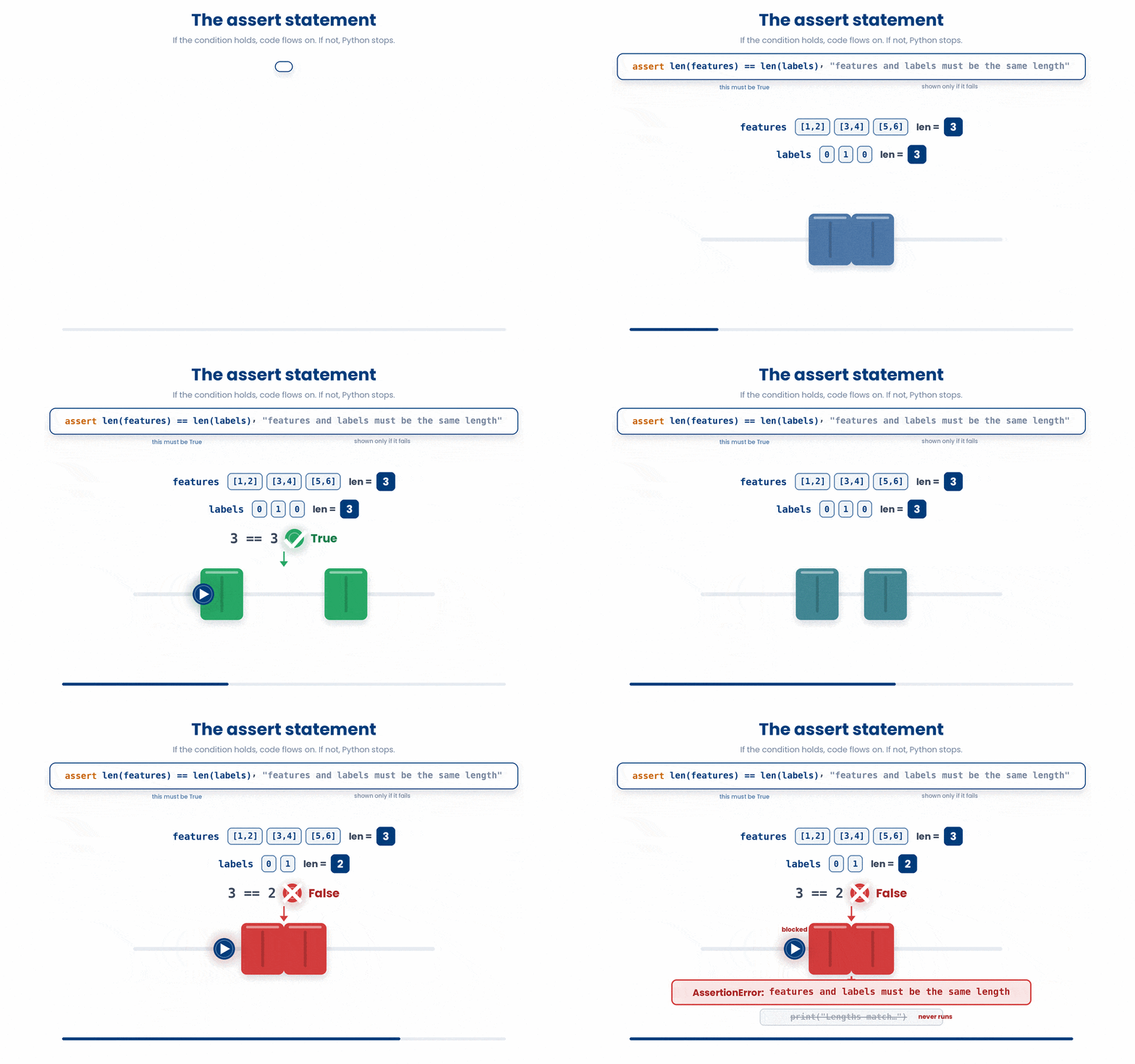
When should you use raise or assert?
Use assert for developer errors, and raise for user errors.
- Use
assertfor things that should never go wrong unless there is a bug in your own code (e.g., "This list should never be empty by the time it reaches this function"). - Use
raise ValueErrorfor things that might naturally go wrong based on outside factors, like bad input from a user (e.g., "The user typed a negative age").
6 Check your understanding
You have reached the end of the module. Try the same questions again — your answers here, paired with your pre-test answers, are how we measure what the module taught you. Answer every question and confidence rating, then click Submit and see results to view your score.
What does print(f"{2 + 3} items") display?
What does f"{4.2e-8:.2e}" produce?
What does f"{0.0423:.1%}" display?
Why does int("banana") raise a ValueError rather than a TypeError?
A script raises KeyError: 'middle_name'. What is the most likely cause?
When you read a Python traceback, which line tells you the exception type and its message?
A line age = int(raw) is wrapped in a try block, with except ValueError setting age = None. If raw is "42", what is age after the block runs?
What happens when Python runs assert len(a) == len(b), "length mismatch" and the two lengths are equal?
I can write an f-string that formats a p-value in scientific notation with two decimal places.
I can read a Python traceback and identify which exception was raised and on which line.
I can wrap a risky line in try/except and decide which specific exception to name.
7 Your results
Here is how your post-test answers compare with your pre-test answers. The pre/post pairing is the most reliable way to see what this module actually taught you.
Submit the post-test to see your results.
What is the one thing from this module that is still unclear to you?