

1 Before you start
This is not graded, and it does not count towards anything. Answer every question even if you are only guessing — having a go at something before you have been taught it is one of the best ways to remember it afterwards. The lesson ends with another short check, and there you will be shown the correct answer for anything you missed. Choose an option for every question and confidence rating, then click Submit answers.
Which command prints every patient id as plain text, one per line?
What does the -r flag do in jq?
On the row P-001,"Tan, Alice",138 what does cut -d, -f2 return?
Which tool selects the CSV column called name while respecting quoted fields?
In jq, what does ending a filter with @csv do?
In jq, what does the single-dot filter '.' do to a dense one-line JSON response?
How do you count how many patients are in the array with jq, without writing a loop?
Which csvkit tool turns a CSV file into JSON?
I can use jq to pull a field out of a JSON document.
I can turn selected JSON fields into CSV rows with jq.
I know why cut can give wrong results on quoted CSVs, and which tool to use instead.
2 Introduction
Once you step outside the world of tidy spreadsheets, you will constantly encounter two data formats: JSON and CSV.
JSON is the standard for web APIs, modern configuration files, and clinical data exchange
CSV is a classic format you might already know how to slice using command-line tools like cut and awk.
However, real-world CSVs hide a trap that can quietly give you the wrong answers. This lesson introduces two powerful solutions: jq for handling JSON, and CSV-aware tools for messy comma-separated files that cut simply cannot handle safely.
In this lesson, we will cover:
- Reading and querying JSON with jq.
- Pulling fields, filtering arrays, and turning JSON into CSV.
- Why cut breaks on quoted CSV fields, and what to use instead.
- csvkit and Miller for header-aware CSV work.
3 JSON - The Shape Of It
JSON relies on nesting two main structural elements:
- Objects: Key-value pairs enclosed in curly braces { }.
- Arrays: Ordered lists enclosed in square brackets [ ].
For example, a small cohort document might wrap a list of patient objects inside one top-level object. Here is what that looks like:
Try this snippet in the Bash Scratchpad on the right.
$ cat patients.json![In JSON, objects wrap key:value pairs in { } and arrays wrap an ordered list in [ ], and these structures nest, as when an array of patient objects sits inside a single top-level cohort object.](GIF_json_nesting.gif)
Reading a file like this by eye is fine for two patients, but it becomes miserable for two thousand. That is exactly where jq comes in handy.
4 jq - Query JSON
jq is a command-line tool that takes a filter and applies it to your JSON data. It allows you to parse, extract, and manipulate JSON right from your terminal.
The simplest filter is a single dot (.), which means "the whole thing." Piping a dense, unformatted JSON string through jq '.' reformats the document with clean indentation and color. This is the fastest way to make a one-line API response readable.
Try this snippet in the Bash Scratchpad on the right.
$ cat patients.json | jq '.'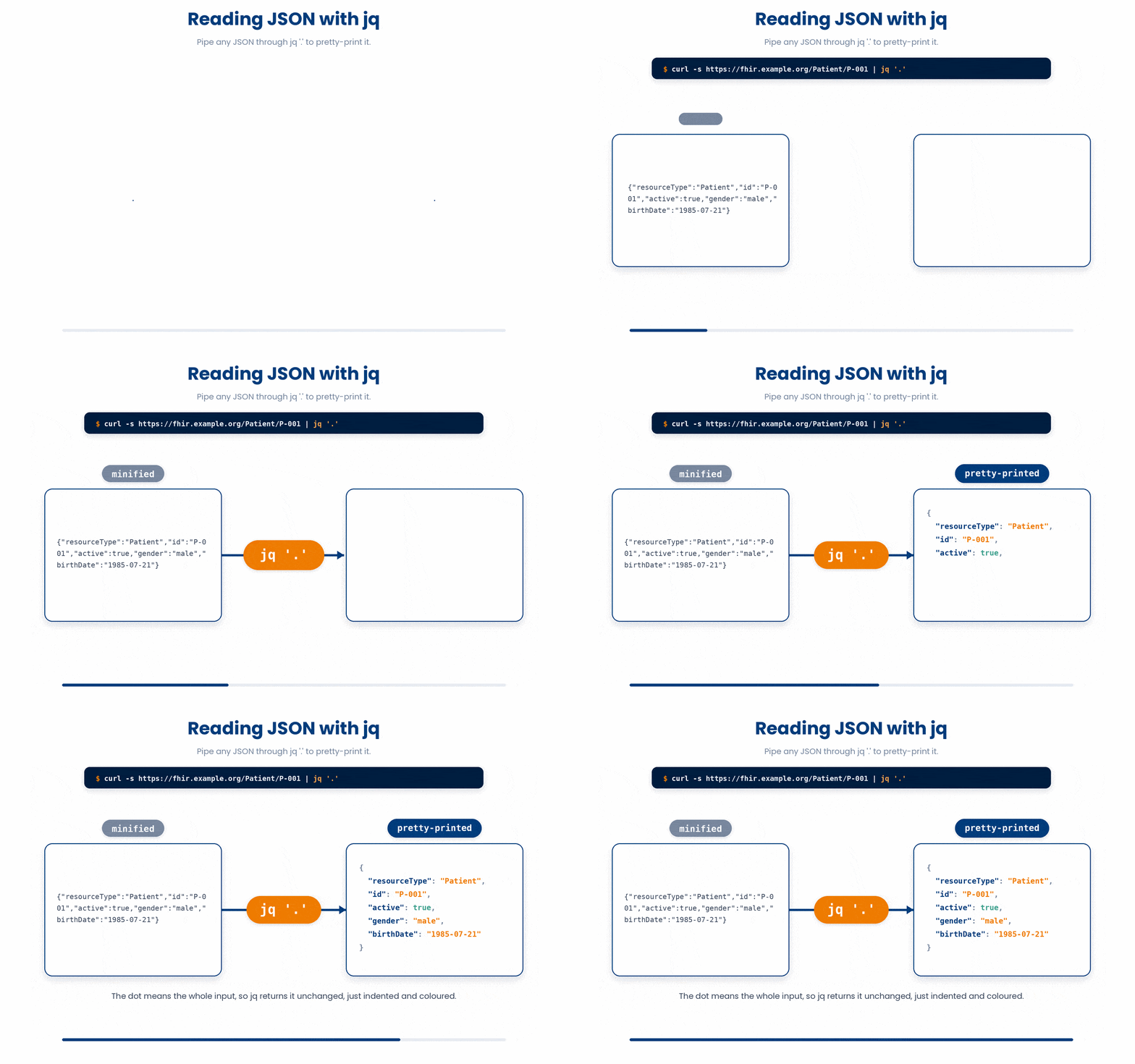
4.1 Pulling out a field
To pull a specific value, name a key after the dot. You can chain dots together to go deeper into nested objects.
Try this snippet in the Bash Scratchpad on the right.
$ jq '.cohort' patients.json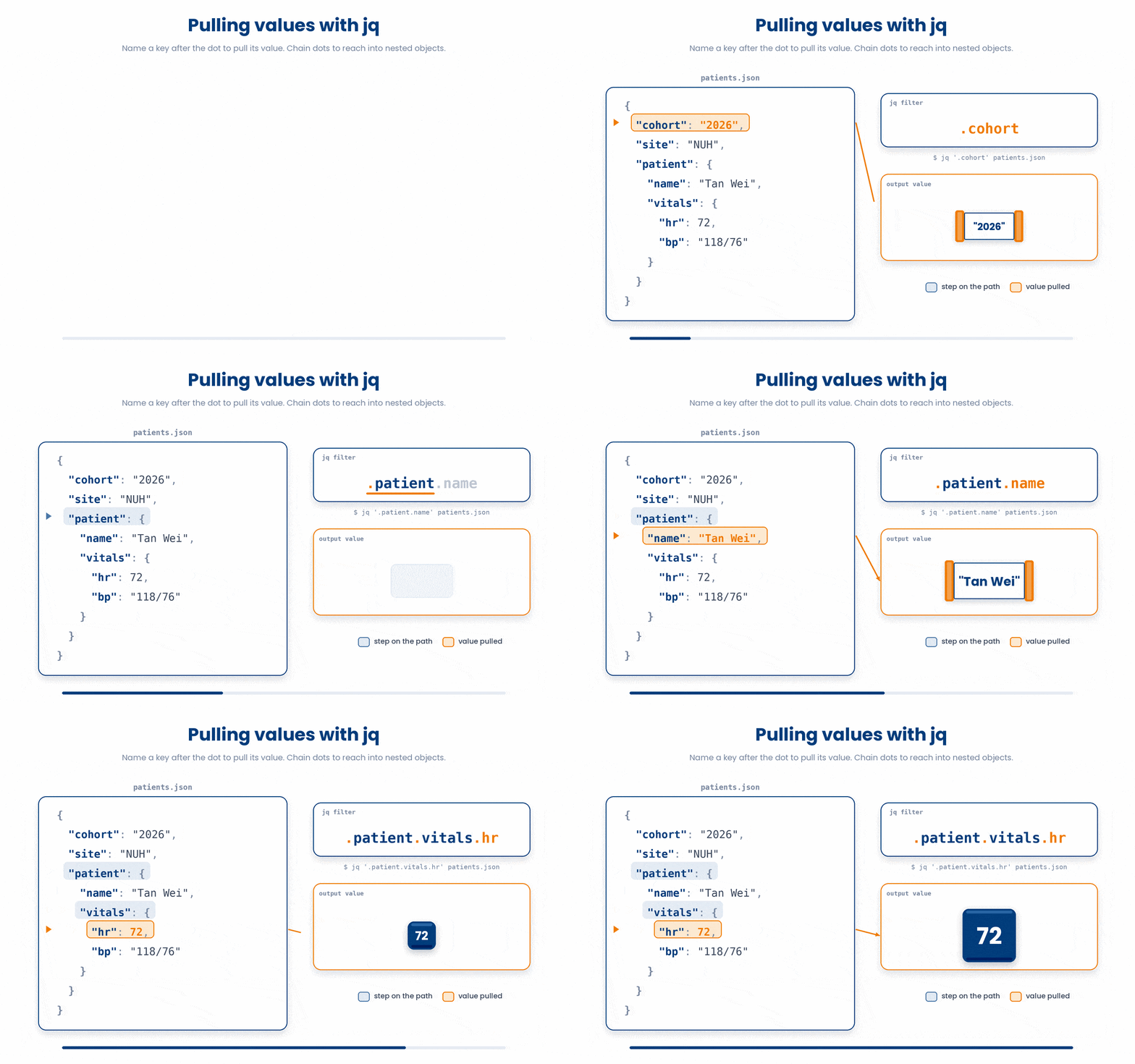
4.2 Walking an array with .[]
The .[] filter iterates over every element of an array, handing each one to the rest of your filter. For example, .patients[].id visits each patient in the array and pulls their ID:
Try this snippet in the Bash Scratchpad on the right.
$ jq '.patients[].id' patients.json![The .[] filter streams every element of an array into the rest of the filter, so .patients[].id applies .id to each patient object and emits one id per element.](GIF_jq_array_iteration.gif)
4.3 Raw output with -r
By default, jq prints strings with their double quotes. This is technically correct JSON, but it is awkward if you want to feed those values into a bash loop. The -r (raw) flag strips the quotes so the output is plain text:
Try this snippet in the Bash Scratchpad on the right.
$ jq -r '.patients[].id' patients.json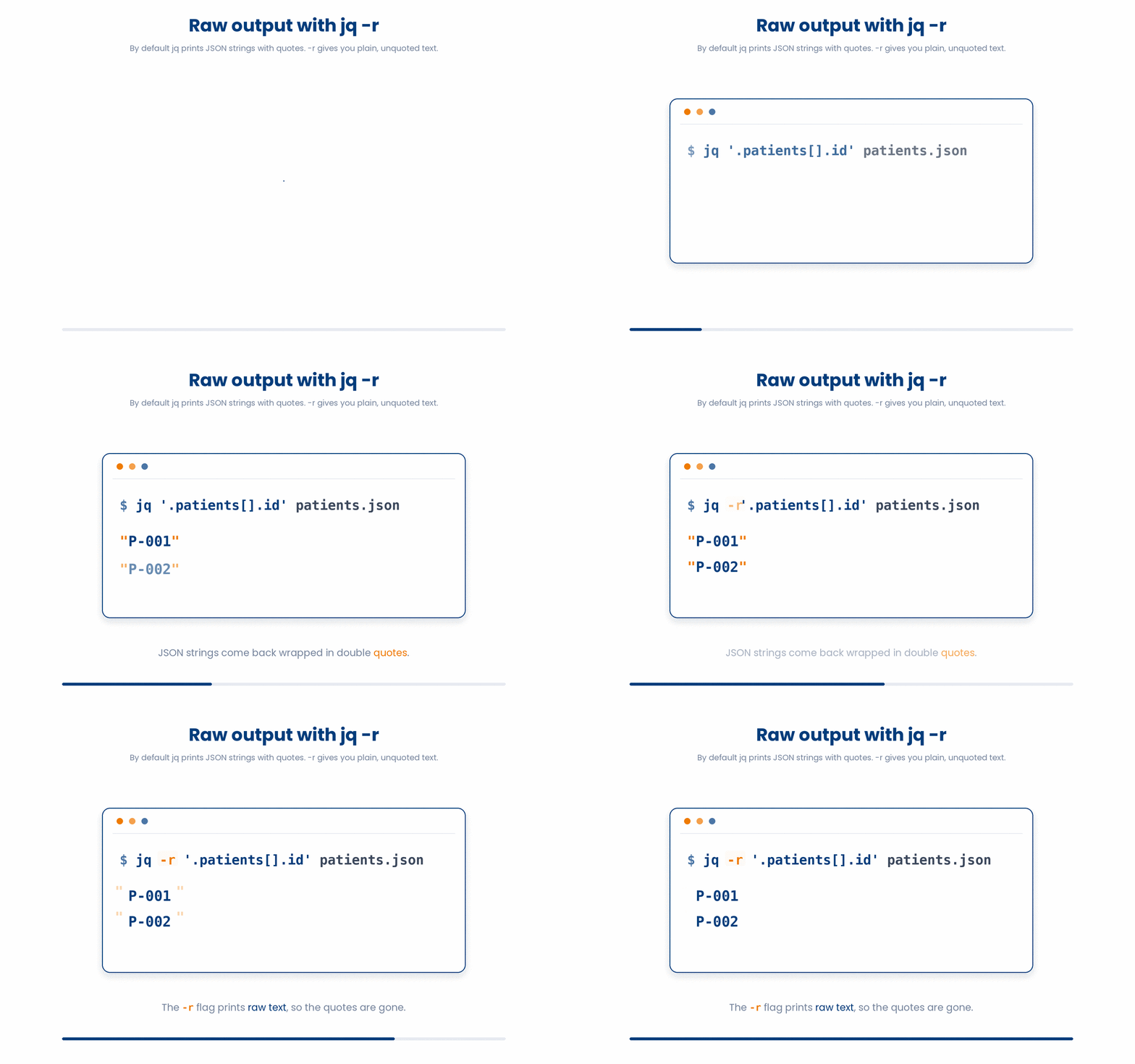
Now, you have a clean list of IDs that you can easily pipe into a while read loop.
4.4 Filtering with select
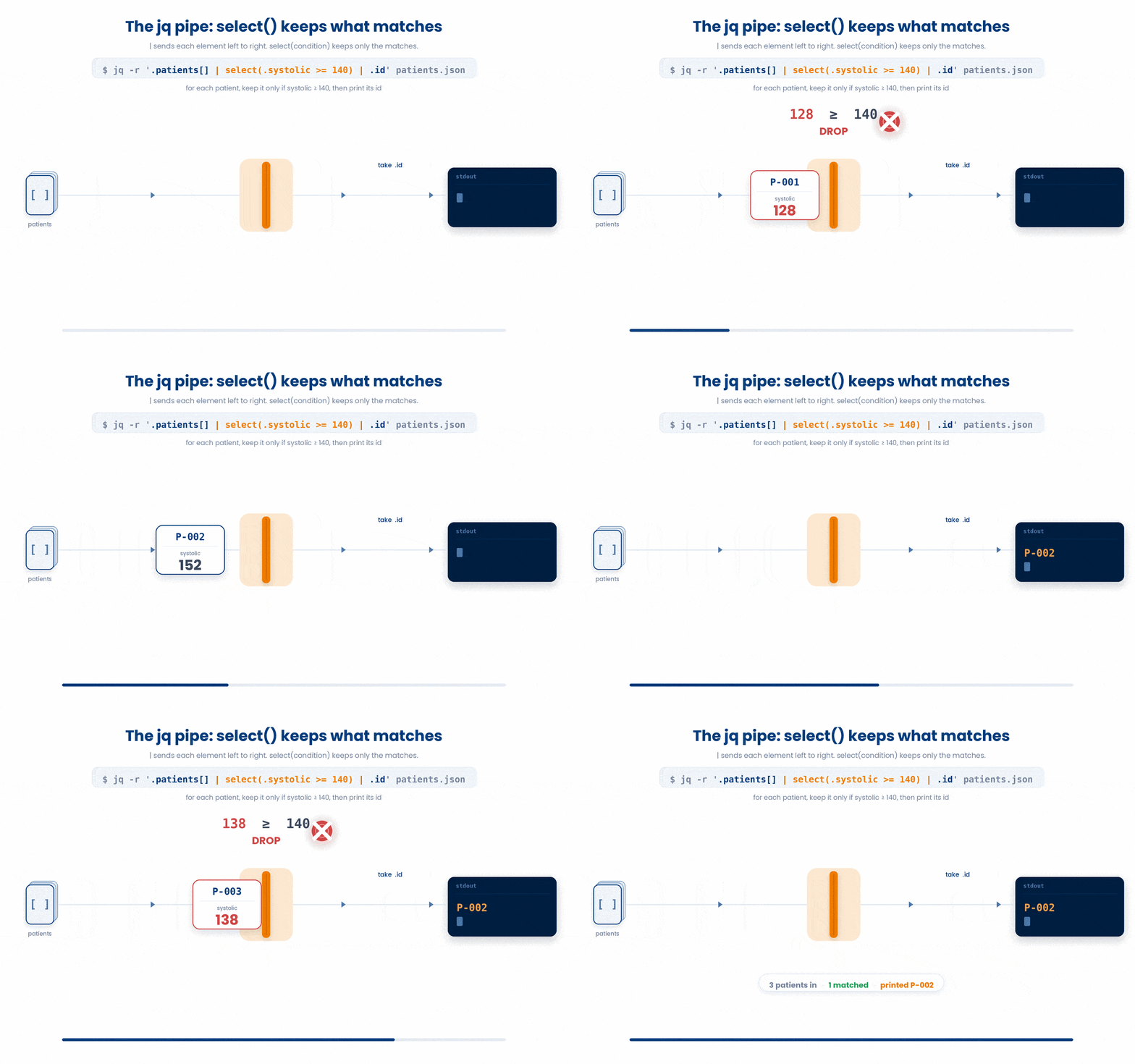
Just like the Linux shell, jq has its own internal pipe (|). You can pipe elements through select(CONDITION) to keep only the elements that match.
Try this snippet in the Bash Scratchpad on the right.
$ jq -r '.patients[] | select(.systolic >= 140) | .id' patients.jsonRead it left to right: for each patient, keep it only if systolic is at least 140, then print its id.
4.5 Turning JSON into CSV
You can act as a bridge from a JSON API straight to your standard CSV tools. Collect the fields you want into an array [ ... ] and end with the @csv filter to emit a proper CSV row:
Try this snippet in the Bash Scratchpad on the right.
$ jq -r '.patients[] | [.id, .systolic, .diastolic] | @csv' patients.json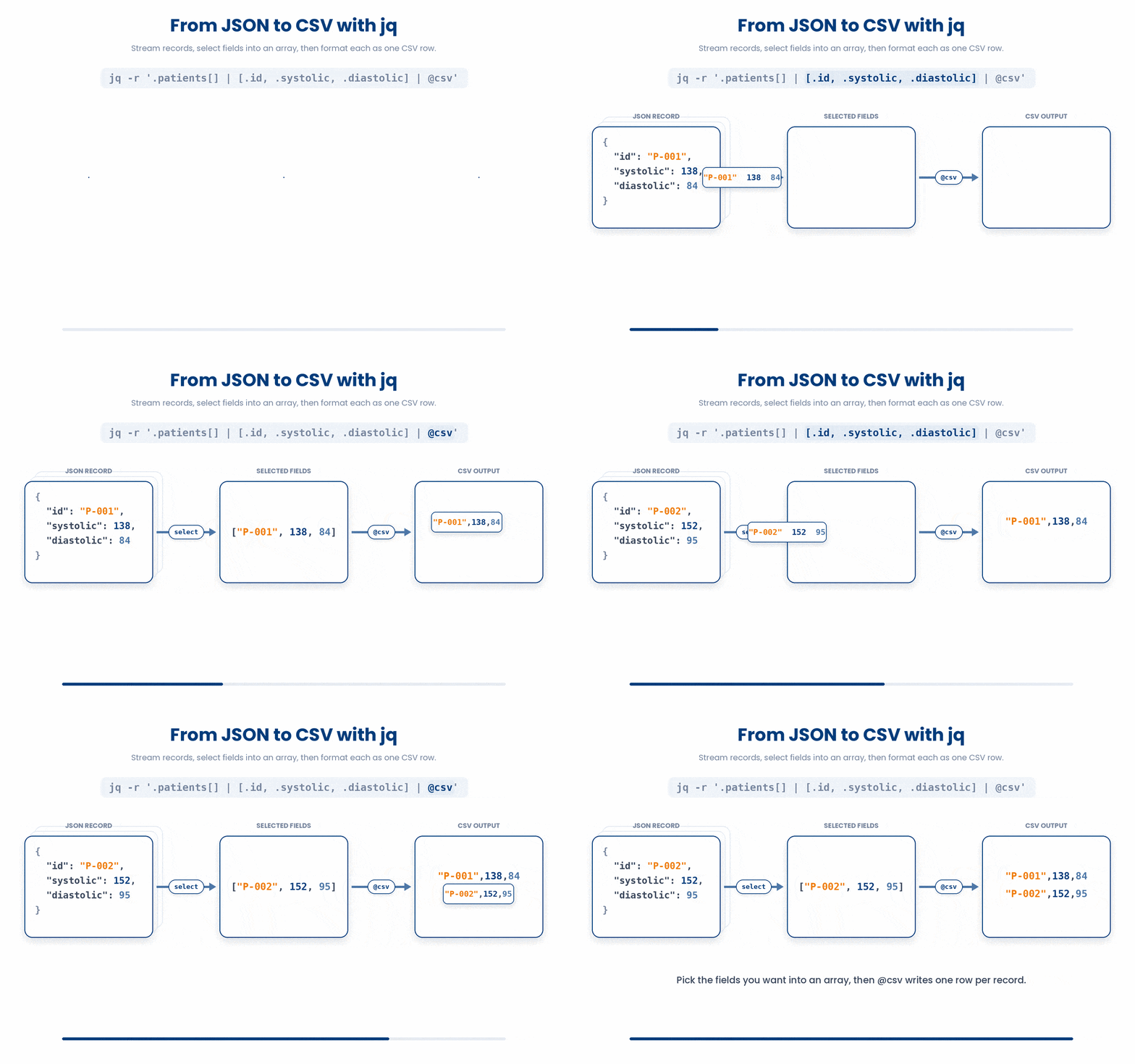
4.6 Counting items quickly
To count how many items are in an array without writing a loop, use the length filter:
Try this snippet in the Bash Scratchpad on the right.
$ jq '.patients | length' patients.json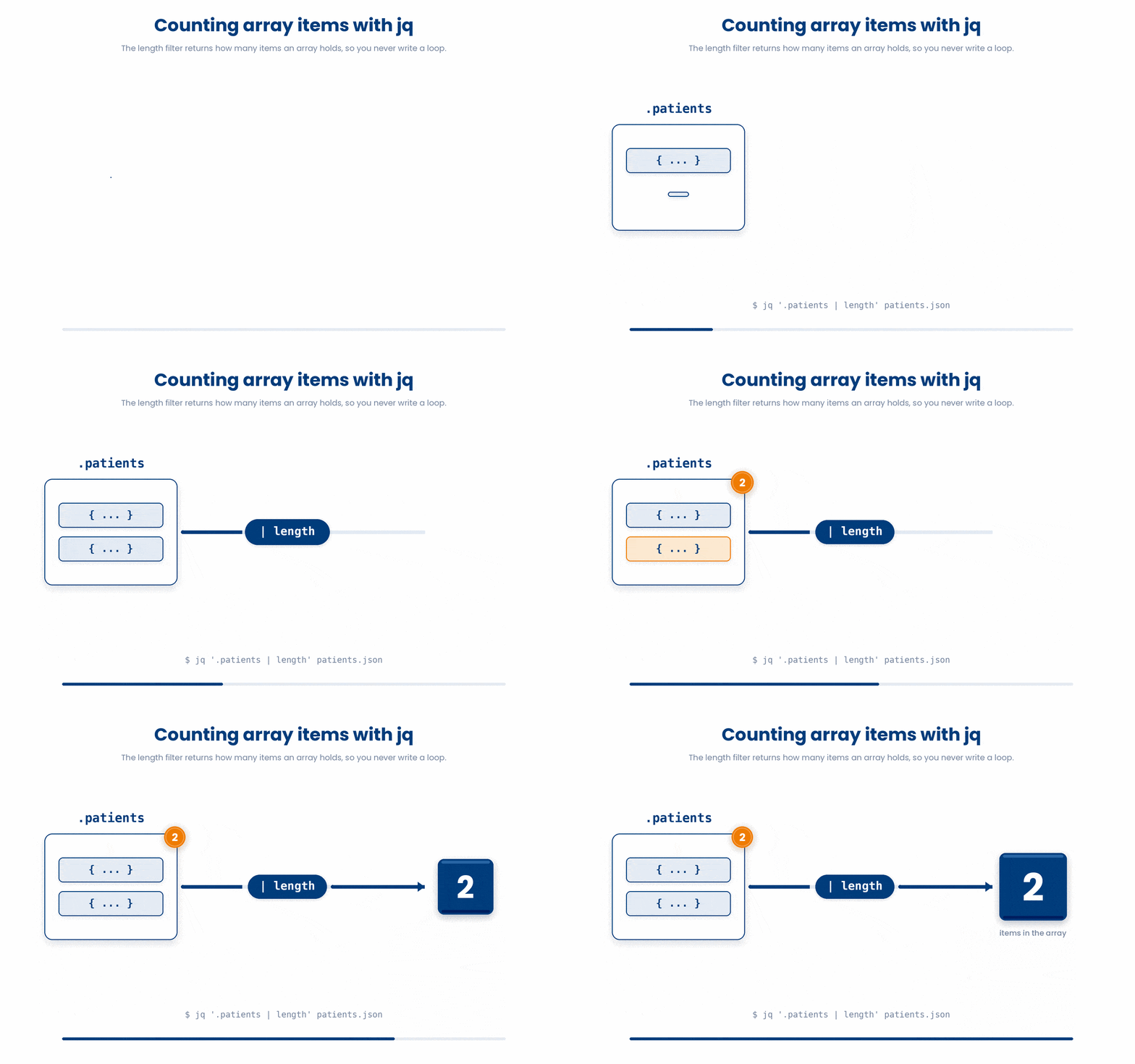
5 CSV - The Quoting Trap
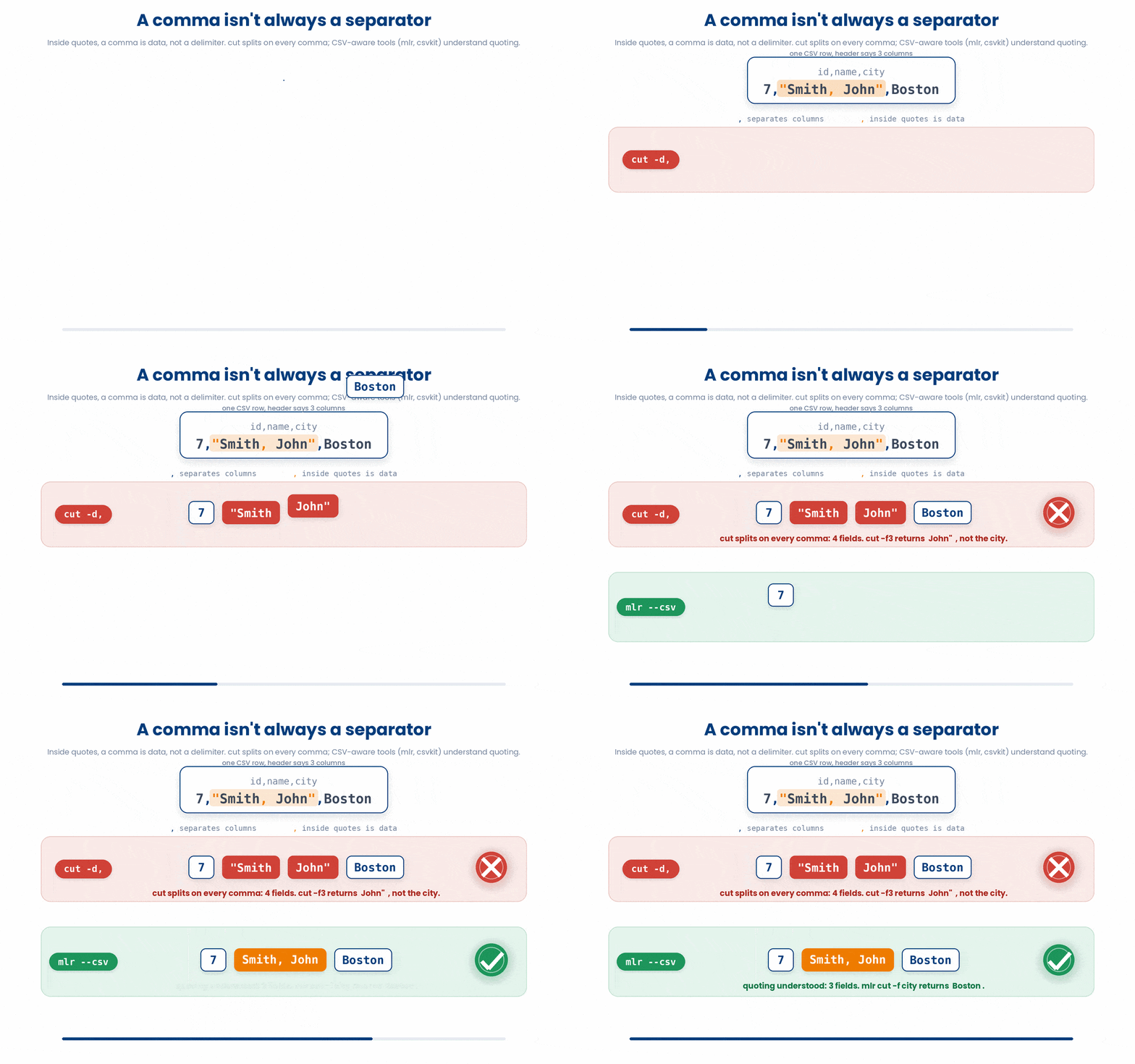
You probably already know how to slice clean CSVs with command-line tools like cut and awk. However, real-world CSVs introduce a major complication: data fields often contain commas themselves.
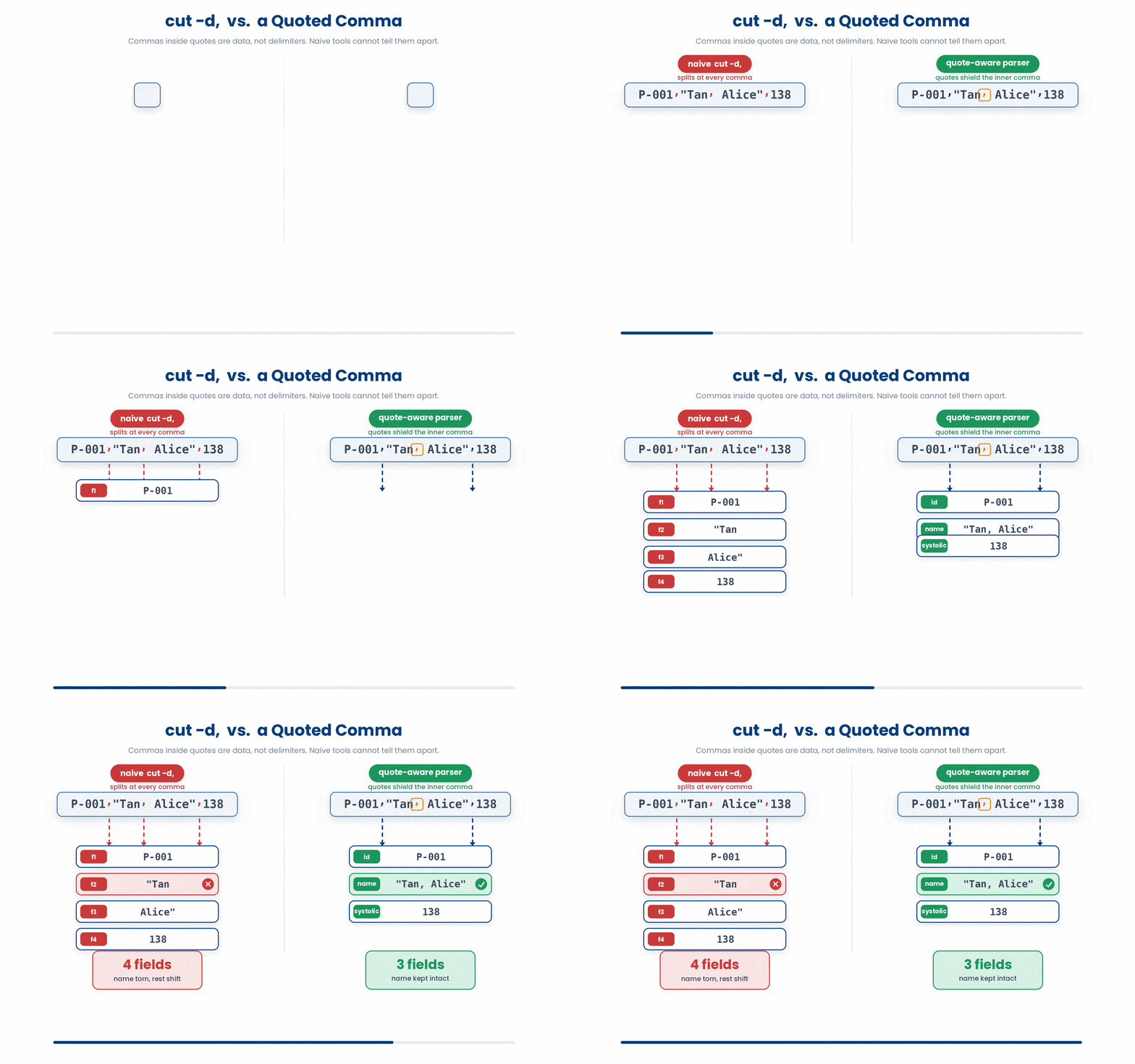
To prevent these internal commas from breaking the format, the data is usually wrapped in double quotes. For example, a name field might be "Tan, Alice". This is technically one value, but standard tools like cut -d, do not understand quoting. They will blindly split the field at the inner comma.
Try this snippet in the Bash Scratchpad on the right.
$ cat cohort.csv
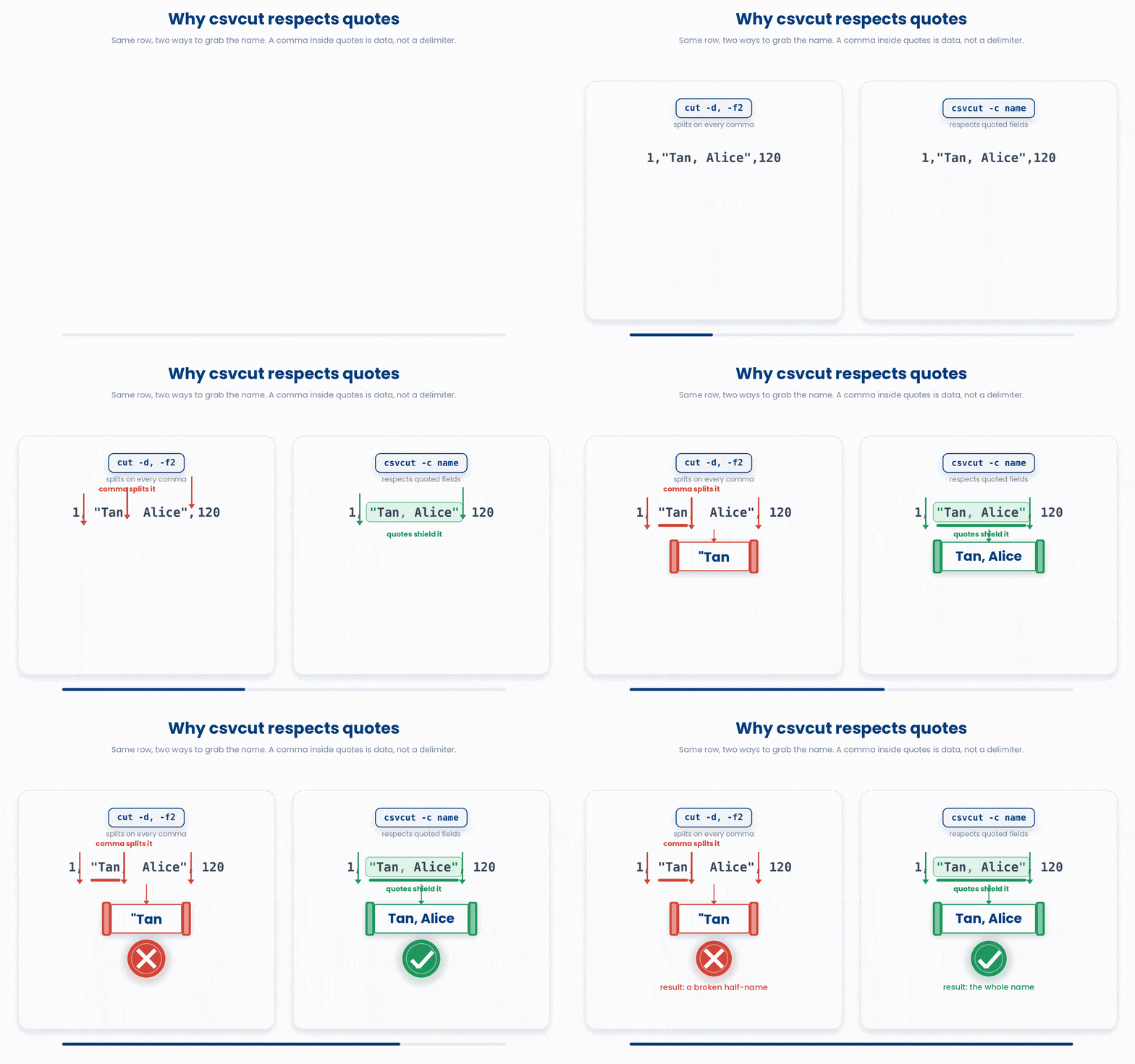
$ cut -d, -f2 cohort.csvWhat happened? cut returned "Tan instead of Tan, Alice. Even worse, every column after the name is now off by one position. The file looks fine to the naked eye, but your answer is silently wrong. This is the single most common way command-line CSV analysis goes bad.
6 csvkit - CSV-Aware Tools
The robust fix is to use tools that actually understand CSV quoting. csvkit is a popular Python toolkit (installed via pip install csvkit) designed exactly for this.
Note: As this requires pip install, you will be able to run this on the bash scratchpad
Its commands feel familiar, but they allow you to select columns by their header name and safely respect quoted fields.
- csvcut -c name cohort.csv - pick a column by header name, not position.
- csvcut -c id,systolic cohort.csv - several columns at once.
- csvlook cohort.csv - render the CSV as a tidy aligned table for reading.
- csvstat cohort.csv - per-column summary: type, min, max, mean, nulls, unique values.
$ csvcut -c name cohort.csv
name
Tan, Alice
Lim, Ben
The full name survives because csvcut parses the quotes properly.
Meanwhile, csvstat tells you the type and range of your data before you write any analysis:
$ csvcut -c systolic cohort.csv | csvstat
  1. "systolic"
    Type of data: Number
    Smallest value: 138
    Largest value:  152
    Mean: 145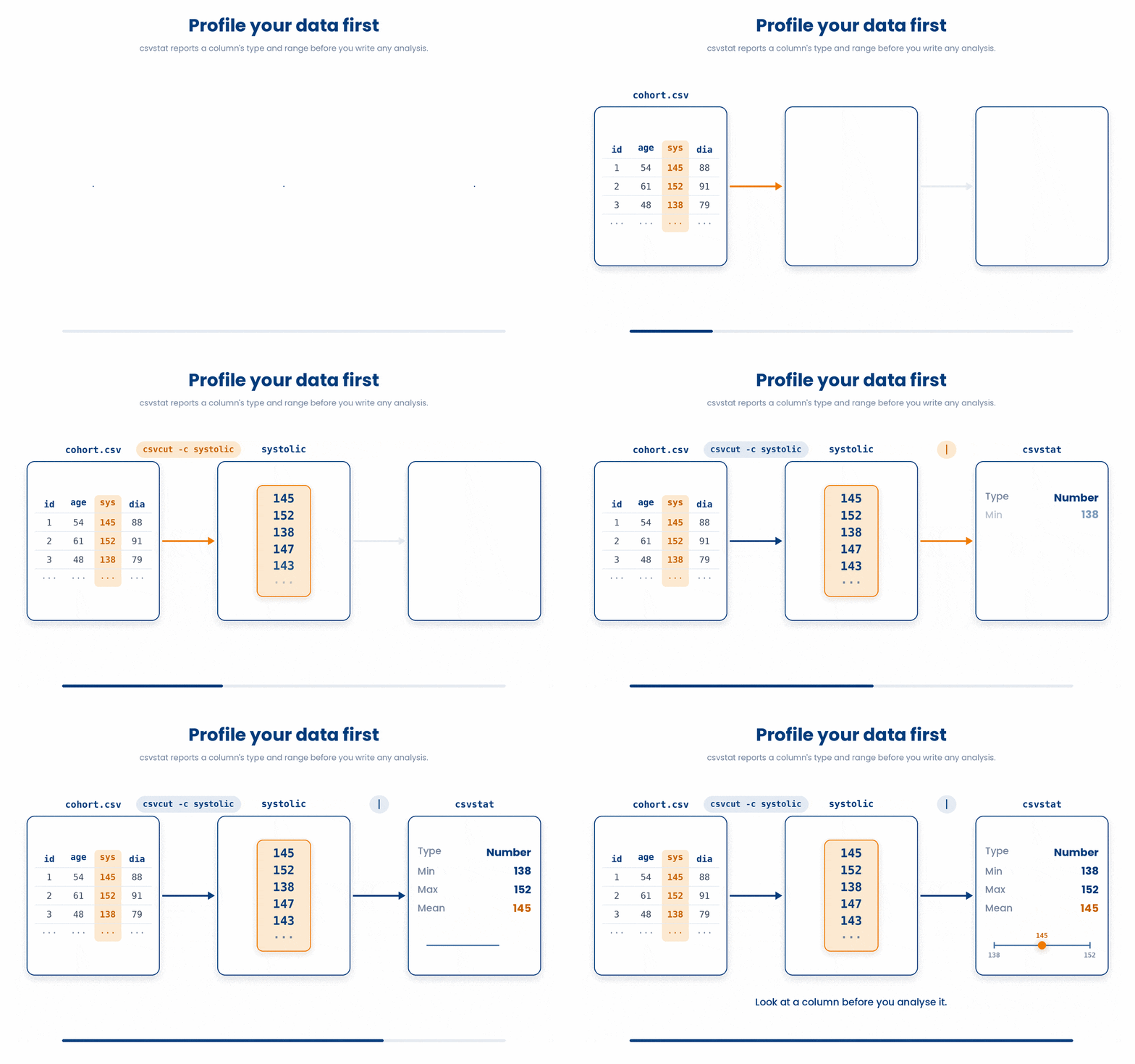
6.1 Converting in and out
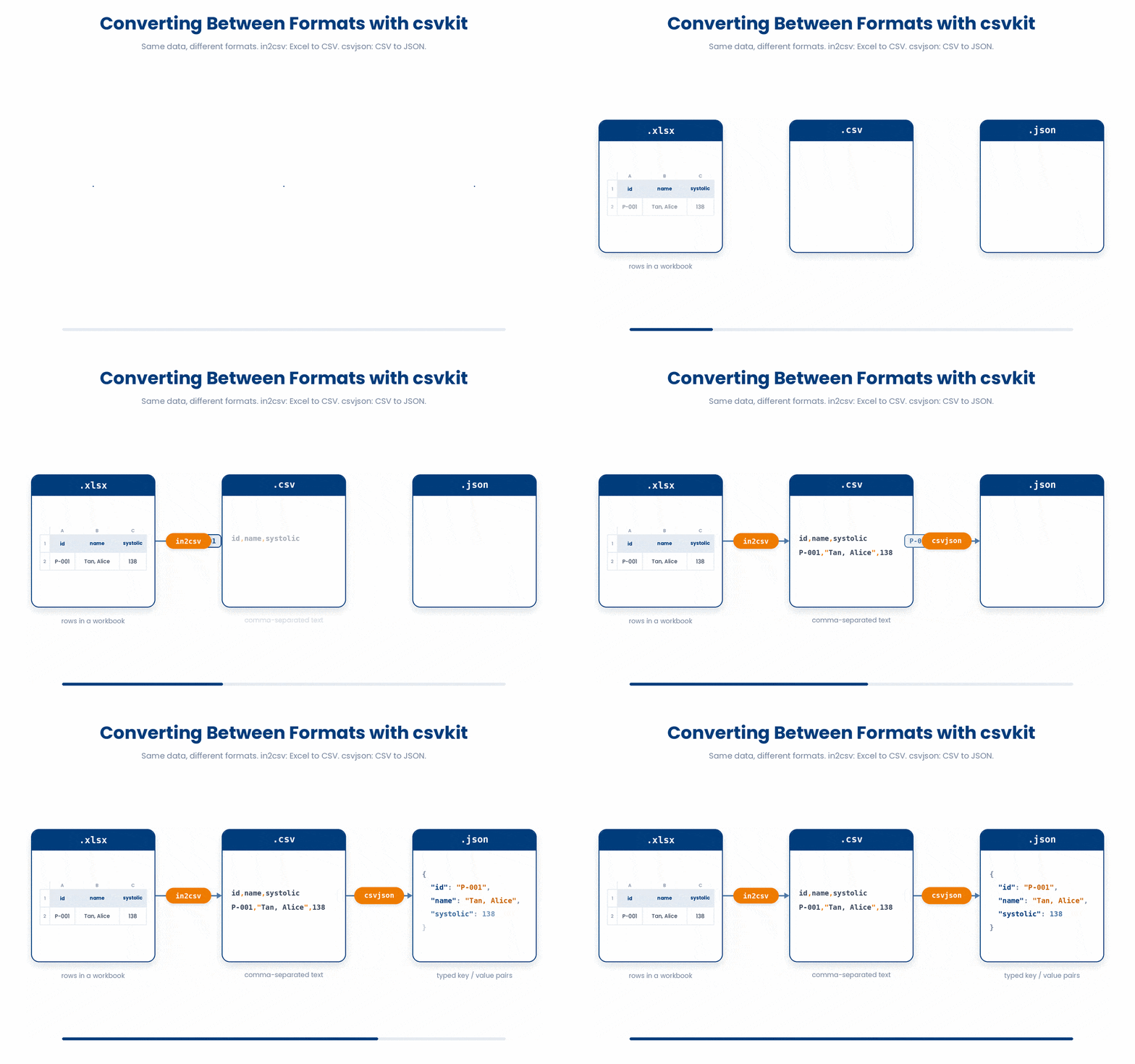
csvkit is not just for reading; it is also excellent for format conversion, helping you move data between different systems.
- in2csv: Turns an Excel sheet directly into a CSV.
- csvjson: Turns a CSV into JSON.
$ in2csv cohort.xlsx > cohort.csv
$ csvjson cohort.csv | jq '.[0]'
{
  "id": "P-001",
  "name": "Tan, Alice",
  "systolic": 138
}
An alternative worth knowing is Miller (mlr). It is a single, extremely fast program that handles CSV, TSV, and JSON natively. However, Miller is beyond the scope of this tutorial.
Whether you choose csvkit or Miller, stop using cut on any CSV that might contain quoted fields.
While jq, csvkit, and Miller are perfect for fast, command-line answers. But when your work grows past basic slicing and summarizing—like complex joins, data reshaping, or real statistics—it is time to step out of the terminal and move your data into Python (pandas) or R.
7 Check your understanding
You have reached the end of the module. Try the same questions again — your answers here, paired with your pre-test answers, are how we measure what the module taught you. Answer every question and confidence rating, then click Submit and see results to view your score.
Which command prints every patient id as plain text, one per line?
What does the -r flag do in jq?
On the row P-001,"Tan, Alice",138 what does cut -d, -f2 return?
Which tool selects the CSV column called name while respecting quoted fields?
In jq, what does ending a filter with @csv do?
In jq, what does the single-dot filter '.' do to a dense one-line JSON response?
How do you count how many patients are in the array with jq, without writing a loop?
Which csvkit tool turns a CSV file into JSON?
I can use jq to pull a field out of a JSON document.
I can turn selected JSON fields into CSV rows with jq.
I know why cut can give wrong results on quoted CSVs, and which tool to use instead.
8 Your results
Here is how your post-test answers compare with your pre-test answers. The pre/post pairing is the most reliable way to see what this module actually taught you.
Submit the post-test to see your results.
What is the one thing from this module that is still unclear to you?