

1 Before you start
This is not graded, and it does not count towards anything. Answer every question even if you are only guessing — having a go at something before you have been taught it is one of the best ways to remember it afterwards. The lesson ends with another short check, and there you will be shown the correct answer for anything you missed. Choose an option for every question and confidence rating, then click Submit answers.
What does set -e do?
Why use set -u in a script?
What does set -o pipefail change?
What does the >&2 at the end of an echo do?
What is shellcheck?
What does set -x do when you are debugging?
What is the shebang line #!/usr/bin/env bash for?
Why write "$file" in quotes instead of $file?
I can explain what set -e, set -u, and set -o pipefail do, and I use all three at the top of my scripts.
I know how to run shellcheck on a script and act on its warnings.
I can write log and err helper functions to make my scripts' output easier to follow.
2 Introduction
A bash script that works on your first test is rare. A bash script that keeps working a month later, on someone else's machine, with slightly different input - that takes discipline.
This lesson is about habits and tools that turn fragile scripts into ones you can trust. None of it is hard; almost all of it is just turning knobs bash has but does not turn on by default.
- Strict mode: set -e, set -u, set -o pipefail - and what each one does.
- Shellcheck: a free linter that catches bugs before you write them.
- Tracing: Seeing what your script is doing with bash -x and set -x.
- Logging: Writing useful error messages to stderr with >&2.
- Small style habits that pay off forever.
3 Strict Mode - The First Three Lines of Every Script
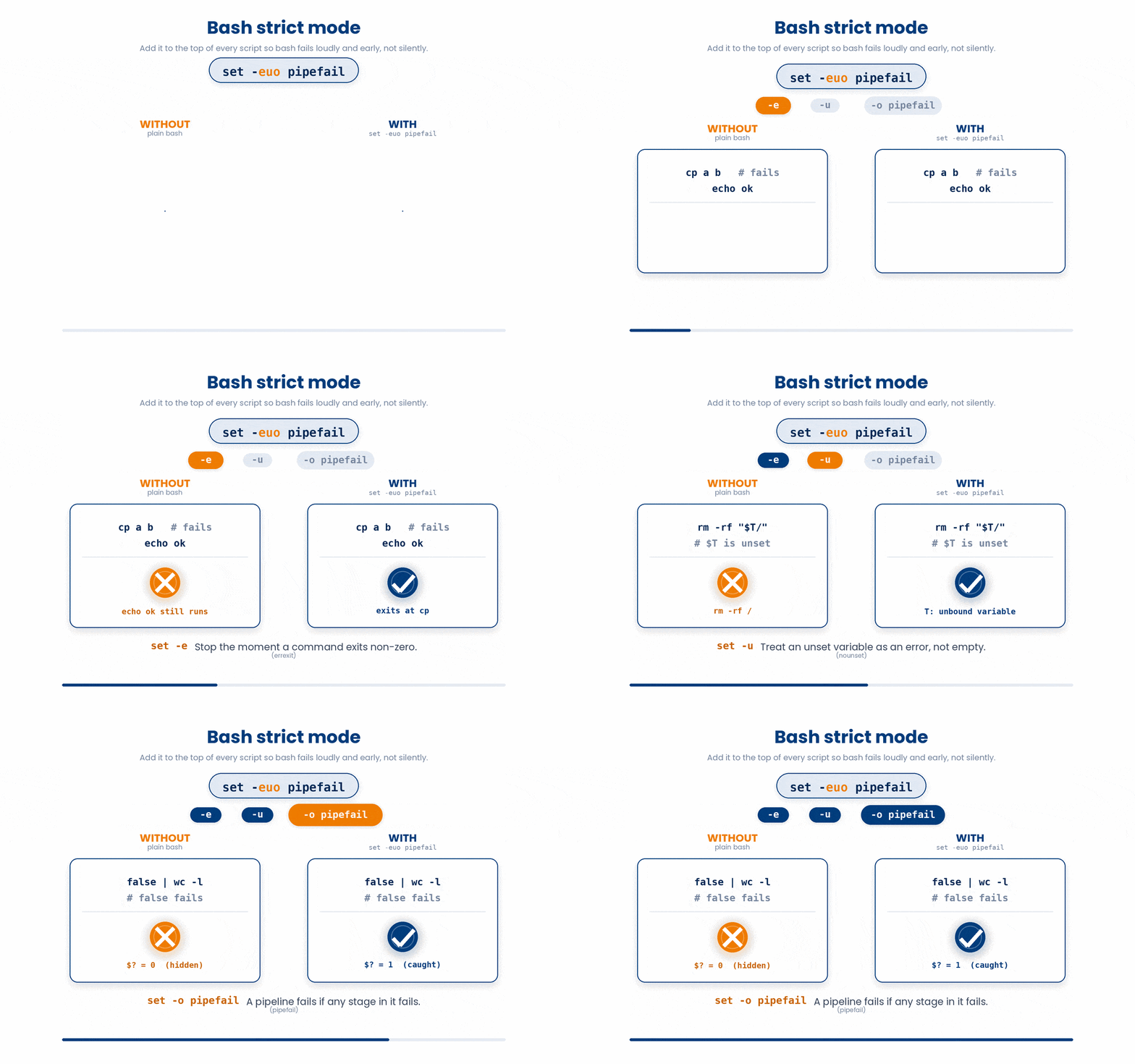
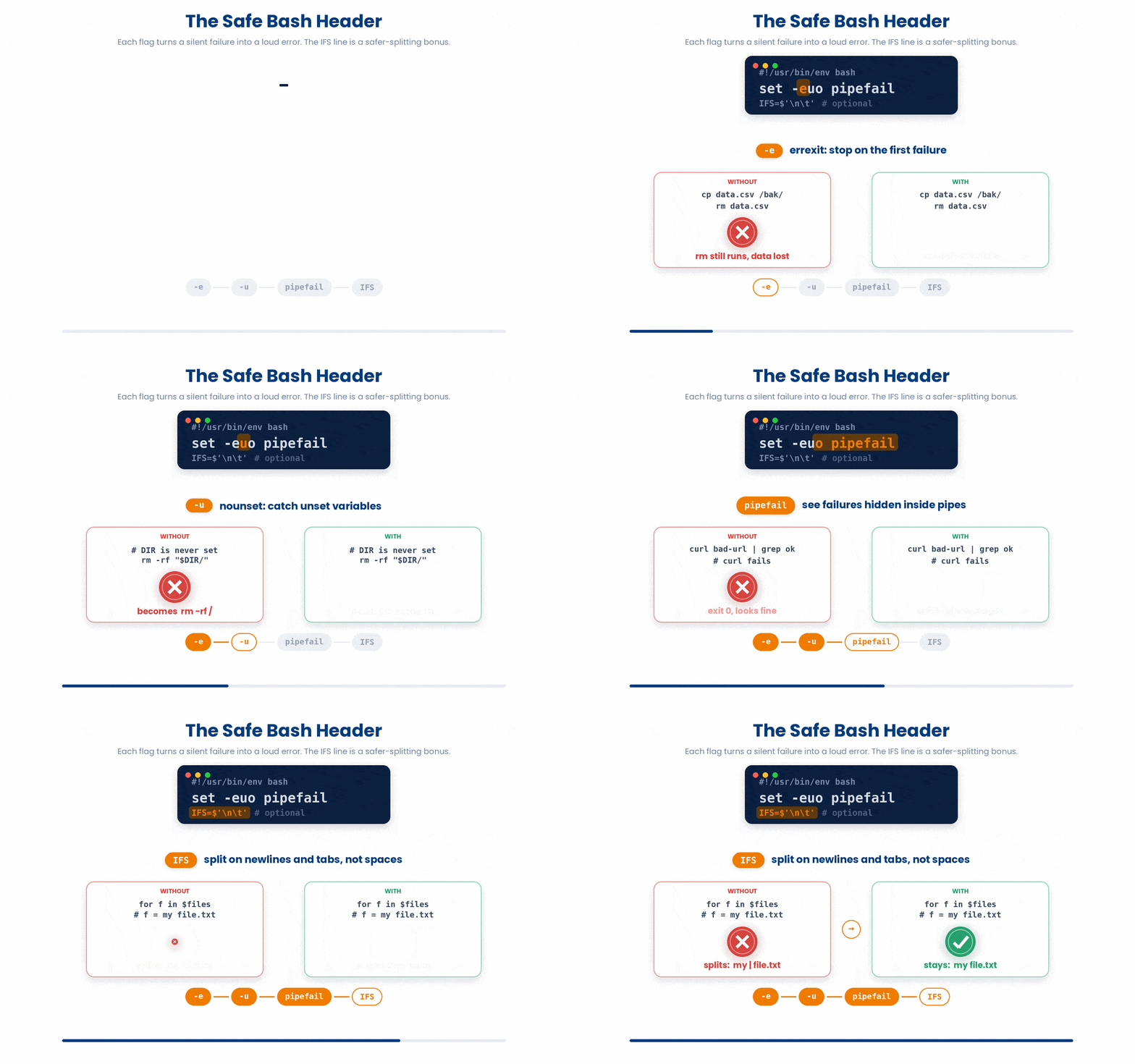
Bash, by default, is very forgiving. If a command fails, the script keeps going. If you use a variable that does not exist, bash treats it as empty. If a pipeline fails halfway through, bash reports success because the last command succeeded.
None of this is what you want when your script is doing real work. Three options turn that behavior around. Think of these as putting on your seatbelt before driving.
3.1 set -e
Without set -e, the echo runs even if grep failed.
With set -e, the script bails the moment any command returns a non-zero exit code (an error), preventing further damage.
#!/usr/bin/env bash
set -e

grep hypertension diagnoses.csv > hyp.txt # if this fails, the script stops here
echo "done"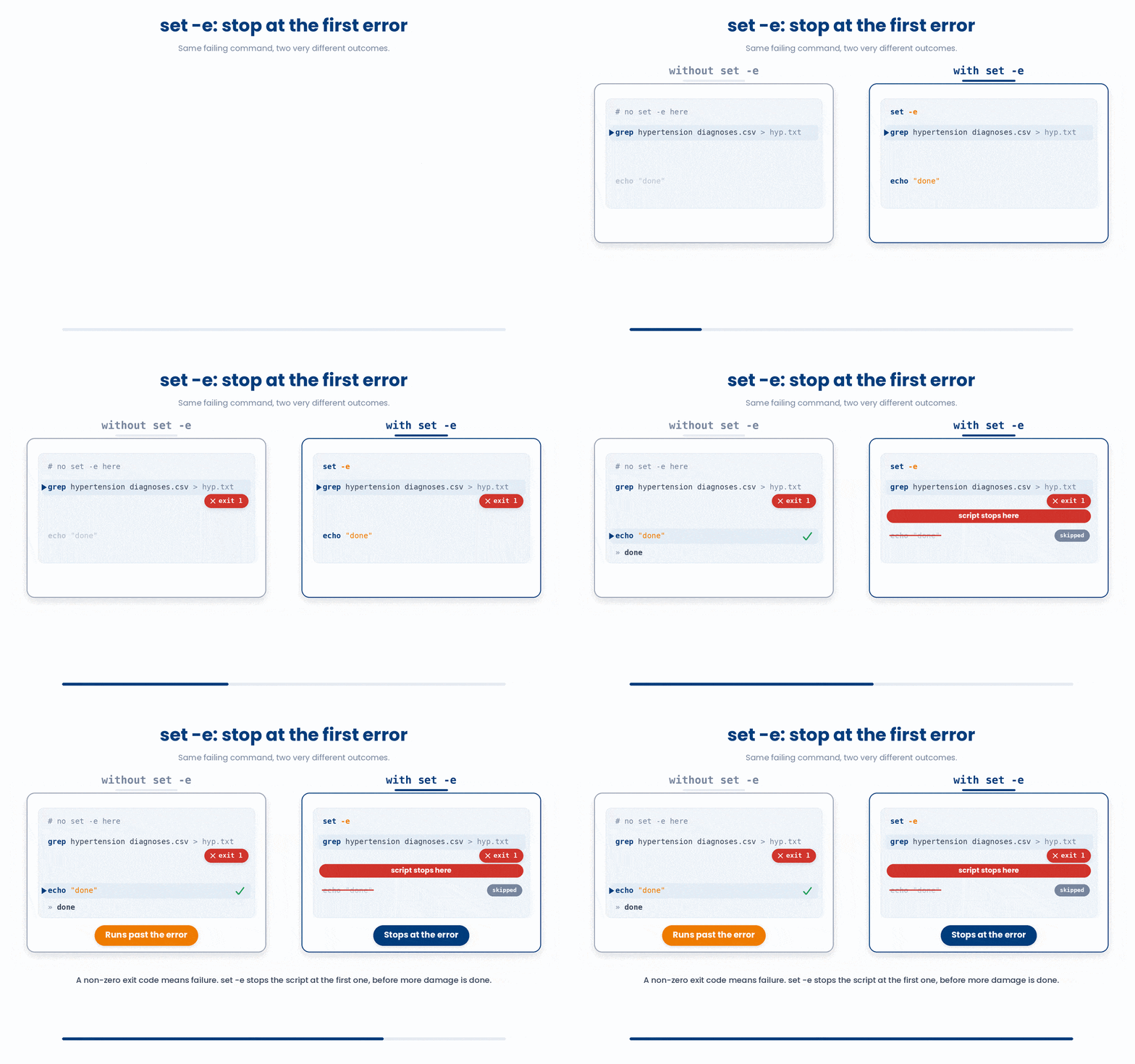
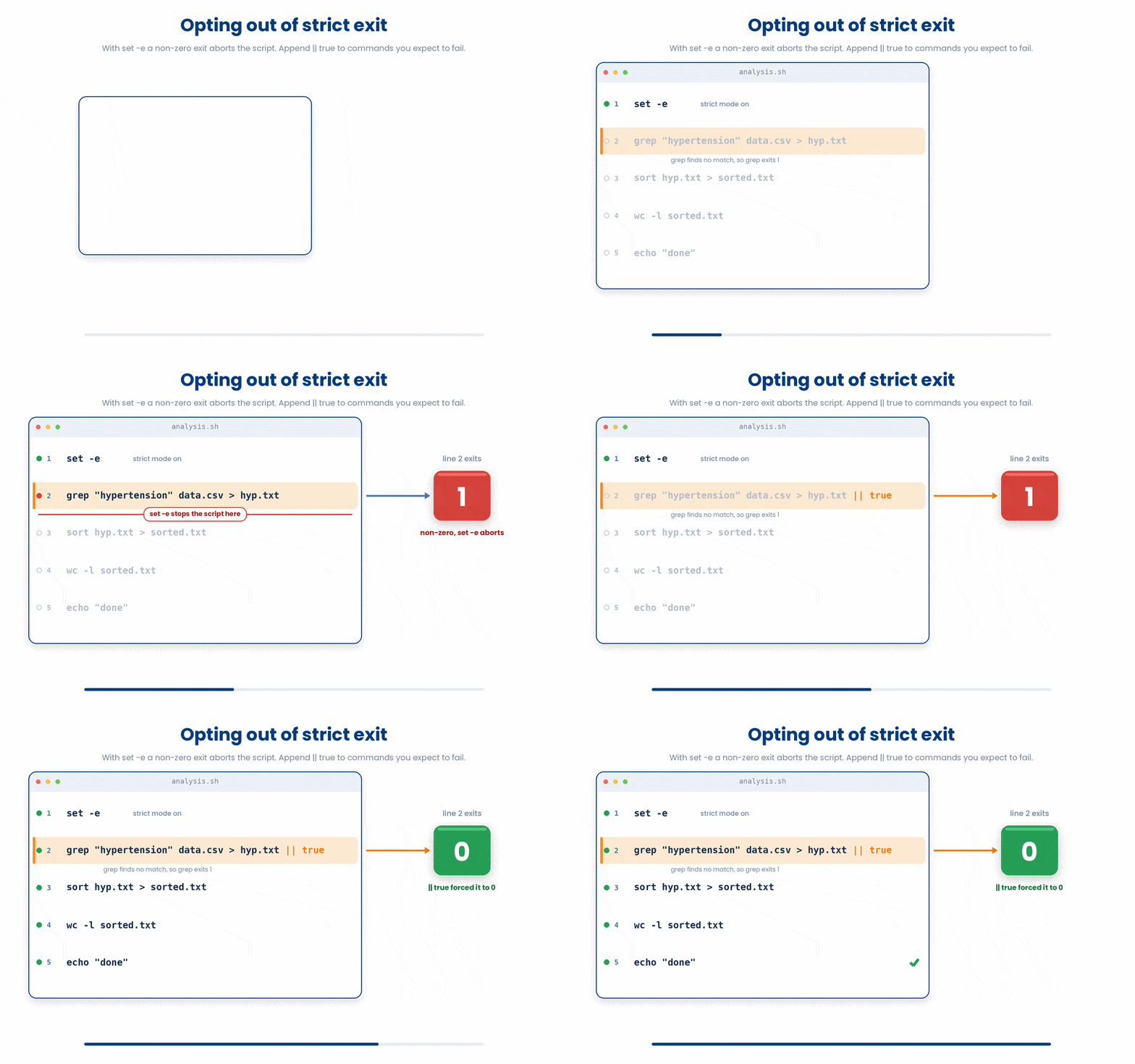
Some commands you expect to sometimes fail (like grep returning empty). For those, you can append || true to opt out of the strict exit: grep "hypertension" data.csv > hyp.txt || true
3.2 set -u
If $COHORT_DIR is unset, the above command silently becomes rm -rf /scratch—which is a total disaster. set -u makes bash refuse to expand an unset variable and exits instead. That single change has saved more home folders than any other bash flag.
#!/usr/bin/env bash
set -u

rm -rf "$COHORT_DIR/scratch" # if COHORT_DIR is unset, this becomes rm -rf /scratch - disaster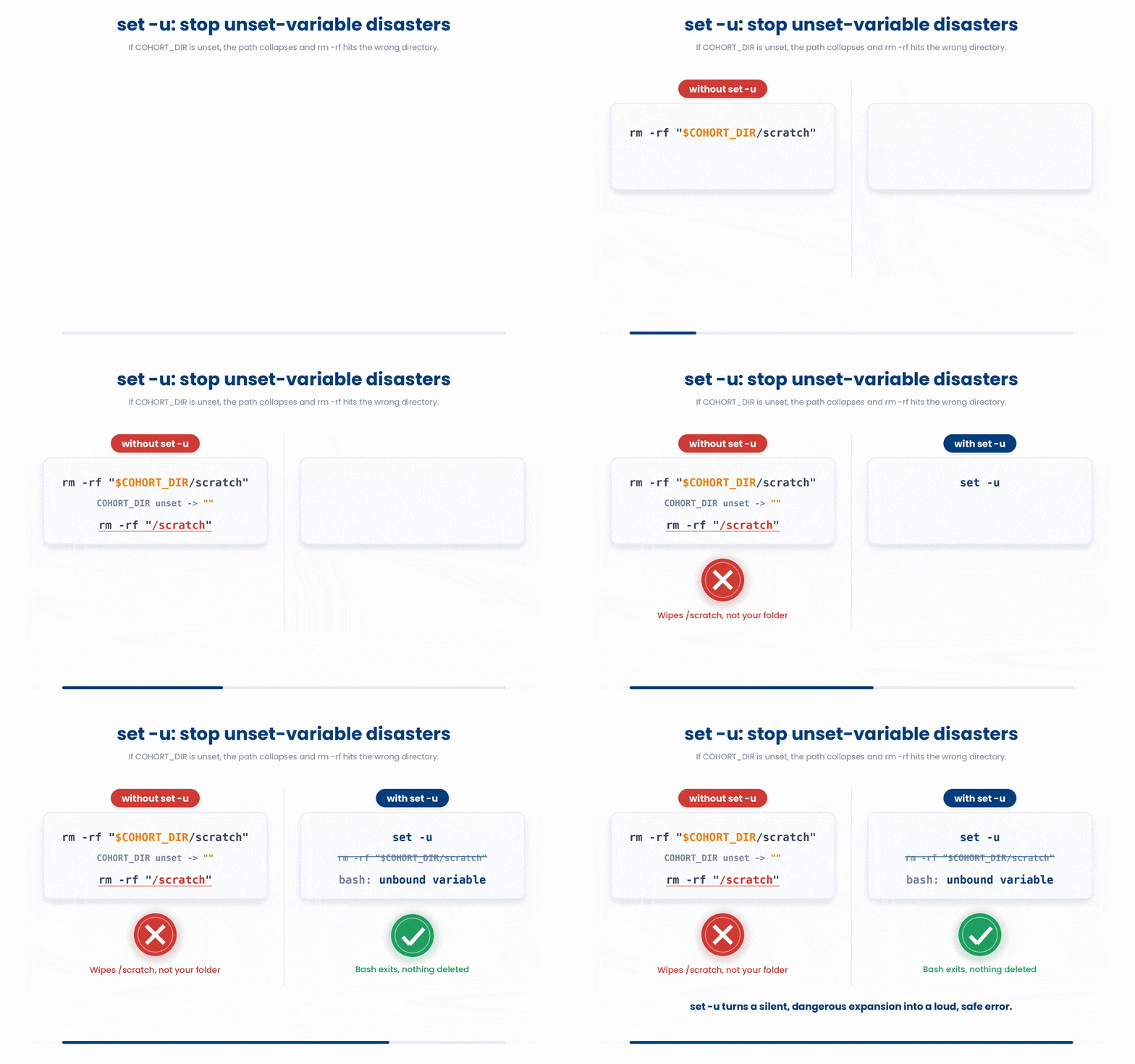
3.3 set -o pipefail
By default, a pipeline's exit code is just the last command's exit code (in this case, wc -l successfully counted 0 lines).
set -o pipefail changes that: if any stage fails, the whole pipeline fails. Pair this with set -e and you catch broken upstream steps instead of carrying on with empty data.
$ cat missing.csv | wc -l
cat: missing.csv: No such file or directory
0
$ echo $?
0 # cat failed but the pipeline "succeeded"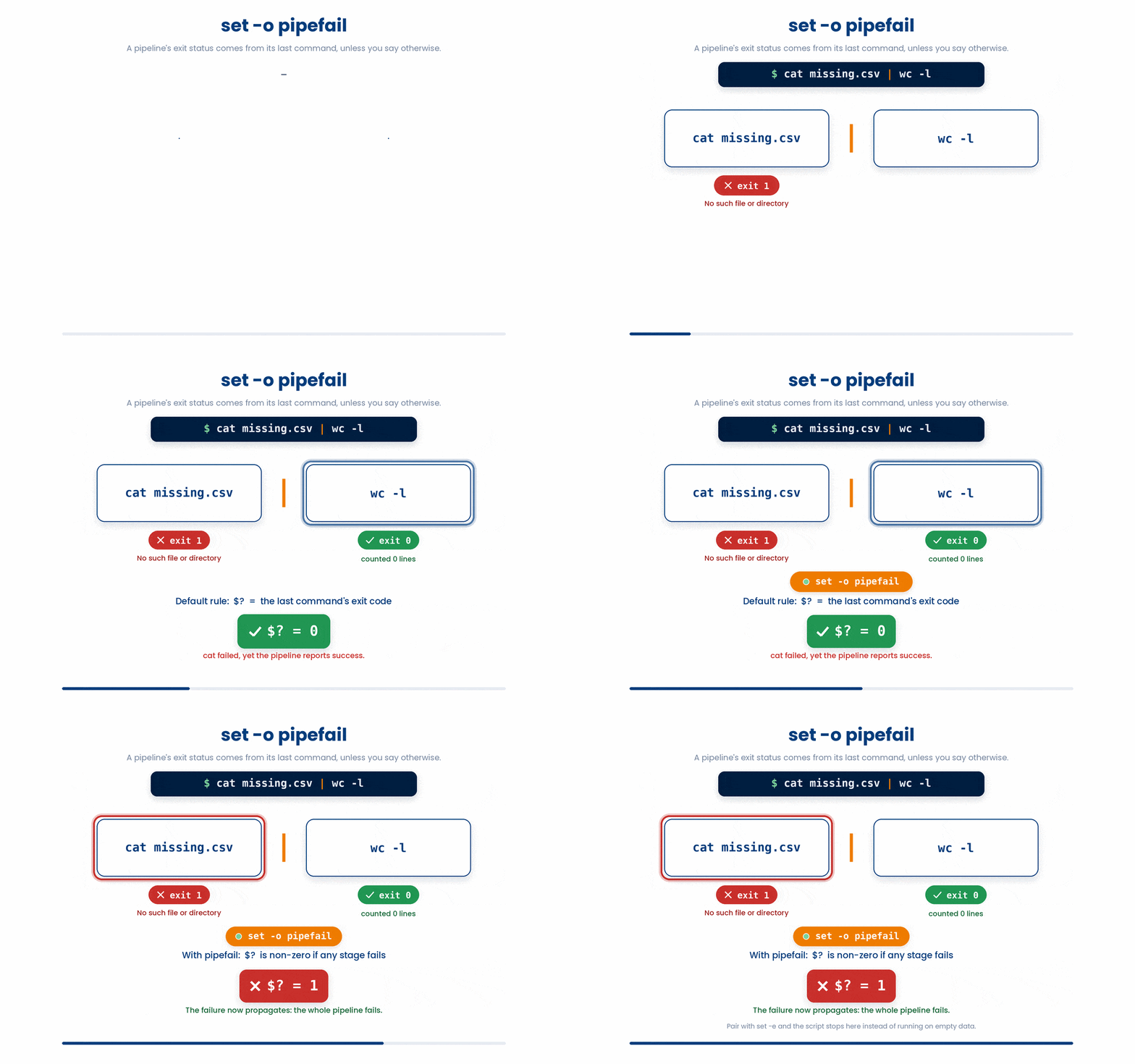
Try this snippet in the Bash Scratchpad on the right.
$ cat missing.csv | wc -l
$ echo "exit without pipefail: $?"
$ set -o pipefail
$ cat missing.csv | wc -l
$ echo "exit with pipefail: $?"
$ set +o pipefail3.4 The recommended top of every script
Most professional bah scripts start with exactly these two or three lines:
#!/usr/bin/env bash
set -euo pipefail
IFS=$'\
\\t' # optional: safer word splitting
set -euo pipefail combines the three options in one go. The IFS line is a bonus that makes the shell split on newlines and tabs instead of any whitespace—super useful when your data contains spaces!
4 shellcheck - The Linter You Should Always Run
Writing bash relies heavily on memorizing weird syntax.
Shellcheck is a free "linter" (a tool that analyzes your code for errors). If you accidentally leave off a quote, or use a command that behaves unpredictably across different operating systems, Shellcheck will flag it and tell you exactly how to fix it.
$ shellcheck analyse_cohort.sh

In analyse_cohort.sh line 12:
    rm -rf $COHORT_DIR/scratch
          ^----------^ SC2086: Double quote to prevent globbing and word splitting.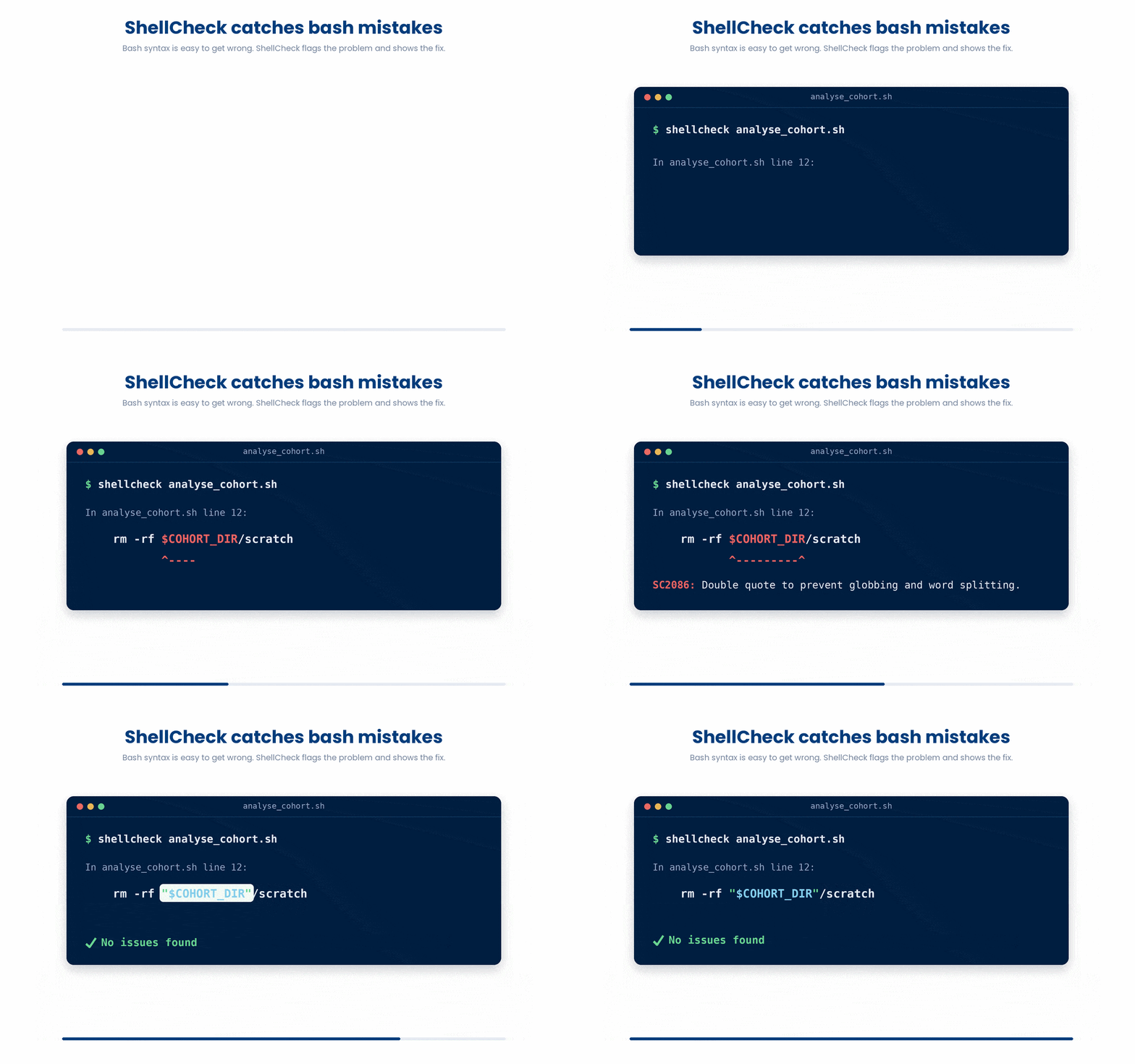
You can paste your code into shellcheck.net, install it as an extension in VS Code, or run it directly in your terminal (shellcheck myscript.sh).
5 Tracing - What Is My Script Actually Doing?
Sometimes a script runs, doesn't throw an error, but produces the wrong result. To figure out what the computer is actually doing, you need to turn on tracing.
Tracing prints every single command to the screen after variables have been expanded, right before it runs.
- To trace an entire script: Run it with bash -x myscript.sh.
- To trace a specific section: Wrap the tricky part in set -x (turn on) and set +x (turn off).
#!/usr/bin/env bash
set -euo pipefail
echo "Starting process..."
set -x # Turn tracing ON
FILE_COUNT=$(ls | wc -l)
echo "There are $FILE_COUNT files."
set +x # Turn tracing OFF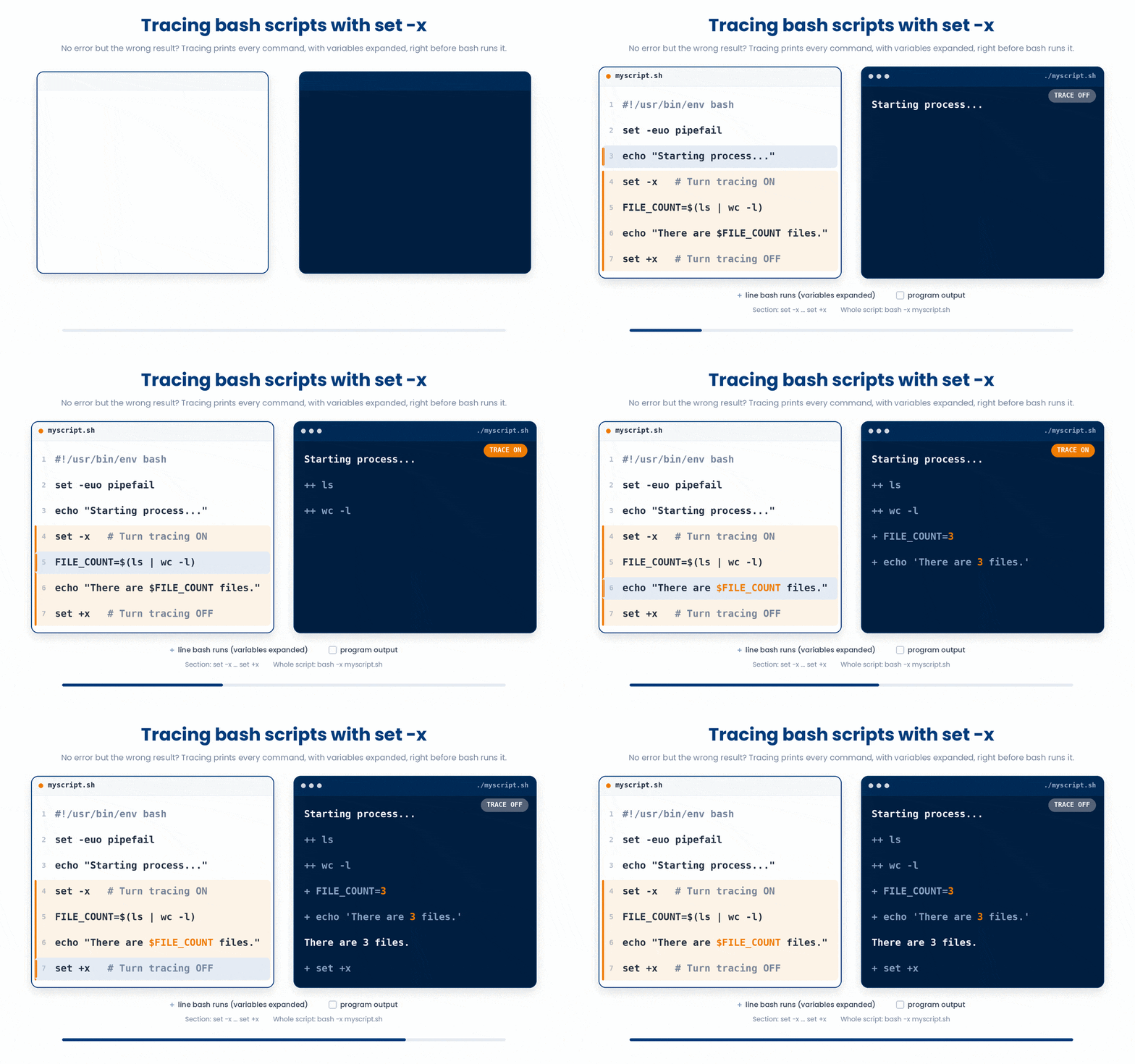
Try this snippet in the Bash Scratchpad on the right.
$ set -x
$ n=$(wc -l < cohort_2026.csv)
$ echo "rows: $n"
$ set +x6 Logging and Useful Error Messages
When your script breaks, the error message is your only clue. "Error" is not a helpful message. "Error: could not find diagnoses.csv in /data/folder" is a great message.
Furthermore, in Unix, there are two standard "streams" for text output:
- Standard Output (stdout): The actual data your script produces.
- Standard Error (stderr): Updates, warnings, and error messages.
If you just use echo "Error!", it goes to stdout. If someone runs your script and saves the output to a file (./myscript.sh > results.txt), your error message gets buried in the text file instead of showing up on the screen!
if [[ ! -f "$input" ]]
then
    echo "ERROR: input file $input does not exist" >&2
    exit 1
fi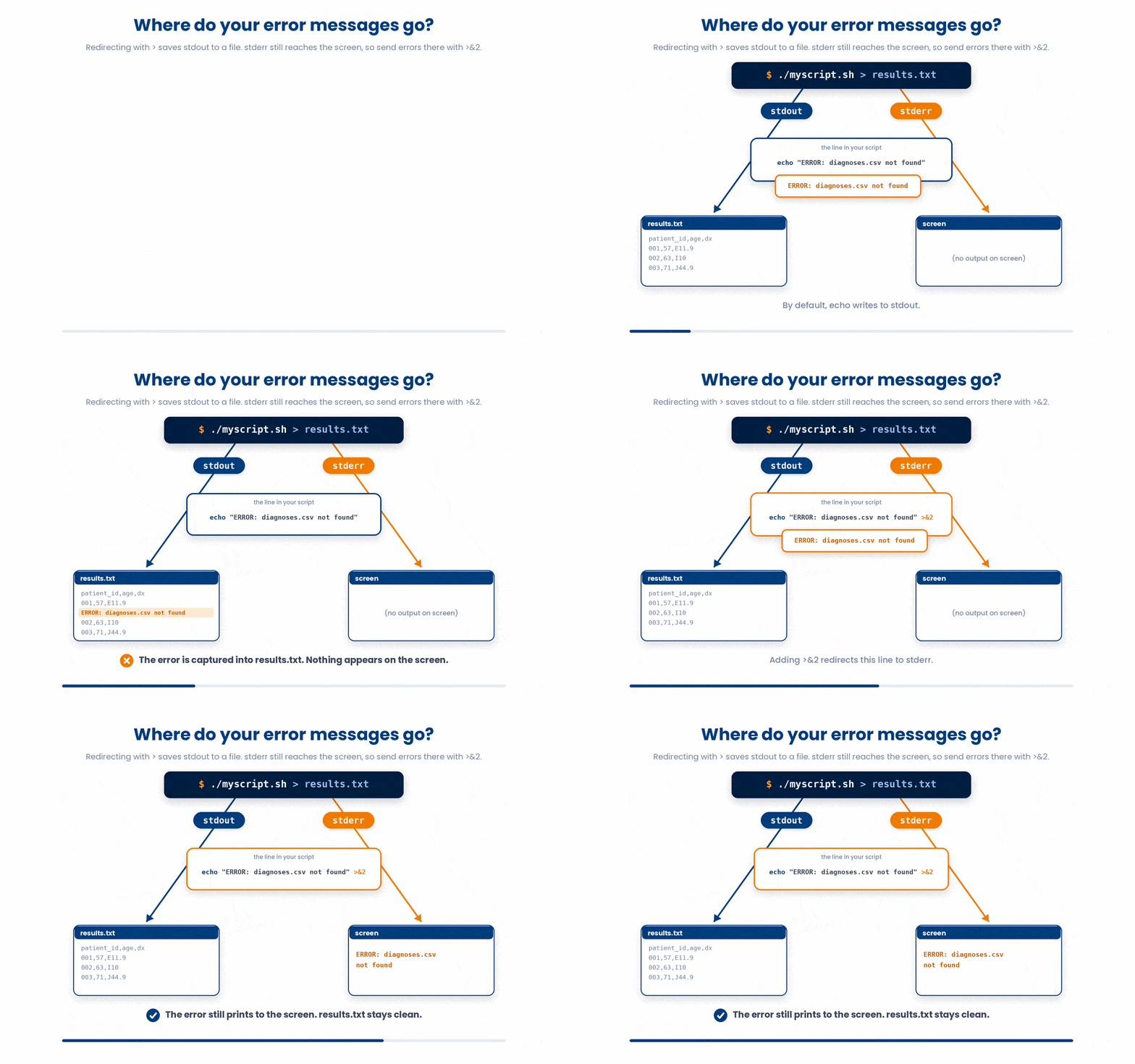
Adding >&2 to the end of your echo command explicitly routes that text to the error stream. It guarantees the user sees it on their screen, even if they are saving the standard data output to a file.
6.1 Reusable log helpers
There are two tiny helpers - log and err – that makes your script produce a clean timestamped trail of what it is doing, with fatal errors clearly marked. Drop them at the top of every non-trivial script.
log() {
    echo "[$(date +%H:%M:%S)] $*" >&2
}

err() {
    echo "[$(date +%H:%M:%S)] ERROR: $*" >&2
    exit 1
}

log "Starting cohort analysis"
log "Processing patient P-001"
[[ -f cohort_2026.csv ]] || err "cohort_2026.csv is missing"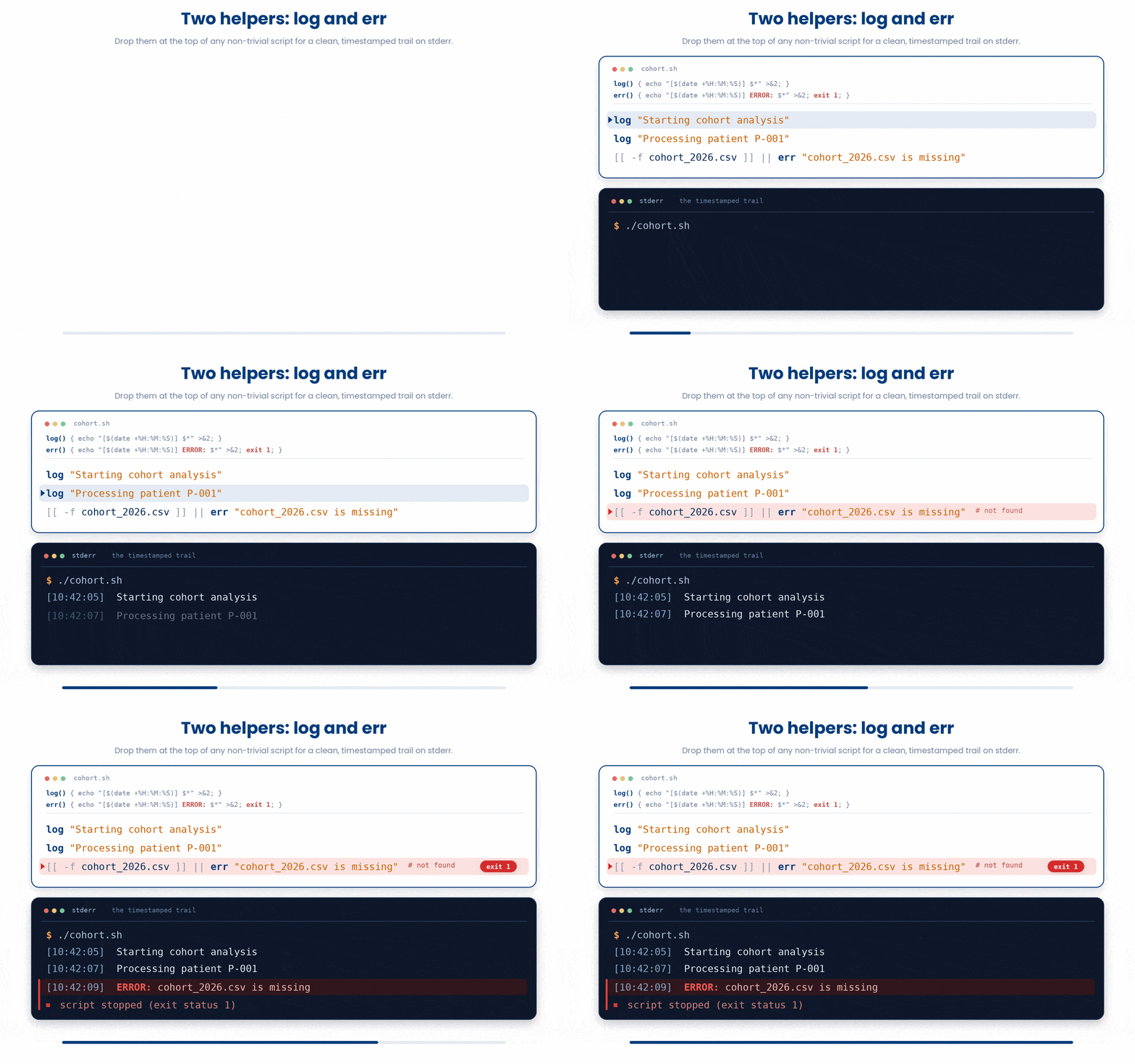
Try this snippet in the Bash Scratchpad on the right.
log() {
    echo "[$(date +%H:%M:%S)] $*" >&2
}
log "starting cohort analysis"
[[ -f cohort_2026.csv ]] && log "cohort file found"7 Small Habits That Pay Off Forever
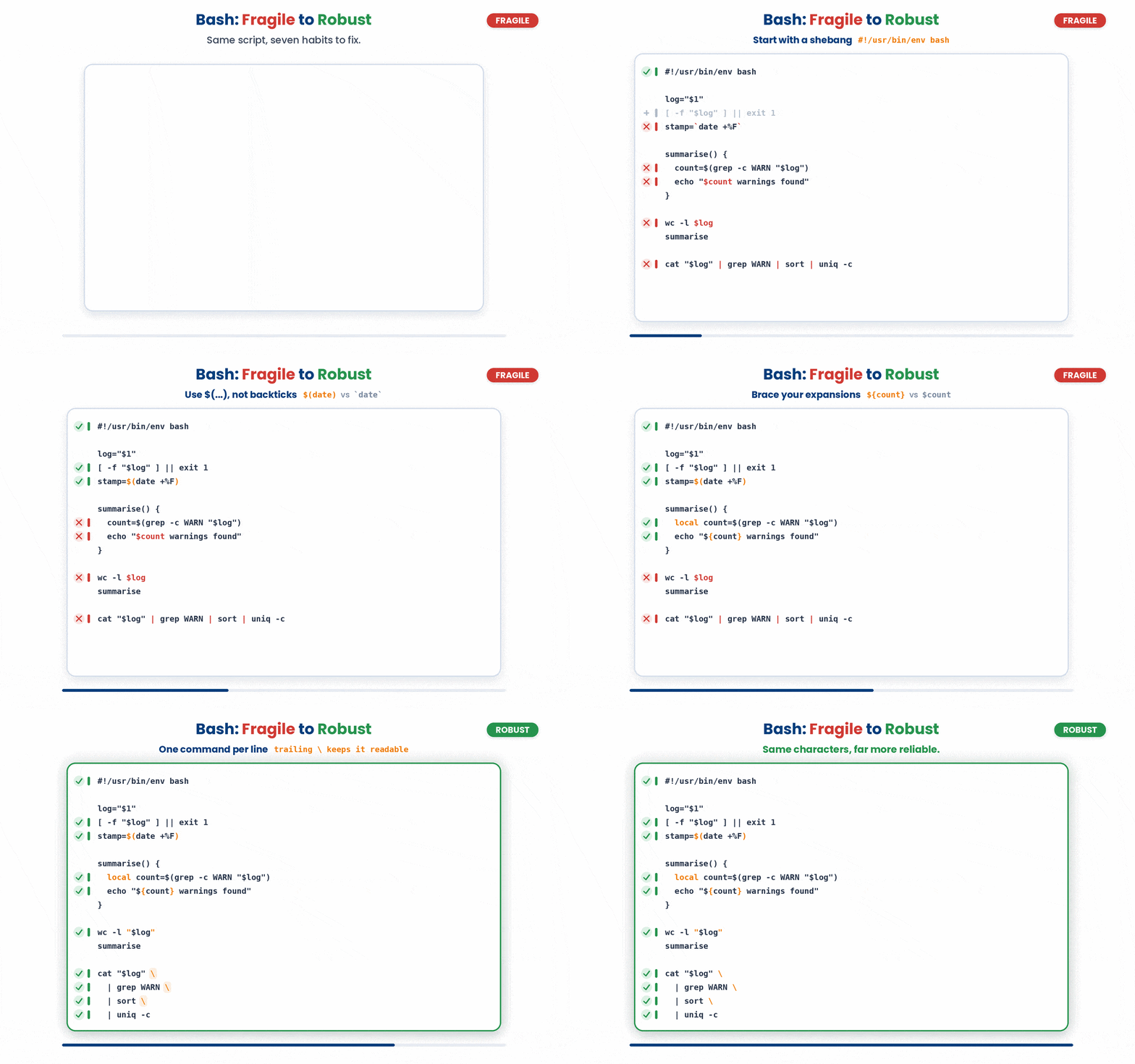
None of these is hard; most are "one or two extra characters". Together they are the difference between bash scripts you fight and bash scripts you rely on.
- Always quote your variables: "$file", not $file. Even when you are sure it does not have spaces.
- Start every script with #!/usr/bin/env bash on the very first line (the shebang) so the system knows which interpreter to use.
- Use ${var} braces in every expansion, not just when you have to.
- Use local for every variable inside a function.
- Use $(...) for command substitution, never backticks.
- Check that input files exist at the top of the script - fail loud and early.
- For long pipelines, put one command per line with a trailing backslash - it stays readable.
8 Check your understanding
You have reached the end of the module. Try the same questions again — your answers here, paired with your pre-test answers, are how we measure what the module taught you. Answer every question and confidence rating, then click Submit and see results to view your score.
What does set -e do?
Why use set -u in a script?
What does set -o pipefail change?
What does the >&2 at the end of an echo do?
What is shellcheck?
What does set -x do when you are debugging?
What is the shebang line #!/usr/bin/env bash for?
Why write "$file" in quotes instead of $file?
I can explain what set -e, set -u, and set -o pipefail do, and I use all three at the top of my scripts.
I know how to run shellcheck on a script and act on its warnings.
I can write log and err helper functions to make my scripts' output easier to follow.
9 Your results
Here is how your post-test answers compare with your pre-test answers. The pre/post pairing is the most reliable way to see what this module actually taught you.
Submit the post-test to see your results.
What is the one thing from this module that is still unclear to you?