

1 Before you start
This is not graded, and it does not count towards anything. Answer every question even if you are only guessing — having a go at something before you have been taught it is one of the best ways to remember it afterwards. The lesson ends with another short check, and there you will be shown the correct answer for anything you missed. Choose an option for every question and confidence rating, then click Submit answers.
What does sed 's/foo/bar/' do to a line?
How do you make sed replace EVERY match on the line, not just the first?
In awk, what does $0 mean?
Which awk one-liner sums column 6 (systolic) of a comma-separated cohort file, skipping the header?
Which flag tells awk that the field separator is a comma?
In awk, what does NR contain?
Which awk program prints the THIRD field of every line?
What does the -i flag do in sed -i 's/draft/final/g' report.txt?
I can do a search-and-replace on a file with sed.
I can use awk to select specific columns from a delimited file.
I can filter rows in awk based on a numeric condition.
2 Introduction
Two more tools for your text-wrangling toolkit. sed is the stream editor - it transforms text as it flows by, mostly via search-and-replace. awk is a tiny programming language purpose-built for processing tabular data line by line and column by column. Together they handle the 80% of data-cleaning jobs that grep, cut, sort, and uniq cannot quite reach. We will use a patient vitals CSV so the patterns transfer straight to clinical data work.
In this lesson, we will look at the following:
- sed for search-and-replace and line editing.
- awk's mental model: pattern { action } per line.
- Selecting and computing on columns with $1, $2, ... $NF.
- Filtering rows by a condition; aggregating with END { ... }.
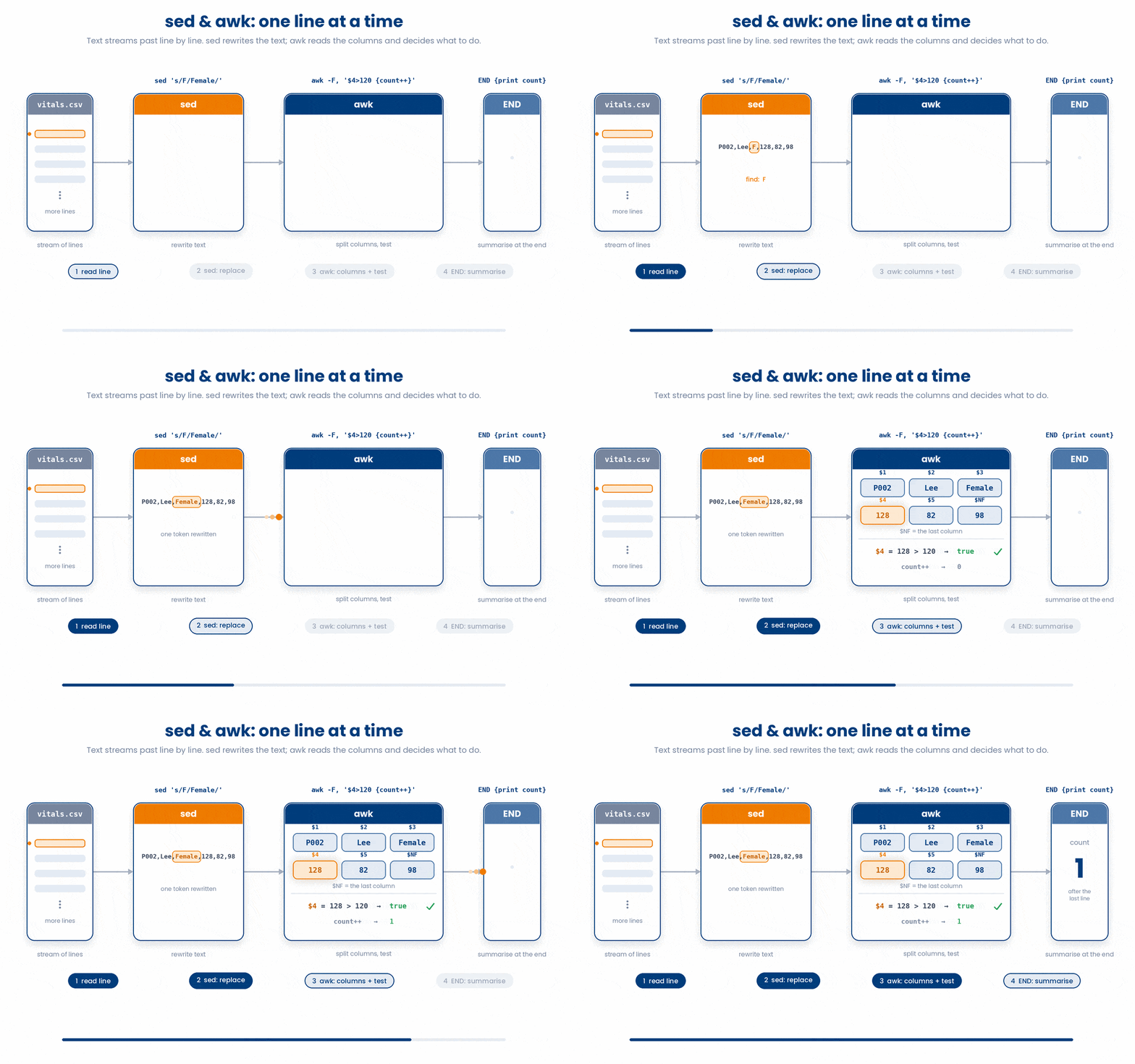
3 sed - Stream Editor
sed is a stream editor. It reads text flowing through your terminal (a stream), automatically applies rules to modify it on the fly, and spits out the result.
It is incredibly powerful for automating edits across massive files or cleaning up data in a pipeline.
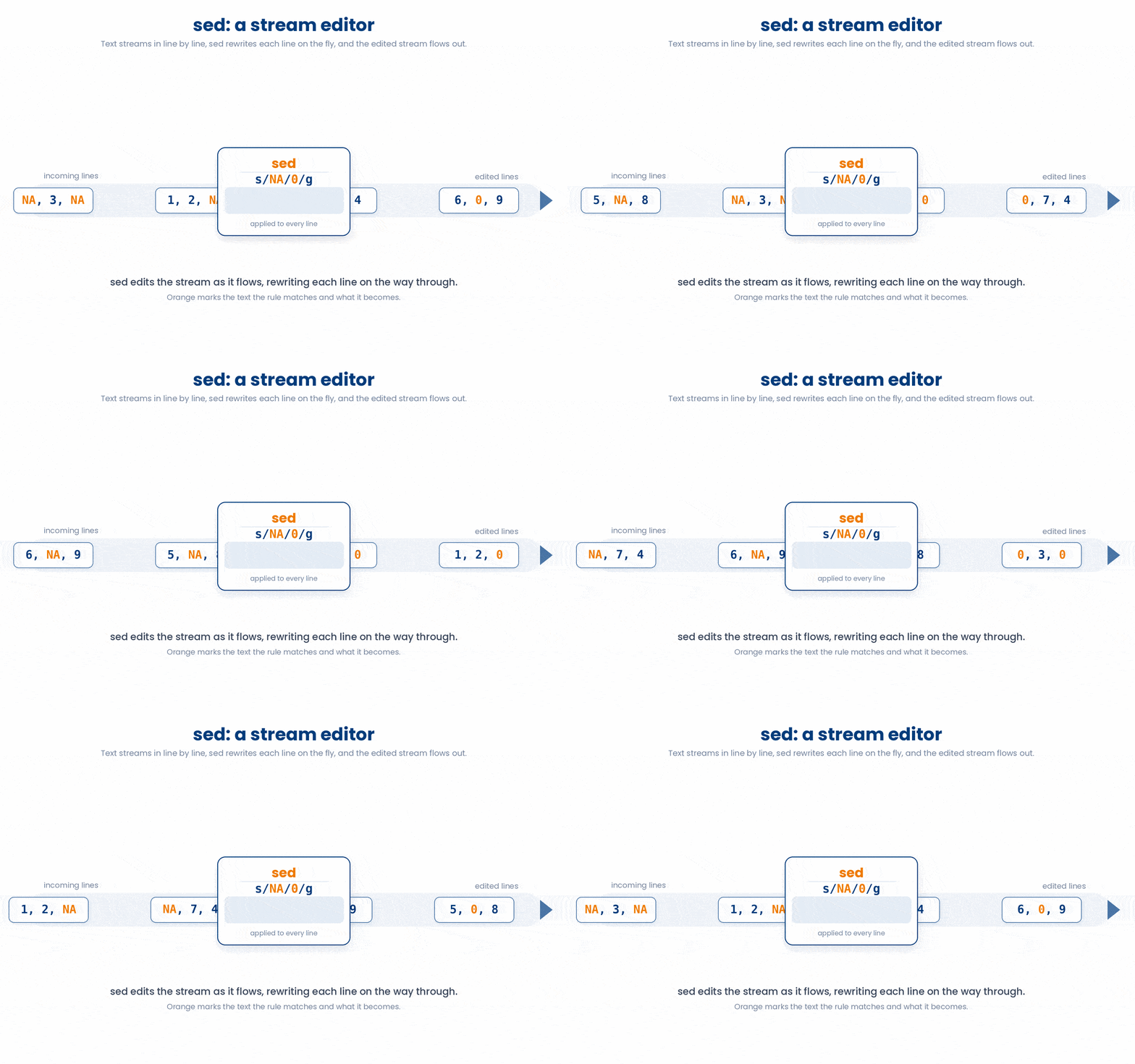
3.1 Substitution - the main use case
The most common use for sed is searching and replacing text.
The sed ‘s/SEARCH_PATTERN/REPLACEMENT_TEXT/FLAGS’ form is the syntax for the search-and-replace.
$ echo 'Hello world' | sed 's/world/bash/'
Hello bash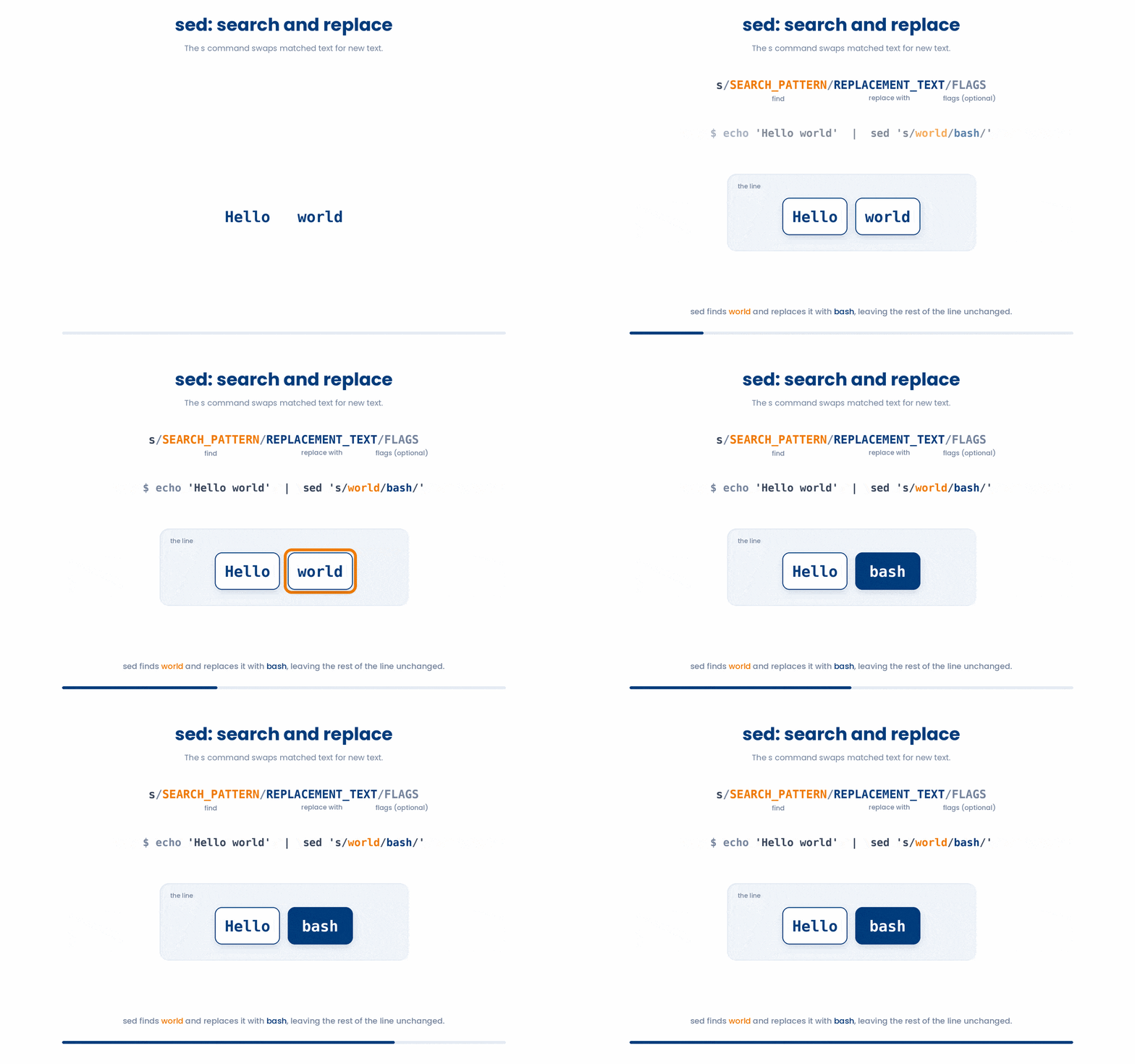
If you want to replace every instance on a line, add the g (global) flag at the end.
$ echo 'aaa bbb aaa' | sed 's/aaa/zzz/'
zzz bbb aaa
$ echo 'aaa bbb aaa' | sed 's/aaa/zzz/g'
zzz bbb zzz
Try this snippet in the Bash Scratchpad on the right.
$ head -n 2 cohort_2026.csv | sed 's/,/ | /'
$ head -n 2 cohort_2026.csv | sed 's/,/ | /g'3.2 Editing a file
By default, sed just prints the modified text to your screen; it does not change the original file.
To save your changes, you have two options
$ sed 's/draft/final/g' report.txt > report_final.txtOr you can use the -i flag. The -i flag tells sed to overwrite the original file.
$ sed -i 's/draft/final/g' report.txtYou can tell sed to edit in-place but keep a backup of the original file by adding an extension directly after -i:
$ sed -i.bak 's/draft/final/g' report.txt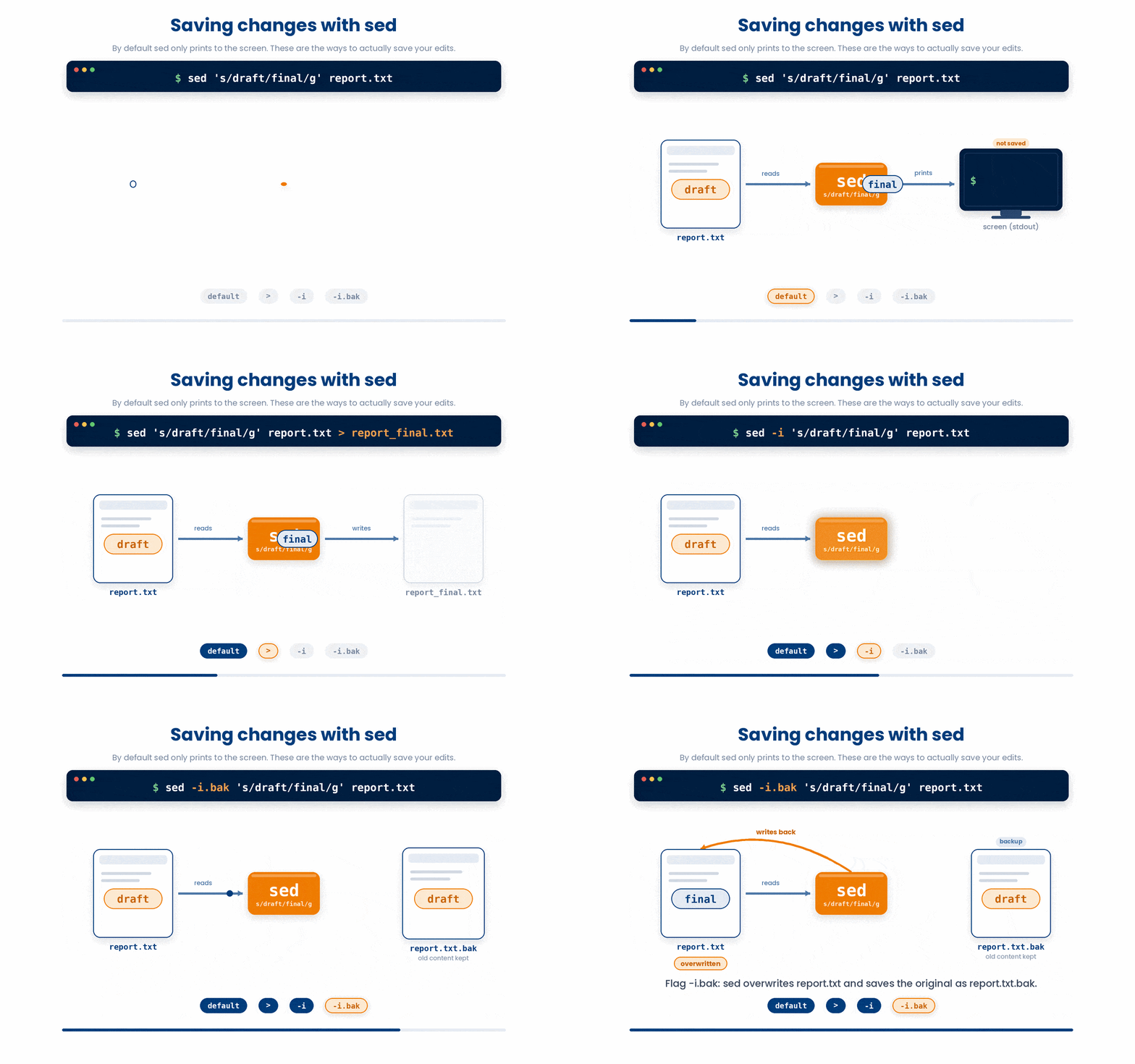
3.3 A different delimiter when / is awkward
If you are trying to replace file paths or URLs, using the standard / delimiter gets incredibly messy because you have to "escape" every slash with a backslash \. (Programmers call this "leaning toothpick syndrome").
You might end up with something messy like this
$ echo '/home/old/data' | sed 's/\/home\/old/\/home\/new/'Instead, sed allows you to use almost any character as a delimiter if you place it right after the s. Using the pipe | or a colon : makes paths much easier to read!
$ echo '/home/old/data' | sed 's|/home/old|/home/new|'
/home/new/data
3.4 Deleting lines
sed isn't just for replacing text; it's great for quickly removing rows of data using d, which is highly useful when cleaning up CSVs or config files.
You can delete a specific line number:
$ sed '1d' cohort_2026.csvor a range of lines.
$ sed '5,10d' cohort_2026.csvYou can use regular expressions to delete lines.
$ sed '/^CTRL/d' cohort_2026.csv
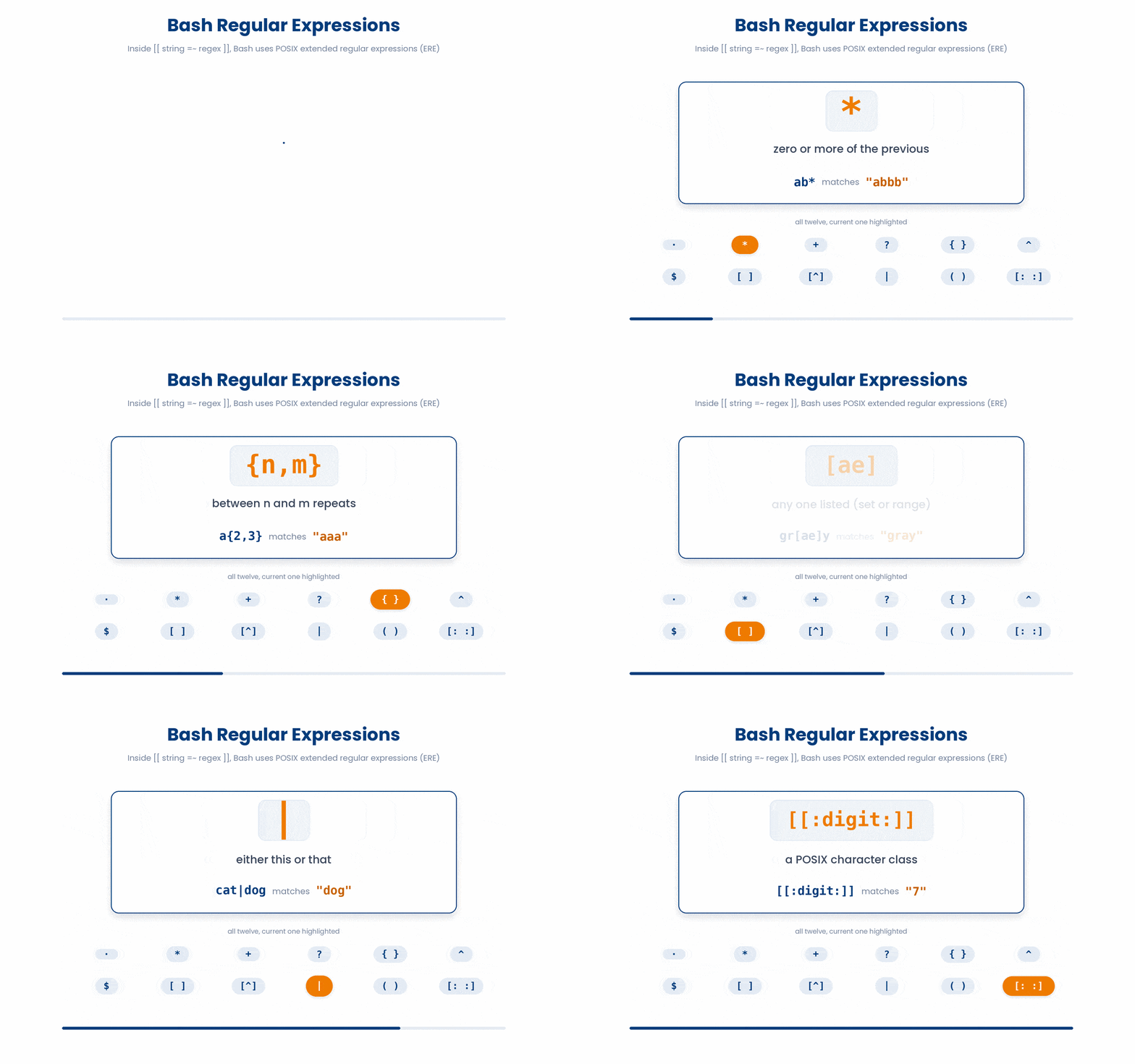
What if you want to make two different substitutions at the same time? You can chain commands together using the -e (expression) flag.
$ sed -e 's/Positive/1/g' -e 's/Negative/0/g' biomarker_panel.csv
4 awk - Line-and-Column Processing
While tools like sed are great for replacing text, awk is an entire programming language built explicitly for working with structured data, like CSVs or log files. If your data has rows and columns, awk is your best friend.
4.1 The mental model
awk reads input one line at a time. For each line it checks a pattern and runs an action when the pattern matches:
awk 'PATTERN { ACTION }' fileInside the action block, awk automatically splits the line into variables for you:
- $1, $2, $3... represent the first, second, third columns (fields) of the line.
- $0 represents the entire line.
- NF (Number of Fields) tells you how many columns are in the current line.
- NR (Number of Records) tells you the current row/line number.
By default, awk assumes columns are separated by spaces or tabs. If you are reading a CSV, use -F, to set the field separator to a comma.

4.2 Print a column
If you don't provide a pattern, awk assumes you want to match every line. Let's look at a sample file, cohort_2026.csv:
$ cat cohort_2026.csv
patient_id,age,sex,height_cm,weight_kg,systolic,diastolic
P-001,54,F,168,72,138,84
P-002,61,M,172,88,152,95
P-003,49,F,159,55,118,72
To print just the patient_id (Column 1):
$ awk -F, '{ print $1 }' cohort_2026.csv
patient_id
P-001
P-002
P-003
To print multiple columns, separate them with commas in your print statement. awk will insert a space between them in the output:
$ awk -F, '{ print $1, $6 }' cohort_2026.csv
patient_id systolic
P-001 138
P-002 152
P-003 118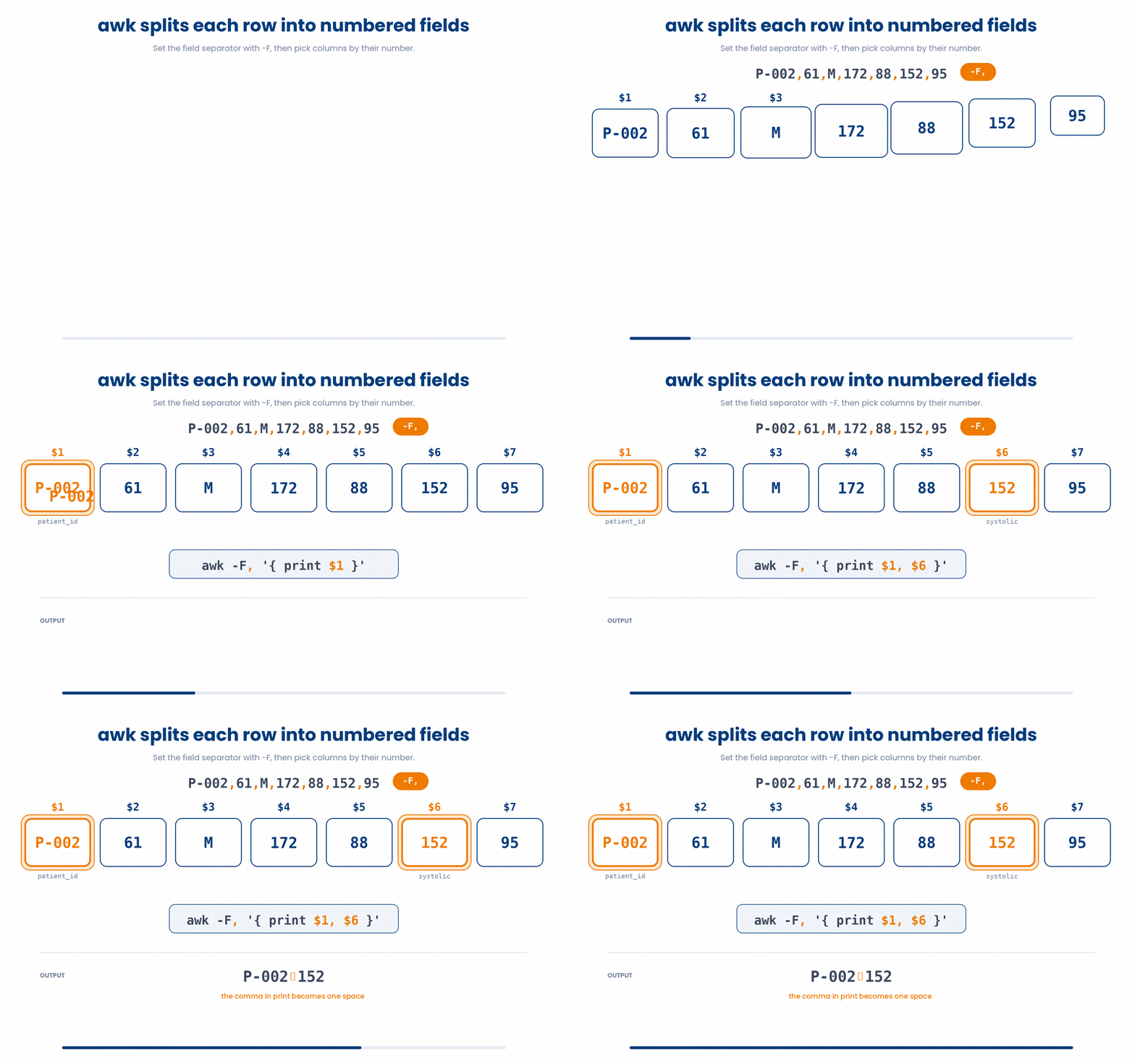
Try this snippet in the Bash Scratchpad on the right.
$ awk -F, '{ print $1, $6 }' cohort_2026.csv | head -n 44.3 Filter rows by a condition
You can use standard logical operators (==, !=, <, >, &&, ||) in your pattern to filter rows.
For example, let's find patients with a systolic blood pressure (Column 6) of 140 or higher.
$ awk -F, '$6 >= 140 { print $1, $6, $7 }' cohort_2026.csv
patient_id systolic diastolic
P-002 152 95
To safely skip the header, tell awk to only look at rows where the Number of Records (NR) is greater than 1:
$ awk -F, 'NR > 1 && $6 >= 140 { print $1 }' cohort_2026.csv
P-002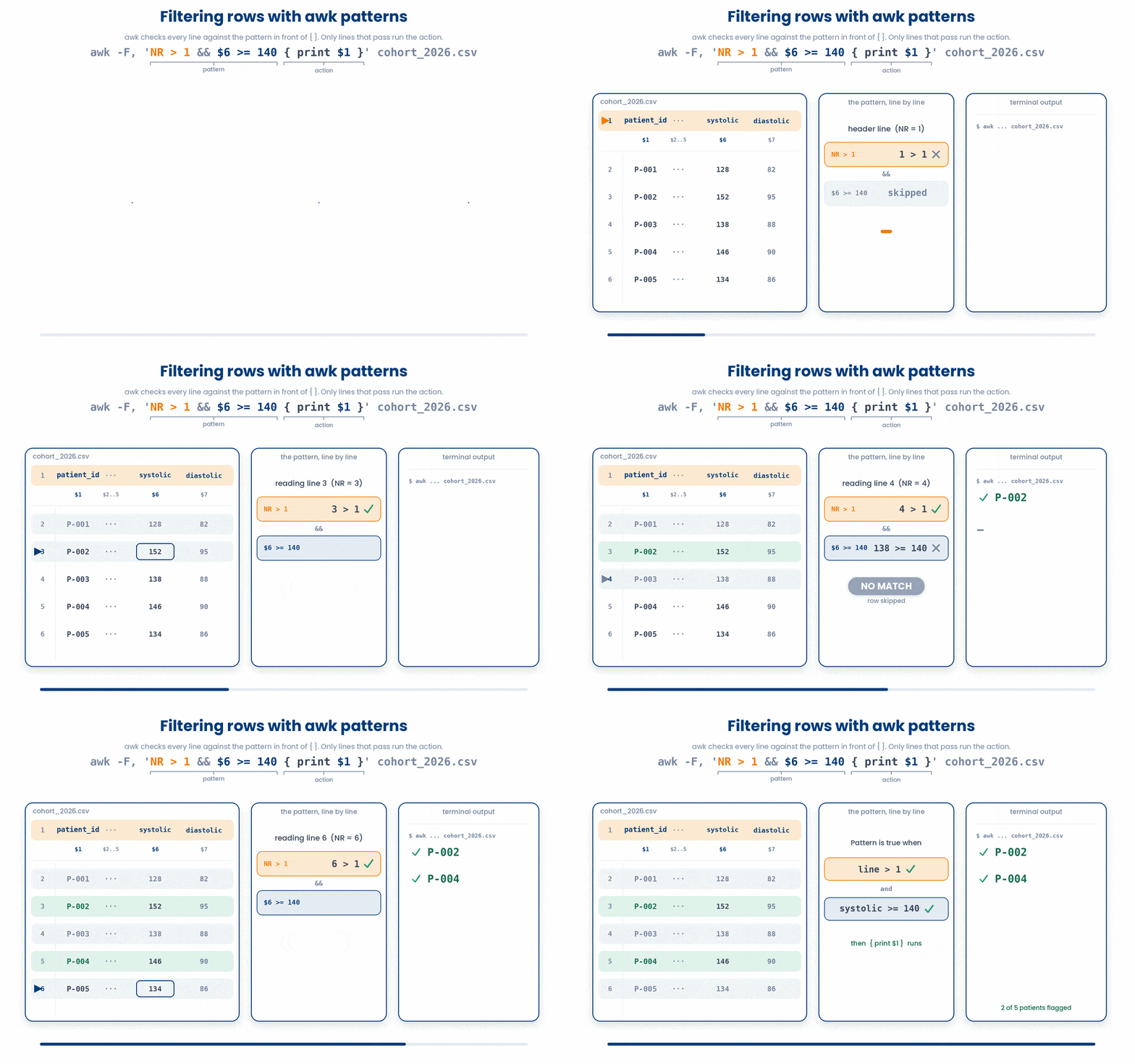
Hypertension is usually defined as systolic >= 140 OR diastolic >= 90. We can combine conditions using || (OR) and format the output strings directly:
$ awk -F, 'NR > 1 && ($6 >= 140 || $7 >= 90) { print $1, $6"/"$7 }' cohort_2026.csv
P-002 152/95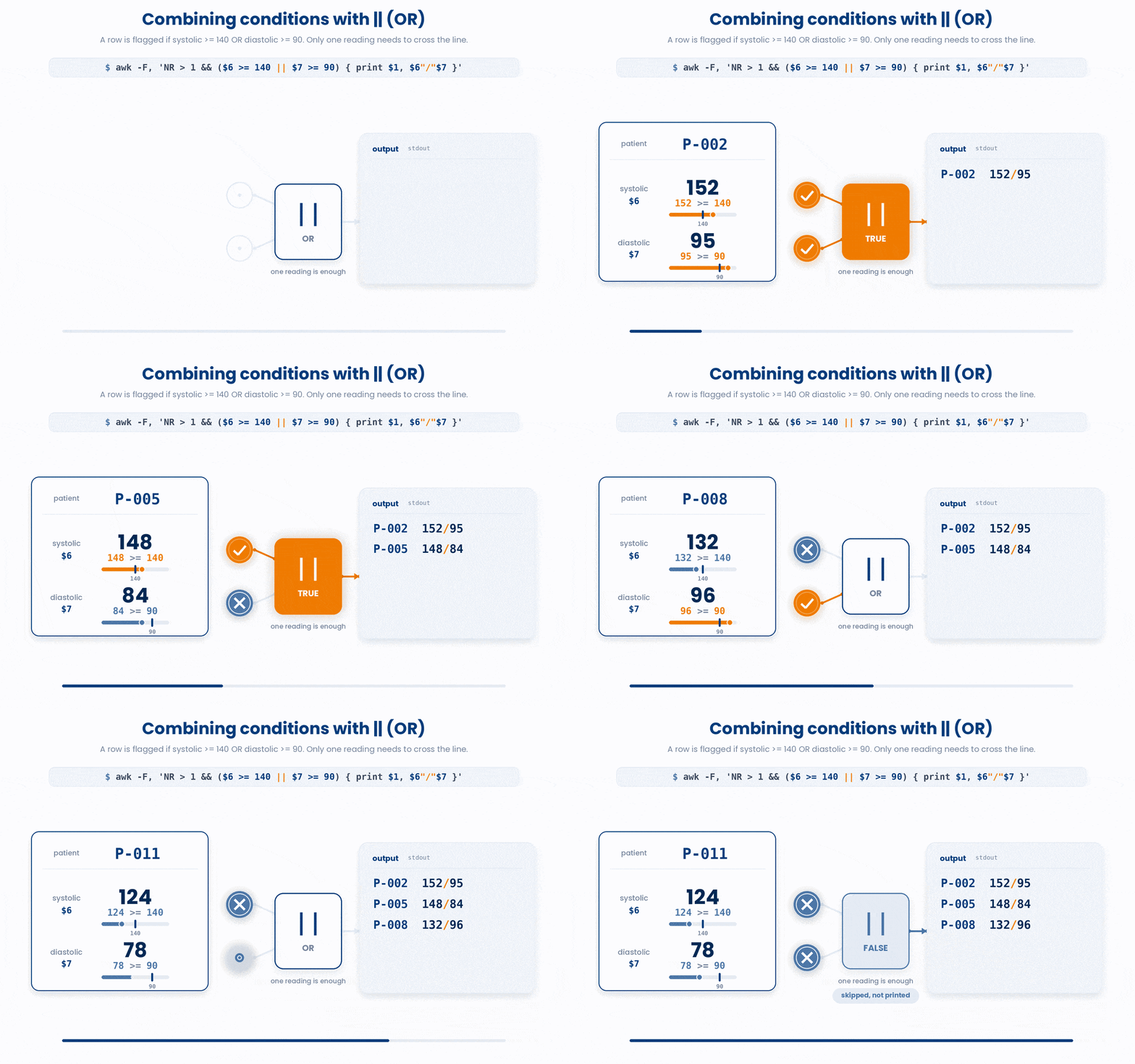
Try this snippet in the Bash Scratchpad on the right.
$ awk -F, 'NR > 1 && $6 >= 140 { print $1, $6, $7 }' cohort_2026.csv | head4.4 Aggregation with END
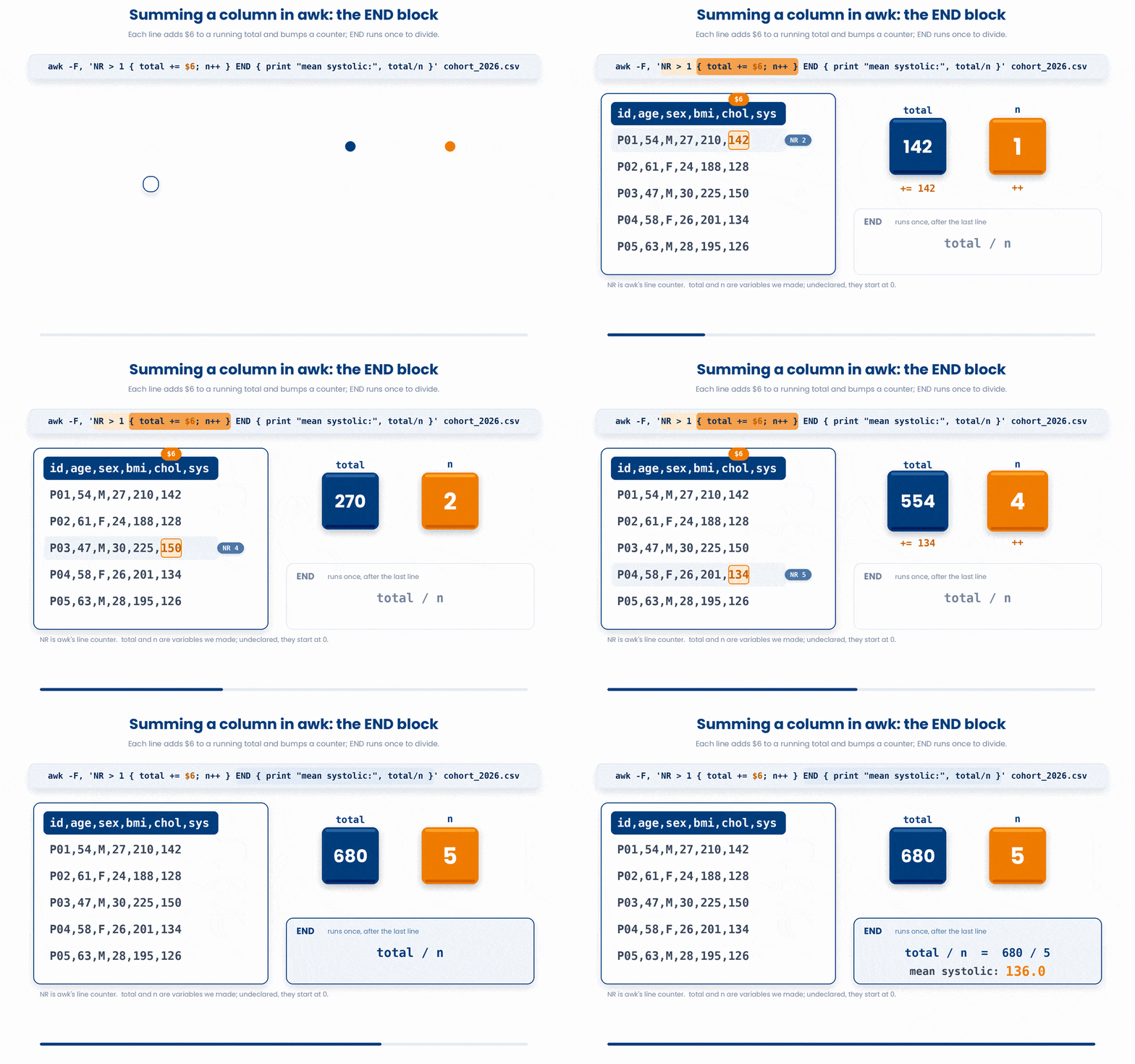
awk has two special patterns: BEGIN (runs once before reading the file) and END (runs once after the last line). END is perfect for computing totals and averages.
Also, awk variables don't need to be declared; they default to 0.
$ awk -F, 'NR > 1 { total += $6; n++ } END { print "mean systolic:", total/n }' cohort_2026.csv
mean systolic: 136.25
For every line (except the header), it adds the systolic value ($6) to a variable called total and increments a counter n. At the END, it divides them.
Try this snippet in the Bash Scratchpad on the right.
$ awk -F, 'NR > 1 { s += $6 } END { print "mean systolic:", s/(NR-1) }' cohort_2026.csv4.5 Group-by aggregation
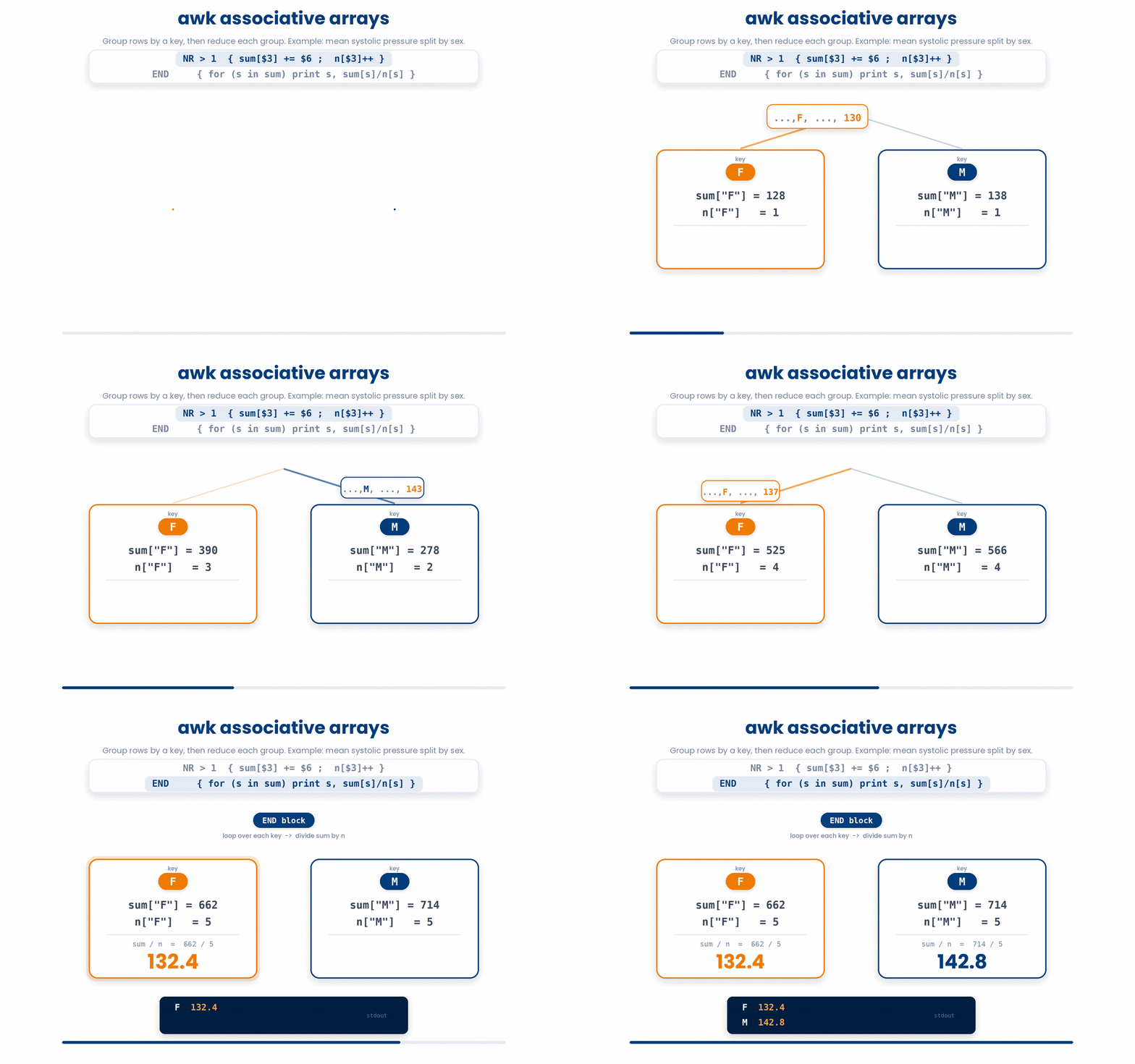
awk has built-in associative arrays (like dictionaries in Python), allowing you to group data. Let's find the mean systolic pressure, grouped by sex (Column 3):
$ awk -F, 'NR > 1 { sum[$3] += $6; n[$3]++ } END { for (s in sum) print s, sum[s]/n[s] }' cohort_2026.csv
F 132.4
M 142.8
sum[$3] creates an array where the "key" is the sex (F or M). We sum the blood pressures and count the occurrences for each key independently. In the END block, we loop through the array and print the averages. It's a spreadsheet pivot table in a one-liner.
5 When to Use What
The command line has many text tools. Knowing which one to pick saves you massive amounts of time:
- Just want to FIND lines? grep is enough.
- Need fixed COLUMNS from a clean delimited file? cut.
- Need a SEARCH AND REPLACE? sed.
- Need to FILTER rows by a numeric condition or compute on columns? awk.

6 Check your understanding
You have reached the end of the module. Try the same questions again — your answers here, paired with your pre-test answers, are how we measure what the module taught you. Answer every question and confidence rating, then click Submit and see results to view your score.
What does sed 's/foo/bar/' do to a line?
How do you make sed replace EVERY match on the line, not just the first?
In awk, what does $0 mean?
Which awk one-liner sums column 6 (systolic) of a comma-separated cohort file, skipping the header?
Which flag tells awk that the field separator is a comma?
In awk, what does NR contain?
Which awk program prints the THIRD field of every line?
What does the -i flag do in sed -i 's/draft/final/g' report.txt?
I can do a search-and-replace on a file with sed.
I can use awk to select specific columns from a delimited file.
I can filter rows in awk based on a numeric condition.
7 Your results
Here is how your post-test answers compare with your pre-test answers. The pre/post pairing is the most reliable way to see what this module actually taught you.
Submit the post-test to see your results.
What is the one thing from this module that is still unclear to you?