

1 Before you start
This is not graded, and it does not count towards anything. Answer every question even if you are only guessing — having a go at something before you have been taught it is one of the best ways to remember it afterwards. The lesson ends with another short check, and there you will be shown the correct answer for anything you missed. Choose an option for every question and confidence rating, then click Submit answers.
Inside a function, what does $1 refer to?
How do you capture the output of a function called my_func into a variable?
What does return 1 do inside a bash function?
Why use local inside a function?
What does "$@" expand to inside a function?
Inside a function or script, what does $# hold?
What does $0 refer to?
Which is the correct way to define a function in bash?
I can define a bash function and call it with arguments.
I can capture a function's output into a variable using $(...).
I know why local matters and use it for every variable inside a function.
2 Introduction
As your bash scripts grow beyond a dozen lines, reading them from top to bottom can start to feel overwhelming. To keep things organized, you will want to group chunks of code into named blocks so your script reads more like a clean outline.
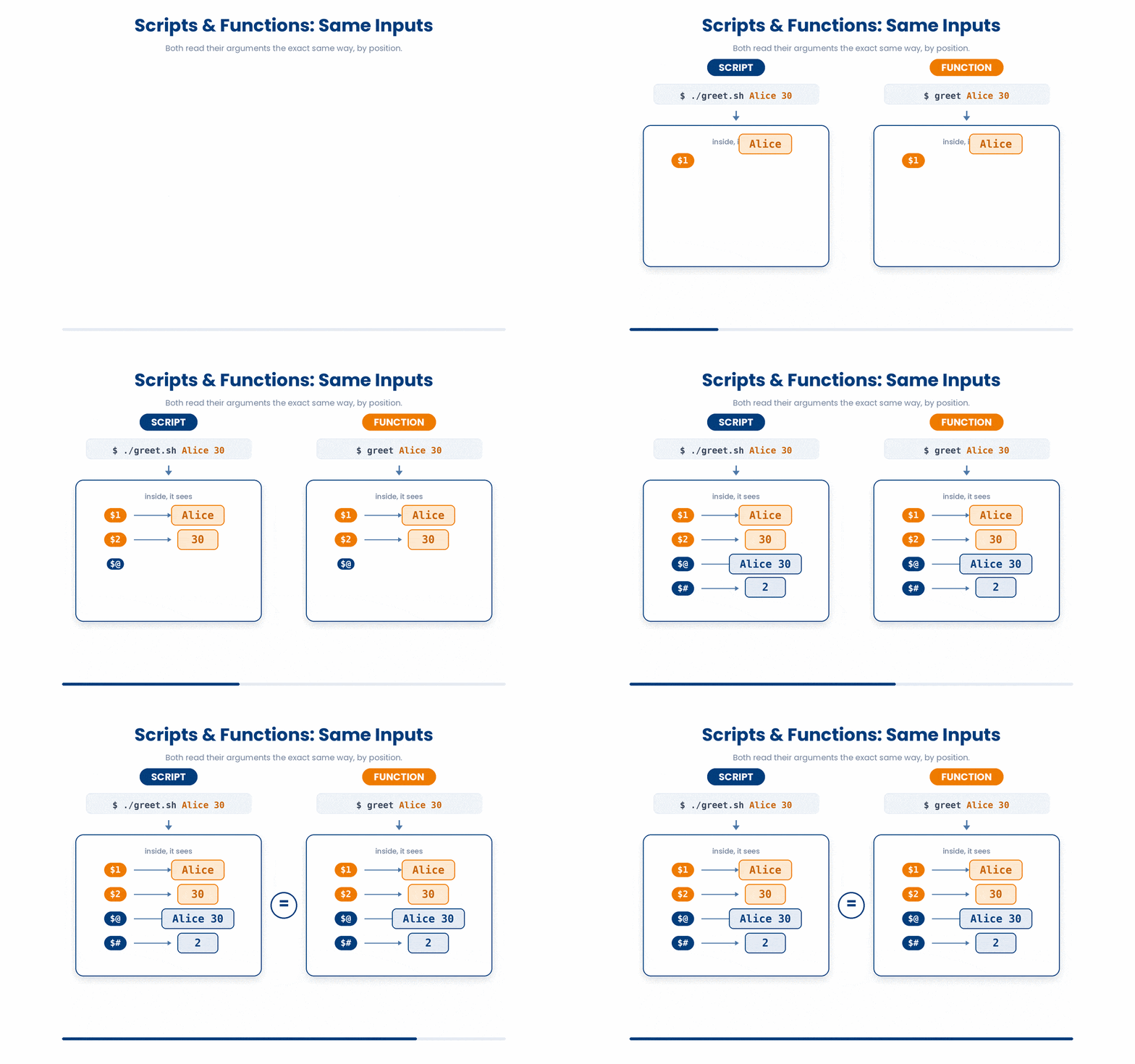
These blocks are called functions. Interestingly, functions and scripts handle inputs in the exact same way. Both topics use the same mental model.
In this lesson we will cover:
- Defining a function and calling it.
- Reading arguments inside a function or script: $1, $2, $@, $#.
- Return values - the difference between echo and return.
- Local variables and why you want them.
3 Defining and Calling a Function
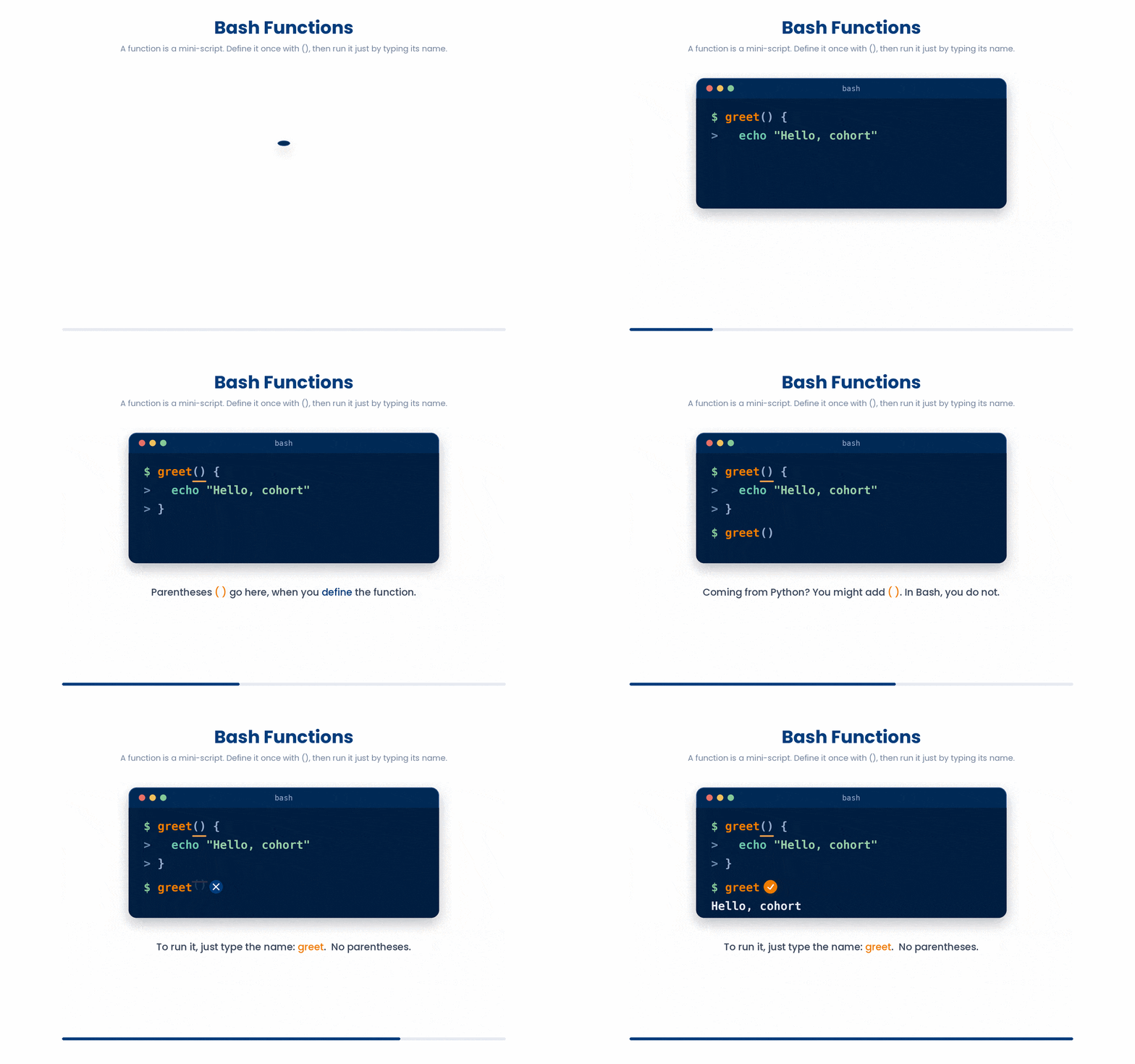
Think of a function as a mini-script living inside your main script. To create one, you write the name, add empty parentheses (), and put the commands inside curly braces {}.
greet() {
    echo "Hello, cohort"
}

greet
If you have programmed in languages like Python, you are used to calling functions with parentheses, like greet(). Bash is different. To run a function, you just type its name like any other terminal command. No parentheses!
You can write a function on one line like greet() { echo "Hi"; }, but you must include that final semicolon before the closing brace. Usually, it is best to stick to the multi-line format above for readability.
greet() { echo "Hello, cohort"; }4 Arguments - $1, $2, $@, $#
Because you don't use parentheses to call functions, you don't put data inside them either. Instead, you just add spaces, exactly like you do when running terminal commands.
Inside the function, bash automatically assigns these inputs to numbered variables starting with a dollar sign ($1, $2, etc.).
introduce() {
    echo "Hi, patient $1 was seen for $2"
}
introduce P-001 hypertension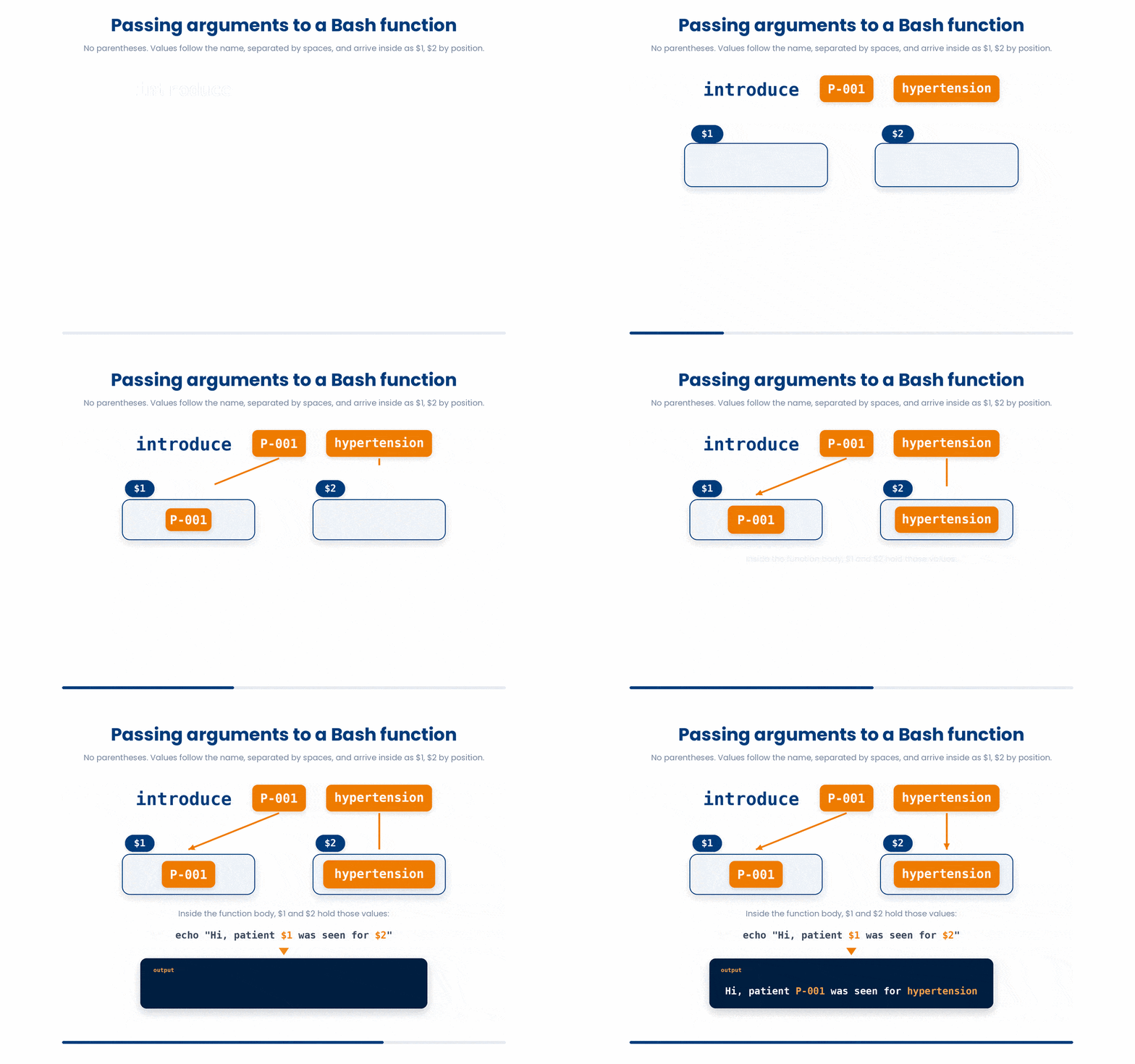
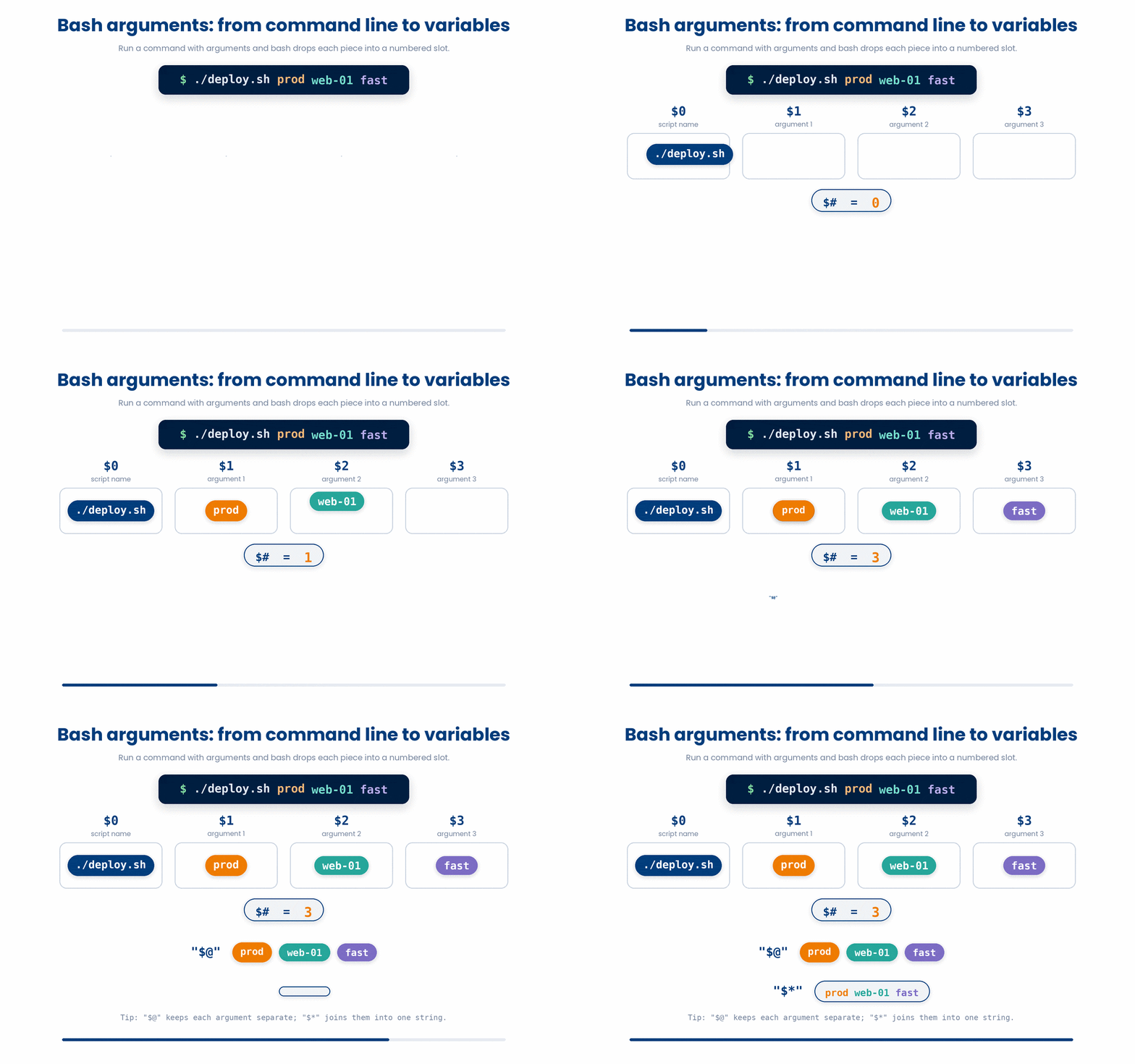
Whether you are reading inputs passed to a function, or inputs passed to the whole script from the terminal, bash provides a few special variables to help you manage them:
- $1, $2, $3 ... - the first, second, third argument.
- $0 - the name of the script (or the function) itself.
- "$@" - all arguments as a list. Quotes matter here.
- $# - the count of arguments.
- "$*" - all arguments joined into one string. Almost always you want "$@" instead.
summarise_args() {
    echo "I got $# arguments"
    for arg in "$@"
do
        echo "  - $arg"
    done
}

summarise_args P-001 P-002 P-003
Try this snippet in the Bash Scratchpad on the right.
summarise() {
    echo "got $# arguments"
    for arg in "$@"
do
        echo "  - $arg"
    done
}
summarise P-001 P-002 P-0034.1 shift - drop the first argument
Sometimes you want to treat the very first argument differently than the rest. The shift command acts like a conveyor belt. It drops $1 entirely, and shifts everything else down the line (what was $2 becomes $1, what was $3 becomes $2).
process_first_then_rest() {
    echo "first: $1"
    shift
    echo "the rest: $@"
}

process_first_then_rest a b c d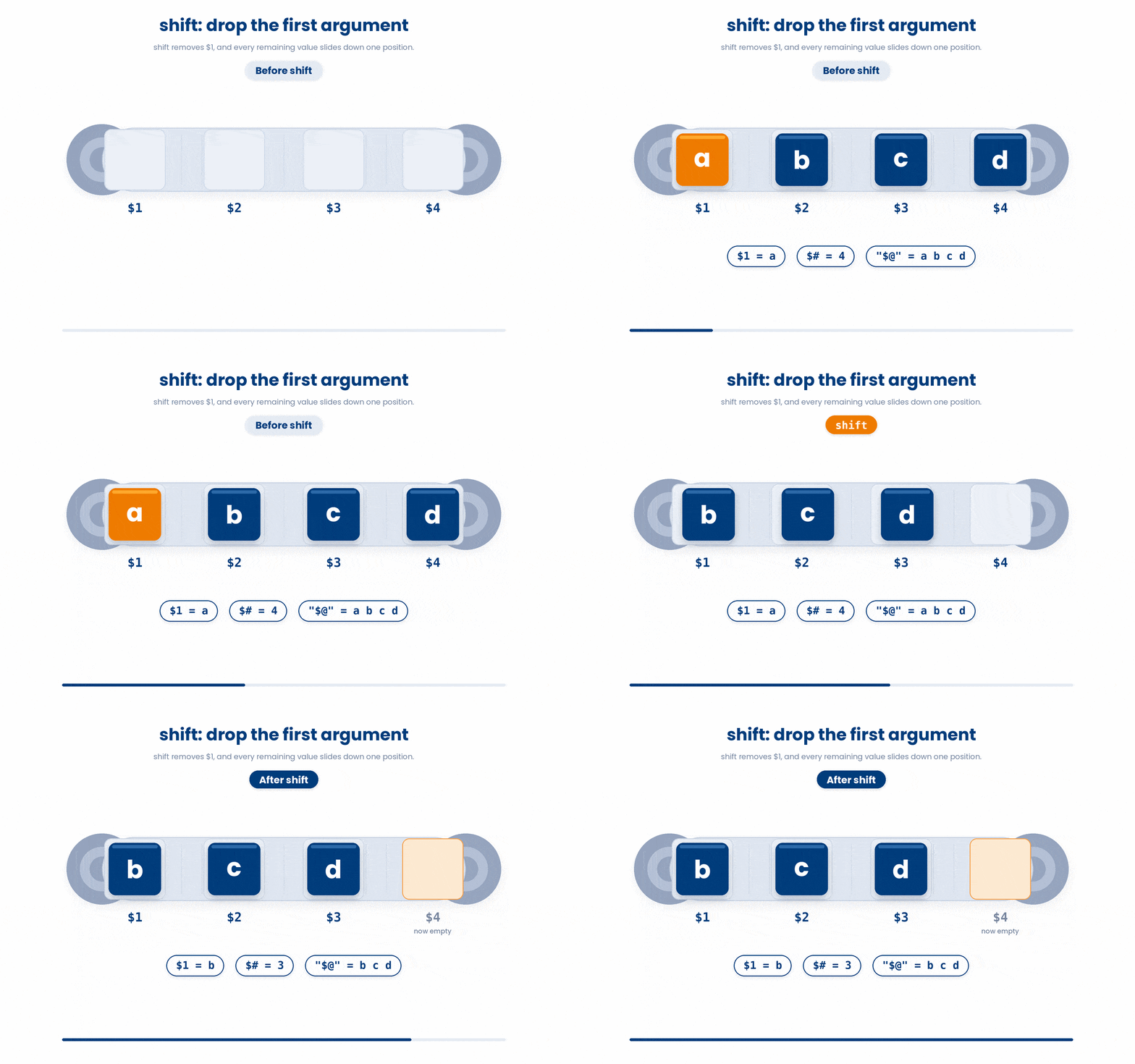
5 Returning Values - echo vs return
If you have programmed in Python or R, you are used to writing functions that calculate a value and then return that value.
Bash functions do not return data. Instead, bash has two completely separate output channels: one for passing data, and one for passing a status.
5.1 echo (or printf) - the actual "return value"
If you want your function to give you back a string, a number, or any actual data, you must use echo (or printf). Think of echo as the function shouting its answer out loud.
To actually "catch" that shouted answer and save it to a variable, you use command substitution $(...), exactly like you would with a regular command.
bmi_category() {
    # crude integer category given an integer BMI in $1
    local bmi=$1
    if [[ $bmi -lt 19 ]]
then echo "underweight"
    elif [[ $bmi -lt 25 ]]
then echo "normal"
    elif [[ $bmi -lt 30 ]]
then echo "overweight"
    else echo "obese"
    fi
}

cat=$(bmi_category 28)
echo "category: $cat"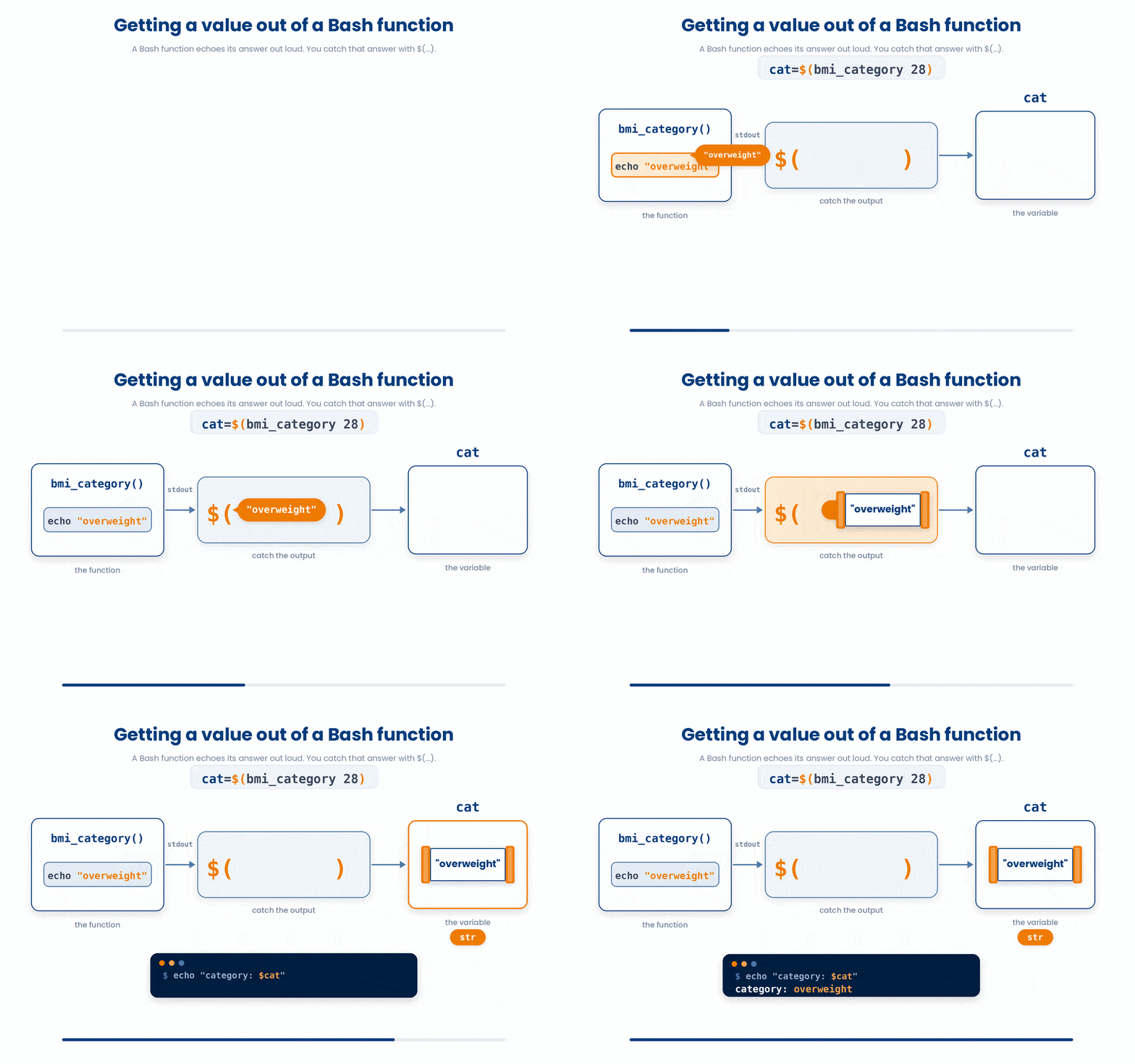
5.2 return - sets the EXIT CODE only
In bash, the return keyword is strictly used to set an exit code (a number between 0 and 255). It is used to answer the question: "Did this function succeed or fail?" It acts exactly like the exit command does for a whole script, but just for the function.
- return 0 = Success
- return 1 (or any other number) = Failure
is_empty_file() {
    if [[ ! -s "$1" ]]
then
        return 0 # success = yes, empty
    else
        return 1
    fi
}

if is_empty_file cohort_2026.csv
then
    echo "cohort file is empty"
fi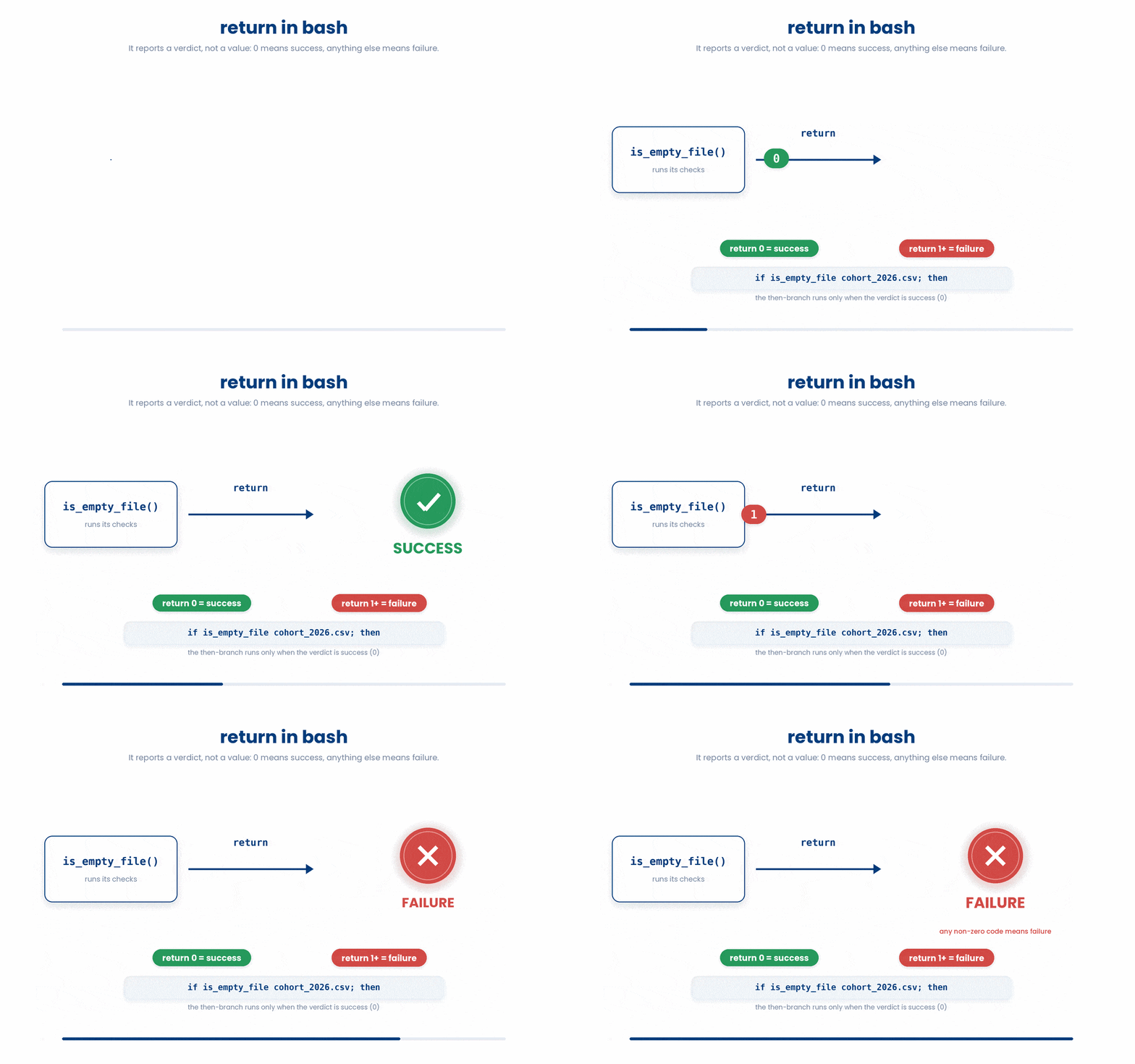
In summary, choosing whether to use echo or return depends entirely on the specific goal of your function.
You should use echo when you need your function to pass back actual data, such as strings, mathematical results, or text.
Conversely, you should use return when your only goal is to signal whether the function succeeded or failed, essentially acting as a basic true or false flag.
Try this snippet in the Bash Scratchpad on the right.
bmi_category() {
    local bmi=$1
    if [[ $bmi -lt 25 ]]
then
        echo "normal"
    else
        echo "high"
    fi
}
category=$(bmi_category 28)
echo "category: $category"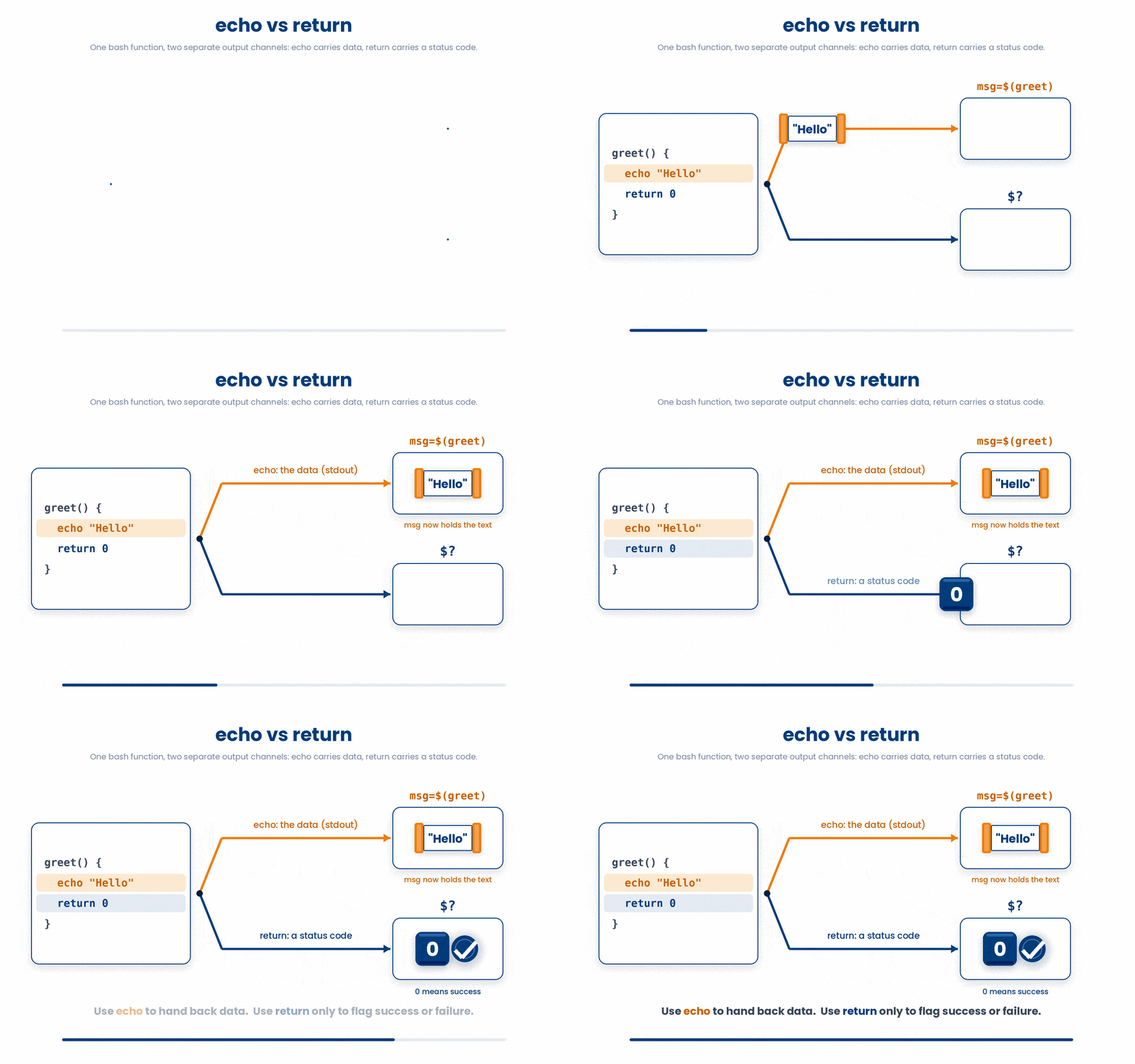
6 Local Variables - Why You Want Them
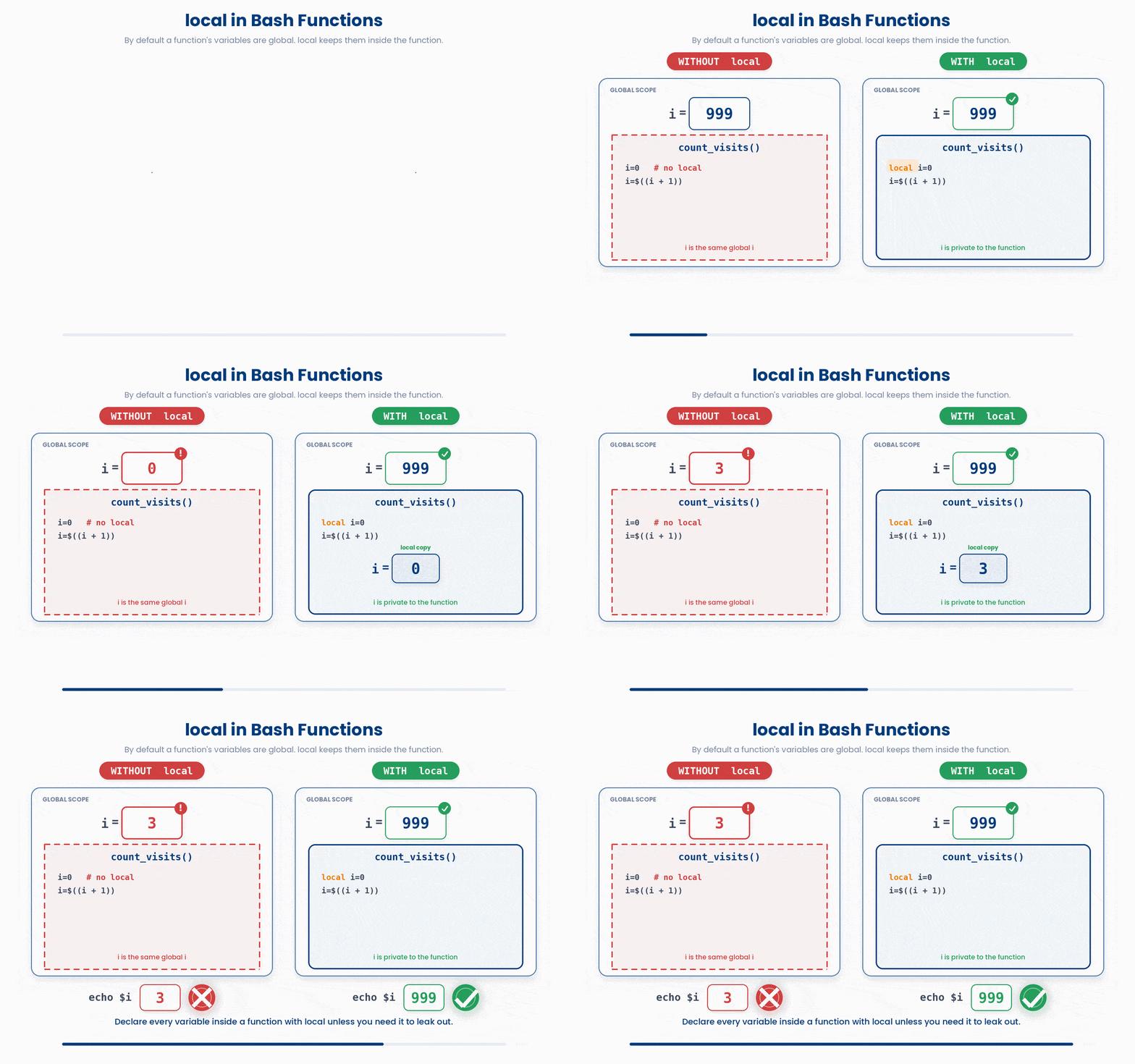
By default, every variable you create in a bash function is global. That means it "leaks out" of the function and can overwrite (shadow) variables with the same name in the rest of your script. It is incredibly easy to do this by accident.
count_visits() {
    i=0 # uh oh - global
    while [[ $i -lt 3 ]]
do
        i=$((i + 1))
    done
}

i=999
count_visits
echo $i # prints 3, not 999
Because the function used the global variable i, it accidentally destroyed the 999 we set earlier.
To prevent this, you simply add the word local in front of any new variable you introduce inside a function. This locks the variable inside the function, so it disappears as soon as the function finishes running.
count_visits() {
    local i=0
    while [[ $i -lt 3 ]]
do
        i=$((i + 1))
    done
}

i=999
count_visits
echo $i # prints 999
Make this a hard habit. Every variable introduced inside a function should be local unless you specifically need it to leak out.
7 Putting It Together
Now that we have covered permissions, find, function outputs (echo vs. return), and local variables, let's look at what a professional, well-structured bash script actually looks like.
Here is a complete script that counts the number of rows in every patient vitals file and saves the results to a new document.
#!/usr/bin/env bash
# count rows in every patient vitals file and print a tsv

count_rows() {
    local f="$1"
    # subtract 1 for the header
    echo $(( $(wc -l < "$f") - 1 ))
}

report_patient() {
    local f="$1"
    local base
    base=$(basename "$f" .csv)
    local n
    n=$(count_rows "$f")
    echo -e "$base\\t$n"
}

for f in vitals/patient_*.csv
do
    report_patient "$f"
done > visit_counts.tsv
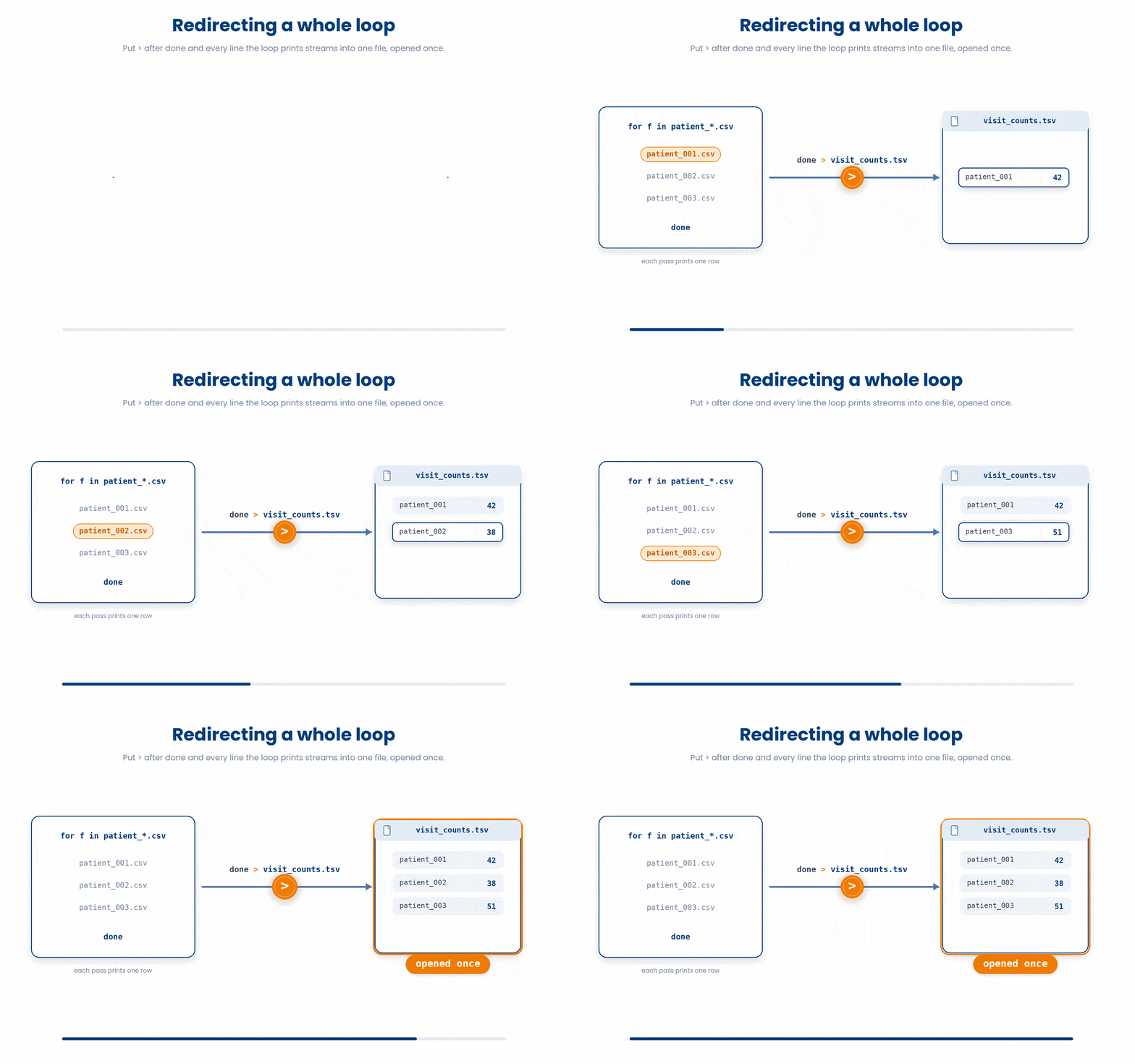
Walk through it slowly: We loop over the patient vitals files, use basename to strip away the messy folder paths and .csv extensions, use wc -l inside a custom function to count the lines (subtracting one to safely ignore the header), and then spit out a clean, tab-separated row. By redirecting the output of the entire loop using > visit_counts.tsv, we generate a complete, perfectly formatted data report using just a handful of organized code.
The top of a real-world script looks exactly like this—your tools and functions are defined at the top, and the main logic sits cleanly at the bottom. This modular approach is infinitely easier to read, debug, and maintain than writing the same logic as one giant, continuous block of code.
Try this snippet in the Bash Scratchpad on the right.
count_rows() {
    local f="$1"
    echo $(( $(wc -l < "$f") - 1 ))
}
count_rows vitals/patient_001.csv8 Check your understanding
You have reached the end of the module. Try the same questions again — your answers here, paired with your pre-test answers, are how we measure what the module taught you. Answer every question and confidence rating, then click Submit and see results to view your score.
Inside a function, what does $1 refer to?
How do you capture the output of a function called my_func into a variable?
What does return 1 do inside a bash function?
Why use local inside a function?
What does "$@" expand to inside a function?
Inside a function or script, what does $# hold?
What does $0 refer to?
Which is the correct way to define a function in bash?
I can define a bash function and call it with arguments.
I can capture a function's output into a variable using $(...).
I know why local matters and use it for every variable inside a function.
9 Your results
Here is how your post-test answers compare with your pre-test answers. The pre/post pairing is the most reliable way to see what this module actually taught you.
Submit the post-test to see your results.
What is the one thing from this module that is still unclear to you?