

1 Before you start
This is not graded, and it does not count towards anything. Answer every question even if you are only guessing — having a go at something before you have been taught it is one of the best ways to remember it afterwards. The lesson ends with another short check, and there you will be shown the correct answer for anything you missed. Choose an option for every question and confidence rating, then click Submit answers.
What keyword closes a bash if block?
Which test checks whether the path data/ is a directory?
Which operator tests numeric equality inside [[ ... ]]?
What does [[ ! -f config.txt ]] check?
Why prefer [[ ... ]] over [ ... ] in new bash scripts?
Which operator tests whether two strings are equal inside [[ ... ]]?
What does [[ -z "$name" ]] test?
In [[ $age -gt 18 ]], what does -gt mean?
I can write an if / elif / else block in bash.
I can choose between -eq, -gt, and == based on whether the data is numeric or a string.
I can test whether a file exists, is a directory, is non-empty, or is readable.
2 Introduction
A script that always does the same thing is rarely useful. Most of the time you need to ask a question - "does this patient file exist?", "is this BMI above 30?", "did the previous command succeed?" - and branch on the answer. This lesson covers the bash if statement, the test command, and the [[ ... ]] expression that has become the modern default.
- if / elif / else / fi - the basic shape.
- [ ... ] vs [[ ... ]] - the old test and the modern one.
- Comparing numbers vs comparing strings.
- File tests: -f, -d, -e, -s, -r, -w, -x.
3 The Basic Shape - if / then / fi
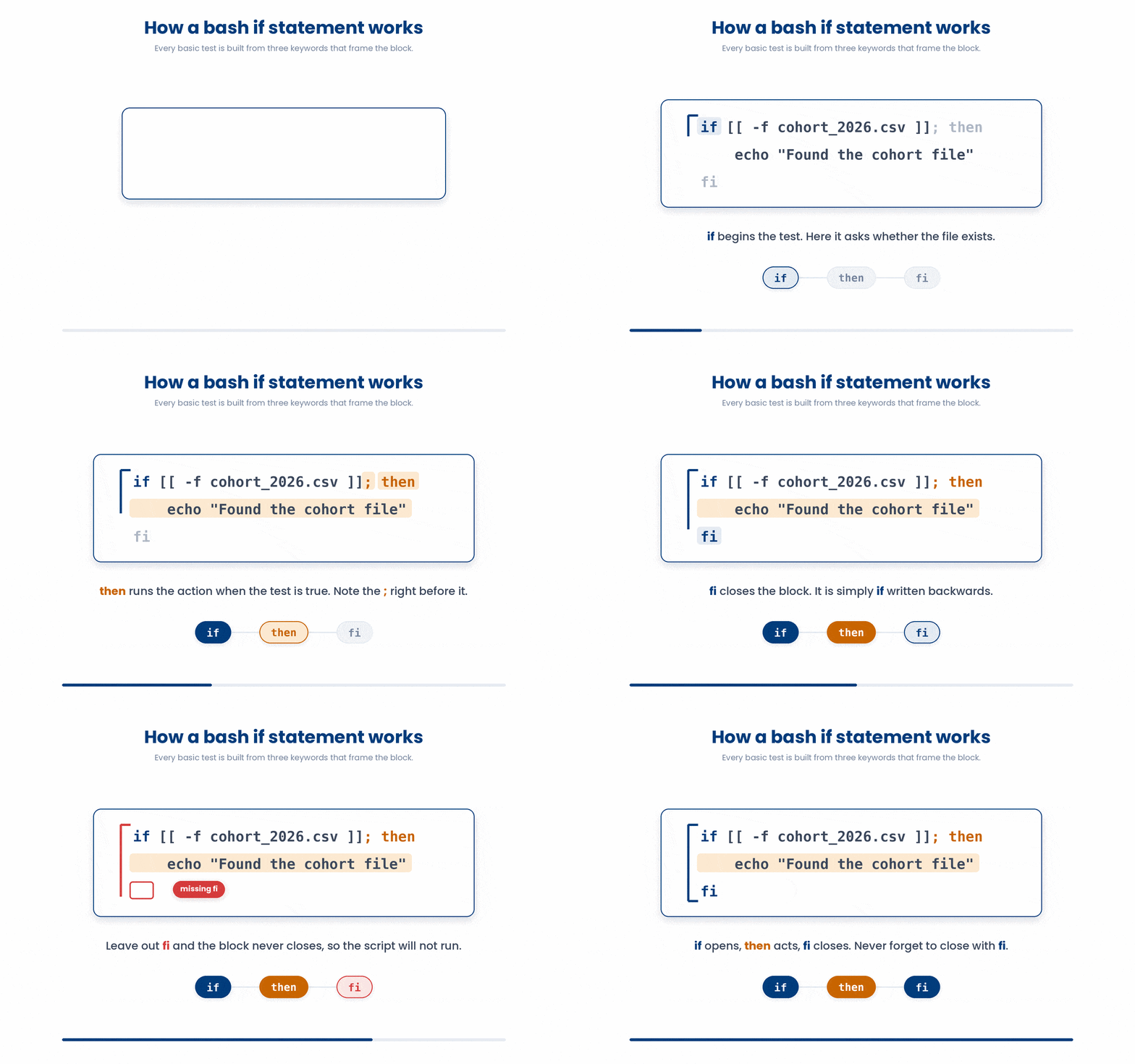
Every basic if statement requires three specific keywords to function:
- if: The condition you want to test.
- then: The action to take if the condition is true (note the semicolon ; right before it).
- fi: The keyword that closes the block. Yes, that is literally just "if" spelled backwards!
if [[ -f cohort_2026.csv ]]
then
    echo "Found the cohort file"
fi
Note: Forgetting the fi at the very end is one of the most common reasons a script will fail to run.
3.1 Adding else and elif
What if the file isn't there? You can use elif (else if) to check for alternative conditions, and else to catch everything that doesn't match.
if [[ -f cohort_2026.csv ]]
then
    echo "Found the cohort"
elif [[ -f cohort_2026.csv.gz ]]
then
    echo "Found a compressed cohort"
else
    echo "No cohort file found"
fi
You can have zero or one else, and as many elifs as you want. However, if you find yourself stacking four or five elif statements, it is usually a sign that you should be using a case statement instead (more on that in future topics!)
Try this snippet in the Bash Scratchpad on the right.
if [[ -f cohort_2026.csv ]]
then
    echo "found cohort"
elif [[ -f cohort_2025.csv ]]
then
    echo "found 2025 cohort"
else
    echo "no cohort"
fi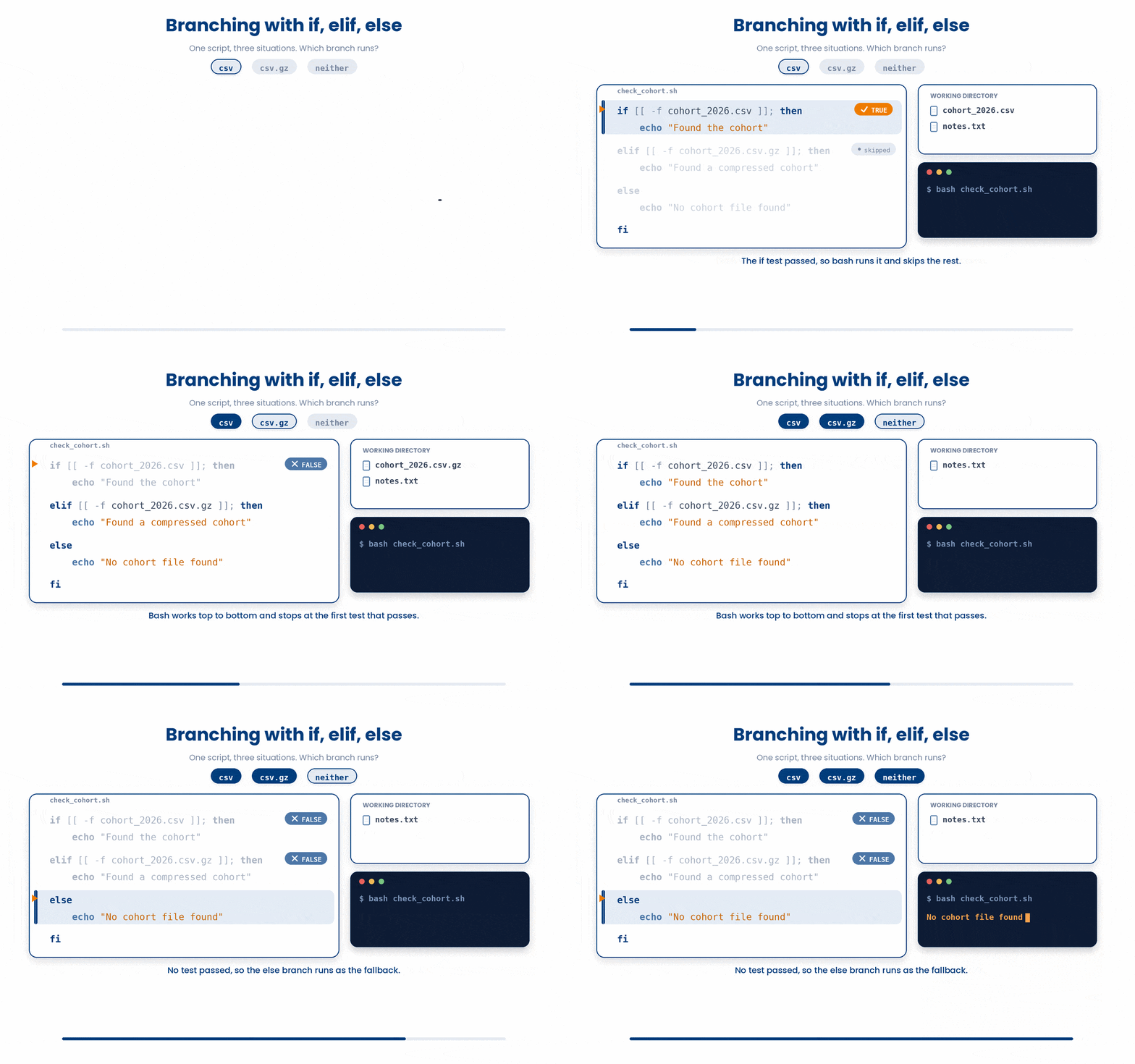
4 [ ... ] vs [[ ... ]]
When you look at bash scripts online, you will see two different ways to write the test conditions. It looks like a minor stylistic choice, but there are actually huge technical differences between single brackets [ ] and double brackets [[ ]].
4.1 [ ... ] - the POSIX test, works in every shell
Single brackets are the older, POSIX-standard way of testing conditions.
if [ "$count" -gt 10 ]
then
    echo "many"
fi
It works in every single shell environment (like basic sh), making it highly portable. But, it is incredibly fragile. You must wrap your variables in quotes (e.g., [ "$count" -gt 10 ]), or the script will crash if the variable happens to be empty. It also doesn't support modern operators like && or || inside the brackets.
4.2 [[ ... ]] - the bash-specific, modern form
Double brackets are an upgraded, bash-specific feature.
if [[ $count -gt 10 ]]
then
    echo "many"
fi
It is much smarter and safer. Variables don't strictly need to be quoted, it supports && and || directly inside, and it even supports advanced Regular Expression matching. However, it will not work on an older sh environment.
5 Comparison Operators
A script that just runs the exact same commands every time isn't very smart. To make your scripts truly useful, you need them to make decisions: "If this file exists, do this. If the patient's BMI is over 30, do that."
In bash, we write these conditions inside double square brackets: [[ condition ]]. But here is the biggest trap for beginners: Bash uses completely different operators for numbers than it does for text.
5.1 Numbers - the dashy ones
When you are comparing math or counters, you must use letter-based flags instead of math symbols.
- -eq - equal to
- -ne - not equal to
- -lt - less than
- -le - less than or equal
- -gt - greater than
- -ge - greater than or equal
- For example,
if [[ $bmi -ge 30 ]]
then
    echo "obese category"
fi![Inside [[ ... ]] you compare numbers with two-letter flags, each one shorthand for a familiar comparison: eq is equal, lt is less than, ge is greater than or equal.](GIF_numeric_comparisons.gif)
Note: bash arithmetic is integer-only. For real BMI numbers like 28.4 you would compare with awk or bc - more on that in the awk lesson.
Try this snippet in the Bash Scratchpad on the right.
count=$(wc -l < cohort_2026.csv)
if [[ $count -gt 100 ]]
then
    echo "large cohort: $count rows"
fi5.2 Strings - the symbol ones
When you are comparing words, letters, or checking if a variable is empty, you switch back to traditional symbols.
- = or == - equal (inside [[ ... ]] they are the same)
- != - not equal
- -z STR - empty string
- -n STR - non-empty string
if [[ "$sex" == "F" ]]
then
    echo "female"
fi
if [[ -z "$patient_id" ]]
then
    echo "no patient id set"
fi![Inside [[ ... ]] bash compares strings with symbol operators (= or ==, and !=) and uses -z and -n to test for a zero-length versus non-empty value, so == and != form one opposite pair and -z and -n form another on the same value.](GIF_string_comparisons.gif)
Mixing them up is the second-most-common bash bug. If you use == on numbers, bash thinks they are words. For example, [[ "10" == "9" ]] is actually false because alphabetically, "1" comes before "9". If you use -eq on text, bash will just error out or silently misbehave.
Try this snippet in the Bash Scratchpad on the right.
sex=F
if [[ "$sex" == "F" ]]
then
    echo "female"
fi6 File Tests - The Most Used
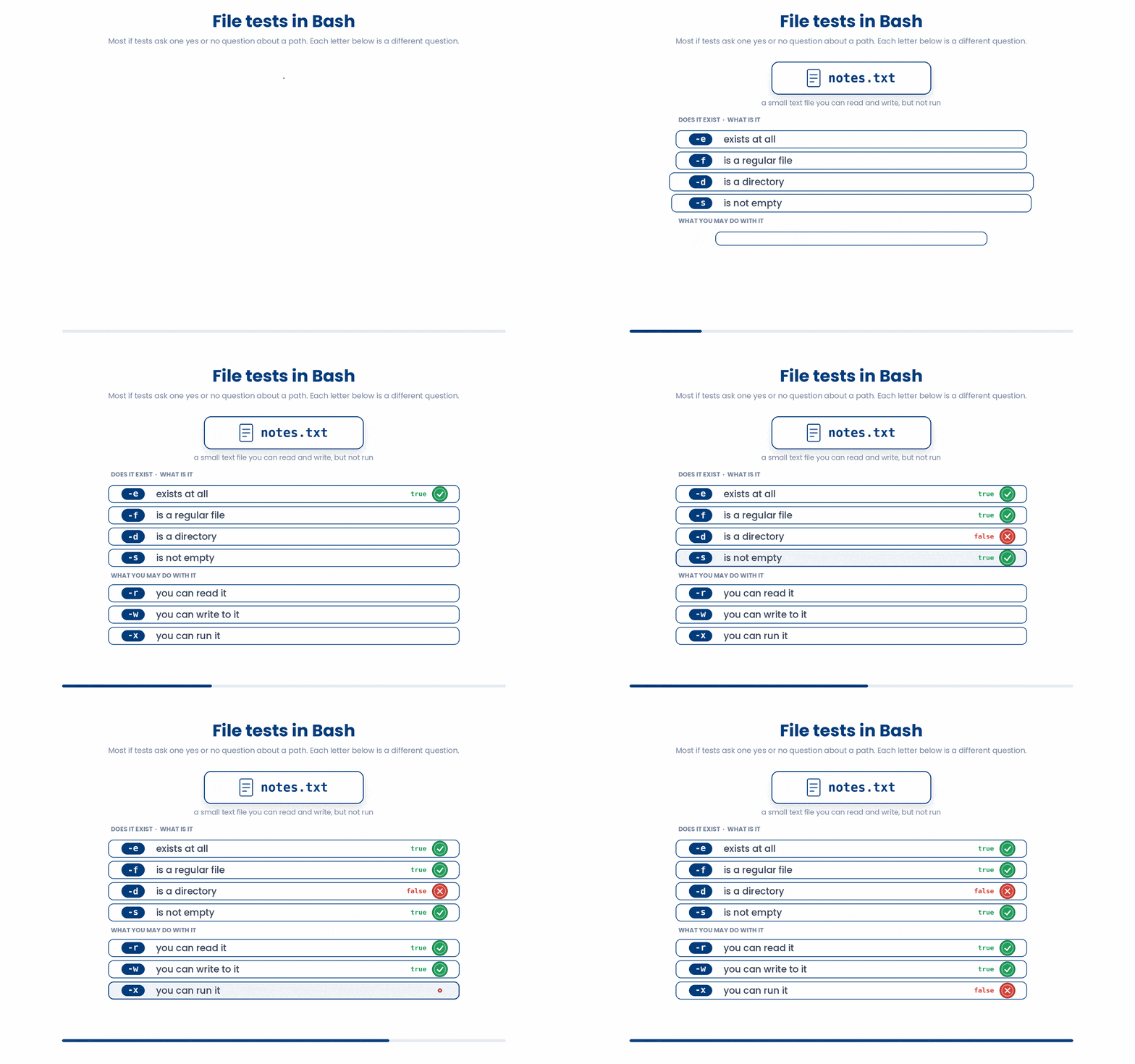
The vast majority of your if statements will actually be asking questions about files. Bash has a brilliant set of single-letter tests to check the status of a path before you act on it.
- -e PATH - exists at all (file, folder, anything)
- -f PATH - is a regular file
- -d PATH - is a directory
- -s PATH - exists AND is non-empty
- -r PATH - exists AND is readable by you
- -w PATH - exists AND is writable by you
- -x PATH - exists AND is executable by you
You can put an exclamation point ! inside the brackets to mean "NOT". This leads to one of the most famous patterns in bash scripting—creating a folder only if it doesn't already exist:
For example,
if [[ ! -d output ]]
then
    mkdir output
fi

if [[ ! -s cohort_2026.csv ]]
then
    echo "cohort file is empty or missing" >&2
    exit 1
fi![The ! operator inverts a bash test, so [[ ! -d output ]] is true exactly when output is not already a directory, letting one script create the folder once and then safely skip it on every later run.](GIF_not_operator.gif)
7 Combining Conditions
You rarely just ask one question. You can chain tests together using && (AND) and ||(OR):
if [[ -f cohort_2026.csv && -s cohort_2026.csv ]]
then
    echo "cohort is present and not empty"
fi
If you start getting complex, you can group logic together using parentheses, just like in algebra:
if [[ ( -f cohort_a.csv || -f cohort_b.csv ) && -d output ]]
then
    echo "ready"
fi![A grouped bash condition is evaluated innermost brackets first, so || needs only one side true while && needs both, and the whole [[ ]] reduces to a single true or false that decides the branch.](GIF_combining_tests.gif)
8 Check your understanding
You have reached the end of the module. Try the same questions again — your answers here, paired with your pre-test answers, are how we measure what the module taught you. Answer every question and confidence rating, then click Submit and see results to view your score.
What keyword closes a bash if block?
Which test checks whether the path data/ is a directory?
Which operator tests numeric equality inside [[ ... ]]?
What does [[ ! -f config.txt ]] check?
Why prefer [[ ... ]] over [ ... ] in new bash scripts?
Which operator tests whether two strings are equal inside [[ ... ]]?
What does [[ -z "$name" ]] test?
In [[ $age -gt 18 ]], what does -gt mean?
I can write an if / elif / else block in bash.
I can choose between -eq, -gt, and == based on whether the data is numeric or a string.
I can test whether a file exists, is a directory, is non-empty, or is readable.
9 Your results
Here is how your post-test answers compare with your pre-test answers. The pre/post pairing is the most reliable way to see what this module actually taught you.
Submit the post-test to see your results.
What is the one thing from this module that is still unclear to you?